
主题
08. 人机协作:interrupt_on 机制详解
让 AI 在关键时刻"暂停等待审批"
引言
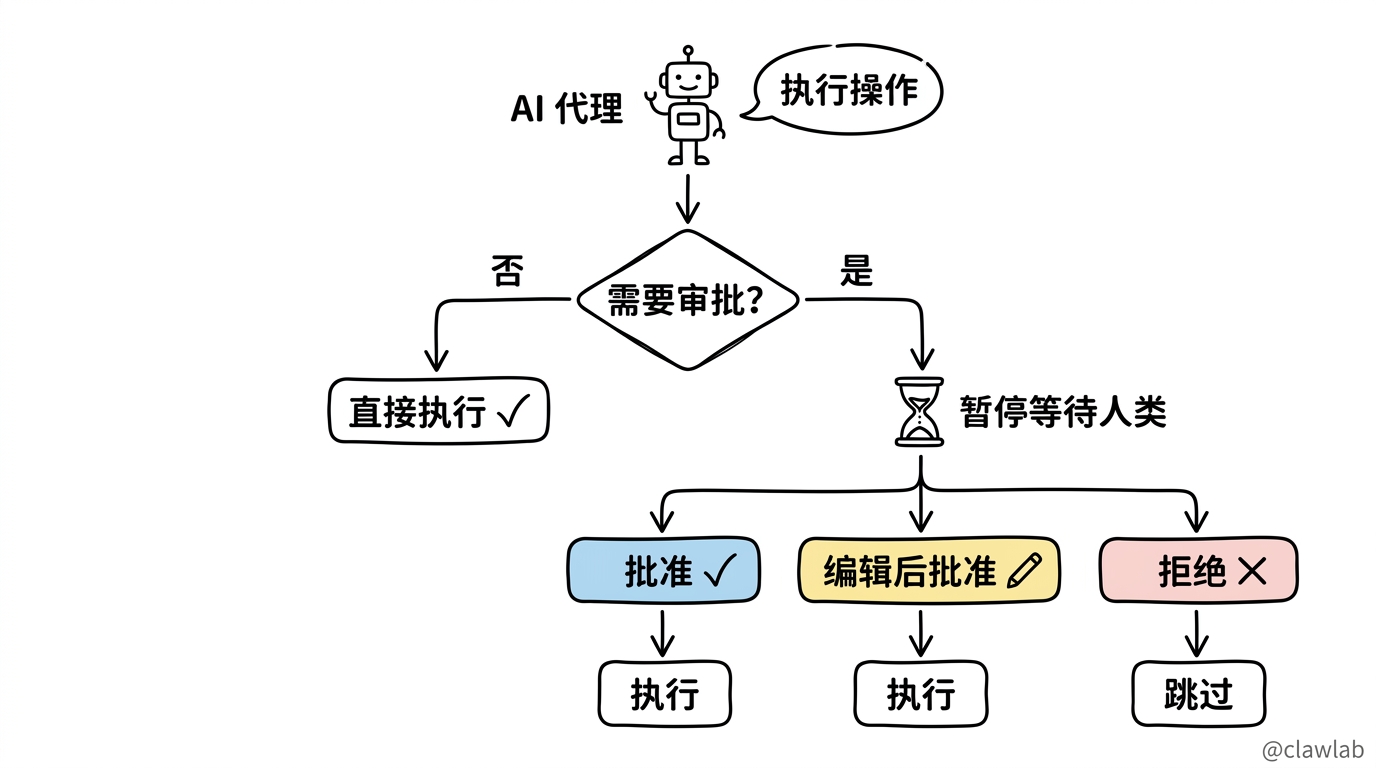
AI 代理拥有强大的能力,但有些操作需要人类把关——删除文件、发送邮件、执行代码、修改数据库。人机协作(Human-in-the-Loop, HITL)机制让代理在执行敏感操作前暂停,等待人类审批。
┌───────────────────────────────────────────────────────────┐
│                      执行流程                              │
│                                                           │
│   代理 ──→ 检查是否需要审批 ──→ 否 ──→ 直接执行           │
│                    │                                      │
│                    ▼ 是                                   │
│              暂停等待人类                                  │
│                    │                                      │
│        ┌──────────┼──────────┐                           │
│        ▼          ▼          ▼                           │
│     批准       编辑后批准    拒绝                          │
│        │          │          │                           │
│        ▼          ▼          ▼                           │
│      执行       执行       跳过                           │
│                                                           │
└───────────────────────────────────────────────────────────┘
核心概念
什么是 interrupt_on?
interrupt_on 是一个配置参数,用于指定哪些工具需要在执行前获得人工审批。
生活类比
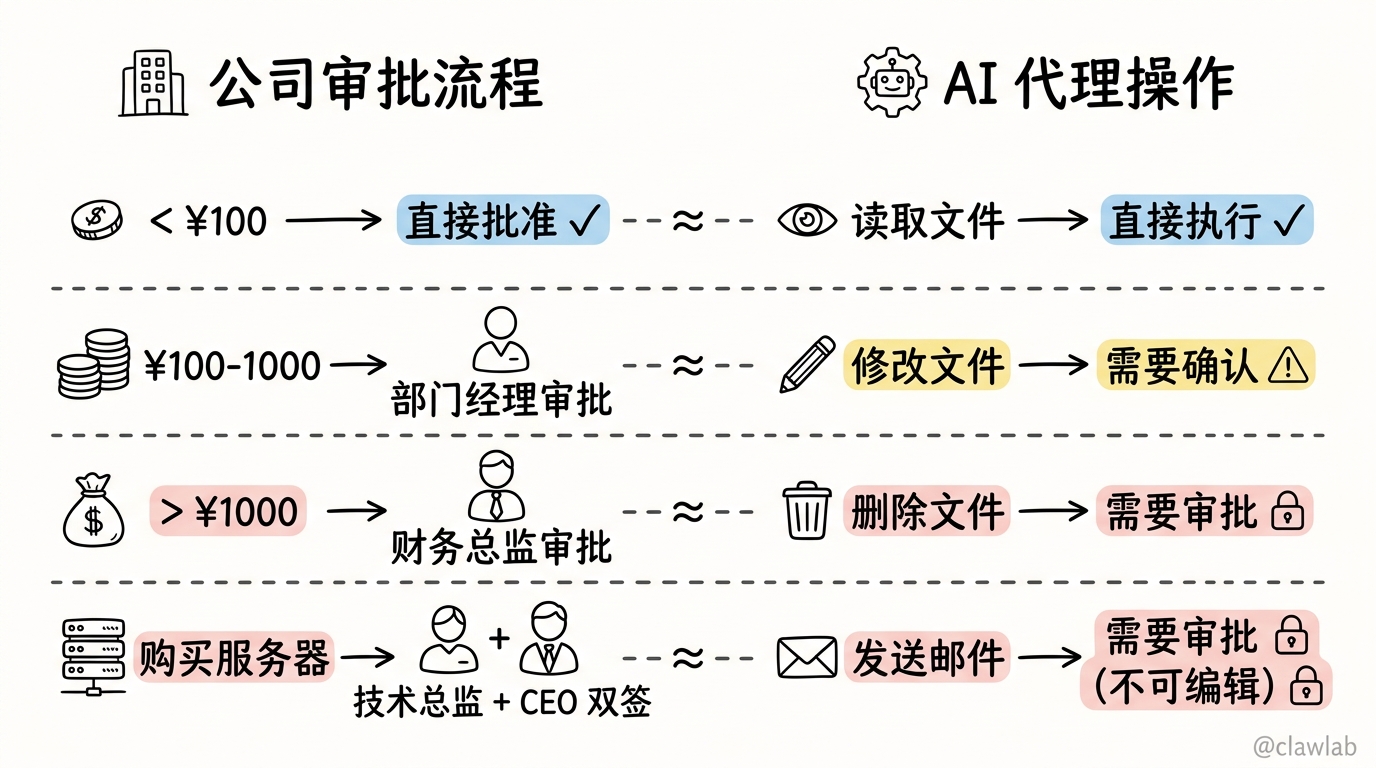
interrupt_on 就像公司的审批流程:
- 报销 100 元以下 → 直接批准
- 报销 100-1000 元 → 部门经理审批
- 报销 1000 元以上 → 财务总监审批
- 购买服务器 → 技术总监 + CEO 双签
代理执行操作时也遵循类似逻辑:
- 读取文件 → 直接执行
- 修改文件 → 需要确认
- 删除文件 → 需要审批
- 发送邮件 → 需要审批(且不允许编辑)
基础配置
前置条件
人机协作需要 Checkpointer 来在中断和恢复之间保存状态:
typescript
import { MemorySaver } from "@langchain/langgraph";

const checkpointer = new MemorySaver();  // 必须提供!
配置 interrupt_on
typescript
import { createDeepAgent } from "deepagents";
import { MemorySaver } from "@langchain/langgraph";
import { tool } from "langchain";
import * as z from "zod";

const deleteFile = tool(
  ({ path }) => `已删除 ${path}`,
  {
    name: "delete_file",
    description: "删除文件",
    schema: z.object({ path: z.string() }),
  }
);

const readFile = tool(
  ({ path }) => `${path} 的内容...`,
  {
    name: "read_file",
    description: "读取文件",
    schema: z.object({ path: z.string() }),
  }
);

const sendEmail = tool(
  ({ to, subject, body }) => `已发送邮件至 ${to}`,
  {
    name: "send_email",
    description: "发送邮件",
    schema: z.object({
      to: z.string(),
      subject: z.string(),
      body: z.string(),
    }),
  }
);

const checkpointer = new MemorySaver();

const agent = createDeepAgent({
  tools: [deleteFile, readFile, sendEmail],
  interruptOn: {
    delete_file: true,  // 默认配置:允许批准、编辑、拒绝
    read_file: false,   // 不需要中断
    send_email: { allowedDecisions: ["approve", "reject"] },  // 只允许批准或拒绝
  },
  checkpointer,  // 必须提供!
});
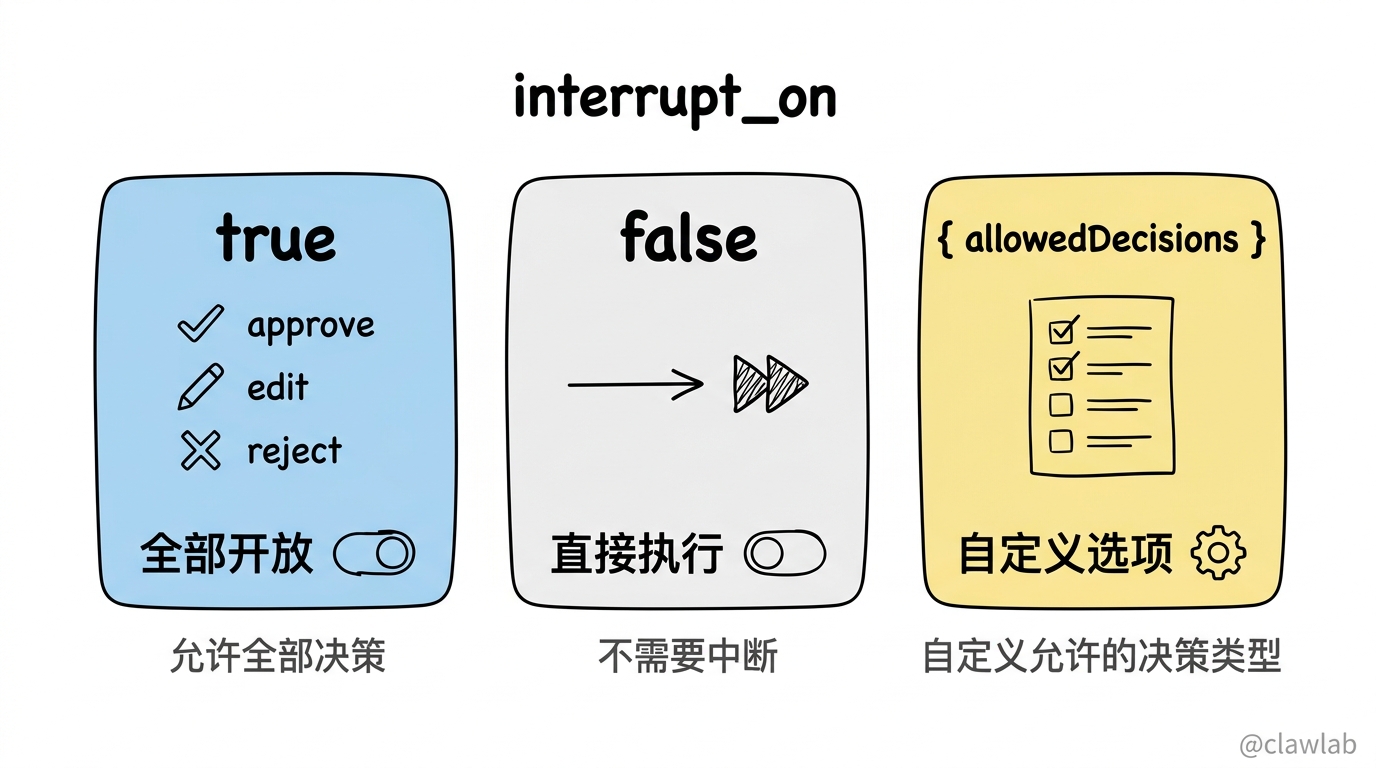
配置值说明
| 配置值 | 说明 |
|---|---|
true | 启用中断,允许全部决策(approve、edit、reject) |
false | 禁用中断,直接执行 |
{ allowedDecisions: [...] } | 自定义允许的决策类型 |
决策类型
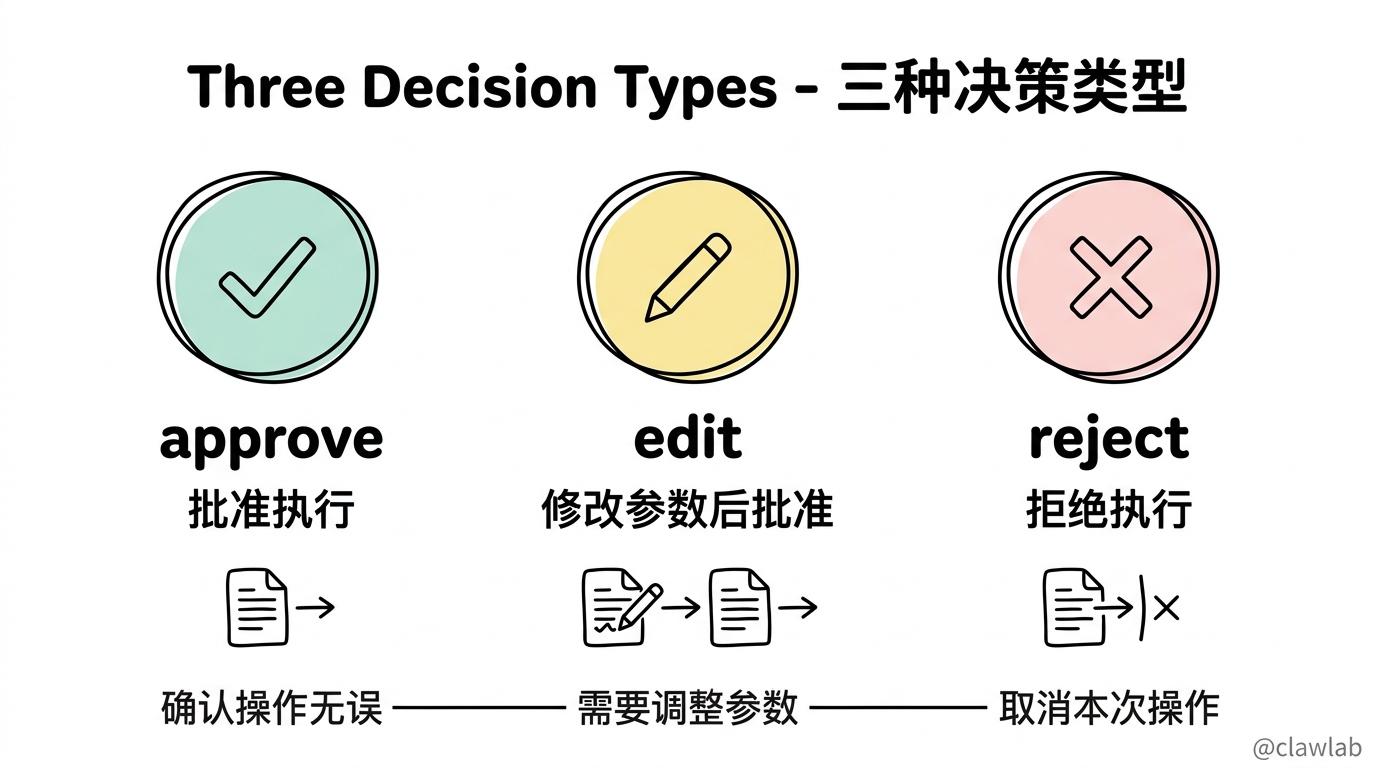
人类在审批时可以做出三种决策:
| 决策 | 说明 | 使用场景 |
|---|---|---|
approve | 批准执行 | 确认操作无误 |
edit | 修改参数后批准 | 需要调整参数 |
reject | 拒绝执行 | 取消本次操作 |
自定义允许的决策
typescript
const interruptOn = {
  // 敏感操作:允许全部选项
  delete_file: { allowedDecisions: ["approve", "edit", "reject"] },

  // 中等风险:只允许批准或拒绝(不允许编辑)
  write_file: { allowedDecisions: ["approve", "reject"] },

  // 必须执行:只允许批准(不能拒绝)
  critical_operation: { allowedDecisions: ["approve"] },
};
处理中断
完整流程
typescript
import { v4 as uuidv4 } from "uuid";
import { Command } from "@langchain/langgraph";

const config = { configurable: { thread_id: uuidv4() } };

let result = await agent.invoke(
  { messages: [{ role: "user", content: "删除文件 temp.txt" }] },
  config
);

if (result.__interrupt__) {
  const interrupts = result.__interrupt__[0].value;
  const actionRequests = interrupts.actionRequests;
  const reviewConfigs = interrupts.reviewConfigs;

  const configMap = Object.fromEntries(
    reviewConfigs.map((cfg) => [cfg.actionName, cfg])
  );

  for (const action of actionRequests) {
    const reviewConfig = configMap[action.name];
    console.log(`工具:${action.name}`);
    console.log(`参数:${JSON.stringify(action.args)}`);
    console.log(`允许的决策:${reviewConfig.allowedDecisions}`);
  }

  const decisions = [{ type: "approve" }];

  result = await agent.invoke(
    new Command({ resume: { decisions } }),
    config  // 必须使用相同的 config!
  );
}

console.log(result.messages[result.messages.length - 1].content);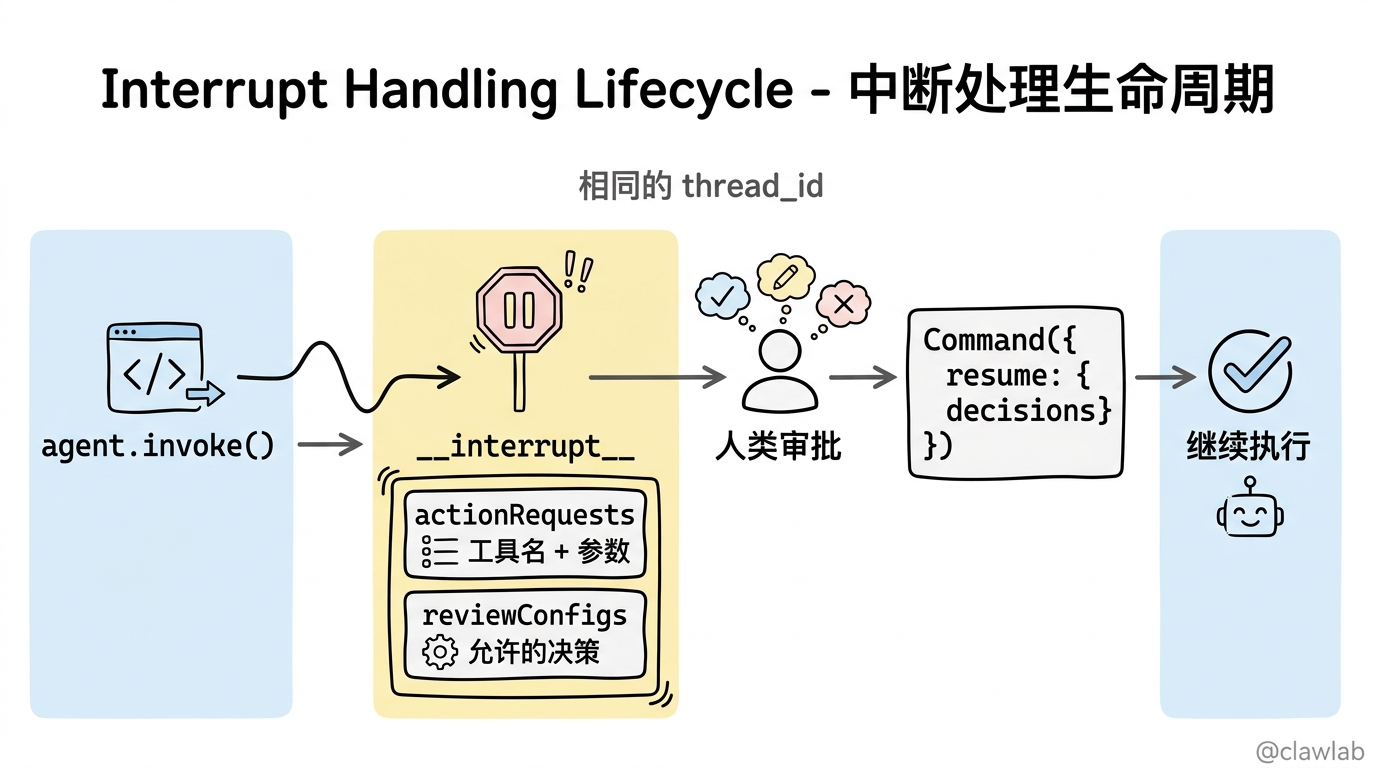
中断响应结构
typescript
// result.__interrupt__ 的结构
{
  __interrupt__: [{
    value: {
      actionRequests: [
        {
          name: "delete_file",  // 工具名
          args: { path: "temp.txt" }  // 参数
        }
      ],
      reviewConfigs: [
        {
          actionName: "delete_file",
          allowedDecisions: ["approve", "edit", "reject"]
        }
      ]
    }
  }]
}
多个工具调用
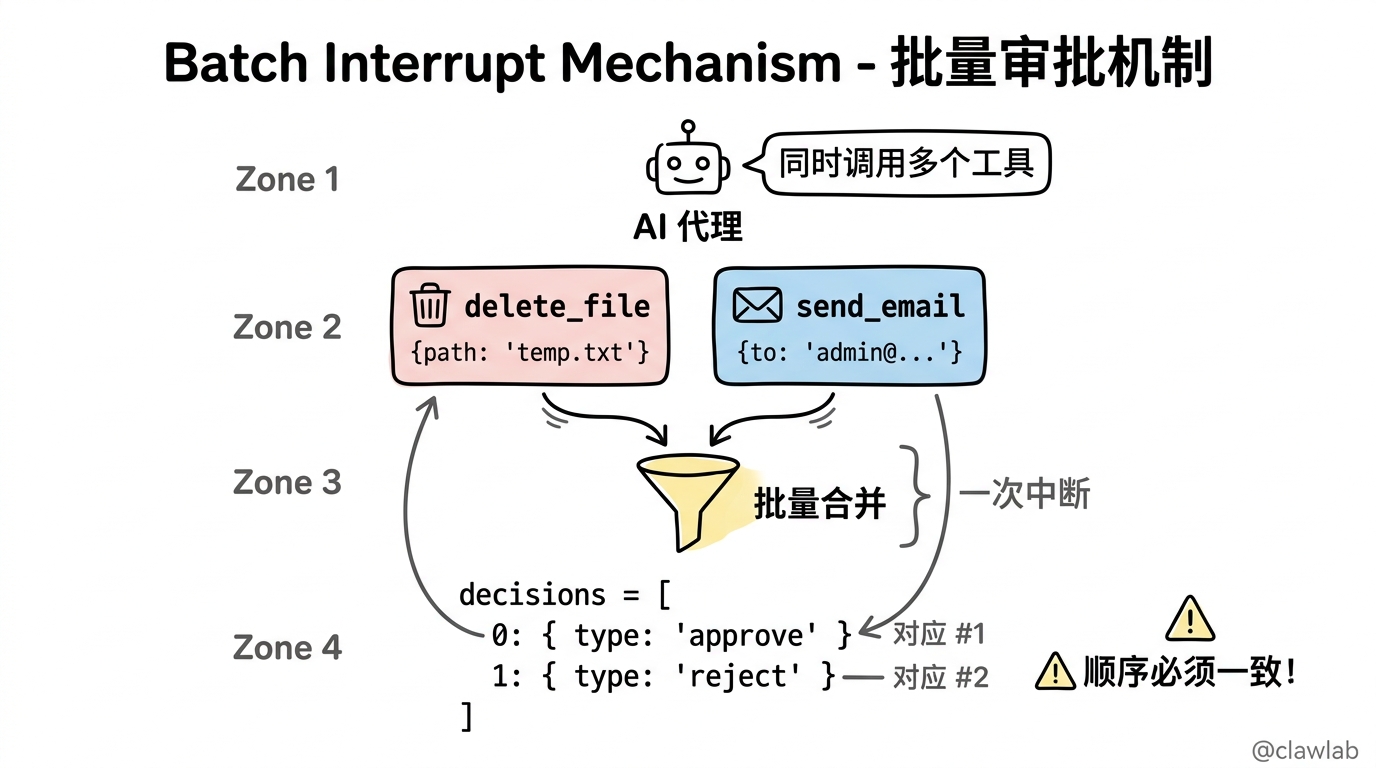
当代理同时调用多个需要审批的工具时,所有中断会被批量合并为一次中断:
typescript
const config = { configurable: { thread_id: uuidv4() } };

let result = await agent.invoke(
  {
    messages: [{
      role: "user",
      content: "删除 temp.txt,并给 admin@example.com 发送邮件"
    }]
  },
  config
);

if (result.__interrupt__) {
  const actionRequests = result.__interrupt__[0].value.actionRequests;

  console.assert(actionRequests.length === 2);
  // actionRequests[0] = delete_file
  // actionRequests[1] = send_email

  const decisions = [
    { type: "approve" },  // 第一个工具:delete_file
    { type: "reject" },   // 第二个工具:send_email
  ];

  result = await agent.invoke(
    new Command({ resume: { decisions } }),
    config
  );
}重要:决策列表必须与 actionRequests 的顺序一致!
编辑工具参数
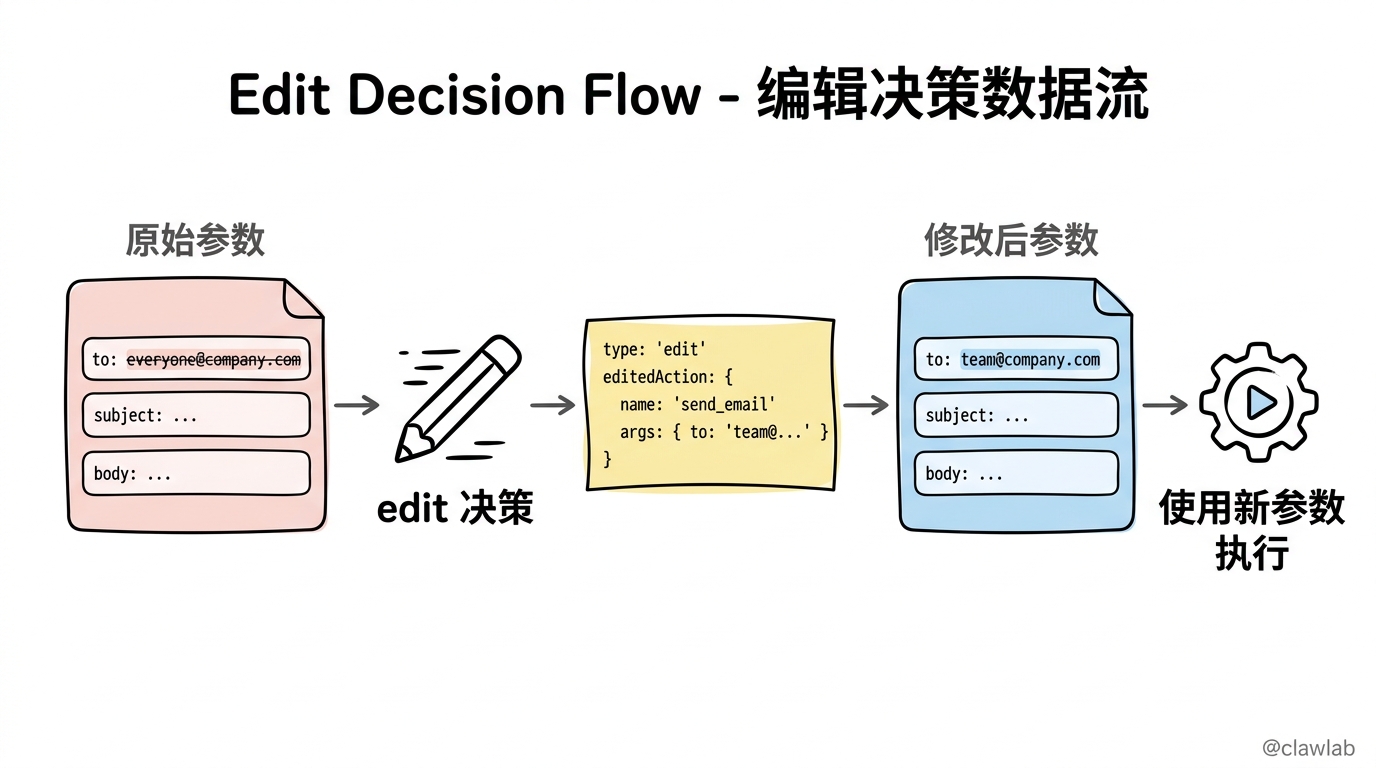
当允许 edit 决策时,可以在执行前修改参数:
typescript
if (result.__interrupt__) {
  const actionRequest = result.__interrupt__[0].value.actionRequests[0];

  console.log("原始参数:", actionRequest.args);
  // { to: "everyone@company.com", subject: "...", body: "..." }

  const decisions = [{
    type: "edit",
    editedAction: {
      name: actionRequest.name,  // 必须包含工具名
      args: {
        to: "team@company.com",  // 修改收件人
        subject: actionRequest.args.subject,
        body: actionRequest.args.body,
      },
    },
  }];

  result = await agent.invoke(
    new Command({ resume: { decisions } }),
    config
  );
}
编辑决策结构
typescript
{
  type: "edit",
  editedAction: {
    name: "send_email",  // 工具名(必填)
    args: {              // 修改后的参数
      to: "new@example.com",
      subject: "New Subject",
      body: "New Body"
    }
  }
}
子代理中断
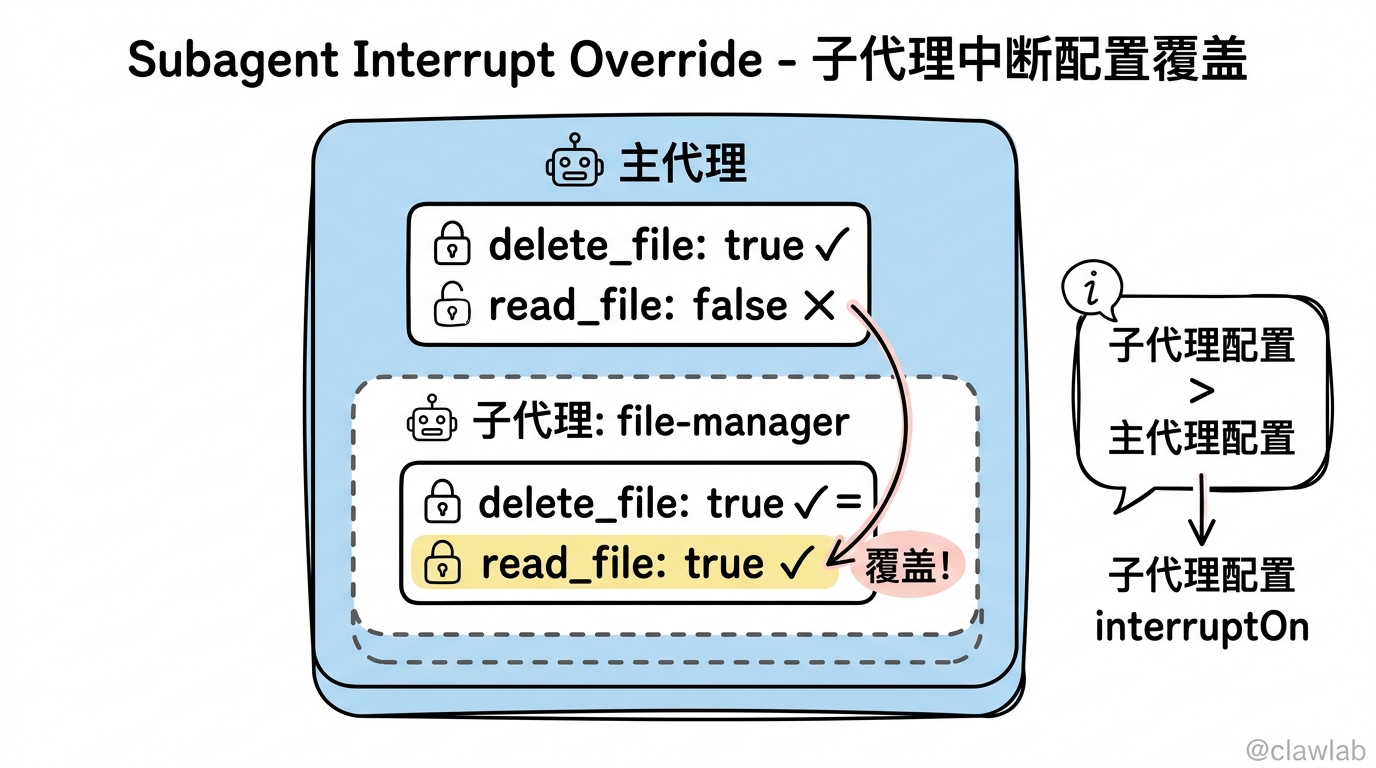
子代理可以有自己的 interrupt_on 配置,覆盖主代理的设置。
配置子代理中断
typescript
const agent = createDeepAgent({
  tools: [deleteFile, readFile],
  interruptOn: {
    delete_file: true,
    read_file: false,
  },
  subagents: [{
    name: "file-manager",
    description: "管理文件操作",
    systemPrompt: "你是一个文件管理助手。",
    tools: [deleteFile, readFile],
    interruptOn: {
      delete_file: true,
      read_file: true,  // 覆盖:在子代理中,读取也需要审批
    },
  }],
  checkpointer,
});
子代理内部的中断
子代理工具可以直接调用 interrupt() 来暂停执行:
typescript
import { interrupt } from "@langchain/langgraph";

const requestApproval = tool(
  async ({ actionDescription }) => {
    const approval = interrupt({
      type: "approval_request",
      action: actionDescription,
      message: `请批准或拒绝:${actionDescription}`,
    });

    if (approval.approved) {
      return `动作 '${actionDescription}' 已获批准,继续执行...`;
    } else {
      return `动作 '${actionDescription}' 已被拒绝。原因:${approval.reason || "未提供"}`;
    }
  },
  {
    name: "request_approval",
    description: "在执行敏感操作前请求人工批准",
    schema: z.object({
      actionDescription: z.string().describe("需要审批的操作描述"),
    }),
  }
);
实践示例
示例一:文件管理助手
typescript
import { createDeepAgent } from "deepagents";
import { MemorySaver } from "@langchain/langgraph";
import { Command } from "@langchain/langgraph";
import { v4 as uuidv4 } from "uuid";

const checkpointer = new MemorySaver();

const agent = createDeepAgent({
  tools: [readFileTool, writeFileTool, deleteFileTool],
  interruptOn: {
    read_file: false,
    write_file: { allowedDecisions: ["approve", "reject"] },
    delete_file: true,
  },
  checkpointer,
  systemPrompt: "你是一个文件管理助手,可以读取、创建和删除文件。"
});

async function chat(message: string, threadId: string) {
  const config = { configurable: { thread_id: threadId } };

  let result = await agent.invoke(
    { messages: [{ role: "user", content: message }] },
    config
  );

  while (result.__interrupt__) {
    const interrupts = result.__interrupt__[0].value;

    console.log("\n⚠️ 需要审批的操作:");
    for (const action of interrupts.actionRequests) {
      console.log(`  工具: ${action.name}`);
      console.log(`  参数: ${JSON.stringify(action.args)}`);
    }

    const userInput = await getUserDecision();

    const decisions = interrupts.actionRequests.map(() => ({
      type: userInput as "approve" | "reject"
    }));

    result = await agent.invoke(
      new Command({ resume: { decisions } }),
      config
    );
  }

  return result.messages[result.messages.length - 1].content;
}

async function main() {
  const threadId = uuidv4();

  console.log(await chat("读取 config.json 的内容", threadId));
  // 直接执行,不需要审批

  console.log(await chat("删除 temp.txt", threadId));
  // 触发审批流程
}
示例二:代码执行平台
typescript
const codeExecutor = createDeepAgent({
  tools: [executeCodeTool, installPackageTool, readFileTool],
  interruptOn: {
    execute_code: true,  // 所有代码执行都需要审批
    install_package: { allowedDecisions: ["approve", "reject"] },
    read_file: false,
  },
  checkpointer,
  systemPrompt: `你是一个代码执行助手。

    安全规则:
    - 不要执行删除系统文件的命令
    - 不要安装未知来源的包
    - 所有代码执行都会经过人工审批`
});
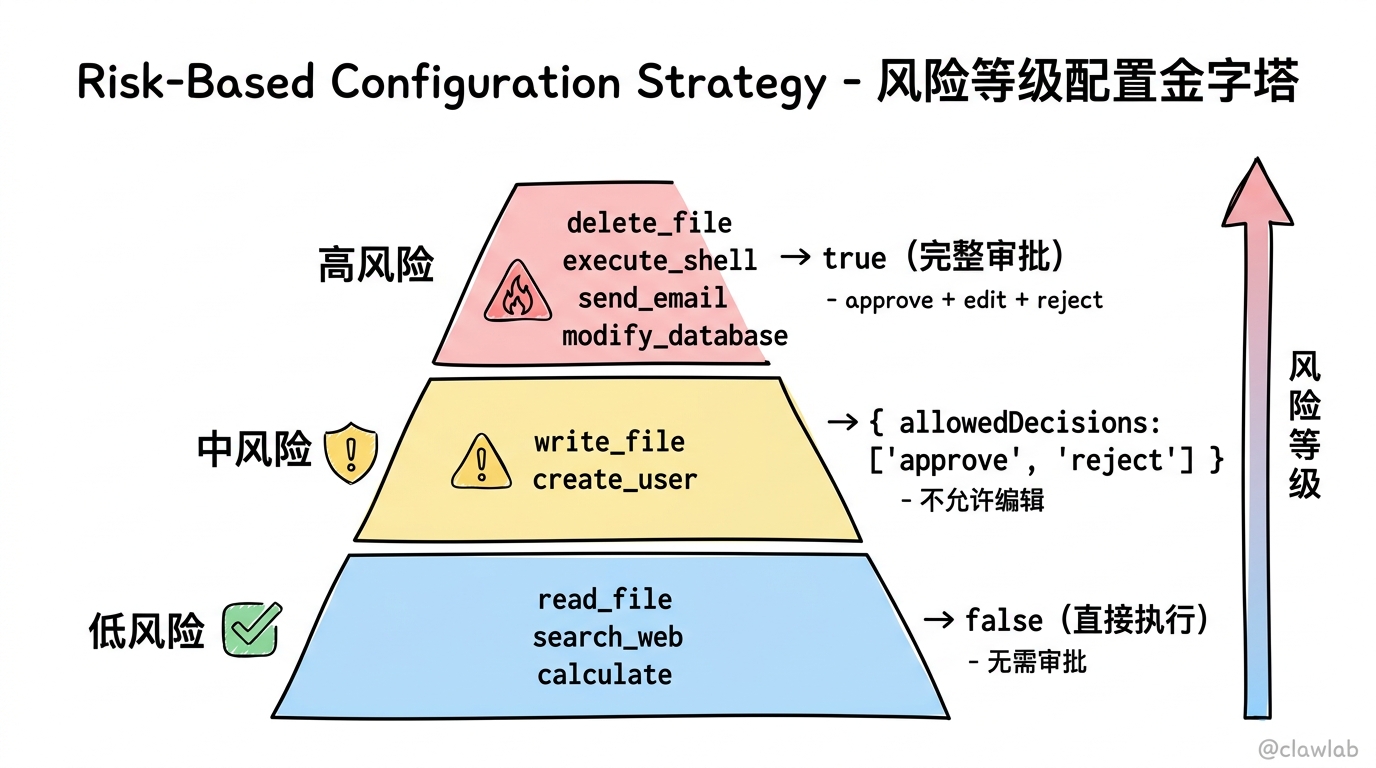
示例三:按风险等级配置
typescript
const agent = createDeepAgent({
  tools: allTools,
  interruptOn: {
    // 高风险:完整审批
    delete_file: true,
    execute_shell: true,
    send_email: true,
    modify_database: true,

    // 中风险:批准或拒绝
    write_file: { allowedDecisions: ["approve", "reject"] },
    create_user: { allowedDecisions: ["approve", "reject"] },

    // 低风险:不需要审批
    read_file: false,
    search_web: false,
    calculate: false,
  },
  checkpointer,
});
最佳实践
1. 始终使用 Checkpointer
人机协作必须使用 Checkpointer 来在中断和恢复之间持久化状态:
typescript
// ✅ 正确
const agent = createDeepAgent({
  interruptOn: { ... },
  checkpointer: new MemorySaver(),  // 必须提供
});

// ❌ 错误:缺少 checkpointer
const agent = createDeepAgent({
  interruptOn: { ... },
  // 缺少 checkpointer 会导致恢复失败
});
2. 使用相同的 thread_id
恢复执行时,必须使用相同的配置:
typescript
const config = { configurable: { thread_id: "my-thread" } };

// 首次调用
let result = await agent.invoke(messages, config);

// 恢复时必须使用相同的 config
result = await agent.invoke(
  new Command({ resume: { decisions } }),
  config  // ✅ 相同的 thread_id
);
3. 决策顺序一致
决策列表必须与 actionRequests 的顺序一致:
typescript
// actionRequests: [delete_file, send_email]
const decisions = [
  { type: "approve" },  // 对应 delete_file
  { type: "reject" },   // 对应 send_email
];
4. 按风险等级配置
typescript
// ✅ 好:根据风险等级区分
{
  delete_file: true,                           // 高风险
  write_file: { allowedDecisions: ["approve", "reject"] },  // 中风险
  read_file: false,                            // 低风险
}

// ❌ 差:所有工具都需要审批(用户体验差)
{
  delete_file: true,
  write_file: true,
  read_file: true,  // 没必要
}
小结
本文介绍了 DeepAgents 人机协作机制的核心概念和使用方法:
| 概念 | 说明 |
|---|---|
| interrupt_on | 配置哪些工具需要审批 |
| Checkpointer | 必须提供,用于状态持久化 |
| approve | 批准执行 |
| edit | 修改参数后批准 |
| reject | 拒绝执行 |
| Command | 恢复执行的命令 |
配置模式:
true→ 允许全部决策false→ 不需要审批{ allowedDecisions: [...] }→ 自定义决策
关键点:
- ✅ 必须提供 Checkpointer
- ✅ 恢复时使用相同的 thread_id
- ✅ 决策顺序与 actionRequests 一致
- ✅ 按风险等级配置
下一步
在下一篇文章中,我们将深入探索长期记忆——如何让代理跨会话"记住"用户偏好和历史交互。
实践任务
- 为一个文件管理代理配置 interrupt_on,对删除操作启用审批
- 实现完整的审批流程,包括批准、编辑和拒绝
- 尝试多工具调用的批量审批场景