主题
流式输出概览:实时响应的艺术
在复杂的代理系统中,任务执行可能需要数秒甚至数分钟。如果让用户盯着空白屏幕等待最终结果,体验会非常糟糕。流式输出让用户能够实时看到代理的思考过程、子代理的工作状态和中间结果——这就是实时响应的艺术。
为什么需要流式输出?
想象一个场景:用户让代理"分析这个项目的代码质量并生成报告"。这个任务可能需要:
- 主代理分析任务,决定委托给代码分析子代理
- 子代理扫描文件、运行 linter、收集指标
- 子代理生成分析报告
- 主代理整合结果,生成最终回复
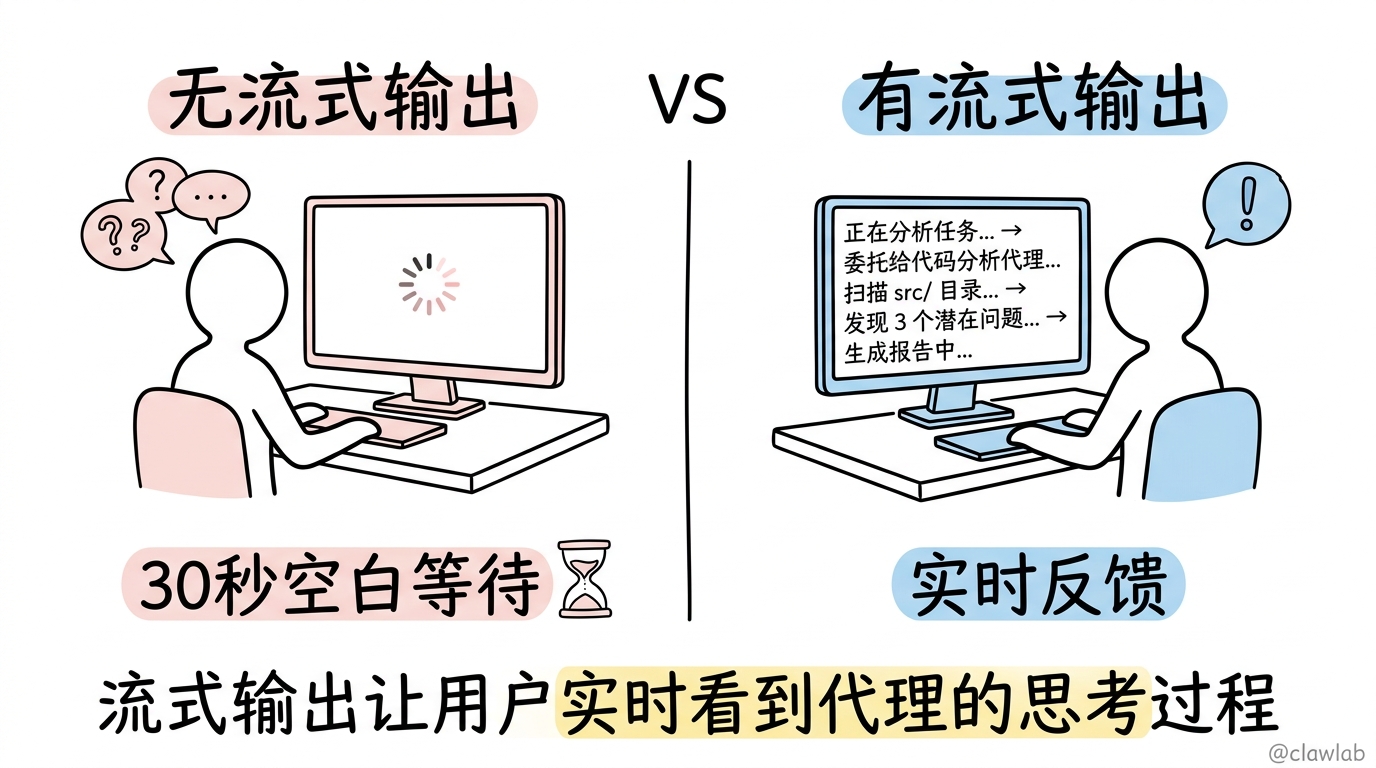
没有流式输出,用户只能等待 30 秒后看到最终结果。有了流式输出,用户可以实时看到:
- "正在分析任务..."
- "委托给代码分析代理..."
- "扫描 src/ 目录..."
- "发现 3 个潜在问题..."
- "生成报告中..."
这种实时反馈极大提升了用户体验。
启用子图流式输出
DeepAgents 支持 LangGraph 的子图流式输出机制。关键是设置 subgraphs: true:
typescript
import { createDeepAgent } from "@anthropic/deep-agents";

const agent = createDeepAgent({
  model: "claude-sonnet-4-20250514",
  name: "research-agent",
  subagents: [analyzerSubagent, writerSubagent],
});

const messages = [{ role: "human", content: "分析项目代码质量" }];

for await (const [namespace, chunk] of await agent.stream(
  { messages },
  { streamMode: "updates", subgraphs: true }
)) {
  console.log("Namespace:", namespace);
  console.log("Chunk:", chunk);
}
命名空间路由:识别事件来源
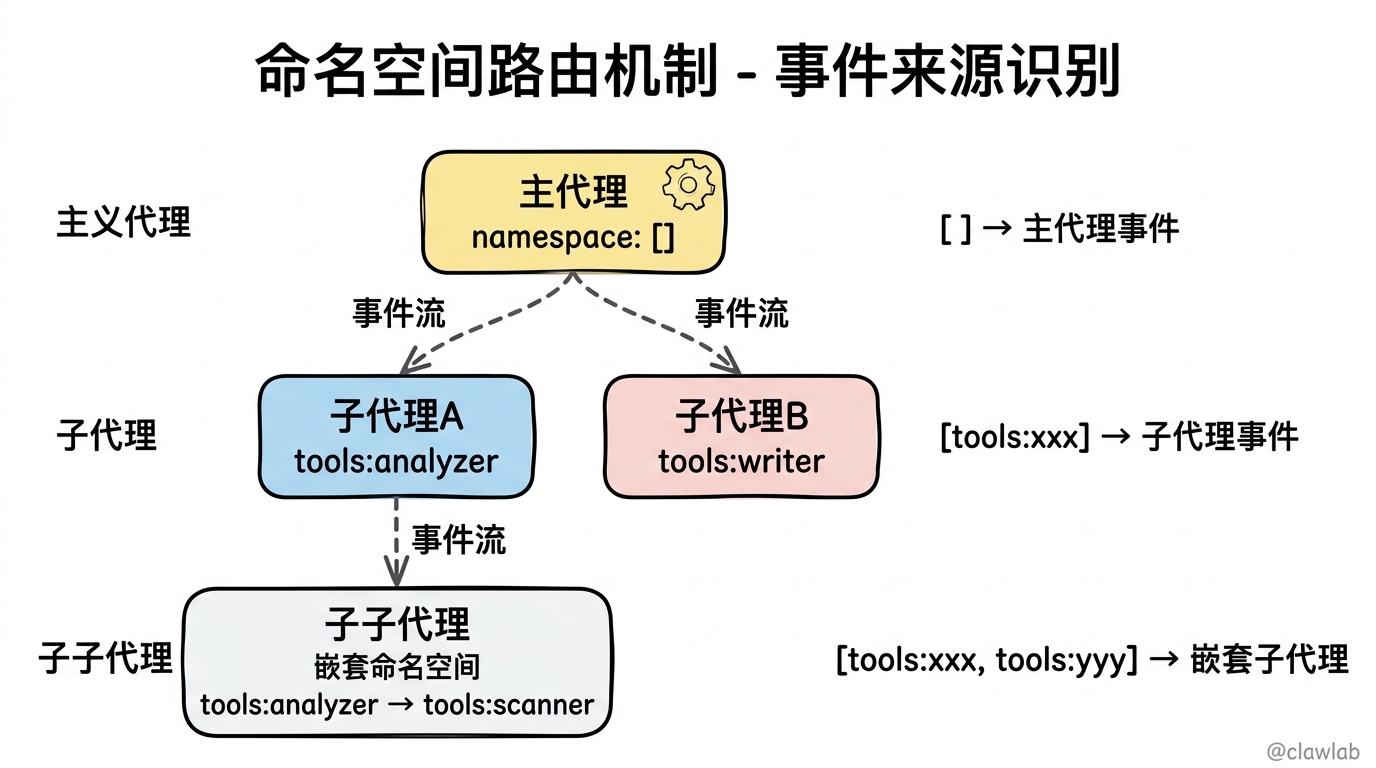
流式输出的核心是命名空间(namespace)机制。每个事件都带有一个命名空间数组,告诉你这个事件来自哪里:
typescript
for await (const [namespace, chunk] of await agent.stream(
  { messages },
  { streamMode: "updates", subgraphs: true }
)) {
  if (namespace.length === 0) {
    console.log("[主代理]", chunk);
  } else if (namespace.some(s => s.startsWith("tools:"))) {
    const toolNamespace = namespace.find(s => s.startsWith("tools:"));
    const subagentId = toolNamespace?.split(":")[1];
    console.log(`[子代理: ${subagentId}]`, chunk);
  }
}
命名空间的规则:
- 空数组
[]:事件来自主代理 - 包含
"tools:xxx":事件来自 ID 为 xxx 的子代理调用 - 嵌套命名空间:支持多层子代理(子代理的子代理)
三种流式模式
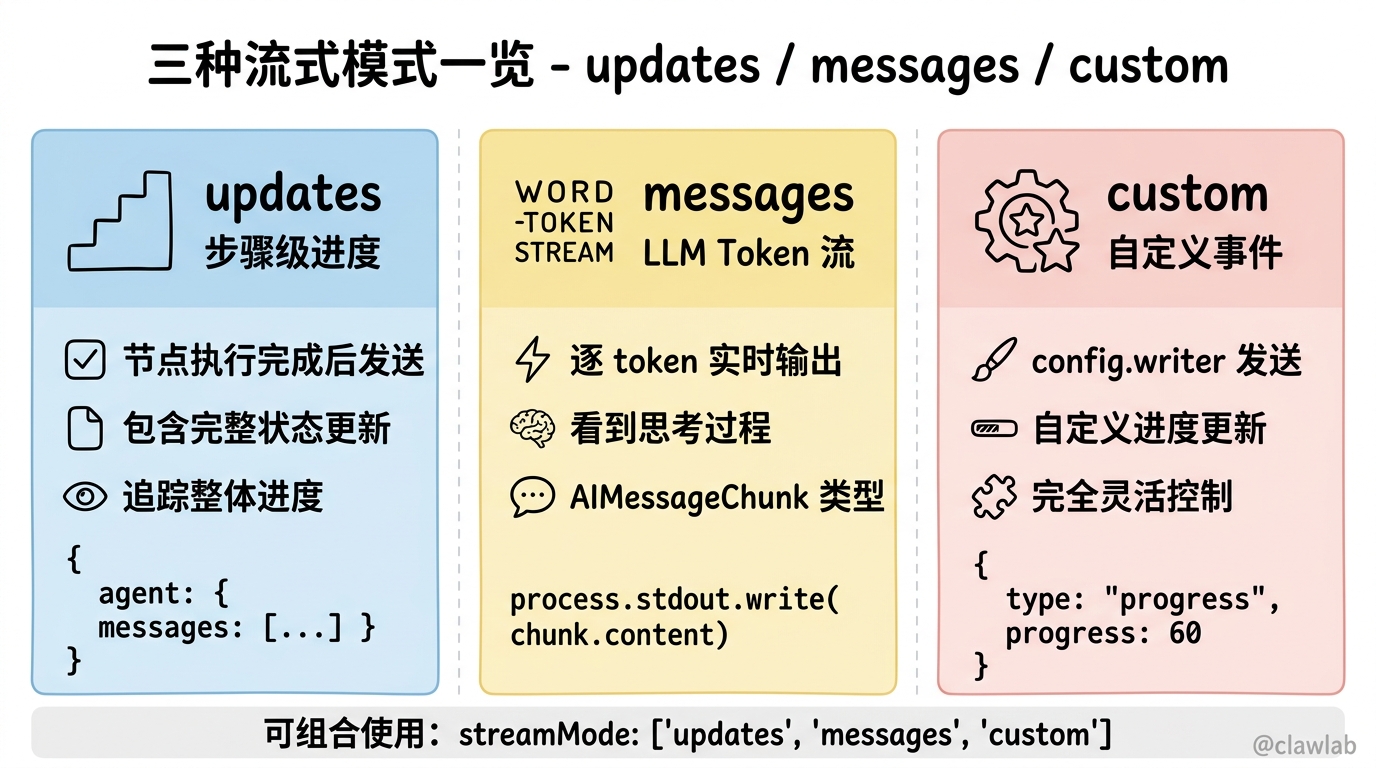
DeepAgents 支持三种流式模式,可以组合使用:
1. updates 模式:步骤级进度
typescript
for await (const [namespace, chunk] of await agent.stream(
  { messages },
  { streamMode: "updates", subgraphs: true }
)) {
  // chunk 包含每个步骤的状态更新
  // 例如:{ agent: { messages: [...] } }
}
updates 模式在每个节点执行完成后发送状态更新,适合追踪整体进度。
2. messages 模式:LLM Token 流
typescript
for await (const [namespace, chunk] of await agent.stream(
  { messages },
  { streamMode: "messages", subgraphs: true }
)) {
  // chunk 包含 LLM 输出的每个 token
  if (chunk.type === "AIMessageChunk") {
    process.stdout.write(chunk.content);
  }
}
messages 模式提供 LLM 的实时 token 输出,让用户看到代理的"思考过程"。
3. custom 模式:自定义事件
typescript
for await (const [namespace, chunk] of await agent.stream(
  { messages },
  { streamMode: "custom", subgraphs: true }
)) {
  // chunk 包含工具通过 config.writer 发送的自定义事件
  if (chunk.type === "progress") {
    updateProgressBar(chunk.progress);
  }
}
组合多种模式
可以同时启用多种模式:
typescript
for await (const [namespace, chunk] of await agent.stream(
  { messages },
  { streamMode: ["updates", "messages", "custom"], subgraphs: true }
)) {
  // 根据 chunk 类型分别处理
}
实时查看工具调用
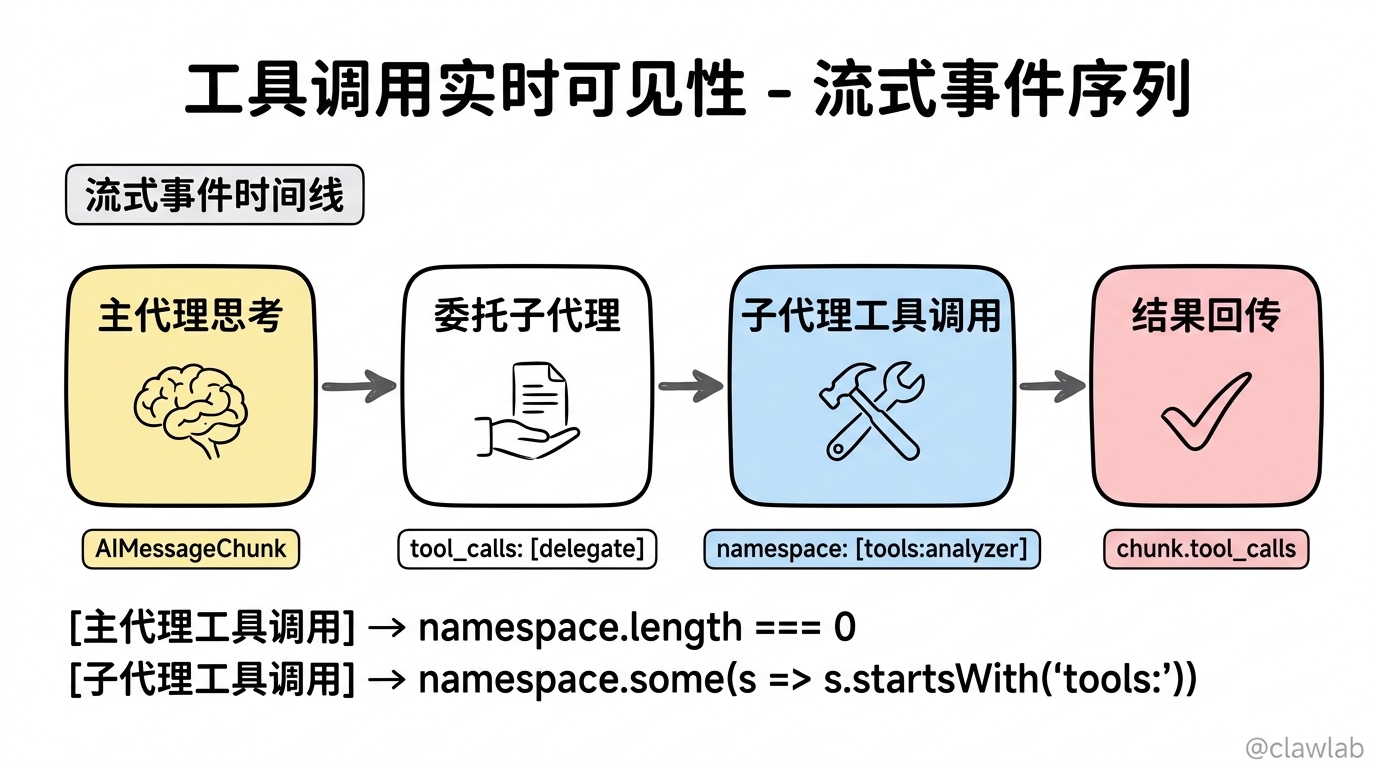
通过流式输出,可以实时看到子代理的工具调用:
typescript
for await (const [namespace, chunk] of await agent.stream(
  { messages },
  { streamMode: "messages", subgraphs: true }
)) {
  const isSubagent = namespace.some(s => s.startsWith("tools:"));

  if (chunk.type === "AIMessageChunk" && chunk.tool_calls?.length > 0) {
    for (const toolCall of chunk.tool_calls) {
      if (isSubagent) {
        console.log(`[子代理工具调用] ${toolCall.name}:`, toolCall.args);
      } else {
        console.log(`[主代理工具调用] ${toolCall.name}:`, toolCall.args);
      }
    }
  }
}
发送自定义进度更新
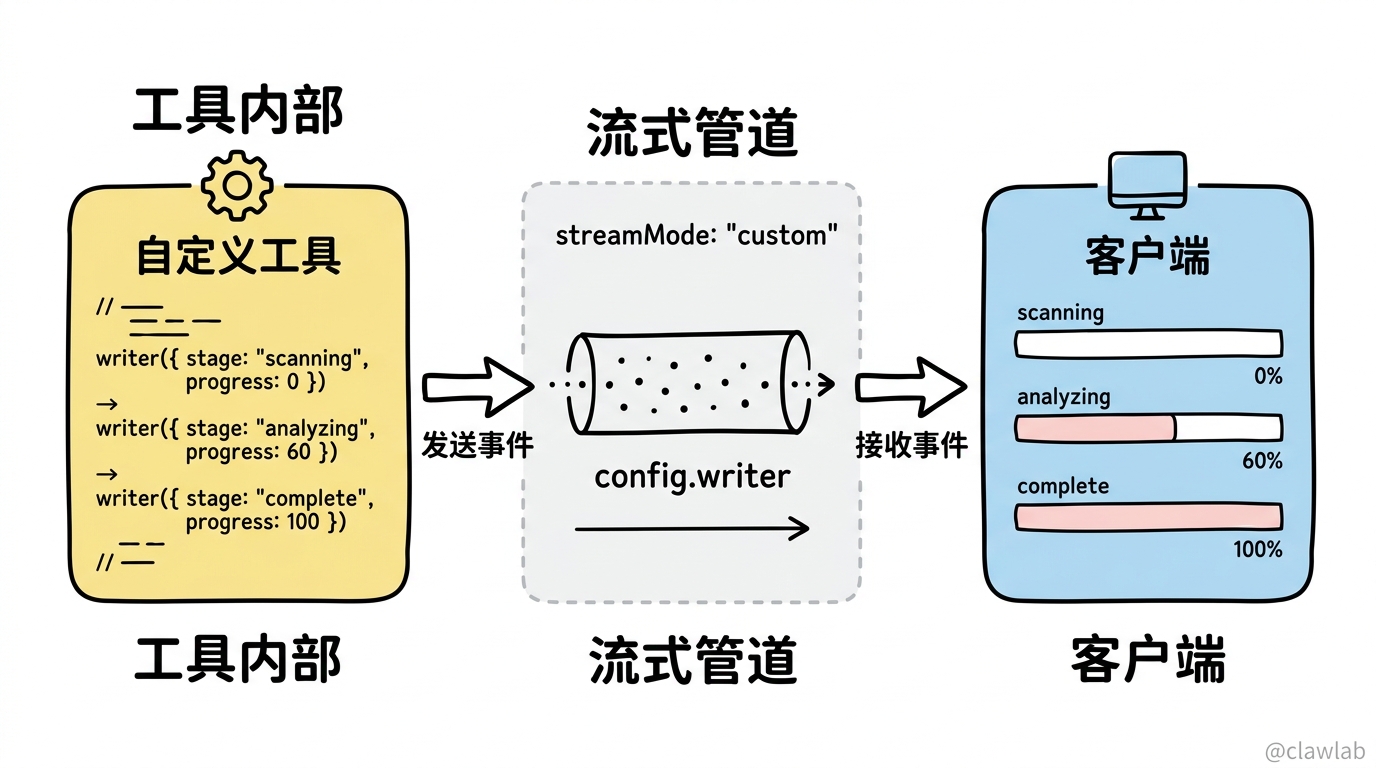
在自定义工具中,可以使用 config.writer 发送进度更新:
typescript
import { tool } from "@langchain/core/tools";
import { z } from "zod";
import { RunnableConfig } from "@langchain/core/runnables";

const analyzeProjectTool = tool(
  async (input: { path: string }, config: RunnableConfig) => {
    const writer = config.writer;

    // 发送进度更新
    writer?.({ type: "progress", stage: "scanning", progress: 0 });

    const files = await scanDirectory(input.path);
    writer?.({ type: "progress", stage: "scanning", progress: 30 });

    const issues = await analyzeFiles(files);
    writer?.({ type: "progress", stage: "analyzing", progress: 60 });

    const report = await generateReport(issues);
    writer?.({ type: "progress", stage: "complete", progress: 100 });

    return report;
  },
  {
    name: "analyze_project",
    description: "分析项目代码质量",
    schema: z.object({
      path: z.string().describe("项目路径"),
    }),
  }
);
在客户端接收自定义事件:
typescript
for await (const [namespace, chunk] of await agent.stream(
  { messages },
  { streamMode: "custom", subgraphs: true }
)) {
  if (chunk.type === "progress") {
    console.log(`[${chunk.stage}] ${chunk.progress}%`);
  }
}
完整的流式处理示例
typescript
import { createDeepAgent } from "@anthropic/deep-agents";

const agent = createDeepAgent({
  model: "claude-sonnet-4-20250514",
  name: "assistant",
  subagents: [codeAnalyzer, docWriter],
});

async function streamWithFullVisibility(userMessage: string) {
  const messages = [{ role: "human", content: userMessage }];

  console.log("🚀 开始执行任务...\n");

  for await (const [namespace, chunk] of await agent.stream(
    { messages },
    { streamMode: ["updates", "messages", "custom"], subgraphs: true }
  )) {
    const isMainAgent = namespace.length === 0;
    const source = isMainAgent ? "主代理" : getSubagentName(namespace);

    // 处理 updates 模式的状态更新
    if (chunk.agent?.messages) {
      const lastMessage = chunk.agent.messages.at(-1);
      if (lastMessage?.content) {
        console.log(`\n[${source}] 完成一个步骤`);
      }
    }

    // 处理 messages 模式的 token 流
    if (chunk.type === "AIMessageChunk") {
      if (chunk.content) {
        process.stdout.write(chunk.content);
      }
      if (chunk.tool_calls?.length > 0) {
        for (const tc of chunk.tool_calls) {
          console.log(`\n[${source}] 调用工具: ${tc.name}`);
        }
      }
    }

    // 处理 custom 模式的自定义事件
    if (chunk.type === "progress") {
      console.log(`\n[${source}] 进度: ${chunk.progress}%`);
    }
  }

  console.log("\n\n✅ 任务完成");
}

function getSubagentName(namespace: string[]): string {
  const toolNs = namespace.find(s => s.startsWith("tools:"));
  return toolNs?.split(":")[1] || "未知子代理";
}

await streamWithFullVisibility("分析项目代码并生成文档");
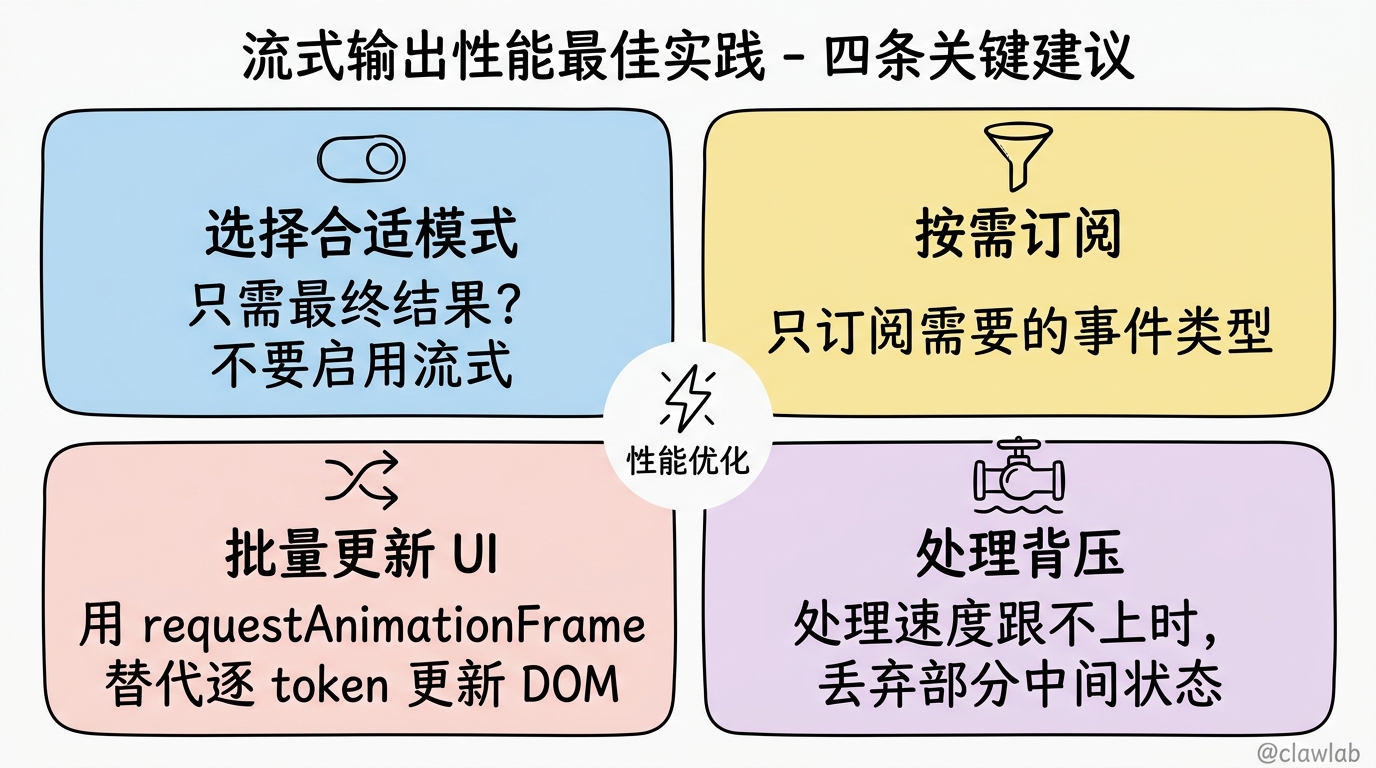
流式输出的性能考虑
- 选择合适的模式:如果只需要最终结果,不要启用流式
- 按需订阅:只订阅你需要的事件类型
- 批量更新 UI:不要每个 token 都更新 DOM,使用 requestAnimationFrame
- 处理背压:如果处理速度跟不上数据流,考虑丢弃部分中间状态
小结
本文介绍了 DeepAgents 的流式输出机制:
- 子图流式:通过
subgraphs: true启用子代理事件 - 命名空间路由:通过 namespace 数组识别事件来源
- 三种模式:updates(步骤进度)、messages(LLM tokens)、custom(自定义事件)
- 工具调用可见性:实时查看主代理和子代理的工具调用
- 自定义进度:通过 config.writer 发送自定义进度事件
下一篇文章,我们将深入前端集成,学习如何使用 useStream Hook 在 React 应用中优雅地处理流式数据。