主题
LangChain 教程 06|消息系统:与 AI 对话的正确姿势
📖 本篇导读:这是 LangChain 系列教程的第 6 篇。本篇将深入讲解 Messages 的类型、结构、多模态内容处理,以及如何构建多轮对话。读完预计需要 8 分钟。
简单来说
Messages 是 LangChain 中对话的基本单位,就像聊天中的一条条消息,包含了发送者角色、内容和元数据。它们是连接用户、AI 和工具之间的桥梁,支持文本、图片、音频等多种模态内容。
本节目标
- 理解 Messages 在 LangChain 中的核心地位
- 掌握不同类型的 Message 及其用途
- 学会使用 Messages 构建多轮对话
- 了解如何处理多模态内容
- 掌握 Message 内容块的标准结构
什么是 Messages?
问题驱动
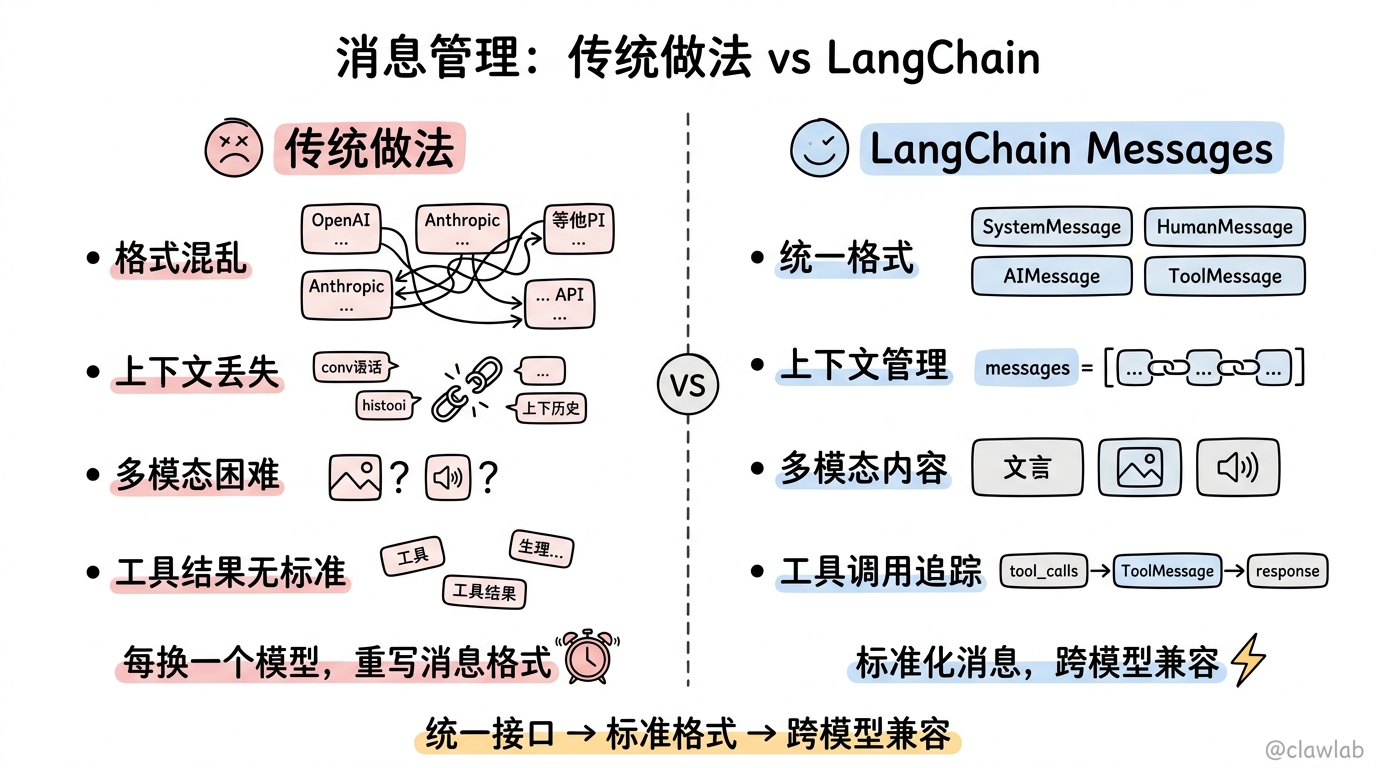
在构建 AI 应用时,我们经常面临以下挑战:
- 如何管理多轮对话的上下文?
- 如何处理文本以外的内容(如图像、音频)?
- 如何标准化不同模型的输入输出格式?
- 如何追踪和管理工具调用的结果?
Messages 正是为了解决这些问题而设计的。
核心概念
Messages 是包含以下信息的对象:
- 角色(Role):标识消息类型(如 system、user、assistant、tool)
- 内容(Content):消息的实际内容(文本、图像、音频等)
- 元数据(Metadata):可选字段,如响应信息、消息 ID、token 使用情况
类比教学
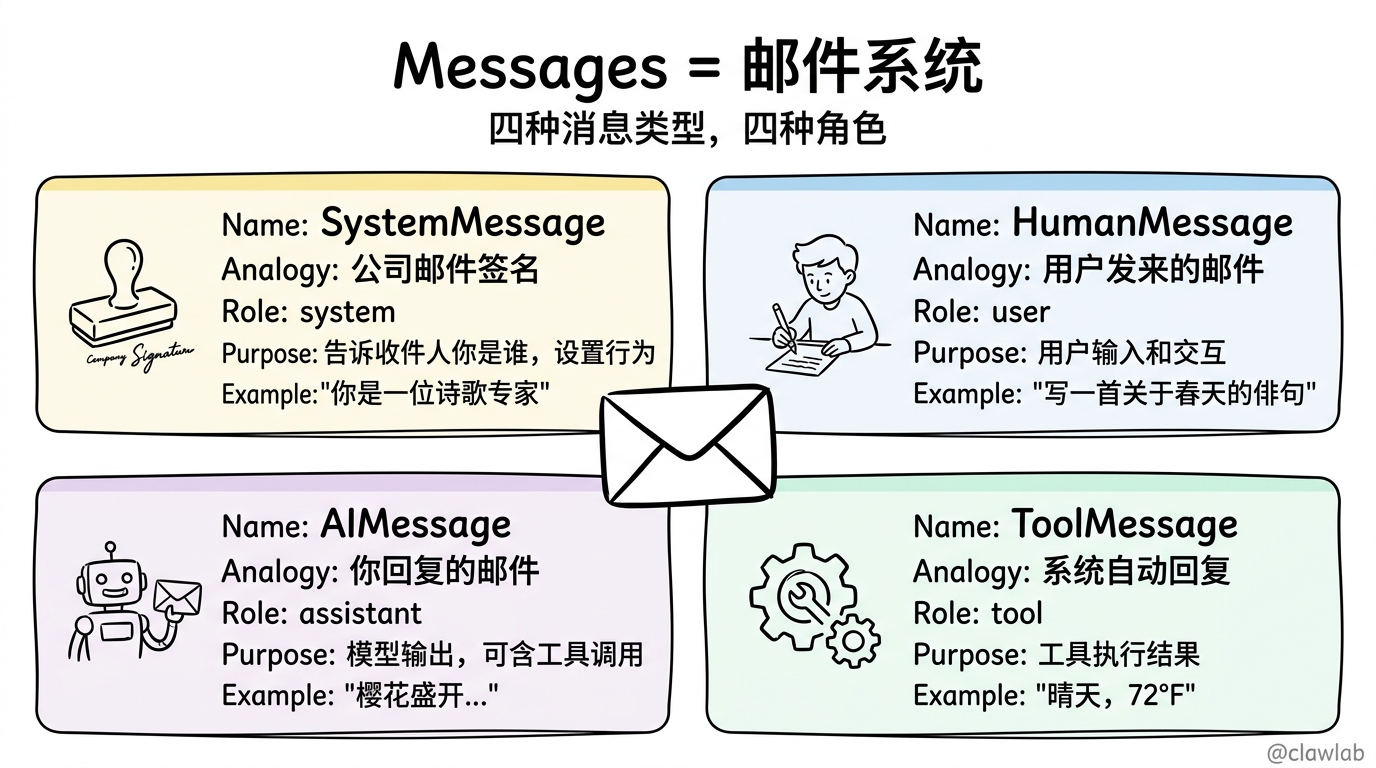
想象一下 Messages 就像电子邮件系统:
- SystemMessage 就像公司的邮件签名,告诉收件人你是谁
- HumanMessage 就像用户发来的邮件
- AIMessage 就像你回复的邮件
- ToolMessage 就像系统自动回复的邮件,提供了一些工具执行的结果
基本使用
文本提示
最简单的使用方式是直接传递字符串:
typescript
import { initChatModel } from "langchain";

const model = await initChatModel("gpt-5-nano");
const response = await model.invoke("写一首关于春天的俳句");适用场景:
- 单个、独立的请求
- 不需要对话历史
- 希望代码简洁
消息提示
对于多轮对话,我们需要传递消息列表:
typescript
import { SystemMessage, HumanMessage, AIMessage, initChatModel } from "langchain";

const model = await initChatModel("gpt-5-nano");

const messages = [
  new SystemMessage("你是一位诗歌专家"),
  new HumanMessage("写一首关于春天的俳句"),
  new AIMessage("樱花盛开..."),
  new HumanMessage("再写一首关于秋天的"),
];

const response = await model.invoke(messages);适用场景:
- 管理多轮对话
- 处理多模态内容(图像、音频、文件)
- 包含系统指令
字典格式
你也可以使用 OpenAI 聊天完成格式的字典:
typescript
const messages = [
  { role: "system", content: "你是一位诗歌专家" },
  { role: "user", content: "写一首关于春天的俳句" },
  { role: "assistant", content: "樱花盛开..." },
];

const response = await model.invoke(messages);
消息类型
SystemMessage
系统消息用于设置模型的行为,定义其角色和响应指南。
typescript
// 基本指令
const systemMsg = new SystemMessage("你是一位乐于助人的编码助手");

// 详细角色设定
const systemMsg = new SystemMessage(`
你是一位资深的 TypeScript 开发者,精通各种 Web 框架。
始终提供代码示例并解释你的推理过程。
你的解释要简洁但全面。
`);
HumanMessage
人类消息代表用户输入和交互,可以包含文本、图像、音频、文件等多模态内容。
typescript
// 文本内容
const humanMsg = new HumanMessage("什么是机器学习?");

// 带元数据的消息
const humanMsg = new HumanMessage({
  content: "你好!",
  name: "alice",
  id: "msg_123",
});
AIMessage
AI 消息代表模型调用的输出,包含多模态数据、工具调用和提供商特定的元数据。
typescript
const response = await model.invoke("解释 AI");
console.log(typeof response);  // AIMessage

// 手动创建 AI 消息
const aiMsg = new AIMessage("我很乐意帮助你解答那个问题!");
ToolMessage
工具消息用于传递工具调用的结果,是工具执行和模型处理之间的桥梁。
typescript
import { AIMessage, ToolMessage, HumanMessage } from "langchain";

// 模型的工具调用
const aiMessage = new AIMessage({
  content: [],
  tool_calls: [{
    name: "get_weather",
    args: { location: "旧金山" },
    id: "call_123"
  }]
});

// 工具执行结果
const toolMessage = new ToolMessage({
  content: "晴天,72°F",
  tool_call_id: "call_123",
  name: "get_weather"
});

// 完整的消息历史
const messages = [
  new HumanMessage("旧金山的天气怎么样?"),
  aiMessage,  // 模型的工具调用
  toolMessage,  // 工具执行结果
];

const response = await model.invoke(messages);  // 模型处理结果
消息内容
内容格式
消息的内容可以是:
- 字符串
- 提供商原生格式的内容块列表
- LangChain 标准内容块列表
多模态内容
LangChain 支持处理多种类型的多模态内容:
typescript
// 图像输入(从 URL)
const message = new HumanMessage({
  content: [
    { type: "text", text: "描述这张图片的内容。" },
    {
      type: "image",
      source_type: "url",
      url: "https://example.com/image.jpg"
    },
  ],
});

// PDF 文档输入
const message = new HumanMessage({
  content: [
    { type: "text", text: "描述这份文档的内容。" },
    {
      type: "file",
      source_type: "url",
      url: "https://example.com/document.pdf",
      mime_type: "application/pdf"
    },
  ],
});
标准内容块
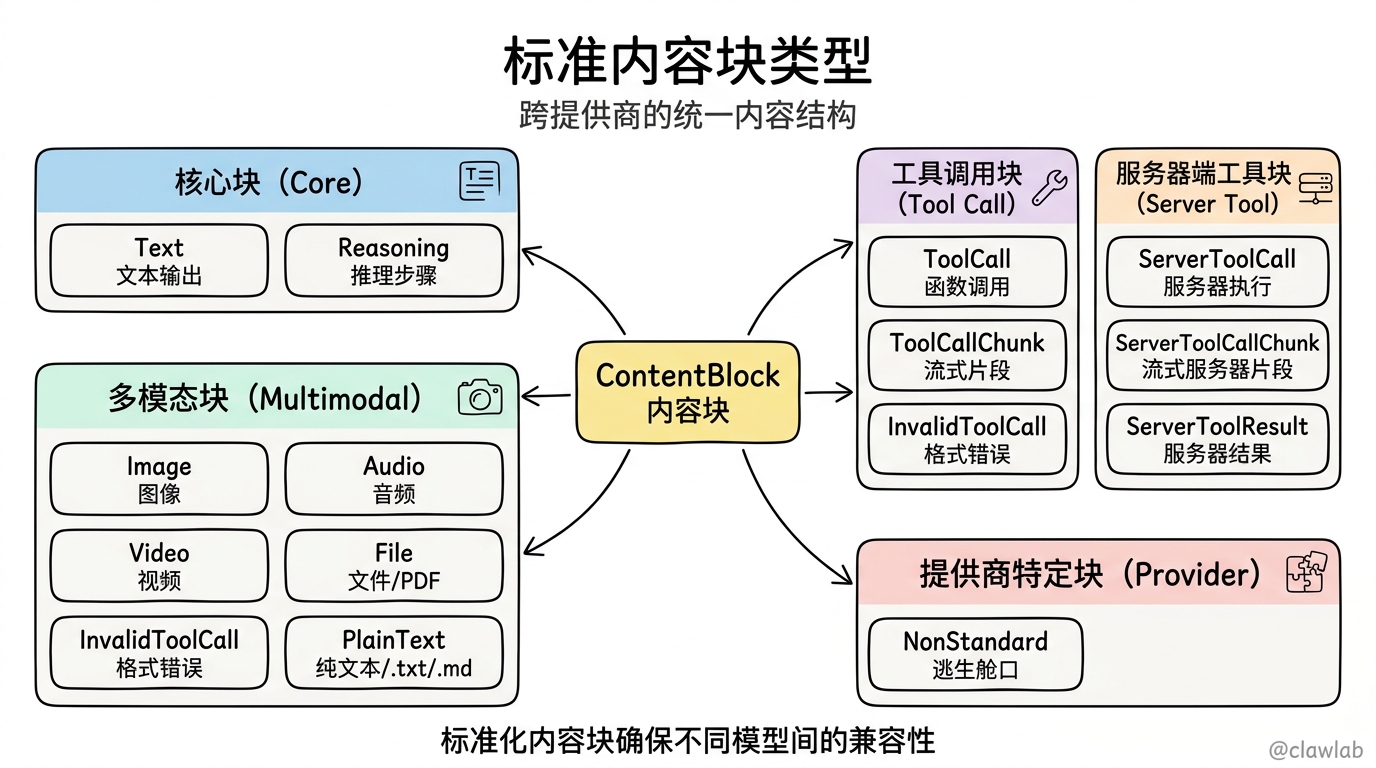
LangChain 提供了跨提供商的标准内容块类型:
核心块
- Text:标准文本输出
- Reasoning:模型推理步骤
多模态块
- Image:图像数据
- Audio:音频数据
- Video:视频数据
- File:通用文件(PDF 等)
- PlainText:文档文本(.txt, .md)
工具调用块
- ToolCall:函数调用
- ToolCallChunk:流式工具片段
- InvalidToolCall:格式错误的调用
服务器端工具执行块
- ServerToolCall:服务器端执行的工具调用
- ServerToolCallChunk:流式服务器端工具调用片段
- ServerToolResult:服务器端工具执行结果
提供商特定块
- NonStandard:提供商特定的逃生舱口
业务场景
场景一:多轮对话机器人
问题:如何构建一个能够记住上下文的对话机器人?
解决方案:使用 Messages 管理对话历史
typescript
import { SystemMessage, HumanMessage, AIMessage, initChatModel } from "langchain";

const model = await initChatModel("gpt-5-nano");

// 初始化对话历史
const chatHistory: any[] = [
  new SystemMessage("你是一位友好的助手,能够记住之前的对话内容。")
];

// 对话函数
async function chat(userInput: string): Promise<string> {
  // 添加用户消息
  chatHistory.push(new HumanMessage(userInput));

  // 调用模型
  const response = await model.invoke(chatHistory);

  // 添加模型响应
  chatHistory.push(response);

  return response.content;
}

// 测试对话
console.log(await chat("你好,我是小明。"));
console.log(await chat("我昨天提到的那个项目怎么样了?")); // 模型应该记得用户是小明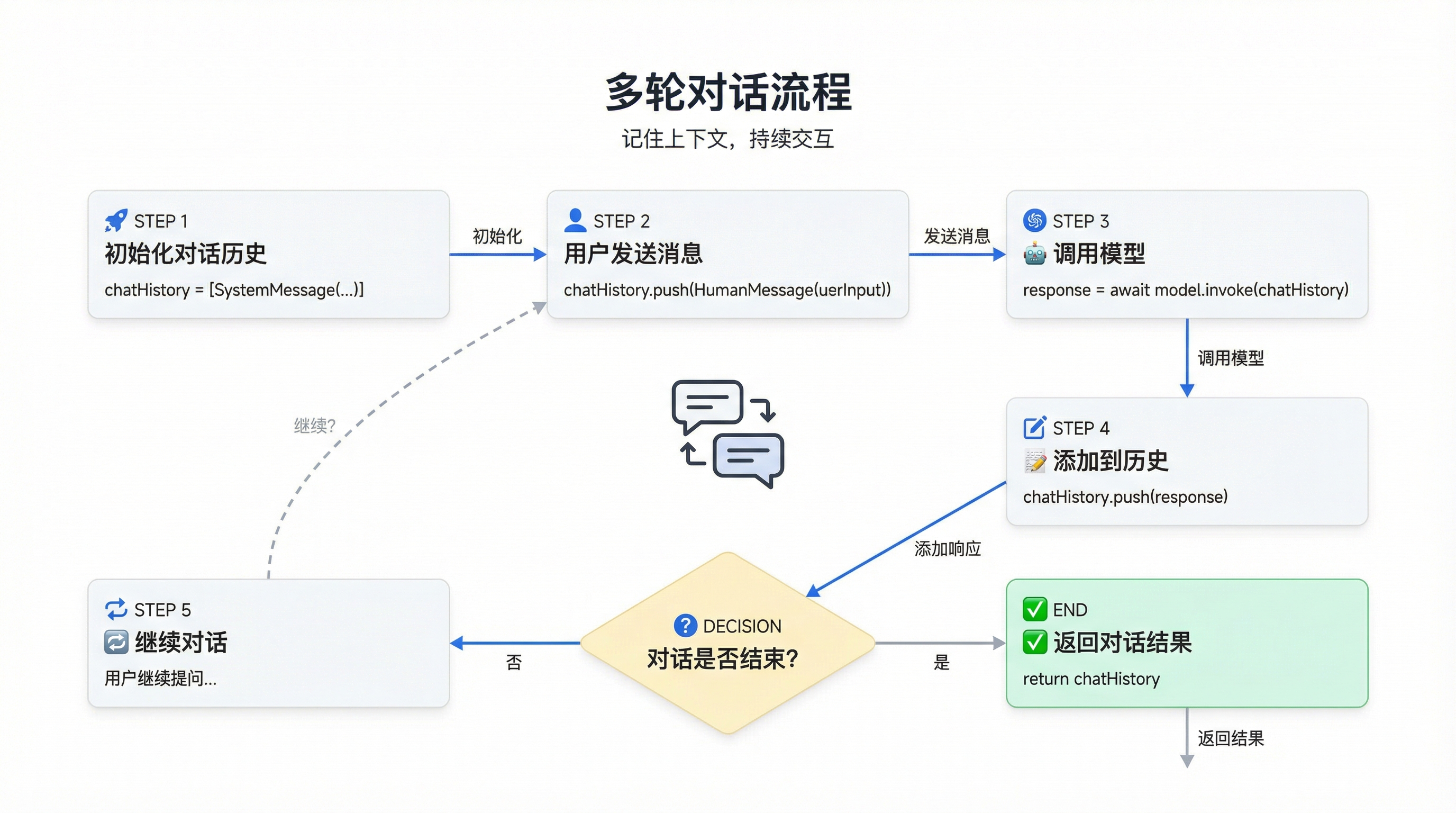
场景二:多模态内容分析
问题:如何构建一个能够分析图像内容的 AI 助手?
解决方案:使用 Messages 传递多模态内容
typescript
import { HumanMessage, initChatModel } from "langchain";

const model = await initChatModel("gpt-5-nano");

// 图像分析请求
const message = new HumanMessage({
  content: [
    { type: "text", text: "分析这张产品图片,描述它的外观、功能和可能的用途。" },
    {
      type: "image",
      source_type: "url",
      url: "https://example.com/product.jpg"
    },
  ],
});

const response = await model.invoke([message]);
console.log(response.content);
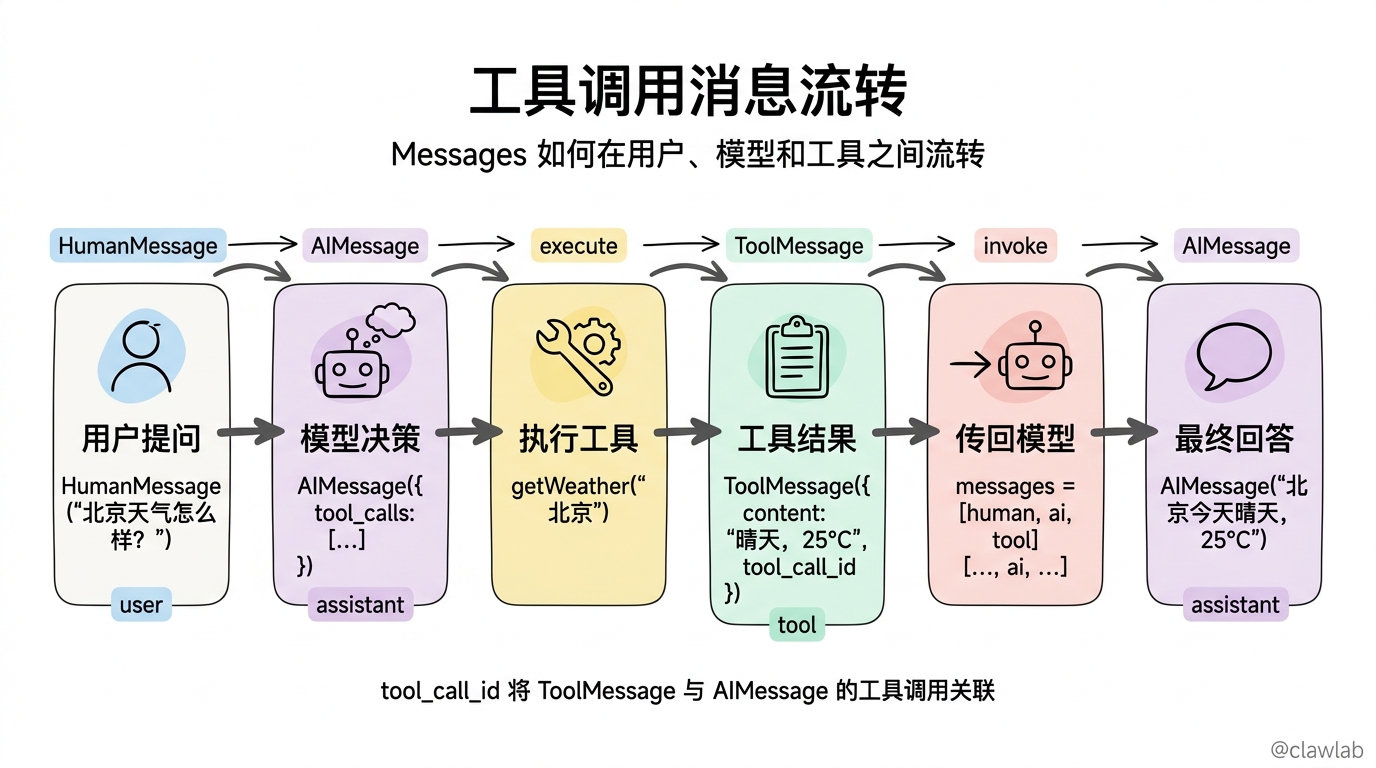
场景三:工具调用和结果处理
问题:如何构建一个能够使用工具获取信息并处理结果的 AI 系统?
解决方案:使用 Messages 管理工具调用和结果
typescript
import { SystemMessage, HumanMessage, AIMessage, ToolMessage, initChatModel } from "langchain";

// 模拟天气工具
function getWeather(location: string): string {
  // 实际应用中这里会调用真实的天气 API
  return `在 ${location},今天的天气是晴天,温度 25°C。`;
}

const model = await initChatModel("gpt-5-nano");

// 绑定工具
const modelWithTools = model.bindTools([{
  name: "get_weather",
  description: "获取指定地点的天气信息",
  schema: {
    type: "object",
    properties: {
      location: {
        type: "string",
        description: "要查询天气的地点"
      }
    },
    required: ["location"]
  }
}]);

// 初始消息
const messages = [
  new SystemMessage("你是一位天气助手,使用工具获取天气信息后回答用户。"),
  new HumanMessage("北京的天气怎么样?")
];

// 第一步:模型生成工具调用
const response1 = await modelWithTools.invoke(messages);
console.log("模型响应:", response1);

// 第二步:执行工具调用
if (response1.tool_calls && response1.tool_calls.length > 0) {
  const toolCall = response1.tool_calls[0];
  const weatherResult = getWeather(toolCall.args.location);

  // 创建工具消息
  const toolMessage = new ToolMessage({
    content: weatherResult,
    tool_call_id: toolCall.id,
    name: toolCall.name
  });

  // 第三步:将工具结果传递给模型
  messages.push(response1);
  messages.push(toolMessage);

  const response2 = await modelWithTools.invoke(messages);
  console.log("最终回答:", response2.content);
}
技术要点
1. 消息流管理
- 上下文窗口:注意模型的上下文窗口限制,过长的对话历史需要修剪
- 消息总结:对于长对话,可以定期总结消息以节省 tokens
- 消息过滤:根据业务需求过滤掉不重要的消息
2. 多模态内容处理
- 格式要求:不同模型对多模态内容有不同的格式要求
- 大小限制:注意文件大小限制,避免超出模型的处理能力
- 来源类型:支持 URL、base64 数据和提供商管理的文件 ID
3. 工具调用流程
- 工具绑定:使用
bindTools为模型绑定可用工具 - 工具调用:模型生成工具调用请求
- 结果处理:执行工具并将结果包装为 ToolMessage
- 结果解析:模型解析工具结果并生成最终回答
4. 内容块标准化
- 跨提供商兼容:使用标准内容块确保在不同模型间的兼容性
- 类型安全:利用 TypeScript 类型系统确保内容块的正确性
- 扩展性:通过 NonStandard 块支持提供商特定的功能
总结
Messages 是 LangChain 中构建对话系统的基础,它们不仅支持简单的文本交互,还能处理复杂的多模态内容和工具调用。通过标准化的消息格式和内容块结构,LangChain 使得构建跨模型、跨提供商的对话系统变得更加简单和可靠。
核心优势
- 统一接口:为不同模型和提供商提供统一的消息接口
- 多模态支持:无缝处理文本、图像、音频、视频等多种内容类型
- 工具集成:通过工具消息实现模型与外部工具的交互
- 上下文管理:支持构建有记忆能力的多轮对话系统
- 标准化内容:跨提供商的标准内容块结构
通过掌握 Messages 的使用,你可以构建更加智能、灵活和强大的 AI 应用,为用户提供更加自然和有效的交互体验。