主题
LangChain 教程 32|项目实战:AI 代码助手
📖 本篇导读:这是 LangChain 系列教程的第 32 篇。本篇将构建一个智能代码助手,支持多语言代码生成、Bug 诊断修复、单元测试生成,以及通过 MCP 访问本地文件和 Git。读完预计需要 20 分钟。
项目概述
简单来说
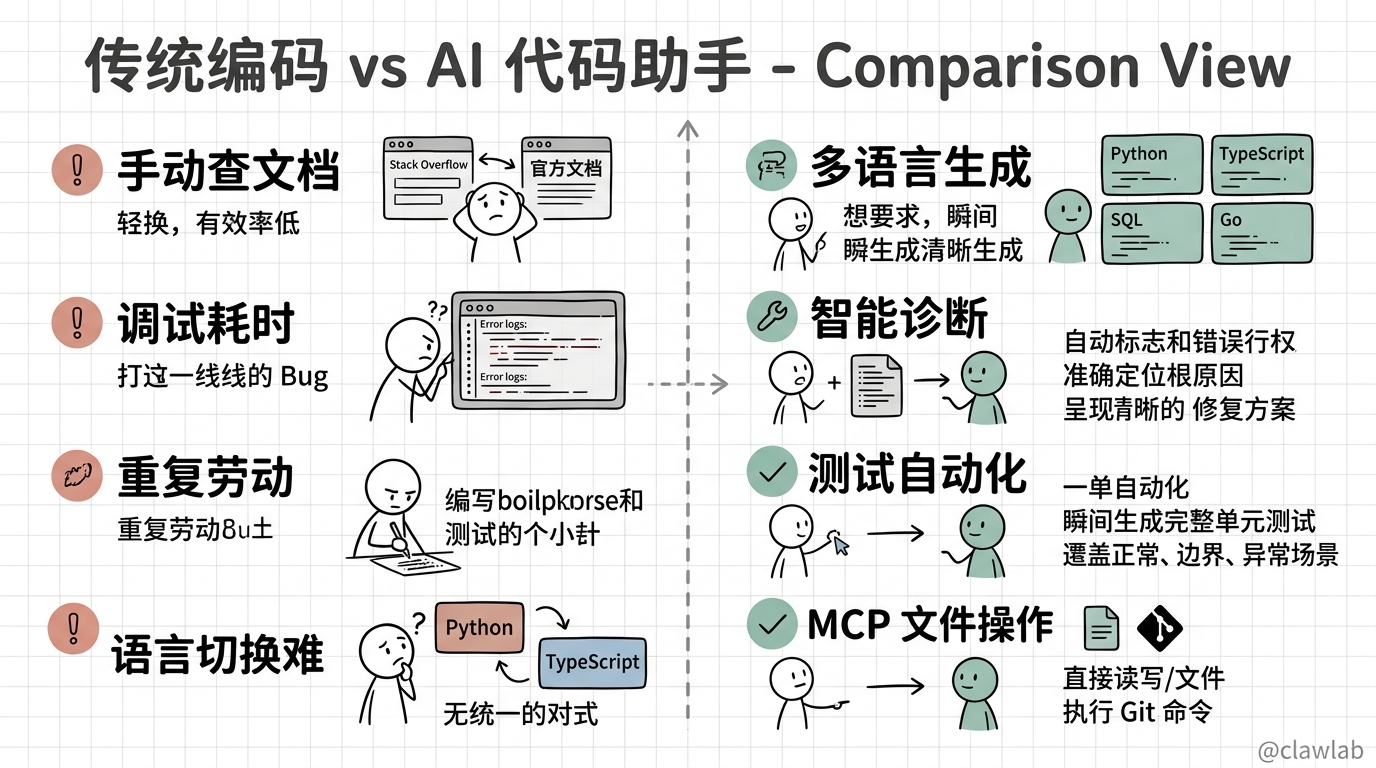
构建一个智能代码助手,用户只需描述需求,系统就能自动:
- 生成多种语言的代码(Python、TypeScript、SQL、Go 等)
- 解释和重构现有代码
- 诊断和修复 Bug
- 生成单元测试
- 通过 MCP 协议访问本地文件系统和 Git 仓库
核心功能
| 功能 | 描述 |
|---|---|
| 多语言代码生成 | 支持 Python、TypeScript、SQL、Go、Rust 等语言 |
| 代码解释 | 解释代码逻辑、复杂算法、设计模式 |
| 代码重构 | 优化代码结构、提取函数、改善可读性 |
| Bug 诊断 | 分析错误日志、定位问题根因 |
| Bug 修复 | 自动生成修复代码 |
| 单元测试生成 | 根据代码自动生成测试用例 |
| 文件操作 | 通过 MCP 读写本地文件 |
| Git 操作 | 通过 MCP 执行 Git 命令 |
技术亮点
┌─────────────────────────────────────────────────────────────────┐
│                    AI 代码助手技术架构                            │
├─────────────────────────────────────────────────────────────────┤
│  前端:React 18 + TypeScript + Monaco Editor + Zustand          │
│  后端:Express + Prisma + MySQL + Redis                         │
│  AI:LangChain 1.x + Skills + 结构化输出 + MCP                   │
│  MCP Server:@modelcontextprotocol/sdk                          │
│  代码执行:Docker 沙箱                                           │
└─────────────────────────────────────────────────────────────────┘
一、系统架构
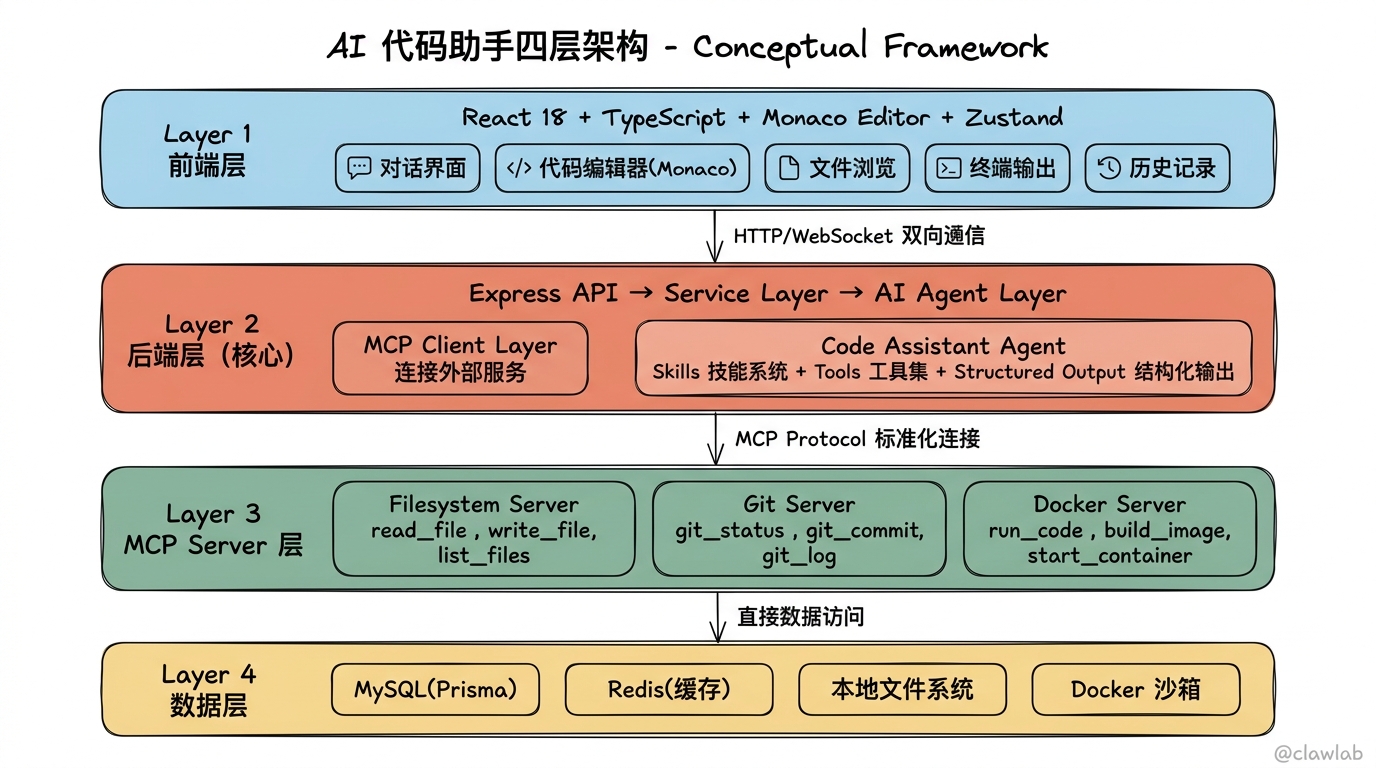
1.1 整体架构图
┌─────────────────────────────────────────────────────────────────────────────┐
│                               前端层                                          │
│  ┌──────────┐  ┌──────────┐  ┌──────────┐  ┌──────────┐  ┌──────────┐      │
│  │  对话界面  │  │ 代码编辑器 │  │  文件浏览  │  │  终端输出  │  │  历史记录  │      │
│  │          │  │ (Monaco)  │  │          │  │          │  │          │      │
│  └────┬─────┘  └────┬─────┘  └────┬─────┘  └────┬─────┘  └────┬─────┘      │
│       └──────────────┴──────────────┴──────────────┴──────────────┘          │
│                                     │                                        │
│                              ┌──────┴───────┐                                │
│                              │ Zustand Store │  ← 状态管理                    │
│                              └──────┬────────┘                                │
└─────────────────────────────────────┼────────────────────────────────────────┘
                                      │ HTTP/WebSocket
┌─────────────────────────────────────┼────────────────────────────────────────┐
│                                     ▼              后端层                     │
│  ┌───────────────────────────────────────────────────────────────────────┐  │
│  │                         Express API Server                            │  │
│  │  ┌──────────┐  ┌──────────┐  ┌──────────┐  ┌──────────┐              │  │
│  │  │ /chat    │  │ /code    │  │ /file    │  │ /execute │              │  │
│  │  └────┬─────┘  └────┬─────┘  └────┬─────┘  └────┬─────┘              │  │
│  └───────┼──────────────┼──────────────┼──────────────┼──────────────────┘  │
│          │              │              │              │                      │
│  ┌───────┴──────────────┴──────────────┴──────────────┴──────────────────┐  │
│  │                         Service Layer                                 │  │
│  │  ┌─────────────┐ ┌─────────────┐ ┌─────────────┐ ┌─────────────┐     │  │
│  │  │ ChatService │ │ CodeService │ │ FileService │ │ExecuteService│    │  │
│  │  └──────┬──────┘ └──────┬──────┘ └──────┬──────┘ └──────┬──────┘     │  │
│  └─────────┼───────────────┼───────────────┼───────────────┼────────────┘  │
│            │               │               │               │               │
│  ┌─────────┴───────────────┴───────────────┴───────────────┴────────────┐  │
│  │                     AI Agent Layer (核心)                             │  │
│  │                                                                       │  │
│  │  ┌─────────────────────────────────────────────────────────────────┐ │  │
│  │  │                   Code Assistant Agent                          │ │  │
│  │  │                                                                 │ │  │
│  │  │   ┌─────────────────────────────────────────────────────────┐  │ │  │
│  │  │   │              Skills System (技能系统)                    │  │ │  │
│  │  │   │   ┌─────────┐ ┌─────────┐ ┌─────────┐ ┌─────────┐      │  │ │  │
│  │  │   │   │ Python  │ │TypeScript│ │  SQL    │ │  Go     │      │  │ │  │
│  │  │   │   │ Skill   │ │ Skill   │ │ Skill   │ │ Skill   │      │  │ │  │
│  │  │   │   └────┬────┘ └────┬────┘ └────┬────┘ └────┬────┘      │  │ │  │
│  │  │   │        │          │          │          │              │  │ │  │
│  │  │   │        └──────────┴──────────┴──────────┘              │  │ │  │
│  │  │   │                        │                                │  │ │  │
│  │  │   │        动态加载语言特定的提示词、工具、规范              │  │ │  │
│  │  │   └────────────────────────┼────────────────────────────────┘  │ │  │
│  │  │                            │                                   │ │  │
│  │  │   ┌────────────────────────┼────────────────────────────────┐  │ │  │
│  │  │   │                   Tools (工具)                          │  │ │  │
│  │  │   │   ┌─────────┐ ┌─────────┐ ┌─────────┐ ┌─────────┐      │  │ │  │
│  │  │   │   │读取文件  │ │写入文件  │ │搜索代码  │ │执行代码  │      │  │ │  │
│  │  │   │   └─────────┘ └─────────┘ └─────────┘ └─────────┘      │  │ │  │
│  │  │   │   ┌─────────┐ ┌─────────┐ ┌─────────┐ ┌─────────┐      │  │ │  │
│  │  │   │   │Git操作  │ │运行测试  │ │安装依赖  │ │分析诊断  │      │  │ │  │
│  │  │   │   └─────────┘ └─────────┘ └─────────┘ └─────────┘      │  │ │  │
│  │  │   └─────────────────────────────────────────────────────────┘  │ │  │
│  │  │                            │                                   │ │  │
│  │  │   ┌────────────────────────┼────────────────────────────────┐  │ │  │
│  │  │   │            Structured Output (结构化输出)                │  │ │  │
│  │  │   │   ┌─────────┐ ┌─────────┐ ┌─────────┐ ┌─────────┐      │  │ │  │
│  │  │   │   │代码块   │ │修复方案  │ │测试用例  │ │重构建议  │      │  │ │  │
│  │  │   │   │Schema   │ │Schema   │ │Schema   │ │Schema   │      │  │ │  │
│  │  │   │   └─────────┘ └─────────┘ └─────────┘ └─────────┘      │  │ │  │
│  │  │   └─────────────────────────────────────────────────────────┘  │ │  │
│  │  └─────────────────────────────────────────────────────────────────┘ │  │
│  └───────────────────────────────────────────────────────────────────────┘  │
│                                      │                                      │
│  ┌───────────────────────────────────┼───────────────────────────────────┐  │
│  │                          MCP Client Layer                             │  │
│  │                                   │                                   │  │
│  │   连接多个 MCP Server,获取工具和资源                                 │  │
│  └───────────────────────────────────┼───────────────────────────────────┘  │
└──────────────────────────────────────┼──────────────────────────────────────┘
                                       │
┌──────────────────────────────────────┼──────────────────────────────────────┐
│                           MCP Server Layer                                  │
│  ┌───────────────────┐  ┌───────────────────┐  ┌───────────────────┐       │
│  │ Filesystem Server │  │   Git Server      │  │  Docker Server    │       │
│  │                   │  │                   │  │                   │       │
│  │ - read_file       │  │ - git_status      │  │ - run_code        │       │
│  │ - write_file      │  │ - git_diff        │  │ - run_tests       │       │
│  │ - list_dir        │  │ - git_log         │  │ - install_deps    │       │
│  │ - search_files    │  │ - git_commit      │  │                   │       │
│  └───────────────────┘  └───────────────────┘  └───────────────────┘       │
└─────────────────────────────────────────────────────────────────────────────┘
                                       │
┌──────────────────────────────────────┼──────────────────────────────────────┐
│                                      ▼            数据层                     │
│  ┌──────────────┐  ┌──────────────┐  ┌──────────────┐  ┌──────────────┐    │
│  │    MySQL     │  │    Redis     │  │  本地文件系统  │  │  Docker 沙箱  │    │
│  │   (Prisma)   │  │   (缓存)     │  │              │  │  (代码执行)   │    │
│  └──────────────┘  └──────────────┘  └──────────────┘  └──────────────┘    │
└─────────────────────────────────────────────────────────────────────────────┘
1.2 核心概念解析
什么是 Skills(技能系统)?
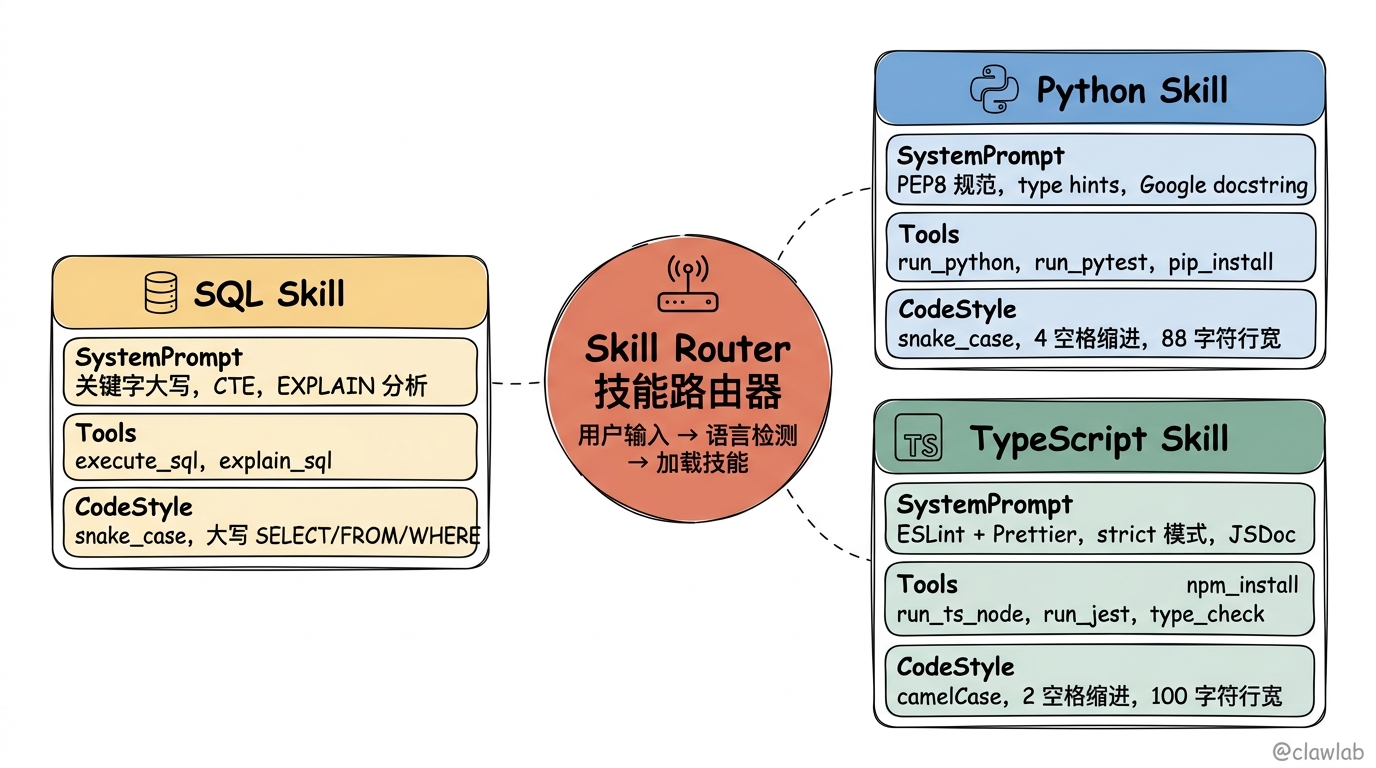
Skills 是一种动态配置 Agent 能力的模式。不同的编程语言有不同的语法规范、最佳实践和工具链,通过技能系统可以让 Agent 根据当前任务动态加载合适的"技能包"。
┌─────────────────────────────────────────────────────────────────┐
│                      Skills 技能系统                             │
├─────────────────────────────────────────────────────────────────┤
│                                                                  │
│  用户: "帮我写一个 Python 的快速排序"                            │
│              │                                                   │
│              ▼                                                   │
│  ┌─────────────────────┐                                        │
│  │   Skill Router      │  检测到需要 Python 技能                 │
│  │   技能路由器         │                                        │
│  └─────────┬───────────┘                                        │
│            │ 加载 Python Skill                                   │
│            ▼                                                     │
│  ┌─────────────────────────────────────────────────────────────┐│
│  │                    Python Skill                              ││
│  │  ┌─────────────────────────────────────────────────────────┐││
│  │  │ System Prompt:                                          │││
│  │  │ "你是 Python 专家,遵循 PEP8 规范,使用 type hints..."   │││
│  │  └─────────────────────────────────────────────────────────┘││
│  │  ┌─────────────────────────────────────────────────────────┐││
│  │  │ Tools:                                                  │││
│  │  │ - run_python: 执行 Python 代码                          │││
│  │  │ - run_pytest: 运行 pytest 测试                          │││
│  │  │ - pip_install: 安装 Python 包                           │││
│  │  └─────────────────────────────────────────────────────────┘││
│  │  ┌─────────────────────────────────────────────────────────┐││
│  │  │ Code Style:                                             │││
│  │  │ - 使用 snake_case 命名                                  │││
│  │  │ - 添加 docstring                                        │││
│  │  │ - 使用 typing 模块                                      │││
│  │  └─────────────────────────────────────────────────────────┘││
│  └─────────────────────────────────────────────────────────────┘│
│                                                                  │
└─────────────────────────────────────────────────────────────────┘
每个 Skill 包含:
- System Prompt:语言特定的系统提示词
- Tools:语言特定的工具集
- Code Style:代码风格规范
- Examples:示例代码模板
什么是 MCP(Model Context Protocol)?
MCP 是 Anthropic 提出的一种标准化协议,用于连接 AI 模型与外部数据源和工具。它将工具提供方(Server)和工具使用方(Client)分离,实现松耦合。
┌─────────────────────────────────────────────────────────────────┐
│                     MCP 架构                                     │
├─────────────────────────────────────────────────────────────────┤
│                                                                  │
│  ┌───────────────────────────────────────────────────────────┐  │
│  │                    AI Application                          │  │
│  │                    (代码助手)                              │  │
│  │                         │                                  │  │
│  │                    MCP Client                              │  │
│  │                         │                                  │  │
│  └─────────────────────────┼─────────────────────────────────┘  │
│                            │                                     │
│            ┌───────────────┼───────────────┐                    │
│            │               │               │                    │
│            ▼               ▼               ▼                    │
│  ┌─────────────────┐ ┌─────────────────┐ ┌─────────────────┐   │
│  │  MCP Server 1   │ │  MCP Server 2   │ │  MCP Server 3   │   │
│  │  (Filesystem)   │ │  (Git)          │ │  (Docker)       │   │
│  │                 │ │                 │ │                 │   │
│  │  Tools:         │ │  Tools:         │ │  Tools:         │   │
│  │  - read_file    │ │  - git_status   │ │  - run_code     │   │
│  │  - write_file   │ │  - git_diff     │ │  - run_tests    │   │
│  │  - list_dir     │ │  - git_commit   │ │                 │   │
│  │                 │ │                 │ │                 │   │
│  │  Resources:     │ │  Resources:     │ │  Resources:     │   │
│  │  - file://      │ │  - git://       │ │  - container:// │   │
│  └─────────────────┘ └─────────────────┘ └─────────────────┘   │
│                                                                  │
│  优势:                                                          │
│  1. 标准化接口 - 所有工具使用统一协议                            │
│  2. 热插拔 - 可以动态添加/移除 Server                            │
│  3. 安全隔离 - Server 可以限制权限                               │
│  4. 可复用 - 同一 Server 可服务多个 AI 应用                      │
│                                                                  │
└─────────────────────────────────────────────────────────────────┘
1.3 核心流程
用户输入 "帮我用 TypeScript 写一个二分查找,并生成测试"
                    │
                    ▼
┌─────────────────────────────────────────────────────────────────┐
│  Step 1: 技能识别                                                │
│  识别语言: TypeScript                                            │
│  任务类型: 代码生成 + 测试生成                                   │
└───────────────────────┬─────────────────────────────────────────┘
                        │
                        ▼
┌─────────────────────────────────────────────────────────────────┐
│  Step 2: 加载技能                                                │
│  加载 TypeScript Skill:                                          │
│  - 系统提示词(TS 专家、ESLint 规范)                            │
│  - 工具集(ts-node、jest、npm)                                  │
│  - 代码风格(camelCase、interface、strict mode)                 │
└───────────────────────┬─────────────────────────────────────────┘
                        │
                        ▼
┌─────────────────────────────────────────────────────────────────┐
│  Step 3: 代码生成(结构化输出)                                  │
│  {                                                               │
│    "language": "typescript",                                     │
│    "code": "function binarySearch<T>(...) { ... }",             │
│    "explanation": "二分查找的实现逻辑是...",                     │
│    "dependencies": []                                            │
│  }                                                               │
└───────────────────────┬─────────────────────────────────────────┘
                        │
                        ▼
┌─────────────────────────────────────────────────────────────────┐
│  Step 4: 测试生成(结构化输出)                                  │
│  {                                                               │
│    "testFramework": "jest",                                      │
│    "testCode": "describe('binarySearch', () => { ... })",       │
│    "testCases": ["空数组", "单元素", "目标在中间", ...]          │
│  }                                                               │
└───────────────────────┬─────────────────────────────────────────┘
                        │
                        ▼
┌─────────────────────────────────────────────────────────────────┐
│  Step 5: 执行验证(通过 MCP)                                    │
│  1. 通过 Filesystem Server 写入文件                              │
│  2. 通过 Docker Server 运行测试                                  │
│  3. 返回测试结果                                                 │
└───────────────────────────────────────────────────────────────────┘
二、Skills 技能系统设计
2.1 Skill 接口定义
typescript
// src/skills/types.ts
import { DynamicStructuredTool } from "@langchain/core/tools";
import { z } from "zod";

// Skill 配置接口
export interface SkillConfig {
  id: string;                    // 技能ID
  name: string;                  // 技能名称
  language: string;              // 编程语言
  description: string;           // 描述
  systemPrompt: string;          // 系统提示词
  codeStyle: CodeStyleConfig;    // 代码风格配置
  tools: DynamicStructuredTool[]; // 语言特定工具
  examples: CodeExample[];       // 示例代码
  fileExtensions: string[];      // 文件扩展名
  testFramework: string;         // 测试框架
  packageManager: string;        // 包管理器
}

// 代码风格配置
export interface CodeStyleConfig {
  namingConvention: "camelCase" | "snake_case" | "PascalCase";
  indentation: "spaces" | "tabs";
  indentSize: number;
  useTyping: boolean;
  docstringStyle?: "google" | "numpy" | "jsdoc";
  maxLineLength: number;
  additionalRules: string[];
}

// 代码示例
export interface CodeExample {
  title: string;
  description: string;
  code: string;
  category: "algorithm" | "data_structure" | "design_pattern" | "utility";
}

// Skill 注册表
export interface SkillRegistry {
  register(skill: SkillConfig): void;
  get(language: string): SkillConfig | undefined;
  list(): SkillConfig[];
  detect(code: string, filename?: string): string | null;
}
2.2 Python Skill 实现
typescript
// src/skills/python.skill.ts
import { tool } from "@langchain/core/tools";
import { z } from "zod";
import { SkillConfig, CodeStyleConfig } from "./types";

const pythonCodeStyle: CodeStyleConfig = {
  namingConvention: "snake_case",
  indentation: "spaces",
  indentSize: 4,
  useTyping: true,
  docstringStyle: "google",
  maxLineLength: 88,
  additionalRules: [
    "使用 PEP8 规范",
    "使用 type hints 进行类型注解",
    "函数添加 docstring 说明",
    "使用 f-string 进行字符串格式化",
    "优先使用 pathlib 处理路径",
  ],
};

const pythonSystemPrompt = `你是一位资深 Python 开发专家,精通 Python 3.10+ 的所有特性。

## 代码规范
1. 严格遵循 PEP8 代码风格
2. 使用 type hints 进行类型注解
3. 函数使用 Google 风格的 docstring
4. 变量和函数使用 snake_case 命名
5. 类名使用 PascalCase 命名
6. 常量使用 UPPER_SNAKE_CASE 命名

## 最佳实践
1. 优先使用内置函数和标准库
2. 使用 context manager 管理资源
3. 使用 dataclass 或 Pydantic 定义数据模型
4. 异常处理要具体,不要 except Exception
5. 使用 logging 而不是 print 进行日志输出

## 代码示例风格
\`\`\`python
from typing import List, Optional
from dataclasses import dataclass

@dataclass
class User:
    """用户数据模型。

    Attributes:
        id: 用户唯一标识
        name: 用户名称
        email: 用户邮箱
    """
    id: int
    name: str
    email: Optional[str] = None

def process_users(users: List[User]) -> List[str]:
    """处理用户列表,返回用户名列表。

    Args:
        users: 用户对象列表

    Returns:
        用户名字符串列表

    Raises:
        ValueError: 当用户列表为空时
    """
    if not users:
        raise ValueError("用户列表不能为空")
    return [user.name for user in users]
\`\`\``;

// Python 特定工具
const runPythonTool = tool(
  async ({ code, timeout }) => {
    // 实际项目中应通过 MCP 调用 Docker 执行
    return JSON.stringify({
      success: true,
      output: "代码执行结果",
      executionTime: 100,
    });
  },
  {
    name: "run_python",
    description: "执行 Python 代码,返回运行结果",
    schema: z.object({
      code: z.string().describe("要执行的 Python 代码"),
      timeout: z.number().optional().describe("超时时间(秒)"),
    }),
  }
);

const runPytestTool = tool(
  async ({ testFile, verbose }) => {
    return JSON.stringify({
      passed: 5,
      failed: 0,
      errors: 0,
      output: "5 passed in 0.5s",
    });
  },
  {
    name: "run_pytest",
    description: "运行 pytest 测试",
    schema: z.object({
      testFile: z.string().optional().describe("测试文件路径"),
      verbose: z.boolean().optional().describe("是否显示详细输出"),
    }),
  }
);

const pipInstallTool = tool(
  async ({ packages }) => {
    return JSON.stringify({
      success: true,
      installed: packages,
    });
  },
  {
    name: "pip_install",
    description: "安装 Python 包",
    schema: z.object({
      packages: z.array(z.string()).describe("要安装的包名列表"),
    }),
  }
);

// Python Skill 配置
export const pythonSkill: SkillConfig = {
  id: "python",
  name: "Python Skill",
  language: "python",
  description: "Python 3.10+ 开发技能",
  systemPrompt: pythonSystemPrompt,
  codeStyle: pythonCodeStyle,
  tools: [runPythonTool, runPytestTool, pipInstallTool],
  fileExtensions: [".py", ".pyw", ".pyi"],
  testFramework: "pytest",
  packageManager: "pip",
  examples: [
    {
      title: "快速排序",
      description: "使用泛型实现的快速排序算法",
      category: "algorithm",
      code: `from typing import TypeVar, List

T = TypeVar('T')

def quick_sort(arr: List[T]) -> List[T]:
    """快速排序算法实现。

    Args:
        arr: 待排序的列表

    Returns:
        排序后的新列表
    """
    if len(arr) <= 1:
        return arr

    pivot = arr[len(arr) // 2]
    left = [x for x in arr if x < pivot]
    middle = [x for x in arr if x == pivot]
    right = [x for x in arr if x > pivot]

    return quick_sort(left) + middle + quick_sort(right)`,
    },
  ],
};
2.3 TypeScript Skill 实现
typescript
// src/skills/typescript.skill.ts
import { tool } from "@langchain/core/tools";
import { z } from "zod";
import { SkillConfig, CodeStyleConfig } from "./types";

const typescriptCodeStyle: CodeStyleConfig = {
  namingConvention: "camelCase",
  indentation: "spaces",
  indentSize: 2,
  useTyping: true,
  docstringStyle: "jsdoc",
  maxLineLength: 100,
  additionalRules: [
    "使用 ESLint + Prettier 规范",
    "使用 strict 模式",
    "优先使用 interface 而非 type",
    "使用 const 断言优化类型推断",
    "避免使用 any,必要时使用 unknown",
  ],
};

const typescriptSystemPrompt = `你是一位资深 TypeScript 开发专家,精通 TypeScript 5.x 的所有特性。

## 代码规范
1. 使用 ESLint + Prettier 代码风格
2. 启用 strict 模式
3. 变量和函数使用 camelCase 命名
4. 类名和接口使用 PascalCase 命名
5. 常量使用 UPPER_SNAKE_CASE 命名
6. 使用 JSDoc 注释重要函数

## 类型最佳实践
1. 优先使用 interface 定义对象类型
2. 使用 type 定义联合类型和工具类型
3. 避免使用 any,必要时使用 unknown
4. 使用泛型提高代码复用性
5. 善用 TypeScript 内置工具类型

## 代码示例风格
\`\`\`typescript
interface User {
  id: number;
  name: string;
  email?: string;
}

interface ProcessResult<T> {
  success: boolean;
  data: T;
  error?: string;
}

/**
 * 处理用户列表,返回用户名
 * @param users - 用户对象数组
 * @returns 用户名数组
 * @throws 当用户列表为空时抛出错误
 */
function processUsers(users: User[]): string[] {
  if (users.length === 0) {
    throw new Error('用户列表不能为空');
  }
  return users.map(user => user.name);
}
\`\`\``;

// TypeScript 特定工具
const runTsNodeTool = tool(
  async ({ code, timeout }) => {
    return JSON.stringify({
      success: true,
      output: "代码执行结果",
      executionTime: 150,
    });
  },
  {
    name: "run_ts_node",
    description: "使用 ts-node 执行 TypeScript 代码",
    schema: z.object({
      code: z.string().describe("要执行的 TypeScript 代码"),
      timeout: z.number().optional().describe("超时时间(秒)"),
    }),
  }
);

const runJestTool = tool(
  async ({ testFile, coverage }) => {
    return JSON.stringify({
      passed: 8,
      failed: 0,
      coverage: coverage ? { lines: 95, branches: 90 } : null,
      output: "8 tests passed",
    });
  },
  {
    name: "run_jest",
    description: "运行 Jest 测试",
    schema: z.object({
      testFile: z.string().optional().describe("测试文件路径"),
      coverage: z.boolean().optional().describe("是否生成覆盖率报告"),
    }),
  }
);

const npmInstallTool = tool(
  async ({ packages, dev }) => {
    return JSON.stringify({
      success: true,
      installed: packages,
      devDependency: dev,
    });
  },
  {
    name: "npm_install",
    description: "安装 npm 包",
    schema: z.object({
      packages: z.array(z.string()).describe("要安装的包名列表"),
      dev: z.boolean().optional().describe("是否作为开发依赖"),
    }),
  }
);

const typeCheckTool = tool(
  async ({ file }) => {
    return JSON.stringify({
      success: true,
      errors: [],
      warnings: [],
    });
  },
  {
    name: "type_check",
    description: "运行 TypeScript 类型检查",
    schema: z.object({
      file: z.string().optional().describe("要检查的文件路径"),
    }),
  }
);

// TypeScript Skill 配置
export const typescriptSkill: SkillConfig = {
  id: "typescript",
  name: "TypeScript Skill",
  language: "typescript",
  description: "TypeScript 5.x 开发技能",
  systemPrompt: typescriptSystemPrompt,
  codeStyle: typescriptCodeStyle,
  tools: [runTsNodeTool, runJestTool, npmInstallTool, typeCheckTool],
  fileExtensions: [".ts", ".tsx", ".mts", ".cts"],
  testFramework: "jest",
  packageManager: "npm",
  examples: [
    {
      title: "二分查找",
      description: "使用泛型实现的二分查找算法",
      category: "algorithm",
      code: `/**
 * 二分查找算法
 * @param arr - 已排序的数组
 * @param target - 目标值
 * @returns 目标值的索引,未找到返回 -1
 */
function binarySearch<T>(arr: T[], target: T): number {
  let left = 0;
  let right = arr.length - 1;

  while (left <= right) {
    const mid = Math.floor((left + right) / 2);

    if (arr[mid] === target) {
      return mid;
    } else if (arr[mid] < target) {
      left = mid + 1;
    } else {
      right = mid - 1;
    }
  }

  return -1;
}`,
    },
  ],
};
2.4 SQL Skill 实现
typescript
// src/skills/sql.skill.ts
import { tool } from "@langchain/core/tools";
import { z } from "zod";
import { SkillConfig, CodeStyleConfig } from "./types";

const sqlCodeStyle: CodeStyleConfig = {
  namingConvention: "snake_case",
  indentation: "spaces",
  indentSize: 2,
  useTyping: false,
  maxLineLength: 120,
  additionalRules: [
    "关键字使用大写(SELECT, FROM, WHERE)",
    "表名和字段名使用小写",
    "使用有意义的别名",
    "复杂查询使用 CTE",
    "避免 SELECT *",
  ],
};

const sqlSystemPrompt = `你是一位资深数据库专家,精通 SQL 和数据库优化。

## SQL 规范
1. 关键字使用大写:SELECT, FROM, WHERE, JOIN 等
2. 表名和字段名使用小写 snake_case
3. 使用有意义的别名(不要用 a, b, c)
4. 复杂查询使用 CTE (WITH 子句)
5. 避免使用 SELECT *,明确列出需要的字段

## 最佳实践
1. 使用参数化查询防止 SQL 注入
2. 合理使用索引
3. 避免在 WHERE 子句中对字段使用函数
4. 使用 EXPLAIN 分析查询计划
5. 大表查询使用分页

## 代码示例风格
\`\`\`sql
-- 使用 CTE 的复杂查询示例
WITH monthly_sales AS (
  SELECT
    DATE_TRUNC('month', order_date) AS month,
    product_id,
    SUM(quantity) AS total_quantity,
    SUM(amount) AS total_amount
  FROM orders
  WHERE order_date >= '2024-01-01'
  GROUP BY DATE_TRUNC('month', order_date), product_id
),
ranked_products AS (
  SELECT
    month,
    product_id,
    total_amount,
    ROW_NUMBER() OVER (PARTITION BY month ORDER BY total_amount DESC) AS rank
  FROM monthly_sales
)
SELECT
  rp.month,
  p.name AS product_name,
  rp.total_amount
FROM ranked_products rp
JOIN products p ON rp.product_id = p.id
WHERE rp.rank <= 10
ORDER BY rp.month, rp.rank;
\`\`\``;

// SQL 特定工具
const executeSqlTool = tool(
  async ({ sql, database }) => {
    return JSON.stringify({
      success: true,
      rowsAffected: 10,
      results: [{ id: 1, name: "example" }],
    });
  },
  {
    name: "execute_sql",
    description: "执行 SQL 查询",
    schema: z.object({
      sql: z.string().describe("要执行的 SQL 语句"),
      database: z.string().optional().describe("目标数据库"),
    }),
  }
);

const explainSqlTool = tool(
  async ({ sql }) => {
    return JSON.stringify({
      plan: "Seq Scan on users...",
      cost: 100,
      suggestions: ["建议在 email 字段添加索引"],
    });
  },
  {
    name: "explain_sql",
    description: "分析 SQL 执行计划",
    schema: z.object({
      sql: z.string().describe("要分析的 SQL 语句"),
    }),
  }
);

// SQL Skill 配置
export const sqlSkill: SkillConfig = {
  id: "sql",
  name: "SQL Skill",
  language: "sql",
  description: "SQL 数据库开发技能",
  systemPrompt: sqlSystemPrompt,
  codeStyle: sqlCodeStyle,
  tools: [executeSqlTool, explainSqlTool],
  fileExtensions: [".sql"],
  testFramework: "none",
  packageManager: "none",
  examples: [],
};
2.5 Skill 注册表
typescript
// src/skills/registry.ts
import { SkillConfig, SkillRegistry } from "./types";
import { pythonSkill } from "./python.skill";
import { typescriptSkill } from "./typescript.skill";
import { sqlSkill } from "./sql.skill";

class SkillRegistryImpl implements SkillRegistry {
  private skills: Map<string, SkillConfig> = new Map();

  constructor() {
    // 注册内置技能
    this.register(pythonSkill);
    this.register(typescriptSkill);
    this.register(sqlSkill);
  }

  register(skill: SkillConfig): void {
    this.skills.set(skill.language.toLowerCase(), skill);
  }

  get(language: string): SkillConfig | undefined {
    return this.skills.get(language.toLowerCase());
  }

  list(): SkillConfig[] {
    return Array.from(this.skills.values());
  }

  detect(code: string, filename?: string): string | null {
    // 1. 根据文件扩展名检测
    if (filename) {
      for (const skill of this.skills.values()) {
        if (skill.fileExtensions.some((ext) => filename.endsWith(ext))) {
          return skill.language;
        }
      }
    }

    // 2. 根据代码特征检测
    const patterns: Record<string, RegExp[]> = {
      python: [/^import\s+\w+/m, /^from\s+\w+\s+import/m, /def\s+\w+\s*\(/],
      typescript: [/^import\s+.*from\s+['"]/, /interface\s+\w+/, /:\s*(string|number|boolean)/],
      sql: [/^SELECT\s+/im, /^INSERT\s+INTO/im, /^CREATE\s+TABLE/im],
    };

    for (const [language, regexList] of Object.entries(patterns)) {
      if (regexList.some((regex) => regex.test(code))) {
        return language;
      }
    }

    return null;
  }
}

// 导出单例
export const skillRegistry = new SkillRegistryImpl();
三、MCP 协议集成
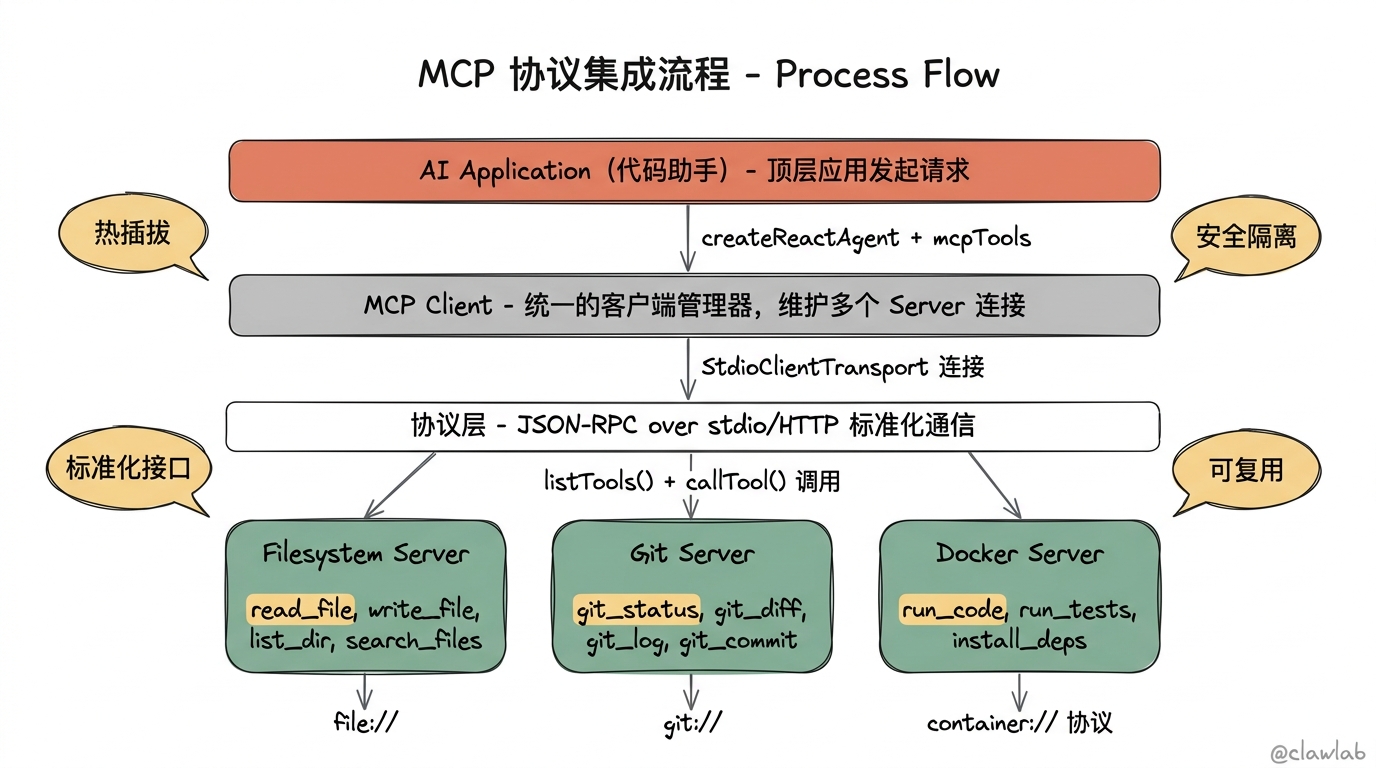
3.1 MCP Client 实现
typescript
// src/mcp/client.ts
import { Client } from "@modelcontextprotocol/sdk/client/index.js";
import { StdioClientTransport } from "@modelcontextprotocol/sdk/client/stdio.js";
import { DynamicStructuredTool } from "@langchain/core/tools";
import { z } from "zod";

// MCP Server 配置
export interface MCPServerConfig {
  name: string;
  command: string;
  args?: string[];
  env?: Record<string, string>;
}

// MCP 客户端管理器
export class MCPClientManager {
  private clients: Map<string, Client> = new Map();
  private tools: Map<string, DynamicStructuredTool> = new Map();

  async connectServer(config: MCPServerConfig): Promise<void> {
    const transport = new StdioClientTransport({
      command: config.command,
      args: config.args,
      env: config.env,
    });

    const client = new Client(
      { name: "code-assistant", version: "1.0.0" },
      { capabilities: {} }
    );

    await client.connect(transport);
    this.clients.set(config.name, client);

    // 获取并注册工具
    const toolsResult = await client.listTools();
    for (const toolInfo of toolsResult.tools) {
      const tool = this.createToolFromMCP(config.name, client, toolInfo);
      this.tools.set(`${config.name}:${toolInfo.name}`, tool);
    }

    console.log(`Connected to MCP server: ${config.name}`);
  }

  private createToolFromMCP(
    serverName: string,
    client: Client,
    toolInfo: any
  ): DynamicStructuredTool {
    // 将 JSON Schema 转换为 Zod Schema
    const zodSchema = this.jsonSchemaToZod(toolInfo.inputSchema);

    return new DynamicStructuredTool({
      name: `${serverName}_${toolInfo.name}`,
      description: toolInfo.description || `MCP tool: ${toolInfo.name}`,
      schema: zodSchema,
      func: async (input) => {
        const result = await client.callTool({
          name: toolInfo.name,
          arguments: input,
        });
        return JSON.stringify(result.content);
      },
    });
  }

  private jsonSchemaToZod(schema: any): z.ZodObject<any> {
    const shape: Record<string, z.ZodTypeAny> = {};

    if (schema.properties) {
      for (const [key, prop] of Object.entries(schema.properties) as any) {
        let zodType: z.ZodTypeAny;

        switch (prop.type) {
          case "string":
            zodType = z.string();
            break;
          case "number":
          case "integer":
            zodType = z.number();
            break;
          case "boolean":
            zodType = z.boolean();
            break;
          case "array":
            zodType = z.array(z.any());
            break;
          default:
            zodType = z.any();
        }

        if (prop.description) {
          zodType = zodType.describe(prop.description);
        }

        if (!schema.required?.includes(key)) {
          zodType = zodType.optional();
        }

        shape[key] = zodType;
      }
    }

    return z.object(shape);
  }

  getTools(): DynamicStructuredTool[] {
    return Array.from(this.tools.values());
  }

  getToolsByServer(serverName: string): DynamicStructuredTool[] {
    return Array.from(this.tools.entries())
      .filter(([name]) => name.startsWith(`${serverName}:`))
      .map(([, tool]) => tool);
  }

  async disconnect(): Promise<void> {
    for (const client of this.clients.values()) {
      await client.close();
    }
    this.clients.clear();
    this.tools.clear();
  }
}

// 默认 MCP 服务器配置
export const defaultMCPServers: MCPServerConfig[] = [
  {
    name: "filesystem",
    command: "npx",
    args: ["-y", "@anthropic/mcp-server-filesystem", "/workspace"],
  },
  {
    name: "git",
    command: "npx",
    args: ["-y", "@anthropic/mcp-server-git"],
  },
];

// 创建并初始化 MCP 客户端管理器
export async function createMCPClientManager(
  servers: MCPServerConfig[] = defaultMCPServers
): Promise<MCPClientManager> {
  const manager = new MCPClientManager();

  for (const server of servers) {
    try {
      await manager.connectServer(server);
    } catch (error) {
      console.error(`Failed to connect to MCP server ${server.name}:`, error);
    }
  }

  return manager;
}
3.2 MCP Server 示例(Filesystem)
typescript
// src/mcp/servers/filesystem.server.ts
import { Server } from "@modelcontextprotocol/sdk/server/index.js";
import { StdioServerTransport } from "@modelcontextprotocol/sdk/server/stdio.js";
import {
  CallToolRequestSchema,
  ListToolsRequestSchema,
} from "@modelcontextprotocol/sdk/types.js";
import * as fs from "fs/promises";
import * as path from "path";
import { glob } from "glob";

// 文件系统 MCP Server
async function main() {
  const allowedPaths = process.argv.slice(2);

  if (allowedPaths.length === 0) {
    console.error("Usage: filesystem-server <allowed-path> [additional-paths...]");
    process.exit(1);
  }

  // 路径验证
  function validatePath(filePath: string): boolean {
    const resolvedPath = path.resolve(filePath);
    return allowedPaths.some((allowed) =>
      resolvedPath.startsWith(path.resolve(allowed))
    );
  }

  const server = new Server(
    { name: "filesystem-server", version: "1.0.0" },
    { capabilities: { tools: {} } }
  );

  // 列出可用工具
  server.setRequestHandler(ListToolsRequestSchema, async () => ({
    tools: [
      {
        name: "read_file",
        description: "读取文件内容",
        inputSchema: {
          type: "object",
          properties: {
            path: { type: "string", description: "文件路径" },
            encoding: { type: "string", description: "编码格式", default: "utf-8" },
          },
          required: ["path"],
        },
      },
      {
        name: "write_file",
        description: "写入文件内容",
        inputSchema: {
          type: "object",
          properties: {
            path: { type: "string", description: "文件路径" },
            content: { type: "string", description: "文件内容" },
            encoding: { type: "string", description: "编码格式", default: "utf-8" },
          },
          required: ["path", "content"],
        },
      },
      {
        name: "list_directory",
        description: "列出目录内容",
        inputSchema: {
          type: "object",
          properties: {
            path: { type: "string", description: "目录路径" },
            recursive: { type: "boolean", description: "是否递归" },
          },
          required: ["path"],
        },
      },
      {
        name: "search_files",
        description: "搜索文件",
        inputSchema: {
          type: "object",
          properties: {
            pattern: { type: "string", description: "Glob 模式" },
            directory: { type: "string", description: "搜索目录" },
          },
          required: ["pattern"],
        },
      },
      {
        name: "get_file_info",
        description: "获取文件信息",
        inputSchema: {
          type: "object",
          properties: {
            path: { type: "string", description: "文件路径" },
          },
          required: ["path"],
        },
      },
    ],
  }));

  // 处理工具调用
  server.setRequestHandler(CallToolRequestSchema, async (request) => {
    const { name, arguments: args } = request.params;

    switch (name) {
      case "read_file": {
        const filePath = args.path as string;
        if (!validatePath(filePath)) {
          throw new Error(`Access denied: ${filePath}`);
        }
        const content = await fs.readFile(filePath, {
          encoding: (args.encoding as BufferEncoding) || "utf-8",
        });
        return { content: [{ type: "text", text: content }] };
      }

      case "write_file": {
        const filePath = args.path as string;
        if (!validatePath(filePath)) {
          throw new Error(`Access denied: ${filePath}`);
        }
        await fs.mkdir(path.dirname(filePath), { recursive: true });
        await fs.writeFile(filePath, args.content as string, {
          encoding: (args.encoding as BufferEncoding) || "utf-8",
        });
        return { content: [{ type: "text", text: `File written: ${filePath}` }] };
      }

      case "list_directory": {
        const dirPath = args.path as string;
        if (!validatePath(dirPath)) {
          throw new Error(`Access denied: ${dirPath}`);
        }
        const entries = await fs.readdir(dirPath, { withFileTypes: true });
        const result = entries.map((entry) => ({
          name: entry.name,
          type: entry.isDirectory() ? "directory" : "file",
        }));
        return { content: [{ type: "text", text: JSON.stringify(result, null, 2) }] };
      }

      case "search_files": {
        const directory = (args.directory as string) || allowedPaths[0];
        if (!validatePath(directory)) {
          throw new Error(`Access denied: ${directory}`);
        }
        const files = await glob(args.pattern as string, {
          cwd: directory,
          nodir: true,
        });
        return { content: [{ type: "text", text: JSON.stringify(files, null, 2) }] };
      }

      case "get_file_info": {
        const filePath = args.path as string;
        if (!validatePath(filePath)) {
          throw new Error(`Access denied: ${filePath}`);
        }
        const stats = await fs.stat(filePath);
        const info = {
          path: filePath,
          size: stats.size,
          isDirectory: stats.isDirectory(),
          isFile: stats.isFile(),
          created: stats.birthtime,
          modified: stats.mtime,
        };
        return { content: [{ type: "text", text: JSON.stringify(info, null, 2) }] };
      }

      default:
        throw new Error(`Unknown tool: ${name}`);
    }
  });

  const transport = new StdioServerTransport();
  await server.connect(transport);
}

main().catch(console.error);
四、结构化输出设计
4.1 Schema 定义
typescript
// src/agents/schemas.ts
import { z } from "zod";

// 代码生成结果
export const CodeGenerationSchema = z.object({
  language: z.string().describe("编程语言"),
  code: z.string().describe("生成的代码"),
  explanation: z.string().describe("代码解释"),
  dependencies: z.array(z.string()).describe("所需依赖"),
  filename: z.string().optional().describe("建议的文件名"),
  imports: z.array(z.string()).optional().describe("需要导入的模块"),
});

export type CodeGeneration = z.infer<typeof CodeGenerationSchema>;

// 代码解释结果
export const CodeExplanationSchema = z.object({
  summary: z.string().describe("代码功能摘要"),
  language: z.string().describe("检测到的编程语言"),
  complexity: z.enum(["simple", "moderate", "complex"]).describe("复杂度"),
  sections: z.array(
    z.object({
      lineRange: z.string().describe("代码行范围,如 1-10"),
      purpose: z.string().describe("这段代码的作用"),
      details: z.string().optional().describe("详细解释"),
    })
  ).describe("分段解释"),
  keyPatterns: z.array(z.string()).optional().describe("使用的设计模式/算法"),
  potentialIssues: z.array(z.string()).optional().describe("潜在问题"),
});

export type CodeExplanation = z.infer<typeof CodeExplanationSchema>;

// Bug 诊断结果
export const BugDiagnosisSchema = z.object({
  errorType: z.string().describe("错误类型"),
  rootCause: z.string().describe("根本原因"),
  affectedLines: z.array(z.number()).describe("受影响的代码行"),
  severity: z.enum(["low", "medium", "high", "critical"]).describe("严重程度"),
  diagnosis: z.string().describe("诊断分析"),
  relatedIssues: z.array(z.string()).optional().describe("相关问题"),
});

export type BugDiagnosis = z.infer<typeof BugDiagnosisSchema>;

// Bug 修复建议
export const BugFixSchema = z.object({
  diagnosis: BugDiagnosisSchema,
  fixes: z.array(
    z.object({
      description: z.string().describe("修复描述"),
      originalCode: z.string().describe("原始代码"),
      fixedCode: z.string().describe("修复后的代码"),
      lineRange: z.string().describe("修改的行范围"),
      explanation: z.string().describe("修复原因"),
    })
  ).describe("修复方案列表"),
  preventionTips: z.array(z.string()).optional().describe("预防建议"),
  testSuggestions: z.array(z.string()).optional().describe("测试建议"),
});

export type BugFix = z.infer<typeof BugFixSchema>;

// 代码重构建议
export const RefactoringSuggestionSchema = z.object({
  type: z.enum([
    "extract_function",
    "rename",
    "simplify_conditional",
    "remove_duplication",
    "improve_naming",
    "add_typing",
    "improve_structure",
  ]).describe("重构类型"),
  description: z.string().describe("重构描述"),
  beforeCode: z.string().describe("重构前代码"),
  afterCode: z.string().describe("重构后代码"),
  benefits: z.array(z.string()).describe("重构收益"),
  risks: z.array(z.string()).optional().describe("潜在风险"),
});

export const RefactoringResultSchema = z.object({
  originalCode: z.string().describe("原始代码"),
  refactoredCode: z.string().describe("重构后的完整代码"),
  suggestions: z.array(RefactoringSuggestionSchema).describe("重构建议列表"),
  qualityImprovement: z.object({
    readability: z.number().min(0).max(100).describe("可读性提升"),
    maintainability: z.number().min(0).max(100).describe("可维护性提升"),
    testability: z.number().min(0).max(100).describe("可测试性提升"),
  }).describe("质量提升评估"),
});

export type RefactoringResult = z.infer<typeof RefactoringResultSchema>;

// 测试生成结果
export const TestGenerationSchema = z.object({
  language: z.string().describe("编程语言"),
  testFramework: z.string().describe("测试框架"),
  testCode: z.string().describe("生成的测试代码"),
  testCases: z.array(
    z.object({
      name: z.string().describe("测试用例名称"),
      description: z.string().describe("测试描述"),
      type: z.enum(["unit", "integration", "edge_case"]).describe("测试类型"),
      expectedBehavior: z.string().describe("期望行为"),
    })
  ).describe("测试用例列表"),
  coverage: z.object({
    functions: z.array(z.string()).describe("覆盖的函数"),
    branches: z.array(z.string()).describe("覆盖的分支"),
    edgeCases: z.array(z.string()).describe("边界情况"),
  }).describe("测试覆盖情况"),
  setupCode: z.string().optional().describe("测试准备代码"),
  teardownCode: z.string().optional().describe("测试清理代码"),
});

export type TestGeneration = z.infer<typeof TestGenerationSchema>;
五、Agent 核心实现
5.1 State 定义
typescript
// src/agents/types.ts
import { Annotation, MessagesAnnotation } from "@langchain/langgraph";
import {
  CodeGeneration,
  CodeExplanation,
  BugFix,
  RefactoringResult,
  TestGeneration,
} from "./schemas";

// 任务类型
export type TaskType =
  | "code_generation"
  | "code_explanation"
  | "bug_diagnosis"
  | "bug_fix"
  | "refactoring"
  | "test_generation"
  | "file_operation"
  | "general";

// 代码助手状态
export const CodeAssistantState = Annotation.Root({
  ...MessagesAnnotation.spec,

  // 当前任务类型
  taskType: Annotation<TaskType>({
    default: () => "general",
    reducer: (_, v) => v,
  }),

  // 当前技能
  currentSkill: Annotation<string | null>({
    default: () => null,
    reducer: (_, v) => v,
  }),

  // 代码上下文
  codeContext: Annotation<{
    code?: string;
    filename?: string;
    language?: string;
    errorLog?: string;
  }>({
    default: () => ({}),
    reducer: (_, v) => v,
  }),

  // 生成结果
  generationResult: Annotation<CodeGeneration | null>({
    default: () => null,
    reducer: (_, v) => v,
  }),

  // 解释结果
  explanationResult: Annotation<CodeExplanation | null>({
    default: () => null,
    reducer: (_, v) => v,
  }),

  // 修复结果
  fixResult: Annotation<BugFix | null>({
    default: () => null,
    reducer: (_, v) => v,
  }),

  // 重构结果
  refactoringResult: Annotation<RefactoringResult | null>({
    default: () => null,
    reducer: (_, v) => v,
  }),

  // 测试结果
  testResult: Annotation<TestGeneration | null>({
    default: () => null,
    reducer: (_, v) => v,
  }),

  // 工作目录
  workingDirectory: Annotation<string>({
    default: () => "/workspace",
    reducer: (_, v) => v,
  }),
});

export type CodeAssistantStateType = typeof CodeAssistantState.State;
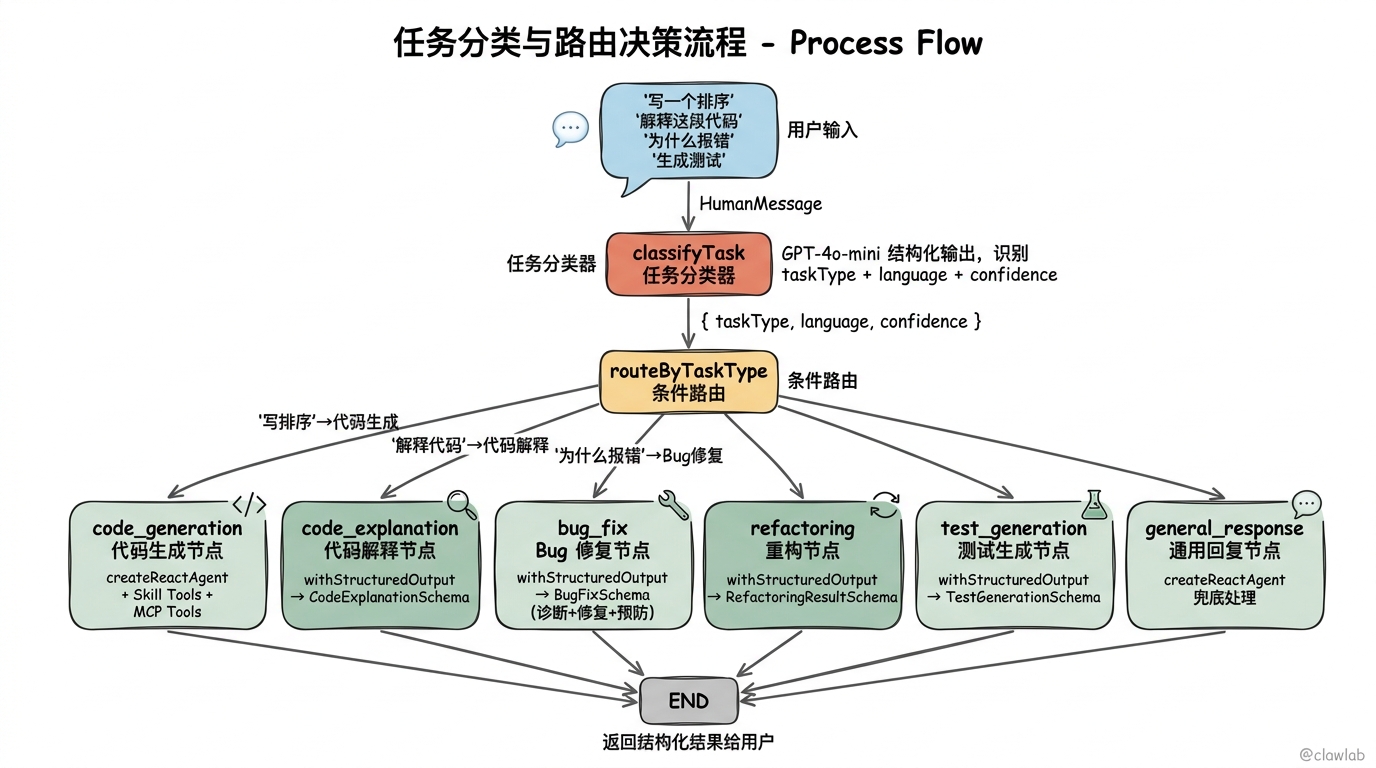
5.2 任务分类器
typescript
// src/agents/classifier.ts
import { ChatOpenAI } from "@langchain/openai";
import { z } from "zod";
import { TaskType } from "./types";

const TaskClassificationSchema = z.object({
  taskType: z.enum([
    "code_generation",
    "code_explanation",
    "bug_diagnosis",
    "bug_fix",
    "refactoring",
    "test_generation",
    "file_operation",
    "general",
  ]).describe("任务类型"),
  language: z.string().optional().describe("检测到的编程语言"),
  confidence: z.number().min(0).max(1).describe("置信度"),
  reasoning: z.string().describe("分类理由"),
});

export async function classifyTask(
  userMessage: string,
  codeContext?: string
): Promise<{
  taskType: TaskType;
  language?: string;
  confidence: number;
}> {
  const model = new ChatOpenAI({
    modelName: "gpt-4o-mini",
    temperature: 0,
  });

  const result = await model
    .withStructuredOutput(TaskClassificationSchema)
    .invoke([
      {
        role: "system",
        content: `你是一个代码助手任务分类器。根据用户输入判断任务类型。

任务类型说明:
- code_generation: 生成新代码(写一个函数、实现某功能)
- code_explanation: 解释代码(这段代码做什么、帮我理解)
- bug_diagnosis: 诊断错误(为什么报错、什么原因)
- bug_fix: 修复错误(帮我修复、怎么解决这个错误)
- refactoring: 代码重构(优化代码、重构、提取函数)
- test_generation: 生成测试(写测试、生成单元测试)
- file_operation: 文件操作(读取文件、写入文件、搜索代码)
- general: 一般问题或不确定

同时检测代码语言(如果有的话)。`,
      },
      {
        role: "user",
        content: codeContext
          ? `用户请求: ${userMessage}\n\n代码上下文:\n${codeContext}`
          : userMessage,
      },
    ]);

  return {
    taskType: result.taskType as TaskType,
    language: result.language,
    confidence: result.confidence,
  };
}
5.3 代码助手 Agent
typescript
// src/agents/code-assistant.agent.ts
import { ChatOpenAI } from "@langchain/openai";
import { createReactAgent } from "@langchain/langgraph/prebuilt";
import { SystemMessage, HumanMessage, AIMessage } from "@langchain/core/messages";
import { DynamicStructuredTool, tool } from "@langchain/core/tools";
import { z } from "zod";
import { skillRegistry } from "../skills/registry";
import { SkillConfig } from "../skills/types";
import {
  CodeGenerationSchema,
  CodeExplanationSchema,
  BugFixSchema,
  RefactoringResultSchema,
  TestGenerationSchema,
} from "./schemas";
import { MCPClientManager } from "../mcp/client";

// 创建代码生成 Agent
export function createCodeGenerationAgent(
  skill: SkillConfig,
  mcpTools: DynamicStructuredTool[]
) {
  const model = new ChatOpenAI({
    modelName: "gpt-4o",
    temperature: 0.2,
  });

  // 结合技能特定工具和 MCP 工具
  const allTools = [...skill.tools, ...mcpTools];

  return createReactAgent({
    llm: model,
    tools: allTools,
    messageModifier: new SystemMessage(`${skill.systemPrompt}

## 当前任务
你的任务是根据用户需求生成高质量的 ${skill.language} 代码。

## 输出要求
生成代码后,使用工具将代码写入文件,然后运行测试验证。`),
  });
}

// 创建代码解释 Agent
export function createCodeExplanationAgent(skill: SkillConfig) {
  const model = new ChatOpenAI({
    modelName: "gpt-4o",
    temperature: 0.1,
  });

  return {
    async explain(code: string): Promise<z.infer<typeof CodeExplanationSchema>> {
      const result = await model
        .withStructuredOutput(CodeExplanationSchema)
        .invoke([
          {
            role: "system",
            content: `${skill.systemPrompt}

## 当前任务
你的任务是解释用户提供的代码。请提供详细、易懂的解释。`,
          },
          {
            role: "user",
            content: `请解释以下代码:\n\n\`\`\`${skill.language}\n${code}\n\`\`\``,
          },
        ]);

      return result;
    },
  };
}

// 创建 Bug 修复 Agent
export function createBugFixAgent(
  skill: SkillConfig,
  mcpTools: DynamicStructuredTool[]
) {
  const model = new ChatOpenAI({
    modelName: "gpt-4o",
    temperature: 0.1,
  });

  return {
    async diagnoseAndFix(
      code: string,
      errorLog: string
    ): Promise<z.infer<typeof BugFixSchema>> {
      const result = await model
        .withStructuredOutput(BugFixSchema)
        .invoke([
          {
            role: "system",
            content: `${skill.systemPrompt}

## 当前任务
你的任务是诊断代码中的 Bug 并提供修复方案。

## 诊断步骤
1. 分析错误日志,确定错误类型
2. 定位问题代码
3. 分析根本原因
4. 提供修复方案
5. 给出预防建议`,
          },
          {
            role: "user",
            content: `## 代码
\`\`\`${skill.language}
${code}
\`\`\`

## 错误日志
\`\`\`
${errorLog}
\`\`\`

请诊断问题并提供修复方案。`,
          },
        ]);

      return result;
    },
  };
}

// 创建代码重构 Agent
export function createRefactoringAgent(skill: SkillConfig) {
  const model = new ChatOpenAI({
    modelName: "gpt-4o",
    temperature: 0.2,
  });

  return {
    async refactor(
      code: string,
      instructions?: string
    ): Promise<z.infer<typeof RefactoringResultSchema>> {
      const result = await model
        .withStructuredOutput(RefactoringResultSchema)
        .invoke([
          {
            role: "system",
            content: `${skill.systemPrompt}

## 当前任务
你的任务是重构用户提供的代码,提高代码质量。

## 重构原则
1. 保持功能不变
2. 提高可读性
3. 减少重复
4. 改善命名
5. 添加类型注解(如适用)`,
          },
          {
            role: "user",
            content: `## 代码
\`\`\`${skill.language}
${code}
\`\`\`

${instructions ? `## 特殊要求\n${instructions}` : ""}

请提供重构建议和重构后的代码。`,
          },
        ]);

      return result;
    },
  };
}

// 创建测试生成 Agent
export function createTestGenerationAgent(skill: SkillConfig) {
  const model = new ChatOpenAI({
    modelName: "gpt-4o",
    temperature: 0.2,
  });

  return {
    async generateTests(
      code: string
    ): Promise<z.infer<typeof TestGenerationSchema>> {
      const result = await model
        .withStructuredOutput(TestGenerationSchema)
        .invoke([
          {
            role: "system",
            content: `${skill.systemPrompt}

## 当前任务
你的任务是为用户提供的代码生成全面的单元测试。

## 测试原则
1. 覆盖正常情况
2. 覆盖边界情况
3. 覆盖错误情况
4. 使用 ${skill.testFramework} 框架
5. 测试应该独立、可重复`,
          },
          {
            role: "user",
            content: `## 代码
\`\`\`${skill.language}
${code}
\`\`\`

请为这段代码生成完整的单元测试。`,
          },
        ]);

      return result;
    },
  };
}
5.4 Graph 组装
typescript
// src/agents/graph.ts
import { StateGraph, START, END } from "@langchain/langgraph";
import { AIMessage, HumanMessage } from "@langchain/core/messages";
import { MemorySaver } from "@langchain/langgraph";
import {
  CodeAssistantState,
  CodeAssistantStateType,
  TaskType,
} from "./types";
import { classifyTask } from "./classifier";
import { skillRegistry } from "../skills/registry";
import {
  createCodeGenerationAgent,
  createCodeExplanationAgent,
  createBugFixAgent,
  createRefactoringAgent,
  createTestGenerationAgent,
} from "./code-assistant.agent";
import { createMCPClientManager, MCPClientManager } from "../mcp/client";

let mcpManager: MCPClientManager | null = null;

// 初始化 MCP
async function getMCPManager(): Promise<MCPClientManager> {
  if (!mcpManager) {
    mcpManager = await createMCPClientManager();
  }
  return mcpManager;
}

// 任务分类节点
async function classifyTaskNode(
  state: CodeAssistantStateType
): Promise<Partial<CodeAssistantStateType>> {
  const lastMessage = state.messages[state.messages.length - 1];
  const userMessage = lastMessage.content as string;

  const classification = await classifyTask(
    userMessage,
    state.codeContext?.code
  );

  // 检测或使用已有的语言
  let language = classification.language || state.codeContext?.language;

  // 如果有代码上下文,尝试自动检测语言
  if (!language && state.codeContext?.code) {
    language = skillRegistry.detect(
      state.codeContext.code,
      state.codeContext.filename
    ) || undefined;
  }

  return {
    taskType: classification.taskType,
    currentSkill: language || null,
    codeContext: {
      ...state.codeContext,
      language,
    },
  };
}

// 代码生成节点
async function codeGenerationNode(
  state: CodeAssistantStateType
): Promise<Partial<CodeAssistantStateType>> {
  const skill = skillRegistry.get(state.currentSkill || "typescript");
  if (!skill) {
    return {
      messages: [
        new AIMessage({
          content: `抱歉,不支持 ${state.currentSkill} 语言。支持的语言有:${skillRegistry.list().map(s => s.language).join(", ")}`,
        }),
      ],
    };
  }

  const mcp = await getMCPManager();
  const agent = createCodeGenerationAgent(skill, mcp.getTools());

  const result = await agent.invoke({
    messages: state.messages,
  });

  return {
    messages: result.messages,
  };
}

// 代码解释节点
async function codeExplanationNode(
  state: CodeAssistantStateType
): Promise<Partial<CodeAssistantStateType>> {
  const skill = skillRegistry.get(state.currentSkill || "typescript");
  if (!skill || !state.codeContext?.code) {
    return {
      messages: [
        new AIMessage({
          content: "请提供需要解释的代码。",
        }),
      ],
    };
  }

  const agent = createCodeExplanationAgent(skill);
  const explanation = await agent.explain(state.codeContext.code);

  // 格式化输出
  const formattedExplanation = `## 代码解释

**语言**: ${explanation.language}
**复杂度**: ${explanation.complexity}

### 概述
${explanation.summary}

### 分段解释
${explanation.sections.map(s => `#### 第 ${s.lineRange} 行\n${s.purpose}\n${s.details ? `\n*详细*: ${s.details}` : ""}`).join("\n\n")}

${explanation.keyPatterns?.length ? `### 使用的模式\n${explanation.keyPatterns.map(p => `- ${p}`).join("\n")}` : ""}

${explanation.potentialIssues?.length ? `### ⚠️ 潜在问题\n${explanation.potentialIssues.map(i => `- ${i}`).join("\n")}` : ""}`;

  return {
    messages: [new AIMessage({ content: formattedExplanation })],
    explanationResult: explanation,
  };
}

// Bug 修复节点
async function bugFixNode(
  state: CodeAssistantStateType
): Promise<Partial<CodeAssistantStateType>> {
  const skill = skillRegistry.get(state.currentSkill || "typescript");
  if (!skill || !state.codeContext?.code || !state.codeContext?.errorLog) {
    return {
      messages: [
        new AIMessage({
          content: "请提供出错的代码和错误日志。",
        }),
      ],
    };
  }

  const mcp = await getMCPManager();
  const agent = createBugFixAgent(skill, mcp.getTools());
  const fix = await agent.diagnoseAndFix(
    state.codeContext.code,
    state.codeContext.errorLog
  );

  // 格式化输出
  const formattedFix = `## Bug 诊断与修复

### 诊断结果
- **错误类型**: ${fix.diagnosis.errorType}
- **严重程度**: ${fix.diagnosis.severity}
- **受影响的行**: ${fix.diagnosis.affectedLines.join(", ")}

### 根本原因
${fix.diagnosis.rootCause}

### 详细分析
${fix.diagnosis.diagnosis}

### 修复方案
${fix.fixes.map((f, i) => `
#### 方案 ${i + 1}: ${f.description}

**修改位置**: 第 ${f.lineRange} 行

**原代码**:
\`\`\`${skill.language}
${f.originalCode}
\`\`\`

**修复后**:
\`\`\`${skill.language}
${f.fixedCode}
\`\`\`

**说明**: ${f.explanation}
`).join("\n---\n")}

${fix.preventionTips?.length ? `### 预防建议\n${fix.preventionTips.map(t => `- ${t}`).join("\n")}` : ""}`;

  return {
    messages: [new AIMessage({ content: formattedFix })],
    fixResult: fix,
  };
}

// 代码重构节点
async function refactoringNode(
  state: CodeAssistantStateType
): Promise<Partial<CodeAssistantStateType>> {
  const skill = skillRegistry.get(state.currentSkill || "typescript");
  if (!skill || !state.codeContext?.code) {
    return {
      messages: [
        new AIMessage({
          content: "请提供需要重构的代码。",
        }),
      ],
    };
  }

  const agent = createRefactoringAgent(skill);
  const result = await agent.refactor(state.codeContext.code);

  // 格式化输出
  const formattedResult = `## 代码重构建议

### 质量提升评估
- 可读性提升: ${result.qualityImprovement.readability}%
- 可维护性提升: ${result.qualityImprovement.maintainability}%
- 可测试性提升: ${result.qualityImprovement.testability}%

### 重构建议
${result.suggestions.map((s, i) => `
#### ${i + 1}. ${s.type}: ${s.description}

**重构前**:
\`\`\`${skill.language}
${s.beforeCode}
\`\`\`

**重构后**:
\`\`\`${skill.language}
${s.afterCode}
\`\`\`

**收益**: ${s.benefits.join(", ")}
${s.risks?.length ? `**风险**: ${s.risks.join(", ")}` : ""}
`).join("\n---\n")}

### 重构后的完整代码
\`\`\`${skill.language}
${result.refactoredCode}
\`\`\``;

  return {
    messages: [new AIMessage({ content: formattedResult })],
    refactoringResult: result,
  };
}

// 测试生成节点
async function testGenerationNode(
  state: CodeAssistantStateType
): Promise<Partial<CodeAssistantStateType>> {
  const skill = skillRegistry.get(state.currentSkill || "typescript");
  if (!skill || !state.codeContext?.code) {
    return {
      messages: [
        new AIMessage({
          content: "请提供需要生成测试的代码。",
        }),
      ],
    };
  }

  const agent = createTestGenerationAgent(skill);
  const tests = await agent.generateTests(state.codeContext.code);

  // 格式化输出
  const formattedTests = `## 生成的单元测试

**测试框架**: ${tests.testFramework}
**语言**: ${tests.language}

### 测试用例
${tests.testCases.map(tc => `- **${tc.name}** (${tc.type}): ${tc.description}`).join("\n")}

### 测试代码
\`\`\`${skill.language}
${tests.testCode}
\`\`\`

### 覆盖情况
- **函数**: ${tests.coverage.functions.join(", ")}
- **分支**: ${tests.coverage.branches.join(", ")}
- **边界情况**: ${tests.coverage.edgeCases.join(", ")}`;

  return {
    messages: [new AIMessage({ content: formattedTests })],
    testResult: tests,
  };
}

// 通用回复节点(使用 ReAct Agent)
async function generalResponseNode(
  state: CodeAssistantStateType
): Promise<Partial<CodeAssistantStateType>> {
  const mcp = await getMCPManager();
  const skill = state.currentSkill
    ? skillRegistry.get(state.currentSkill)
    : skillRegistry.get("typescript");

  const tools = skill ? [...skill.tools, ...mcp.getTools()] : mcp.getTools();

  const { createReactAgent } = await import("@langchain/langgraph/prebuilt");
  const { ChatOpenAI } = await import("@langchain/openai");

  const model = new ChatOpenAI({
    modelName: "gpt-4o",
    temperature: 0.3,
  });

  const agent = createReactAgent({
    llm: model,
    tools,
    messageModifier: new SystemMessage(`你是一个专业的代码助手。
${skill ? skill.systemPrompt : ""}

你可以帮助用户:
1. 生成代码
2. 解释代码
3. 诊断和修复 Bug
4. 重构代码
5. 生成测试
6. 读写文件

如果用户的请求不够明确,请主动询问细节。`),
  });

  const result = await agent.invoke({
    messages: state.messages,
  });

  return {
    messages: result.messages,
  };
}

// 路由函数
function routeByTaskType(state: CodeAssistantStateType): string {
  switch (state.taskType) {
    case "code_generation":
      return "code_generation";
    case "code_explanation":
      return "code_explanation";
    case "bug_diagnosis":
    case "bug_fix":
      return "bug_fix";
    case "refactoring":
      return "refactoring";
    case "test_generation":
      return "test_generation";
    default:
      return "general_response";
  }
}

// 创建 Graph
export function createCodeAssistantGraph() {
  const workflow = new StateGraph(CodeAssistantState)
    // 添加节点
    .addNode("classify_task", classifyTaskNode)
    .addNode("code_generation", codeGenerationNode)
    .addNode("code_explanation", codeExplanationNode)
    .addNode("bug_fix", bugFixNode)
    .addNode("refactoring", refactoringNode)
    .addNode("test_generation", testGenerationNode)
    .addNode("general_response", generalResponseNode)

    // 添加边
    .addEdge(START, "classify_task")
    .addConditionalEdges("classify_task", routeByTaskType, {
      code_generation: "code_generation",
      code_explanation: "code_explanation",
      bug_fix: "bug_fix",
      refactoring: "refactoring",
      test_generation: "test_generation",
      general_response: "general_response",
    })
    .addEdge("code_generation", END)
    .addEdge("code_explanation", END)
    .addEdge("bug_fix", END)
    .addEdge("refactoring", END)
    .addEdge("test_generation", END)
    .addEdge("general_response", END);

  const checkpointer = new MemorySaver();

  return workflow.compile({ checkpointer });
}

export type CodeAssistantGraph = ReturnType<typeof createCodeAssistantGraph>;
5.5 使用示例
typescript
// src/agents/example.ts
import { HumanMessage } from "@langchain/core/messages";
import { createCodeAssistantGraph } from "./graph";

async function main() {
  const graph = createCodeAssistantGraph();
  const config = { configurable: { thread_id: "session-1" } };

  // 示例 1: 代码生成
  console.log("=== 示例 1: 代码生成 ===");
  let result = await graph.invoke(
    {
      messages: [new HumanMessage("用 Python 写一个快速排序算法,要有详细注释")],
    },
    config
  );
  console.log("AI:", result.messages[result.messages.length - 1].content);

  // 示例 2: 代码解释
  console.log("\n=== 示例 2: 代码解释 ===");
  result = await graph.invoke(
    {
      messages: [new HumanMessage("解释一下这段代码")],
      codeContext: {
        code: `
def binary_search(arr, target):
    left, right = 0, len(arr) - 1
    while left <= right:
        mid = (left + right) // 2
        if arr[mid] == target:
            return mid
        elif arr[mid] < target:
            left = mid + 1
        else:
            right = mid - 1
    return -1
        `,
        language: "python",
      },
    },
    { configurable: { thread_id: "session-2" } }
  );
  console.log("AI:", result.messages[result.messages.length - 1].content);

  // 示例 3: Bug 修复
  console.log("\n=== 示例 3: Bug 修复 ===");
  result = await graph.invoke(
    {
      messages: [new HumanMessage("帮我修复这个错误")],
      codeContext: {
        code: `
function divide(a, b) {
  return a / b;
}

console.log(divide(10, 0));
        `,
        language: "typescript",
        errorLog: "Error: Division by zero",
      },
    },
    { configurable: { thread_id: "session-3" } }
  );
  console.log("AI:", result.messages[result.messages.length - 1].content);

  // 示例 4: 测试生成
  console.log("\n=== 示例 4: 测试生成 ===");
  result = await graph.invoke(
    {
      messages: [new HumanMessage("给这个函数生成单元测试")],
      codeContext: {
        code: `
export function isPalindrome(str: string): boolean {
  const cleaned = str.toLowerCase().replace(/[^a-z0-9]/g, '');
  return cleaned === cleaned.split('').reverse().join('');
}
        `,
        language: "typescript",
      },
    },
    { configurable: { thread_id: "session-4" } }
  );
  console.log("AI:", result.messages[result.messages.length - 1].content);
}

main().catch(console.error);
六、数据库设计
6.1 Prisma Schema
prisma
// prisma/schema.prisma

generator client {
  provider = "prisma-client-js"
}

datasource db {
  provider = "mysql"
  url      = env("DATABASE_URL")
}

model User {
  id        String   @id @default(uuid())
  email     String   @unique
  name      String
  createdAt DateTime @default(now())
  updatedAt DateTime @updatedAt

  sessions      Session[]
  codeSnippets  CodeSnippet[]
  projects      Project[]
}

model Session {
  id        String   @id @default(uuid())
  userId    String
  threadId  String   @unique
  title     String?
  createdAt DateTime @default(now())
  updatedAt DateTime @updatedAt

  user     User      @relation(fields: [userId], references: [id])
  messages Message[]
}

model Message {
  id        String      @id @default(uuid())
  sessionId String
  role      MessageRole
  content   String      @db.LongText
  metadata  Json?
  createdAt DateTime    @default(now())

  session Session @relation(fields: [sessionId], references: [id])
}

enum MessageRole {
  USER
  ASSISTANT
  SYSTEM
  TOOL
}

model CodeSnippet {
  id          String   @id @default(uuid())
  userId      String
  title       String
  language    String
  code        String   @db.LongText
  description String?  @db.Text
  tags        String?
  isPublic    Boolean  @default(false)
  createdAt   DateTime @default(now())
  updatedAt   DateTime @updatedAt

  user User @relation(fields: [userId], references: [id])
}

model Project {
  id          String   @id @default(uuid())
  userId      String
  name        String
  path        String
  language    String?
  description String?  @db.Text
  createdAt   DateTime @default(now())
  updatedAt   DateTime @updatedAt

  user  User   @relation(fields: [userId], references: [id])
  files File[]
}

model File {
  id        String   @id @default(uuid())
  projectId String
  path      String
  content   String   @db.LongText
  language  String?
  createdAt DateTime @default(now())
  updatedAt DateTime @updatedAt

  project Project @relation(fields: [projectId], references: [id])
}

model SkillUsageLog {
  id        String   @id @default(uuid())
  skillId   String
  taskType  String
  input     String   @db.Text
  output    String   @db.LongText
  duration  Int
  success   Boolean
  createdAt DateTime @default(now())
}
七、项目结构
code-assistant/
├── src/
│   ├── skills/                    # 技能系统
│   │   ├── types.ts               # 类型定义
│   │   ├── registry.ts            # 技能注册表
│   │   ├── python.skill.ts        # Python 技能
│   │   ├── typescript.skill.ts    # TypeScript 技能
│   │   ├── sql.skill.ts           # SQL 技能
│   │   └── go.skill.ts            # Go 技能
│   ├── mcp/                       # MCP 协议
│   │   ├── client.ts              # MCP 客户端
│   │   └── servers/               # MCP 服务器实现
│   │       ├── filesystem.server.ts
│   │       ├── git.server.ts
│   │       └── docker.server.ts
│   ├── agents/                    # Agent 核心
│   │   ├── types.ts               # 状态类型
│   │   ├── schemas.ts             # 结构化输出 Schema
│   │   ├── classifier.ts          # 任务分类器
│   │   ├── code-assistant.agent.ts # Agent 定义
│   │   ├── graph.ts               # Graph 组装
│   │   └── example.ts             # 使用示例
│   ├── controllers/               # 控制器
│   │   ├── chat.controller.ts
│   │   ├── code.controller.ts
│   │   └── file.controller.ts
│   ├── routes/                    # 路由
│   │   ├── chat.routes.ts
│   │   ├── code.routes.ts
│   │   ├── file.routes.ts
│   │   └── index.ts
│   ├── services/                  # 服务层
│   │   ├── session.service.ts
│   │   ├── snippet.service.ts
│   │   └── project.service.ts
│   ├── lib/                       # 库
│   │   ├── prisma.ts
│   │   └── redis.ts
│   ├── types/                     # TypeScript 类型
│   │   └── index.ts
│   ├── utils/                     # 工具函数
│   │   └── code-executor.ts       # 代码执行器
│   └── app.ts                     # 应用入口
├── prisma/
│   └── schema.prisma
├── docker/                        # Docker 配置
│   └── sandbox/                   # 代码沙箱
│       ├── Dockerfile.python
│       └── Dockerfile.node
├── .env
├── .env.example
├── package.json
├── tsconfig.json
└── README.md
八、总结
技术要点回顾
| 模块 | 技术栈 | 说明 |
|---|---|---|
| 技能系统 | Skills | 动态加载语言特定的提示词、工具、规范 |
| 任务分类 | withStructuredOutput | 自动识别任务类型和编程语言 |
| 代码生成 | createReactAgent | ReAct 模式生成代码,可调用工具验证 |
| 代码解释 | 结构化输出 | 分段解释、复杂度评估、潜在问题 |
| Bug 修复 | 结构化输出 | 诊断分析、修复方案、预防建议 |
| MCP 协议 | @modelcontextprotocol/sdk | 标准化工具接口,热插拔 |
| 代码执行 | Docker 沙箱 | 安全隔离的代码运行环境 |
架构亮点
┌─────────────────────────────────────────────────────────────────────────────┐
│                           项目架构亮点                                       │
├─────────────────────────────────────────────────────────────────────────────┤
│                                                                              │
│  1. Skills 技能系统 - 动态适配不同编程语言                                   │
│     ┌───────────────────────────────────────────────────────────────────┐   │
│     │   用户请求 → Skill Router → 加载对应 Skill                         │   │
│     │                                                                   │   │
│     │   Python Skill:  PEP8 规范 + pytest + type hints                 │   │
│     │   TypeScript Skill:  ESLint + Jest + strict mode                 │   │
│     │   SQL Skill:  大写关键字 + CTE + EXPLAIN                          │   │
│     └───────────────────────────────────────────────────────────────────┘   │
│                                                                              │
│  2. MCP 协议 - 标准化工具接口                                                │
│     ┌─────────┐ ┌─────────┐ ┌─────────┐                                    │
│     │Filesystem│ │  Git    │ │ Docker  │   热插拔、安全隔离                 │
│     │ Server  │ │ Server  │ │ Server  │                                    │
│     └─────────┘ └─────────┘ └─────────┘                                    │
│                                                                              │
│  3. 结构化输出 - 规范化的代码处理结果                                        │
│     • CodeGenerationSchema: 代码 + 解释 + 依赖                              │
│     • BugFixSchema: 诊断 + 修复方案 + 预防建议                              │
│     • TestGenerationSchema: 测试代码 + 用例 + 覆盖情况                      │
│                                                                              │
│  4. 任务路由 - 智能识别任务类型                                              │
│     ┌─────────────────────────────────────────────────────────────────┐    │
│     │  用户输入 → 任务分类器 → 路由到专门节点                          │    │
│     │                                                                 │    │
│     │  "写一个排序" → code_generation → 代码生成 Agent                │    │
│     │  "解释这段代码" → code_explanation → 代码解释 Agent             │    │
│     │  "为什么报错" → bug_fix → Bug 修复 Agent                        │    │
│     └─────────────────────────────────────────────────────────────────┘    │
│                                                                              │
│  5. 代码沙箱 - 安全的代码执行环境                                            │
│     • Docker 容器隔离                                                        │
│     • 资源限制(CPU、内存、时间)                                            │
│     • 网络隔离                                                               │
│                                                                              │
└─────────────────────────────────────────────────────────────────────────────┘
项目亮点
- Skills 技能系统:根据编程语言动态加载提示词、工具、代码规范
- MCP 协议集成:标准化的工具接口,支持热插拔
- 智能任务路由:自动识别代码生成、解释、修复、重构、测试等任务
- 结构化输出:所有代码处理结果都有明确的 Schema
- 多语言支持:Python、TypeScript、SQL、Go 等语言
- 安全沙箱:Docker 容器隔离执行用户代码
扩展方向
- 添加更多语言 Skill(Rust、Java、C++)
- 集成 LSP(Language Server Protocol)提供代码补全
- 添加代码审查功能
- 支持多文件项目理解
- 添加 Git 工作流自动化(自动提交、PR)
- 集成 CI/CD 管道
- 添加代码安全扫描