主题
LangChain 教程 19|MCP 集成:连接外部工具的标准协议
📖 本篇导读:这是 LangChain 系列教程的第 19 篇。本篇将深入讲解 MCP 协议的核心概念、MultiServerMCPClient 的使用、两种传输方式,以及如何创建自定义 MCP 服务器。读完预计需要 10 分钟。
简单来说
MCP(Model Context Protocol)是一个开放协议,让 LLM 可以通过标准化接口连接外部工具和数据。LangChain 提供了 @langchain/mcp-adapters 库,让你的 Agent 轻松使用任何 MCP 服务器上的工具。
本节目标
学完本节,你将能够:
- 理解 MCP 协议的核心概念
- 使用
MultiServerMCPClient连接多个 MCP 服务器 - 了解 stdio 和 HTTP 两种传输方式
- 创建自定义 MCP 服务器
业务场景
想象这些集成需求:
- 连接现有服务:公司有很多内部服务,想让 AI 调用但不想重写工具
- 工具复用:开源社区有很多 MCP 工具服务器,想直接使用
- 跨语言集成:后端是 Python/Go,前端 Agent 是 TypeScript,需要标准协议
- 安全隔离:工具运行在独立进程或服务器,需要标准通信方式
MCP 提供了标准化的解决方案——就像 REST API 让服务互通一样,MCP 让 AI 工具互通。
一、MCP 协议简介
1.1 什么是 MCP
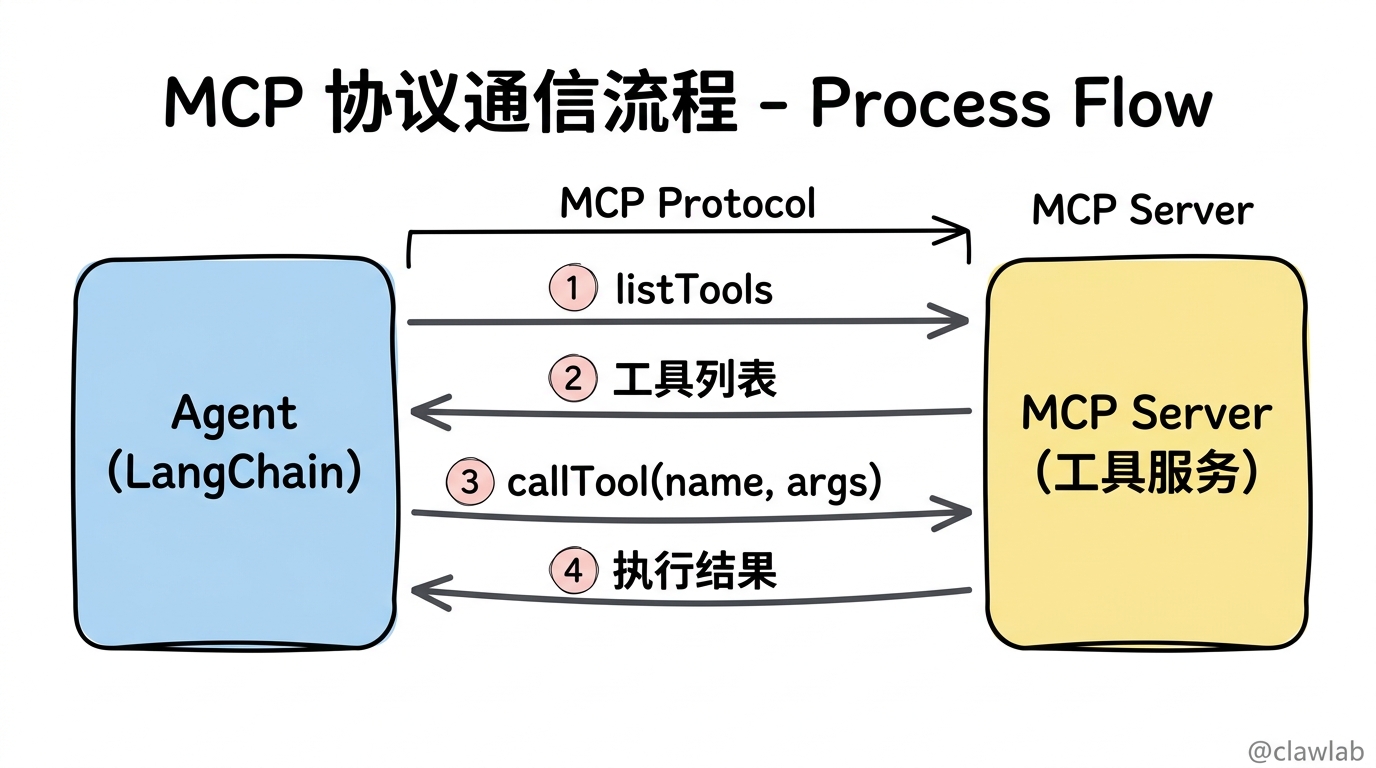
MCP 是 Anthropic 推出的开放协议,定义了:
- 工具发现:客户端如何知道服务器有哪些工具
- 工具调用:客户端如何调用工具、传递参数
- 结果返回:服务器如何返回工具执行结果
┌─────────────┐                    ┌─────────────┐
│   Agent     │   MCP Protocol    │ MCP Server  │
│ (LangChain) │ ◄─────────────────►│  (工具服务)  │
└─────────────┘                    └─────────────┘
      │                                   │
      │  1. 列出工具 (listTools)          │
      │ ──────────────────────────────► │
      │  2. 返回工具列表                   │
      │ ◄────────────────────────────── │
      │  3. 调用工具 (callTool)           │
      │ ──────────────────────────────► │
      │  4. 返回结果                      │
      │ ◄────────────────────────────── │
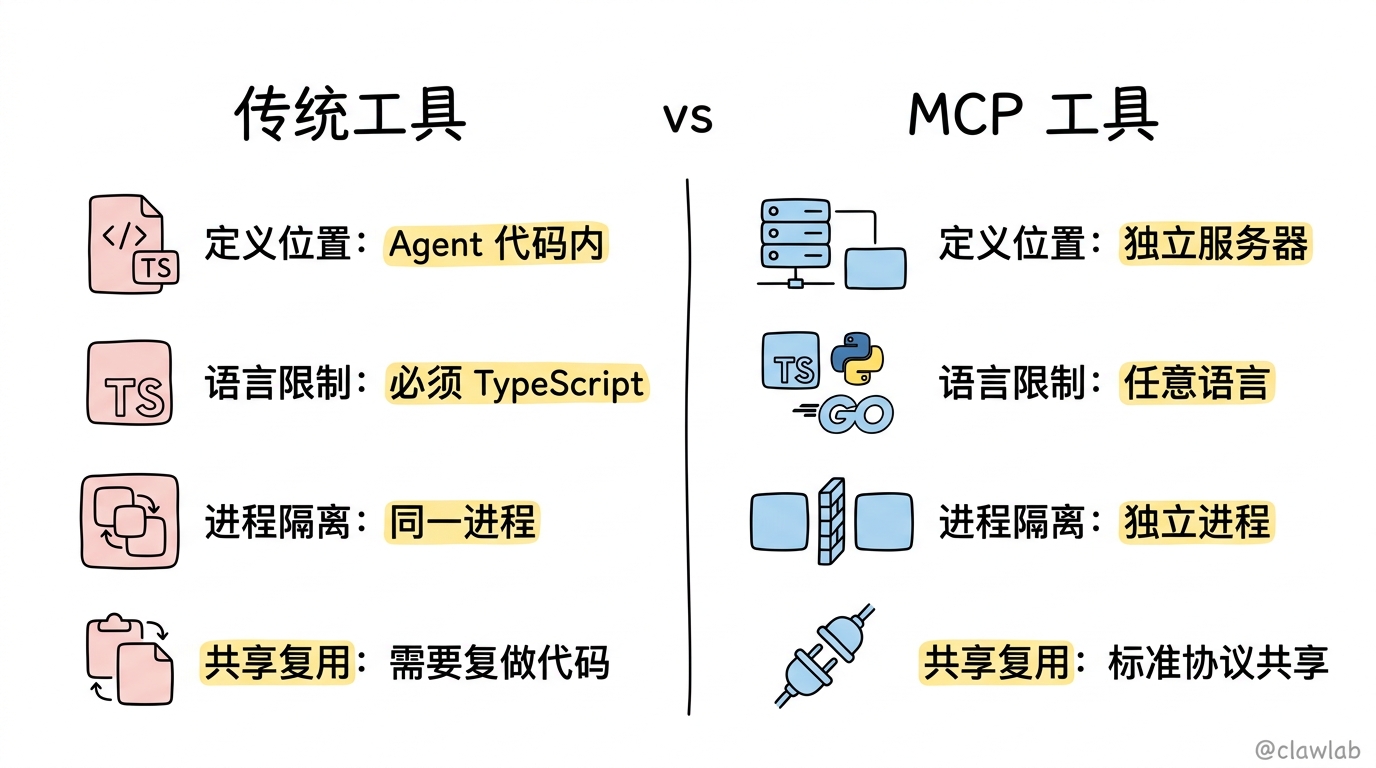
1.2 MCP vs 传统工具
| 特性 | 传统 LangChain 工具 | MCP 工具 |
|---|---|---|
| 定义位置 | Agent 代码内 | 独立服务器 |
| 语言限制 | 必须是 TypeScript | 任意语言 |
| 进程隔离 | 同一进程 | 可以独立进程 |
| 共享复用 | 需要复制代码 | 标准协议共享 |
二、快速开始
2.1 安装依赖
bash
npm install @langchain/mcp-adapters2.2 连接 MCP 服务器
typescript
import { MultiServerMCPClient } from "@langchain/mcp-adapters";
import { createAgent } from "langchain";

const client = new MultiServerMCPClient({
  math: {
    transport: "stdio",
    command: "node",
    args: ["/path/to/math_server.js"],
  },
  weather: {
    transport: "http",
    url: "http://localhost:8000/mcp",
  },
});

const tools = await client.getTools();

const agent = createAgent({
  model: "gpt-4o",
  tools,
});

const mathResponse = await agent.invoke({
  messages: [{ role: "user", content: "(3 + 5) x 12 等于多少?" }],
});

const weatherResponse = await agent.invoke({
  messages: [{ role: "user", content: "北京今天天气怎么样?" }],
});关键概念:
MultiServerMCPClient:管理多个 MCP 服务器连接getTools():从所有服务器获取工具列表- 工具就像普通 LangChain 工具一样使用
三、传输方式
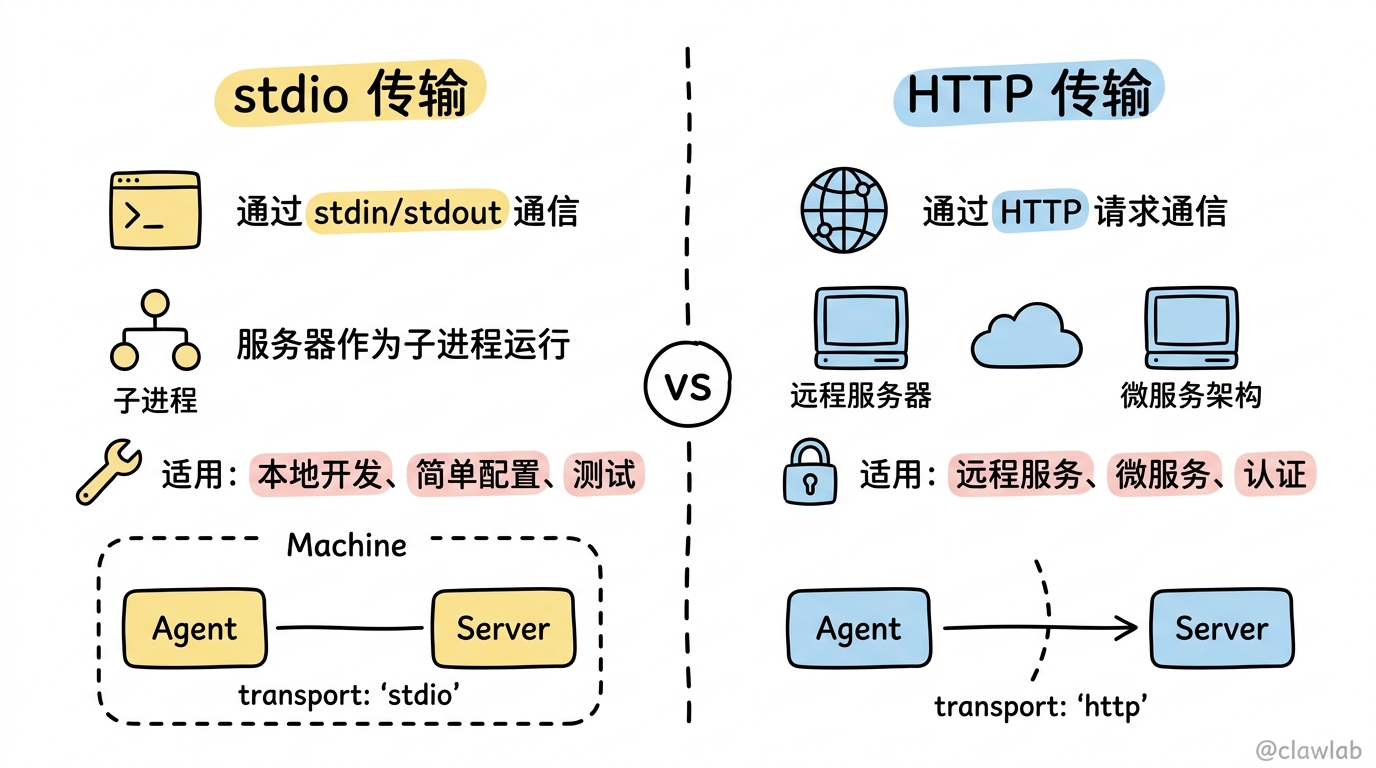
3.1 stdio 传输
客户端启动服务器作为子进程,通过标准输入输出通信:
typescript
const client = new MultiServerMCPClient({
  math: {
    transport: "stdio",
    command: "node",
    args: ["/path/to/math_server.js"],
  },
});适用场景:
- 本地工具服务
- 简单配置
- 开发测试
特点:
- 服务器作为子进程运行
- 通信通过 stdin/stdout
- 进程生命周期由客户端管理
3.2 HTTP 传输
通过 HTTP 请求与远程服务器通信:
typescript
const client = new MultiServerMCPClient({
  weather: {
    transport: "http",
    url: "http://localhost:8000/mcp",
  },
});适用场景:
- 远程服务集成
- 微服务架构
- 需要认证的服务
3.3 带认证的 HTTP
typescript
const client = new MultiServerMCPClient({
  secureService: {
    transport: "http",
    url: "https://api.example.com/mcp",
    headers: {
      "Authorization": "Bearer your-api-key",
      "X-Custom-Header": "value",
    },
  },
});
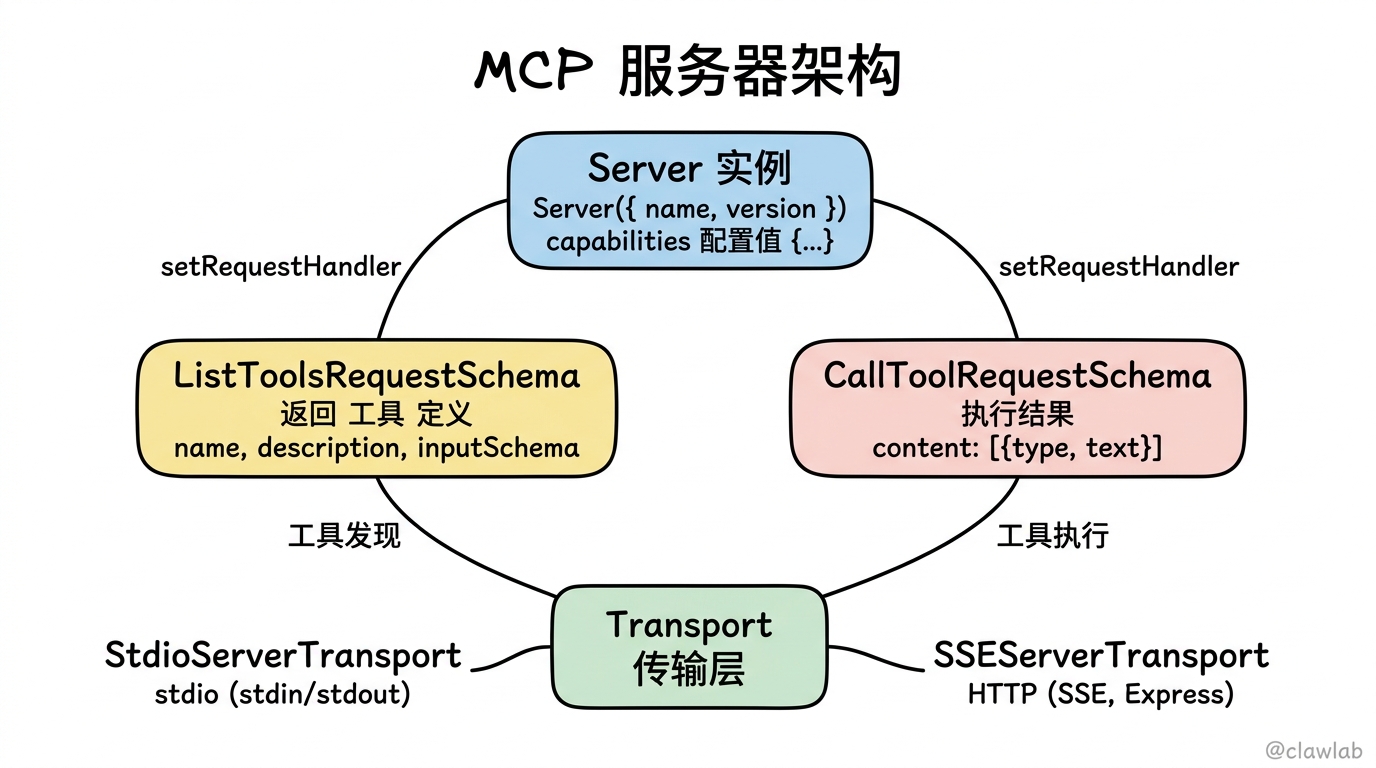
四、创建自定义 MCP 服务器
4.1 安装 MCP SDK
bash
npm install @modelcontextprotocol/sdk4.2 stdio 服务器示例(数学计算)
typescript
import { Server } from "@modelcontextprotocol/sdk/server/index.js";
import { StdioServerTransport } from "@modelcontextprotocol/sdk/server/stdio.js";
import {
  CallToolRequestSchema,
  ListToolsRequestSchema,
} from "@modelcontextprotocol/sdk/types.js";

const server = new Server(
  {
    name: "math-server",
    version: "0.1.0",
  },
  {
    capabilities: {
      tools: {},
    },
  }
);

server.setRequestHandler(ListToolsRequestSchema, async () => {
  return {
    tools: [
      {
        name: "add",
        description: "两数相加",
        inputSchema: {
          type: "object",
          properties: {
            a: { type: "number", description: "第一个数" },
            b: { type: "number", description: "第二个数" },
          },
          required: ["a", "b"],
        },
      },
      {
        name: "multiply",
        description: "两数相乘",
        inputSchema: {
          type: "object",
          properties: {
            a: { type: "number", description: "第一个数" },
            b: { type: "number", description: "第二个数" },
          },
          required: ["a", "b"],
        },
      },
    ],
  };
});

server.setRequestHandler(CallToolRequestSchema, async (request) => {
  const { name, arguments: args } = request.params;

  switch (name) {
    case "add": {
      const { a, b } = args as { a: number; b: number };
      return {
        content: [{ type: "text", text: String(a + b) }],
      };
    }
    case "multiply": {
      const { a, b } = args as { a: number; b: number };
      return {
        content: [{ type: "text", text: String(a * b) }],
      };
    }
    default:
      throw new Error(`未知工具: ${name}`);
  }
});

async function main() {
  const transport = new StdioServerTransport();
  await server.connect(transport);
  console.error("数学 MCP 服务器已启动 (stdio)");
}

main();
4.3 HTTP 服务器示例(天气查询)
typescript
import { Server } from "@modelcontextprotocol/sdk/server/index.js";
import { SSEServerTransport } from "@modelcontextprotocol/sdk/server/sse.js";
import {
  CallToolRequestSchema,
  ListToolsRequestSchema,
} from "@modelcontextprotocol/sdk/types.js";
import express from "express";

const app = express();
app.use(express.json());

const server = new Server(
  {
    name: "weather-server",
    version: "0.1.0",
  },
  {
    capabilities: {
      tools: {},
    },
  }
);

server.setRequestHandler(ListToolsRequestSchema, async () => {
  return {
    tools: [
      {
        name: "get_weather",
        description: "获取指定城市的天气",
        inputSchema: {
          type: "object",
          properties: {
            location: { type: "string", description: "城市名称" },
          },
          required: ["location"],
        },
      },
    ],
  };
});

server.setRequestHandler(CallToolRequestSchema, async (request) => {
  const { name, arguments: args } = request.params;

  switch (name) {
    case "get_weather": {
      const { location } = args as { location: string };
      return {
        content: [
          {
            type: "text",
            text: `${location}今天晴朗,气温 25°C,空气质量优`,
          },
        ],
      };
    }
    default:
      throw new Error(`未知工具: ${name}`);
  }
});

app.post("/mcp", async (req, res) => {
  const transport = new SSEServerTransport("/mcp", res);
  await server.connect(transport);
});

const PORT = process.env.PORT || 8000;
app.listen(PORT, () => {
  console.log(`天气 MCP 服务器运行在端口 ${PORT}`);
});
五、完整实战示例
5.1 多服务集成
typescript
import { MultiServerMCPClient } from "@langchain/mcp-adapters";
import { createAgent } from "langchain";

const client = new MultiServerMCPClient({
  math: {
    transport: "stdio",
    command: "node",
    args: ["./servers/math_server.js"],
  },

  weather: {
    transport: "http",
    url: "http://localhost:8000/mcp",
  },

  database: {
    transport: "http",
    url: "https://internal-api.example.com/mcp",
    headers: {
      "Authorization": `Bearer ${process.env.INTERNAL_API_KEY}`,
    },
  },
});

const tools = await client.getTools();
console.log("可用工具:", tools.map(t => t.name));

const agent = createAgent({
  model: "gpt-4o",
  tools,
  systemPrompt: `你是一个多功能助手,可以:
1. 进行数学计算
2. 查询天气信息
3. 查询数据库

根据用户需求选择合适的工具。`,
});

const response = await agent.invoke({
  messages: [
    {
      role: "user",
      content: "帮我算一下 (10 + 20) * 3,然后查一下北京的天气",
    },
  ],
});

console.log(response.messages.at(-1)?.content);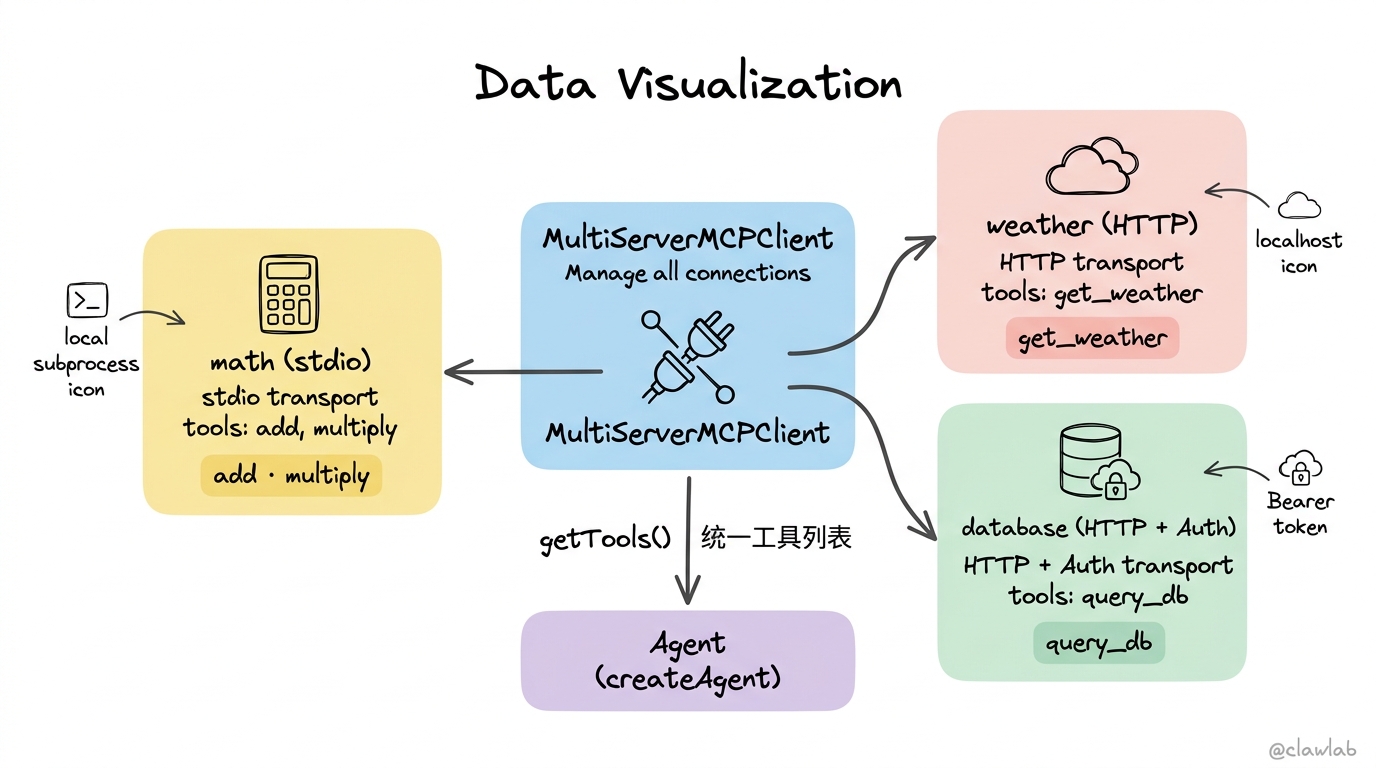
5.2 工具服务器模板
创建一个通用的工具服务器模板:
typescript
import { Server } from "@modelcontextprotocol/sdk/server/index.js";
import { StdioServerTransport } from "@modelcontextprotocol/sdk/server/stdio.js";
import {
  CallToolRequestSchema,
  ListToolsRequestSchema,
} from "@modelcontextprotocol/sdk/types.js";

interface ToolDefinition {
  name: string;
  description: string;
  inputSchema: object;
  handler: (args: Record<string, unknown>) => Promise<string>;
}

function createMCPServer(name: string, tools: ToolDefinition[]) {
  const server = new Server(
    { name, version: "0.1.0" },
    { capabilities: { tools: {} } }
  );

  server.setRequestHandler(ListToolsRequestSchema, async () => ({
    tools: tools.map(({ name, description, inputSchema }) => ({
      name,
      description,
      inputSchema,
    })),
  }));

  server.setRequestHandler(CallToolRequestSchema, async (request) => {
    const { name: toolName, arguments: args } = request.params;
    const tool = tools.find(t => t.name === toolName);

    if (!tool) {
      throw new Error(`未知工具: ${toolName}`);
    }

    const result = await tool.handler(args as Record<string, unknown>);
    return { content: [{ type: "text", text: result }] };
  });

  return server;
}

const tools: ToolDefinition[] = [
  {
    name: "greet",
    description: "向用户问好",
    inputSchema: {
      type: "object",
      properties: {
        name: { type: "string", description: "用户名" },
      },
      required: ["name"],
    },
    handler: async (args) => `你好,${args.name}!`,
  },
  {
    name: "get_time",
    description: "获取当前时间",
    inputSchema: { type: "object", properties: {} },
    handler: async () => new Date().toLocaleString("zh-CN"),
  },
];

const server = createMCPServer("custom-server", tools);

async function main() {
  const transport = new StdioServerTransport();
  await server.connect(transport);
}

main();
六、会话管理
6.1 无状态 vs 有状态
默认情况下,MultiServerMCPClient 是无状态的——每次工具调用都创建新连接:
typescript
const client = new MultiServerMCPClient({
  service: {
    transport: "stdio",
    command: "node",
    args: ["./server.js"],
  },
});
6.2 有状态会话
如果需要在多次调用间保持状态,可以使用有状态会话:
typescript
const client = new MultiServerMCPClient({
  service: {
    transport: "stdio",
    command: "node",
    args: ["./server.js"],
    stateful: true,
  },
});有状态会话的特点:
- 服务器进程在多次调用间保持运行
- 可以在服务器端维护状态
- 适合需要上下文的工具
七、最佳实践
7.1 服务器设计原则
- 单一职责:每个服务器专注一类工具
- 清晰描述:工具描述要让 LLM 能理解何时使用
- 错误处理:返回有意义的错误信息
- 超时设置:避免长时间阻塞
7.2 安全考虑
typescript
const client = new MultiServerMCPClient({
  secureService: {
    transport: "http",
    url: process.env.SERVICE_URL!,
    headers: {
      "Authorization": `Bearer ${process.env.API_KEY}`,
    },
  },
});
7.3 错误处理
typescript
try {
  const tools = await client.getTools();
  const agent = createAgent({ model: "gpt-4o", tools });
  const response = await agent.invoke({ messages: [...] });
} catch (error) {
  if (error.code === "ECONNREFUSED") {
    console.error("MCP 服务器连接失败,请检查服务是否启动");
  } else if (error.message.includes("Unknown tool")) {
    console.error("工具不存在");
  } else {
    console.error("未知错误:", error);
  }
}
常见问题
Q1: MCP 和 REST API 有什么区别?
MCP 专门为 LLM 工具调用设计:
- 标准化工具发现:自动列出可用工具
- Schema 定义:标准化参数格式
- 流式支持:适合长时间运行的工具
Q2: stdio 和 HTTP 传输怎么选?
- stdio:本地开发、简单场景、单机部署
- HTTP:远程服务、微服务架构、需要认证
Q3: 如何调试 MCP 连接问题?
typescript
const client = new MultiServerMCPClient({
  service: {
    transport: "stdio",
    command: "node",
    args: ["./server.js"],
    env: {
      DEBUG: "mcp:*",
    },
  },
});
总结
MCP 为 AI 工具集成提供了标准化协议:
| 功能 | 实现方式 |
|---|---|
| 连接多服务器 | MultiServerMCPClient |
| 本地工具 | transport: "stdio" |
| 远程服务 | transport: "http" |
| 认证访问 | headers 配置 |
| 创建服务器 | @modelcontextprotocol/sdk |
核心理念:MCP 就像工具世界的"USB 接口"——标准化协议让各种工具服务可以即插即用,无需关心实现细节。
下一篇,我们将学习 Human-in-the-Loop(人机协作),了解如何让人类参与 Agent 的决策过程!