主题
LangChain 教程 30|Agent 测试:确保 AI 稳定可靠
📖 本篇导读:这是 LangChain 系列教程的第 30 篇。本篇将深入讲解 Agent 测试的核心思路——测试执行轨迹而非具体输出,以及如何使用 LangChain 的测试工具。读完预计需要 12 分钟。
简单来说
想象你开发了一个天气 Agent,测试时一切正常:
用户:"旧金山天气怎么样?"
Agent:调用 get_weather 工具 → "旧金山今天 25°C,晴朗"
上线后用户反馈:"你们的 AI 不靠谱,问天气直接瞎编!"
一查日志,发现 Agent 有时候不调用工具,直接编造天气数据...
问题来了:LLM 是非确定性的,同样的输入可能产生不同的输出。
传统测试方法失效了:
- 单元测试?LLM 输出不固定,没法断言
- 集成测试?每次运行结果可能不同
- 怎么保证 Agent 行为稳定?
Agent 测试的核心思路:不测具体输出,测执行轨迹(Trajectory)。
✅ 正确轨迹:用户提问 → 调用 get_weather → 返回结果
❌ 错误轨迹:用户提问 → 直接编造答案(没有调用工具)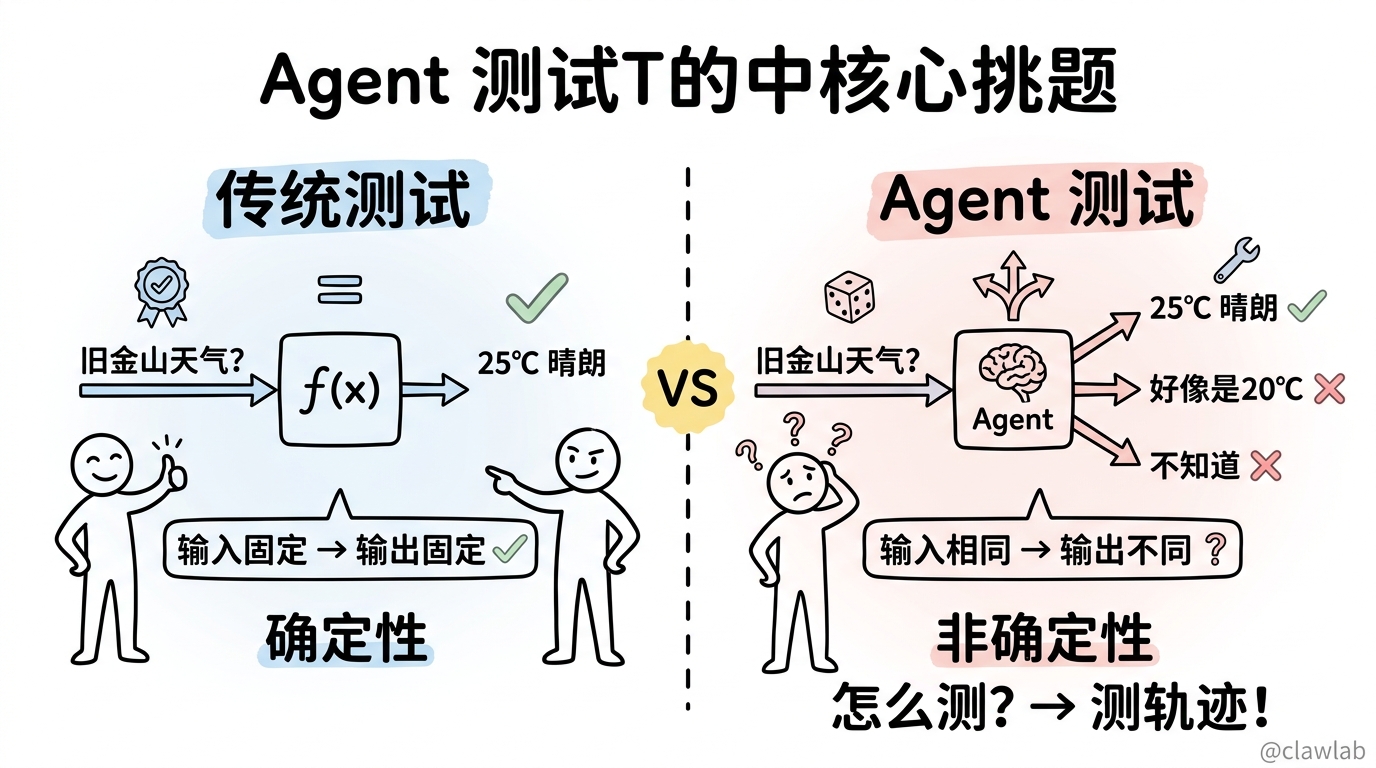
本节目标
- 理解 Agent 测试的核心挑战
- 掌握轨迹匹配测试(Trajectory Match)
- 学会使用 LLM-as-Judge 评估
- 了解 LangSmith 集成测试
业务场景
假设你开发了一个天气助手 Agent:
typescript
import { createAgent, tool } from "langchain";
import * as z from "zod";

const getWeather = tool(
  async ({ city }) => {
    // 调用天气 API
    return `It's 75 degrees and sunny in ${city}.`;
  },
  {
    name: "get_weather",
    description: "获取城市天气信息",
    schema: z.object({
      city: z.string().describe("城市名")
    })
  }
);

const agent = createAgent({
  model: "gpt-4.1",
  tools: [getWeather],
  systemPrompt: "你是天气助手,使用 get_weather 工具查询天气。"
});
你需要测试:
- 用户问天气时,Agent 必须调用
get_weather工具 - 工具参数是正确的城市名
- 最终回复基于工具返回的真实数据
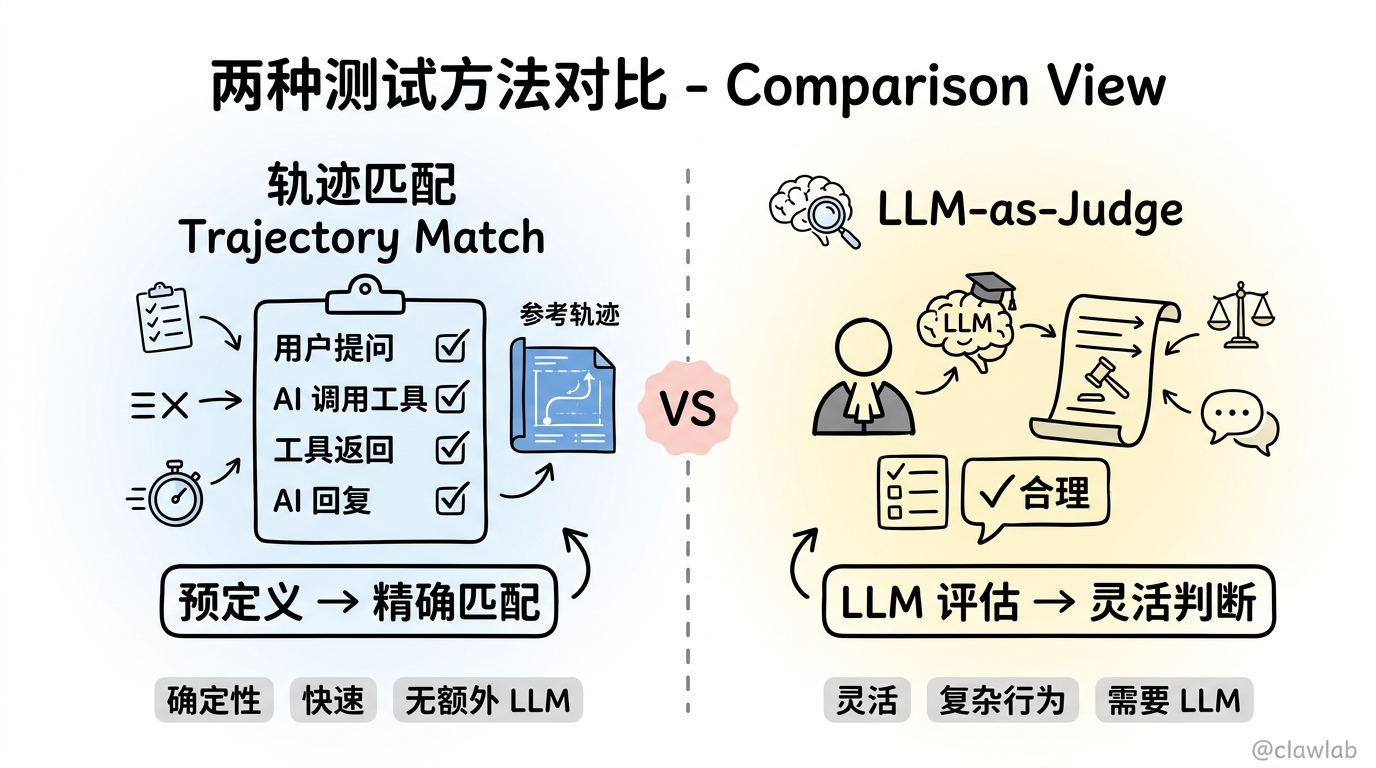
两种测试方法
方法 1:轨迹匹配(Trajectory Match)
预定义期望的执行轨迹,验证实际轨迹是否匹配。
优点:确定性、快速、无额外 LLM 调用 缺点:需要预先知道期望行为
方法 2:LLM-as-Judge
用另一个 LLM 评估 Agent 的执行轨迹是否合理。
优点:灵活、可评估复杂行为 缺点:需要额外 LLM 调用、结果不完全确定
轨迹匹配测试
安装 AgentEvals
bash
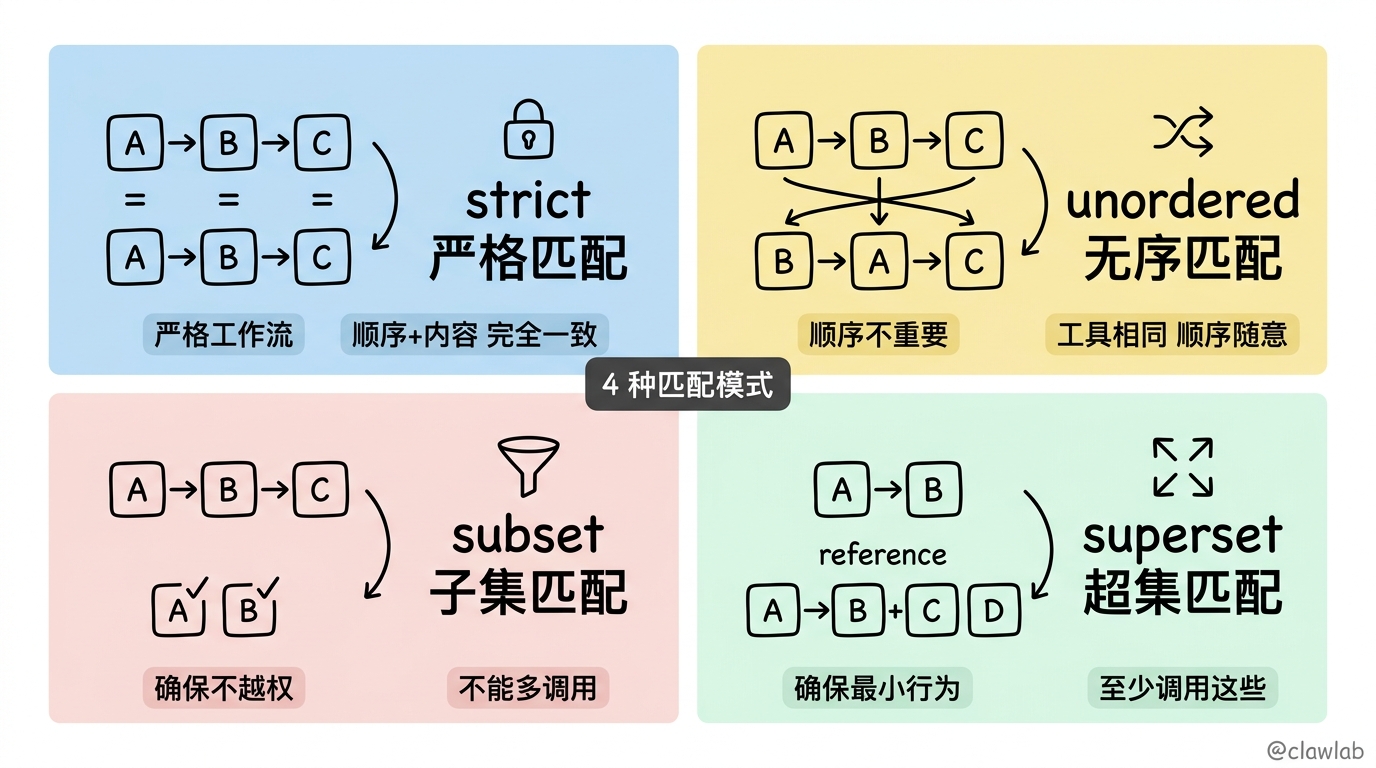
npm install agentevals @langchain/core四种匹配模式
| 模式 | 描述 | 适用场景 |
|---|---|---|
strict | 完全匹配,顺序和内容都要一致 | 严格的工作流程 |
unordered | 工具调用相同,顺序可以不同 | 顺序不重要的场景 |
subset | Agent 只调用参考轨迹中的工具 | 确保不越权 |
superset | Agent 至少调用参考轨迹中的工具 | 确保最小行为 |
严格匹配测试
确保 Agent 的执行轨迹完全符合预期:
typescript
import { createAgent, tool } from "langchain";
import { HumanMessage, AIMessage, ToolMessage } from "@langchain/core/messages";
import { createTrajectoryMatchEvaluator } from "agentevals";
import * as z from "zod";

const getWeather = tool(
  async ({ city }) => `It's 75 degrees and sunny in ${city}.`,
  {
    name: "get_weather",
    description: "获取天气",
    schema: z.object({ city: z.string() })
  }
);

const agent = createAgent({
  model: "gpt-4.1",
  tools: [getWeather]
});

const evaluator = createTrajectoryMatchEvaluator({
  trajectoryMatchMode: "strict"
});

async function testWeatherToolCalled() {
  const result = await agent.invoke({
    messages: [new HumanMessage("What's the weather in San Francisco?")]
  });

  const referenceTrajectory = [
    new HumanMessage("What's the weather in San Francisco?"),
    new AIMessage({
      content: "",
      tool_calls: [
        { id: "call_1", name: "get_weather", args: { city: "San Francisco" } }
      ]
    }),
    new ToolMessage({
      content: "It's 75 degrees and sunny in San Francisco.",
      tool_call_id: "call_1"
    }),
    new AIMessage("The weather in San Francisco is 75 degrees and sunny."),
  ];

  const evaluation = await evaluator({
    outputs: result.messages,
    referenceOutputs: referenceTrajectory
  });

  console.log(evaluation);
  // { key: 'trajectory_strict_match', score: true }

  expect(evaluation.score).toBe(true);
}
无序匹配测试
当调用顺序不重要时使用:
typescript
const getWeather = tool(
  async ({ city }) => `Weather in ${city}: 75°F`,
  {
    name: "get_weather",
    description: "获取天气",
    schema: z.object({ city: z.string() })
  }
);

const getEvents = tool(
  async ({ city }) => `Events in ${city}: Concert tonight`,
  {
    name: "get_events",
    description: "获取活动",
    schema: z.object({ city: z.string() })
  }
);

const agent = createAgent({
  model: "gpt-4.1",
  tools: [getWeather, getEvents]
});

const evaluator = createTrajectoryMatchEvaluator({
  trajectoryMatchMode: "unordered"
});

async function testMultipleToolsAnyOrder() {
  const result = await agent.invoke({
    messages: [new HumanMessage("What's happening in SF today?")]
  });

  const referenceTrajectory = [
    new HumanMessage("What's happening in SF today?"),
    new AIMessage({
      content: "",
      tool_calls: [
        { id: "call_1", name: "get_events", args: { city: "SF" } },
        { id: "call_2", name: "get_weather", args: { city: "SF" } },
      ]
    }),
    new ToolMessage({ content: "Events in SF: Concert tonight", tool_call_id: "call_1" }),
    new ToolMessage({ content: "Weather in SF: 75°F", tool_call_id: "call_2" }),
    new AIMessage("Today in SF: 75°F with a concert tonight."),
  ];

  const evaluation = await evaluator({
    outputs: result.messages,
    referenceOutputs: referenceTrajectory,
  });

  expect(evaluation.score).toBe(true);
}
子集/超集匹配
确保 Agent 调用了必要的工具,或没有调用多余的工具:
typescript
const evaluator = createTrajectoryMatchEvaluator({
  trajectoryMatchMode: "superset"
});

async function testMinimumRequiredTools() {
  const result = await agent.invoke({
    messages: [new HumanMessage("What's the weather in Boston?")]
  });

  const referenceTrajectory = [
    new HumanMessage("What's the weather in Boston?"),
    new AIMessage({
      content: "",
      tool_calls: [
        { id: "call_1", name: "get_weather", args: { city: "Boston" } },
      ]
    }),
    new ToolMessage({
      content: "Weather in Boston: 75°F",
      tool_call_id: "call_1"
    }),
    new AIMessage("The weather in Boston is 75°F."),
  ];

  const evaluation = await evaluator({
    outputs: result.messages,
    referenceOutputs: referenceTrajectory,
  });

  expect(evaluation.score).toBe(true);
}
LLM-as-Judge 评估
当预定义轨迹不可行时,用 LLM 评估 Agent 行为是否合理。
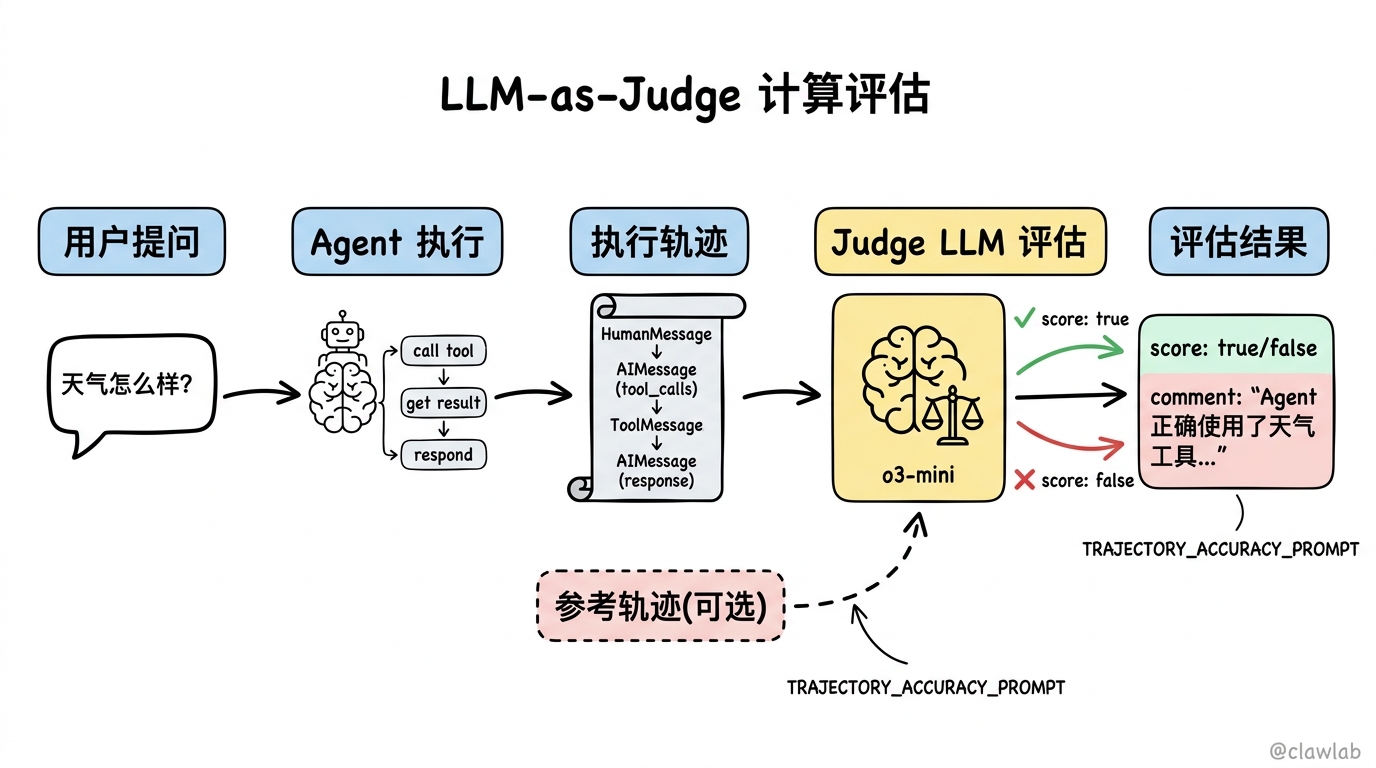
无参考轨迹评估
typescript
import { createTrajectoryLLMAsJudge, TRAJECTORY_ACCURACY_PROMPT } from "agentevals";

const evaluator = createTrajectoryLLMAsJudge({
  model: "openai:o3-mini",
  prompt: TRAJECTORY_ACCURACY_PROMPT
});

async function testTrajectoryQuality() {
  const result = await agent.invoke({
    messages: [new HumanMessage("What's the weather in Seattle?")]
  });

  const evaluation = await evaluator({
    outputs: result.messages
  });

  console.log(evaluation);
  // {
  //   key: 'trajectory_accuracy',
  //   score: true,
  //   comment: 'The agent correctly used the weather tool...'
  // }

  expect(evaluation.score).toBe(true);
}
带参考轨迹评估
提供参考轨迹,让 Judge 评估是否符合预期:
typescript
import {
  createTrajectoryLLMAsJudge,
  TRAJECTORY_ACCURACY_PROMPT_WITH_REFERENCE
} from "agentevals";

const evaluator = createTrajectoryLLMAsJudge({
  model: "openai:o3-mini",
  prompt: TRAJECTORY_ACCURACY_PROMPT_WITH_REFERENCE
});

async function testWithReference() {
  const result = await agent.invoke({
    messages: [new HumanMessage("What's the weather in Seattle?")]
  });

  const referenceTrajectory = [
    new HumanMessage("What's the weather in Seattle?"),
    new AIMessage({
      content: "",
      tool_calls: [{ id: "call_1", name: "get_weather", args: { city: "Seattle" } }]
    }),
    new ToolMessage({ content: "Weather: 65°F, cloudy", tool_call_id: "call_1" }),
    new AIMessage("Seattle is 65°F and cloudy today."),
  ];

  const evaluation = await evaluator({
    outputs: result.messages,
    referenceOutputs: referenceTrajectory
  });

  expect(evaluation.score).toBe(true);
}
LangSmith 集成
配置环境
bash
export LANGSMITH_API_KEY="your_api_key"
export LANGSMITH_TRACING="true"
使用 Vitest/Jest 集成
typescript
import * as ls from "langsmith/vitest";
// import * as ls from "langsmith/jest";

import { createTrajectoryLLMAsJudge, TRAJECTORY_ACCURACY_PROMPT } from "agentevals";
import { HumanMessage, AIMessage, ToolMessage } from "@langchain/core/messages";

const trajectoryEvaluator = createTrajectoryLLMAsJudge({
  model: "openai:o3-mini",
  prompt: TRAJECTORY_ACCURACY_PROMPT
});

ls.describe("Weather Agent Tests", () => {
  ls.test("should call weather tool for weather questions", {
    inputs: {
      messages: [{ role: "user", content: "What is the weather in SF?" }]
    },
    referenceOutputs: {
      messages: [
        new HumanMessage("What is the weather in SF?"),
        new AIMessage({
          content: "",
          tool_calls: [{ id: "call_1", name: "get_weather", args: { city: "SF" } }]
        }),
        new ToolMessage({
          content: "It's 75 degrees and sunny in SF.",
          tool_call_id: "call_1"
        }),
        new AIMessage("The weather in SF is 75 degrees and sunny."),
      ],
    },
  }, async ({ inputs, referenceOutputs }) => {
    const result = await agent.invoke({
      messages: [new HumanMessage("What is the weather in SF?")]
    });

    ls.logOutputs({ messages: result.messages });

    await trajectoryEvaluator({
      inputs,
      outputs: result.messages,
      referenceOutputs,
    });
  });
});
运行测试:
bash
vitest run weather-agent.eval.ts
# 或
jest weather-agent.eval.ts
使用 evaluate 函数
typescript
import { evaluate } from "langsmith/evaluation";
import { createTrajectoryLLMAsJudge, TRAJECTORY_ACCURACY_PROMPT } from "agentevals";

const trajectoryEvaluator = createTrajectoryLLMAsJudge({
  model: "openai:o3-mini",
  prompt: TRAJECTORY_ACCURACY_PROMPT
});

async function runAgent(inputs: any) {
  const result = await agent.invoke(inputs);
  return result.messages;
}

await evaluate(
  runAgent,
  {
    data: "weather_agent_test_dataset",
    evaluators: [trajectoryEvaluator],
  }
);
测试策略建议
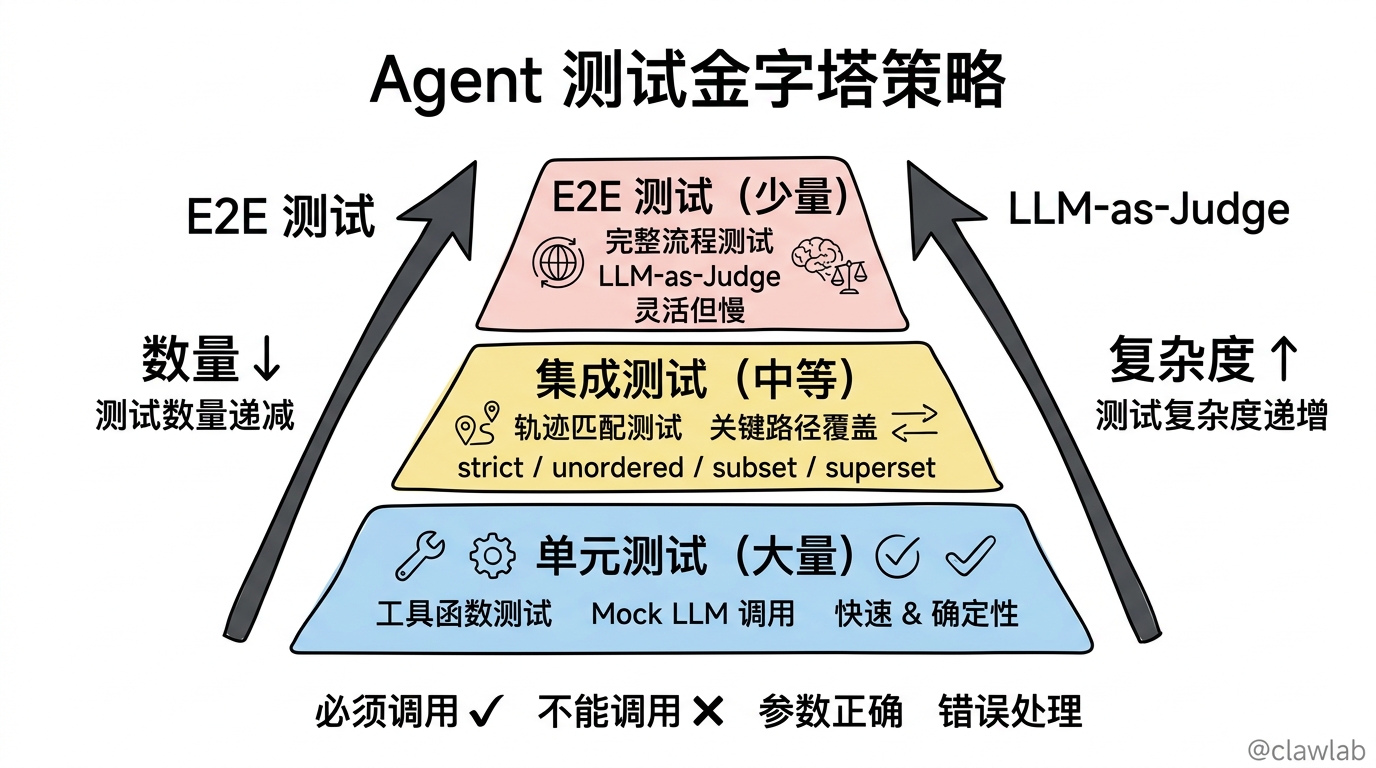
1. 分层测试
┌─────────────────────────────────────────────┐
│  E2E 测试(少量)                            │
│  - 完整流程测试                              │
│  - 使用 LLM-as-Judge                        │
├─────────────────────────────────────────────┤
│  集成测试(中等)                            │
│  - 轨迹匹配测试                              │
│  - 关键路径覆盖                              │
├─────────────────────────────────────────────┤
│  单元测试(大量)                            │
│  - 工具函数测试                              │
│  - Mock LLM 调用                            │
└─────────────────────────────────────────────┘
2. 关键行为测试
重点测试这些行为:
- Agent 必须调用特定工具的场景
- Agent 不能调用特定工具的场景
- 工具参数的正确性
- 错误处理和恢复
typescript
describe("Weather Agent Critical Behaviors", () => {
  test("MUST call weather tool when asked about weather", async () => {
    // 轨迹匹配 - strict 模式
  });

  test("MUST NOT call weather tool for general questions", async () => {
    // 确保不会对"你好"这类问题调用天气工具
  });

  test("MUST handle API errors gracefully", async () => {
    // Mock 工具返回错误,验证 Agent 处理
  });
});
3. 回归测试
保存历史测试用例,确保新改动不破坏已有行为:
typescript
const regressionTestCases = [
  {
    input: "Weather in SF?",
    expectedToolCalls: ["get_weather"],
    description: "Basic weather query"
  },
  {
    input: "Tell me about SF",
    expectedToolCalls: [],
    description: "Should not call tool for general info"
  }
];

for (const testCase of regressionTestCases) {
  test(testCase.description, async () => {
    // ...
  });
}
完整测试示例
typescript
// weather-agent.test.ts
import { createAgent, tool } from "langchain";
import { HumanMessage, AIMessage, ToolMessage } from "@langchain/core/messages";
import {
  createTrajectoryMatchEvaluator,
  createTrajectoryLLMAsJudge,
  TRAJECTORY_ACCURACY_PROMPT
} from "agentevals";
import * as z from "zod";

const getWeather = tool(
  async ({ city }) => `Weather in ${city}: 75°F, sunny`,
  {
    name: "get_weather",
    description: "Get weather for a city",
    schema: z.object({ city: z.string() })
  }
);

const agent = createAgent({
  model: "gpt-4.1",
  tools: [getWeather],
  systemPrompt: "You are a weather assistant. Use get_weather tool for weather queries."
});

describe("Weather Agent", () => {
  const strictEvaluator = createTrajectoryMatchEvaluator({
    trajectoryMatchMode: "strict"
  });

  const llmJudge = createTrajectoryLLMAsJudge({
    model: "openai:o3-mini",
    prompt: TRAJECTORY_ACCURACY_PROMPT
  });

  test("calls weather tool for weather questions", async () => {
    const result = await agent.invoke({
      messages: [new HumanMessage("What's the weather in Tokyo?")]
    });

    const reference = [
      new HumanMessage("What's the weather in Tokyo?"),
      new AIMessage({
        content: "",
        tool_calls: [{ id: "call_1", name: "get_weather", args: { city: "Tokyo" } }]
      }),
      new ToolMessage({ content: "Weather in Tokyo: 75°F, sunny", tool_call_id: "call_1" }),
      new AIMessage("The weather in Tokyo is 75°F and sunny."),
    ];

    const evaluation = await strictEvaluator({
      outputs: result.messages,
      referenceOutputs: reference
    });

    expect(evaluation.score).toBe(true);
  });

  test("produces reasonable trajectory (LLM judge)", async () => {
    const result = await agent.invoke({
      messages: [new HumanMessage("How's the weather in Paris?")]
    });

    const evaluation = await llmJudge({
      outputs: result.messages
    });

    expect(evaluation.score).toBe(true);
    console.log("Judge comment:", evaluation.comment);
  });
});
本章小结
Agent 测试的核心要点:
核心挑战:
- LLM 非确定性,传统断言失效
- 需要测试执行轨迹而非具体输出
两种方法:
- 轨迹匹配:确定性、快速、预定义期望
- LLM-as-Judge:灵活、评估复杂行为
轨迹匹配模式:
- strict:完全匹配
- unordered:顺序无关
- subset:不能多调用
- superset:至少调用
测试策略:
- 分层测试:E2E < 集成 < 单元
- 关键行为测试:必须/不能调用
- 回归测试:保护已有行为
LangSmith 集成:
- Vitest/Jest 集成
- evaluate 函数
- 自动记录测试结果
Agent 测试是保证生产质量的关键,虽然不能 100% 保证行为一致,但能大幅降低出错概率!
教程总结
恭喜你完成了 LangChain 中文教程 全部 30 篇文章!
让我们回顾一下学到的内容:
| 篇章 | 内容 |
|---|---|
| 基础入门篇 | Agent 概念、工具调用、消息系统、模型配置 |
| 高级功能篇 | 结构化输出、中间件、护栏、运行时配置 |
| 上下文工程篇 | 上下文管理、MCP 协议、人机协作 |
| 多代理系统篇 | Subagents、Handoffs、Skills、Router、Custom Workflow |
| RAG 与知识库篇 | 检索流水线、三种 RAG 架构 |
| 工具与部署篇 | LangSmith Studio、Agent Chat UI、测试策略 |
现在你已经掌握了构建生产级 AI Agent 的完整技能!🎉