主题
LangChain 教程 20|人机协作:让人类参与 Agent 决策
📖 本篇导读:这是 LangChain 系列教程的第 20 篇。本篇将深入讲解 Human-in-the-Loop 的工作原理、人工审批中间件的配置,以及三种审批决策的实现。读完预计需要 10 分钟。
简单来说
Human-in-the-Loop(HITL)让你能在 Agent 执行敏感操作前暂停,等待人工确认。用户可以批准、修改或拒绝 Agent 提议的操作——就像给 AI 配了一个"人工审批关卡"。
本节目标
学完本节,你将能够:
- 配置人工审批中间件
- 理解三种审批决策:approve、edit、reject
- 实现流式场景下的人工审批
- 处理多个待审批操作
业务场景
想象这些敏感操作:
- 发送邮件:AI 写好邮件后,需要人工确认再发送
- 执行 SQL:AI 生成 DELETE/UPDATE 语句,必须 DBA 审批
- 文件操作:AI 要删除或修改文件,需要用户确认
- 支付转账:AI 发起付款,必须财务审批
这些场景中,AI 可以提议操作,但最终决定权在人类——HITL 正是为此而生。
一、HITL 工作原理
1.1 执行流程
用户请求 → Agent 思考 → 提议工具调用
                           │
                    [需要人工审批?]
                           │
              ┌────────────┴────────────┐
              ↓                          ↓
             否                         是
              │                          │
              ↓                    保存状态并中断
         直接执行                        │
              │                    等待人工决策
              │                          │
              ↓                    ┌─────┴─────┐
           返回结果              approve  edit  reject
                                   │       │      │
                                   ↓       ↓      ↓
                                 执行   修改后   拒绝并
                                 原操作  执行    反馈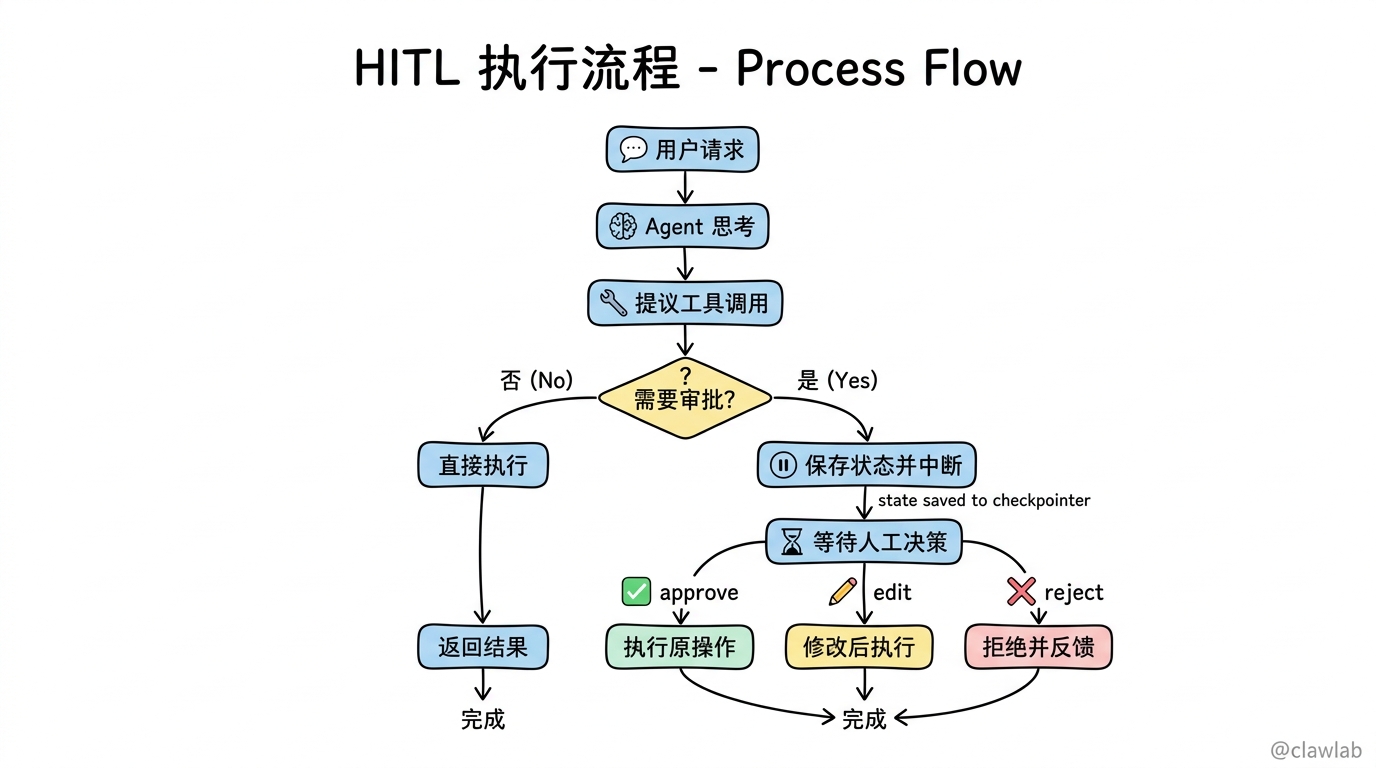
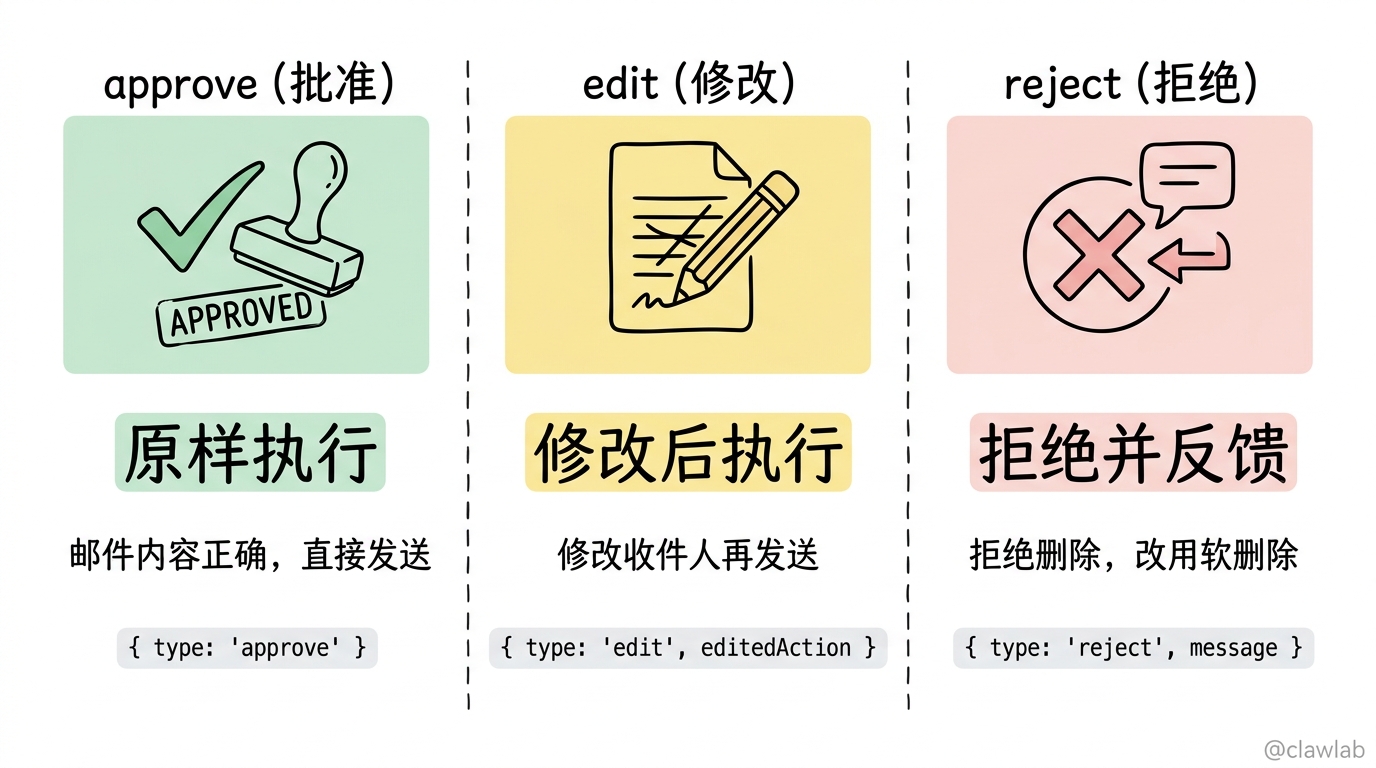
1.2 三种决策类型
| 决策类型 | 说明 | 示例场景 |
|---|---|---|
| ✅ approve | 批准原操作,原样执行 | 邮件内容正确,直接发送 |
| ✏️ edit | 修改后执行 | 修改邮件收件人再发送 |
| ❌ reject | 拒绝并反馈 | 拒绝删除操作,告诉 AI 原因 |
二、基础配置
2.1 添加 HITL 中间件
typescript
import { createAgent, humanInTheLoopMiddleware } from "langchain";
import { MemorySaver } from "@langchain/langgraph";

const agent = createAgent({
  model: "gpt-4o",
  tools: [writeFileTool, executeSQLTool, sendEmailTool, readDataTool],
  middleware: [
    humanInTheLoopMiddleware({
      interruptOn: {
        write_file: true,
        execute_sql: {
          allowedDecisions: ["approve", "reject"],
          description: "🚨 SQL 执行需要 DBA 审批",
        },
        send_email: {
          allowedDecisions: ["approve", "edit", "reject"],
          description: "📧 邮件发送前请确认内容",
        },
        read_data: false,
      },
      descriptionPrefix: "工具执行待审批",
    }),
  ],
  checkpointer: new MemorySaver(),
});
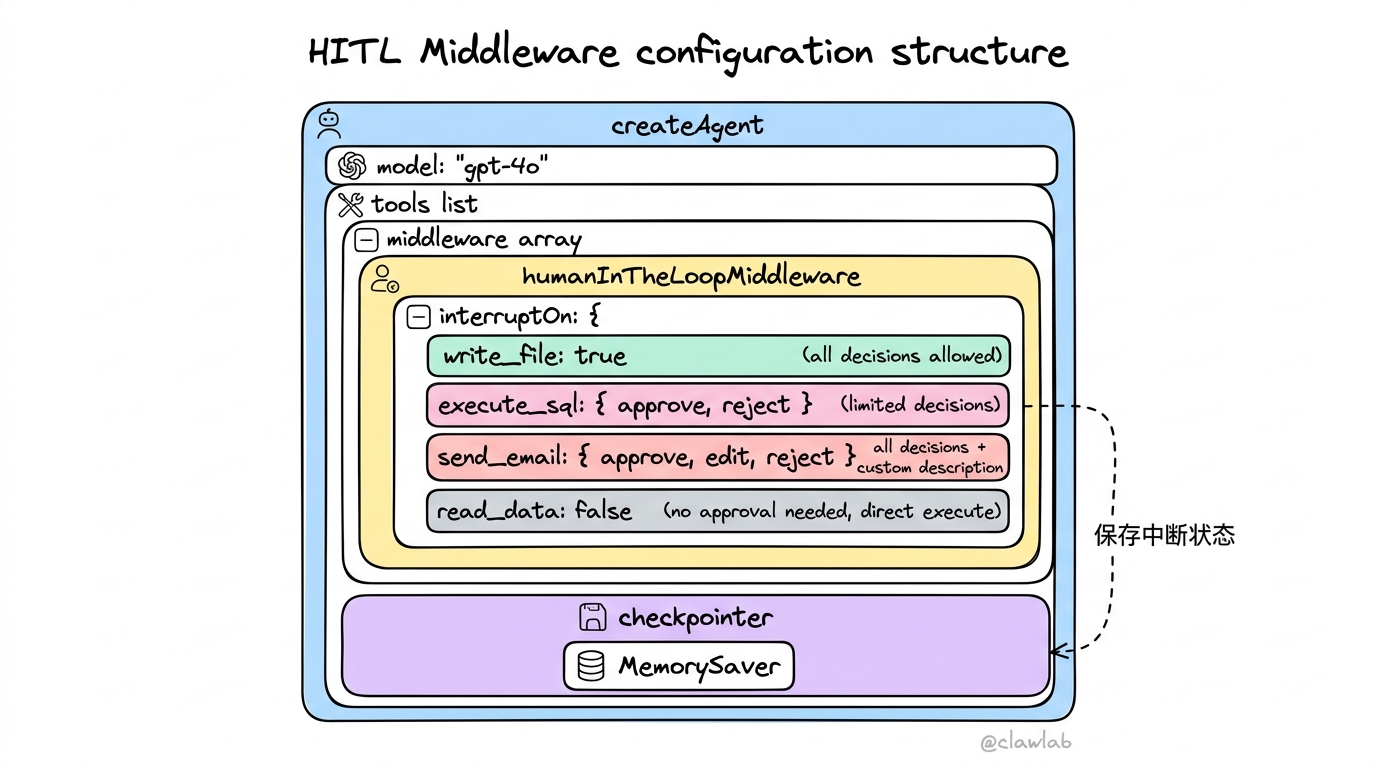
2.2 配置说明
| 配置值 | 说明 |
|---|---|
true | 允许所有决策(approve/edit/reject) |
false | 不需要审批,直接执行 |
{ allowedDecisions: [...] } | 只允许指定的决策类型 |
description | 自定义审批提示信息 |
重要:HITL 必须配置 checkpointer 来保存中断状态!
三、响应中断
3.1 触发中断
typescript
import { HumanMessage } from "@langchain/core/messages";

const config = { configurable: { thread_id: "session-123" } };

const result = await agent.invoke(
  {
    messages: [new HumanMessage("删除数据库中 30 天前的旧记录")],
  },
  config
);

if (result.__interrupt__) {
  console.log("需要人工审批:");
  console.log(result.__interrupt__);
}
3.2 中断响应结构
typescript
// result.__interrupt__ 的结构
[
  {
    value: {
      action_requests: [
        {
          name: "execute_sql",
          arguments: {
            query: "DELETE FROM records WHERE created_at < NOW() - INTERVAL '30 days';"
          },
          description: "🚨 SQL 执行需要 DBA 审批\n\nTool: execute_sql\nArgs: {...}"
        }
      ],
      review_configs: [
        {
          action_name: "execute_sql",
          allowed_decisions: ["approve", "reject"]
        }
      ]
    }
  }
]
四、提供决策
4.1 批准操作 (approve)
typescript
import { Command } from "@langchain/langgraph";

await agent.invoke(
  new Command({
    resume: {
      decisions: [{ type: "approve" }]
    }
  }),
  config
);
4.2 修改后执行 (edit)
typescript
await agent.invoke(
  new Command({
    resume: {
      decisions: [
        {
          type: "edit",
          editedAction: {
            name: "execute_sql",
            args: {
              query: "DELETE FROM records WHERE created_at < NOW() - INTERVAL '60 days' LIMIT 1000;"
            }
          }
        }
      ]
    }
  }),
  config
);注意:修改操作时保持保守——大幅修改可能导致 AI 重新评估策略。
4.3 拒绝操作 (reject)
typescript
await agent.invoke(
  new Command({
    resume: {
      decisions: [
        {
          type: "reject",
          message: "不允许直接删除数据,请改用软删除(设置 deleted_at 字段)"
        }
      ]
    }
  }),
  config
);
拒绝消息会作为反馈添加到对话中,帮助 AI 理解原因并调整策略。
五、多个待审批操作
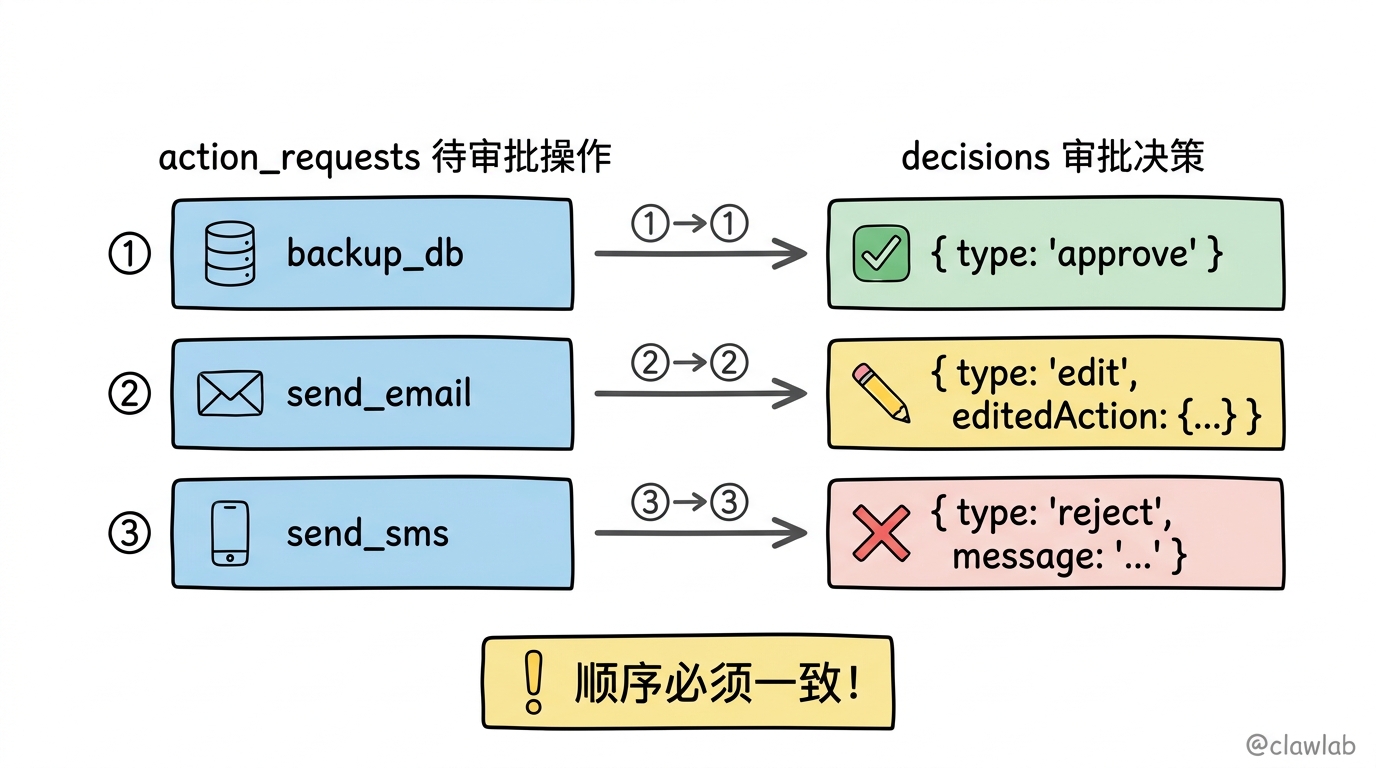
当 AI 同时提议多个需要审批的操作时,需要为每个操作提供决策:
typescript
const result = await agent.invoke(
  {
    messages: [new HumanMessage("备份数据库,然后发邮件通知管理员")],
  },
  config
);

await agent.invoke(
  new Command({
    resume: {
      decisions: [
        { type: "approve" },
        {
          type: "edit",
          editedAction: {
            name: "send_email",
            args: {
              to: "admin@company.com",
              subject: "数据库备份完成",
              body: "备份已完成,请查收。"
            }
          }
        },
        {
          type: "reject",
          message: "不需要发送短信通知"
        }
      ]
    }
  }),
  config
);重要:决策顺序必须与 action_requests 中的顺序一致!
六、流式处理
6.1 流式中断检测
typescript
import { Command } from "@langchain/langgraph";

const config = { configurable: { thread_id: "stream-session" } };

for await (const [mode, chunk] of await agent.stream(
  { messages: [{ role: "user", content: "删除旧记录并发送通知" }] },
  { ...config, streamMode: ["updates", "messages"] }
)) {
  if (mode === "messages") {
    const [token, metadata] = chunk;
    if (token.content) {
      process.stdout.write(token.content);
    }
  } else if (mode === "updates") {
    if ("__interrupt__" in chunk) {
      console.log("\n\n⚠️ 需要人工审批:");
      console.log(JSON.stringify(chunk.__interrupt__, null, 2));
    }
  }
}
6.2 流式恢复
typescript
for await (const [mode, chunk] of await agent.stream(
  new Command({ resume: { decisions: [{ type: "approve" }] } }),
  { ...config, streamMode: ["updates", "messages"] }
)) {
  if (mode === "messages") {
    const [token, metadata] = chunk;
    if (token.content) {
      process.stdout.write(token.content);
    }
  }
}
七、完整实战示例
7.1 邮件审批系统
typescript
import { createAgent, humanInTheLoopMiddleware } from "langchain";
import { MemorySaver } from "@langchain/langgraph";
import { HumanMessage } from "@langchain/core/messages";
import { Command } from "@langchain/langgraph";
import { tool } from "@langchain/core/tools";
import * as z from "zod";

const sendEmailTool = tool(
  async ({ to, subject, body }) => {
    console.log(`发送邮件到 ${to}: ${subject}`);
    return `邮件已发送到 ${to}`;
  },
  {
    name: "send_email",
    description: "发送电子邮件",
    schema: z.object({
      to: z.string().describe("收件人邮箱"),
      subject: z.string().describe("邮件主题"),
      body: z.string().describe("邮件正文"),
    }),
  }
);

const agent = createAgent({
  model: "gpt-4o",
  tools: [sendEmailTool],
  middleware: [
    humanInTheLoopMiddleware({
      interruptOn: {
        send_email: {
          allowedDecisions: ["approve", "edit", "reject"],
          description: "📧 请确认邮件内容后再发送",
        },
      },
    }),
  ],
  checkpointer: new MemorySaver(),
});

async function emailWorkflow() {
  const config = { configurable: { thread_id: "email-thread-1" } };

  console.log("用户: 给团队发一封会议通知邮件,明天下午 3 点开会");
  let result = await agent.invoke(
    {
      messages: [
        new HumanMessage("给团队发一封会议通知邮件,明天下午 3 点开会")
      ],
    },
    config
  );

  if (result.__interrupt__) {
    const actionRequest = result.__interrupt__[0].value.action_requests[0];
    console.log("\n📋 待审批的操作:");
    console.log(`工具: ${actionRequest.name}`);
    console.log(`参数:`, actionRequest.arguments);

    const userChoice = "edit";

    if (userChoice === "approve") {
      result = await agent.invoke(
        new Command({ resume: { decisions: [{ type: "approve" }] } }),
        config
      );
    } else if (userChoice === "edit") {
      result = await agent.invoke(
        new Command({
          resume: {
            decisions: [
              {
                type: "edit",
                editedAction: {
                  name: "send_email",
                  args: {
                    to: "team@company.com",
                    subject: "【重要】明日会议通知 - 下午3点",
                    body: `各位同事:

明天(周三)下午 3 点,我们将在会议室 A 召开团队周会。

请提前准备好本周工作汇报。

谢谢!`,
                  },
                },
              },
            ],
          },
        }),
        config
      );
    } else {
      result = await agent.invoke(
        new Command({
          resume: {
            decisions: [
              {
                type: "reject",
                message: "请不要发送邮件,改用企业微信通知",
              },
            ],
          },
        }),
        config
      );
    }
  }

  console.log("\n最终结果:", result.messages.at(-1)?.content);
}

emailWorkflow();
7.2 数据库操作审批
typescript
import { createAgent, humanInTheLoopMiddleware } from "langchain";
import { MemorySaver } from "@langchain/langgraph";
import { tool } from "@langchain/core/tools";
import * as z from "zod";

const executeSQLTool = tool(
  async ({ query }) => {
    console.log(`执行 SQL: ${query}`);
    return `SQL 执行成功,影响 100 行`;
  },
  {
    name: "execute_sql",
    description: "执行 SQL 语句",
    schema: z.object({
      query: z.string().describe("SQL 语句"),
    }),
  }
);

const agent = createAgent({
  model: "gpt-4o",
  tools: [executeSQLTool],
  middleware: [
    humanInTheLoopMiddleware({
      interruptOn: {
        execute_sql: {
          allowedDecisions: ["approve", "reject"],
          description: "🔒 危险操作:SQL 执行需要 DBA 审批",
        },
      },
    }),
  ],
  checkpointer: new MemorySaver(),
});

async function databaseWorkflow() {
  const config = { configurable: { thread_id: "db-thread-1" } };

  const result = await agent.invoke(
    {
      messages: [{ role: "user", content: "删除所有过期的用户会话" }],
    },
    config
  );

  if (result.__interrupt__) {
    const action = result.__interrupt__[0].value.action_requests[0];

    console.log("⚠️ DBA 审批请求:");
    console.log(`SQL: ${action.arguments.query}`);

    const isDangerous = action.arguments.query.includes("DELETE") ||
                        action.arguments.query.includes("DROP") ||
                        action.arguments.query.includes("TRUNCATE");

    if (isDangerous) {
      console.log("检测到危险操作,自动拒绝");
      await agent.invoke(
        new Command({
          resume: {
            decisions: [
              {
                type: "reject",
                message: "DELETE 操作需要添加 WHERE 条件和 LIMIT 限制",
              },
            ],
          },
        }),
        config
      );
    } else {
      await agent.invoke(
        new Command({ resume: { decisions: [{ type: "approve" }] } }),
        config
      );
    }
  }
}

databaseWorkflow();
八、前端集成
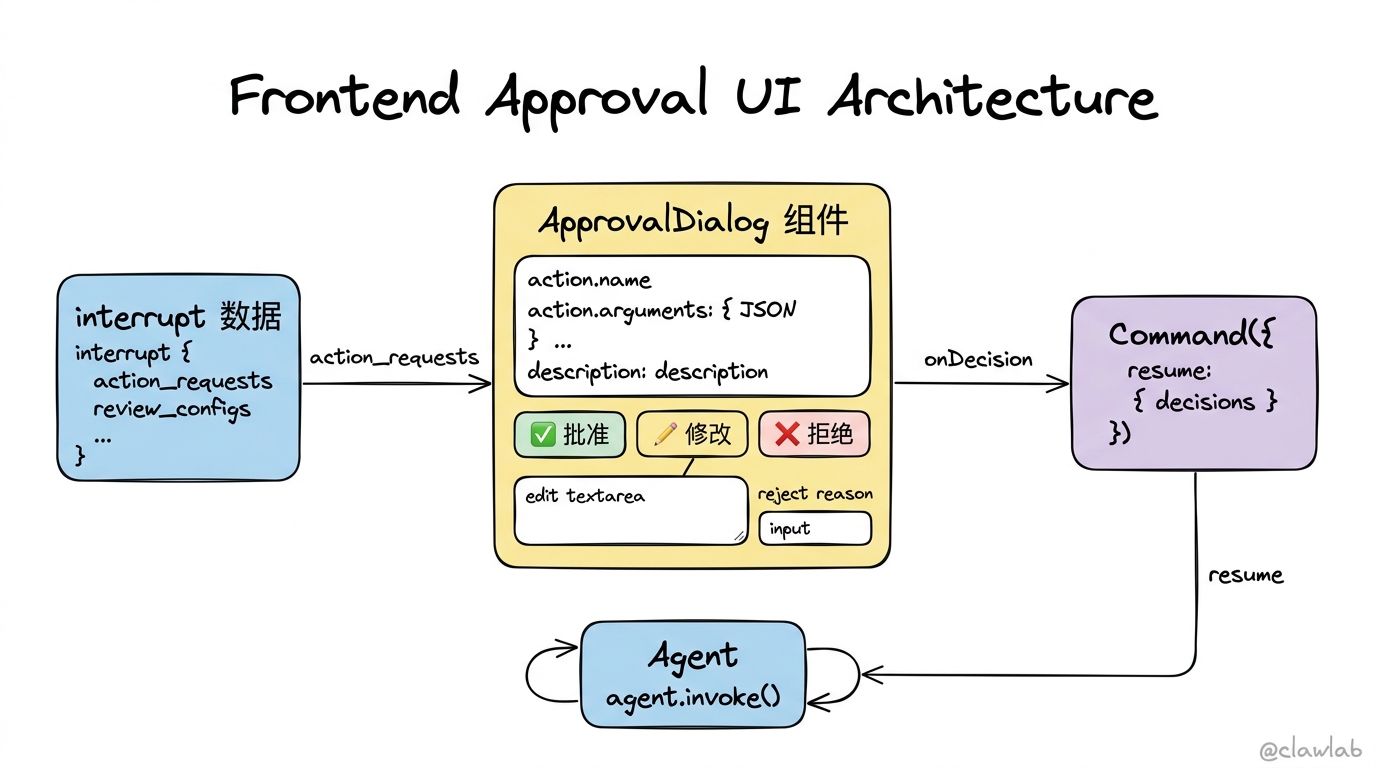
8.1 React 审批组件
tsx
import { useState, useEffect } from "react";
import { useStream } from "@langchain/langgraph-sdk/react";

interface ActionRequest {
  name: string;
  arguments: Record<string, unknown>;
  description: string;
}

interface ApprovalDialogProps {
  action: ActionRequest;
  allowedDecisions: string[];
  onDecision: (decision: Decision) => void;
}

type Decision =
  | { type: "approve" }
  | { type: "edit"; editedAction: { name: string; args: Record<string, unknown> } }
  | { type: "reject"; message: string };

function ApprovalDialog({ action, allowedDecisions, onDecision }: ApprovalDialogProps) {
  const [editedArgs, setEditedArgs] = useState(action.arguments);
  const [rejectMessage, setRejectMessage] = useState("");

  return (
    <div className="approval-dialog">
      <h3>⚠️ 需要您的确认</h3>
      <p><strong>操作:</strong> {action.name}</p>
      <pre>{JSON.stringify(action.arguments, null, 2)}</pre>

      <div className="actions">
        {allowedDecisions.includes("approve") && (
          <button onClick={() => onDecision({ type: "approve" })}>
            ✅ 批准
          </button>
        )}

        {allowedDecisions.includes("edit") && (
          <button onClick={() => onDecision({
            type: "edit",
            editedAction: { name: action.name, args: editedArgs }
          })}>
            ✏️ 修改后执行
          </button>
        )}

        {allowedDecisions.includes("reject") && (
          <>
            <input
              type="text"
              placeholder="拒绝原因..."
              value={rejectMessage}
              onChange={(e) => setRejectMessage(e.target.value)}
            />
            <button onClick={() => onDecision({
              type: "reject",
              message: rejectMessage || "操作被拒绝"
            })}>
              ❌ 拒绝
            </button>
          </>
        )}
      </div>
    </div>
  );
}
常见问题
Q1: 为什么必须配置 checkpointer?
HITL 需要在中断时保存 Agent 状态(包括消息历史、待执行的工具调用等)。没有 checkpointer,恢复执行时状态会丢失。
Q2: 如何设置审批超时?
可以在应用层实现超时逻辑:
typescript
const timeoutMs = 3600000;
const startTime = Date.now();

while (Date.now() - startTime < timeoutMs) {
  const decision = await checkForUserDecision();
  if (decision) {
    await agent.invoke(new Command({ resume: { decisions: [decision] } }), config);
    break;
  }
  await sleep(1000);
}
Q3: 可以跳过特定调用的审批吗?
可以通过 false 配置特定工具不需要审批:
typescript
interruptOn: {
  send_email: true,
  read_data: false,
}
总结
Human-in-the-Loop 让人类保持对 AI 的控制权:
| 功能 | 实现方式 |
|---|---|
| 配置审批 | humanInTheLoopMiddleware({ interruptOn: {...} }) |
| 批准操作 | { type: "approve" } |
| 修改执行 | { type: "edit", editedAction: {...} } |
| 拒绝并反馈 | { type: "reject", message: "..." } |
| 恢复执行 | new Command({ resume: { decisions: [...] } }) |
| 持久化状态 | checkpointer: new MemorySaver() |
核心理念:HITL 是 AI 安全的最后一道防线——让人类在关键决策点保持控制权,同时享受 AI 自动化带来的效率提升。
恭喜你完成了上下文工程篇的学习!你现在已经掌握了 LangChain 的核心概念和高级功能,可以构建可靠、安全、可控的 AI Agent 了!