主题
Functional API:函数式编程风格指南
简单来说
Functional API 是 LangGraph 的另一种编程风格,不用"画图",而是用熟悉的 while 循环和函数调用来编排 AI 工作流。如果你觉得 Graph API 的"节点+边"太抽象,Functional API 会让你感觉像在写普通的 TypeScript 代码。
🎯 本节目标
学完本节,你将能够:
- 掌握
task和entrypoint两个核心函数 - 理解 Functional API 与 Graph API 的区别
- 学会用函数式风格构建 Agent
- 知道什么场景下该选择哪种 API
核心痛点与解决方案
痛点:Graph API 学习曲线
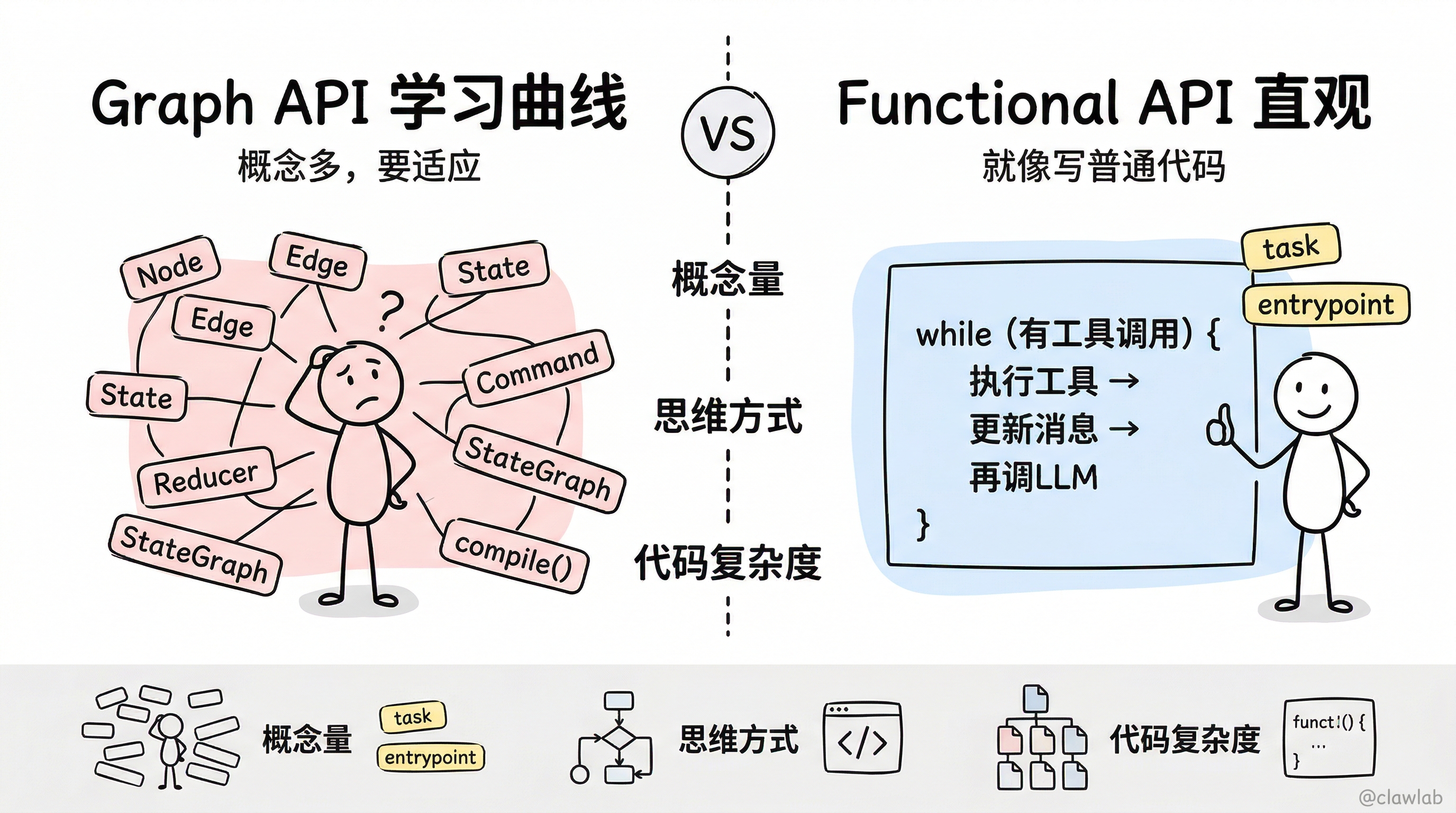
Graph API 很强大,但对于习惯命令式编程的开发者来说,可能会有一些不适应:
| 不适应的地方 | 具体表现 |
|---|---|
| 概念多 | 要理解 Node、Edge、State、Reducer、Command... |
| 思维转换 | 从"写代码"变成"画图",需要适应 |
| 简单场景过度设计 | 就想写个循环,非得画一堆节点 |
解决:Functional API 的直观表达
typescript
// Functional API:就像写普通代码
const agent = entrypoint({ name: "agent" }, async (messages) => {
  let response = await callLlm(messages);

  while (response.tool_calls?.length) {
    const results = await executeTools(response.tool_calls);
    messages = addMessages(messages, [response, ...results]);
    response = await callLlm(messages);
  }

  return messages;
});
💡 人话解读:
"看,就是一个 while 循环!LLM 说要用工具,就执行工具;不用了,就退出循环。没有节点,没有边,就是普通代码。"
生活化类比:两种点菜方式
想象你去餐厅点菜:
| API 风格 | 点菜方式 | 特点 |
|---|---|---|
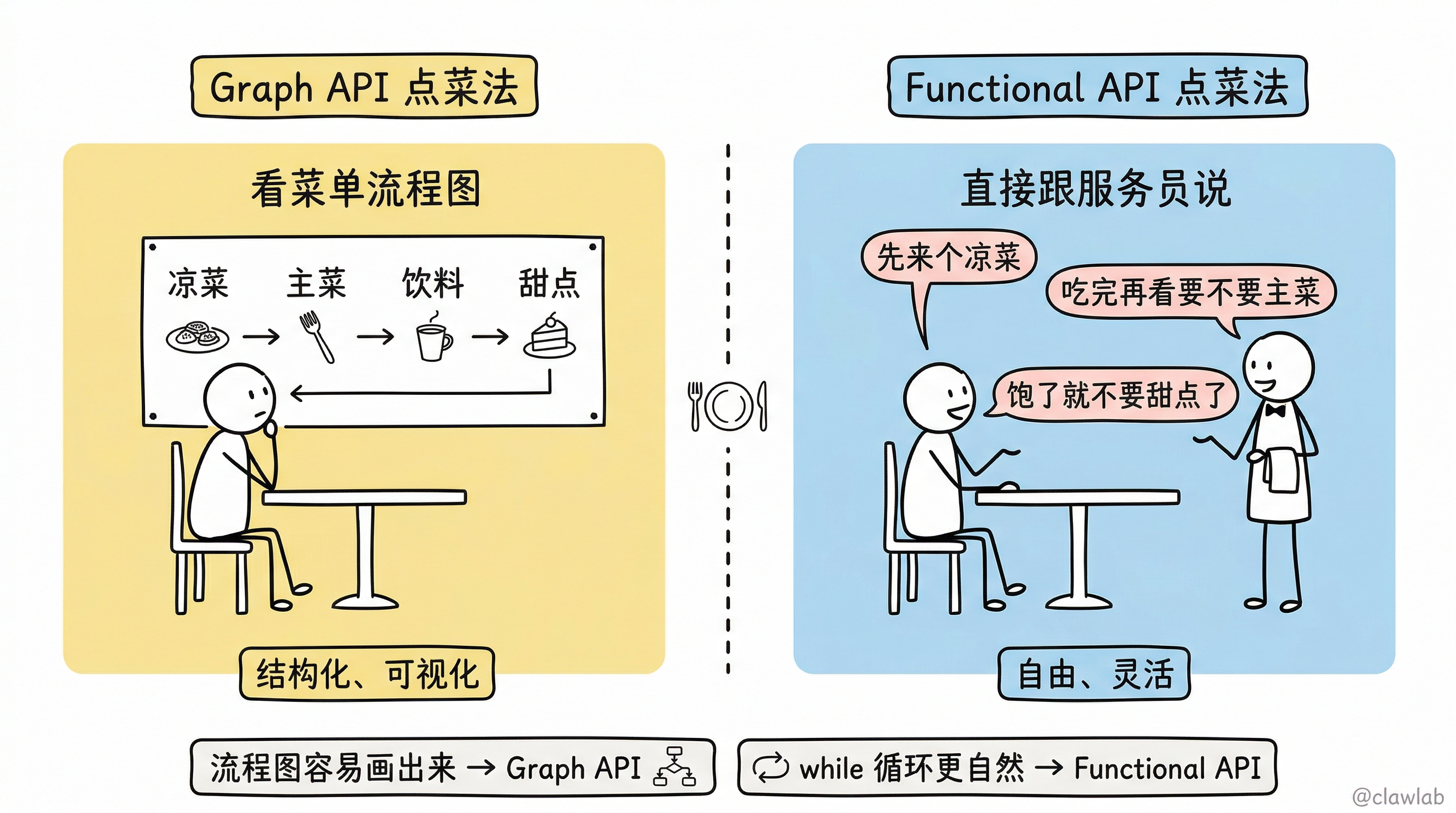
| Graph API | 看菜单流程图 | 先看凉菜 → 再选主菜 → 然后看饮料 → 最后甜点 |
| Functional API | 直接跟服务员说 | "先来个凉菜,吃完再看要不要主菜,主菜吃饱了就不要甜点了" |
两种方式都能点到菜,只是表达方式不同:
- Graph API:结构化、可视化,适合复杂流程
- Functional API:自由、灵活,适合简单循环
核心 API 详解
1. task:定义可复用的任务单元
typescript
import { task } from "@langchain/langgraph";

const myTask = task(
  { name: "taskName" },
  async (input: InputType): Promise<OutputType> => {
    // 执行任务逻辑
    return result;
  }
);
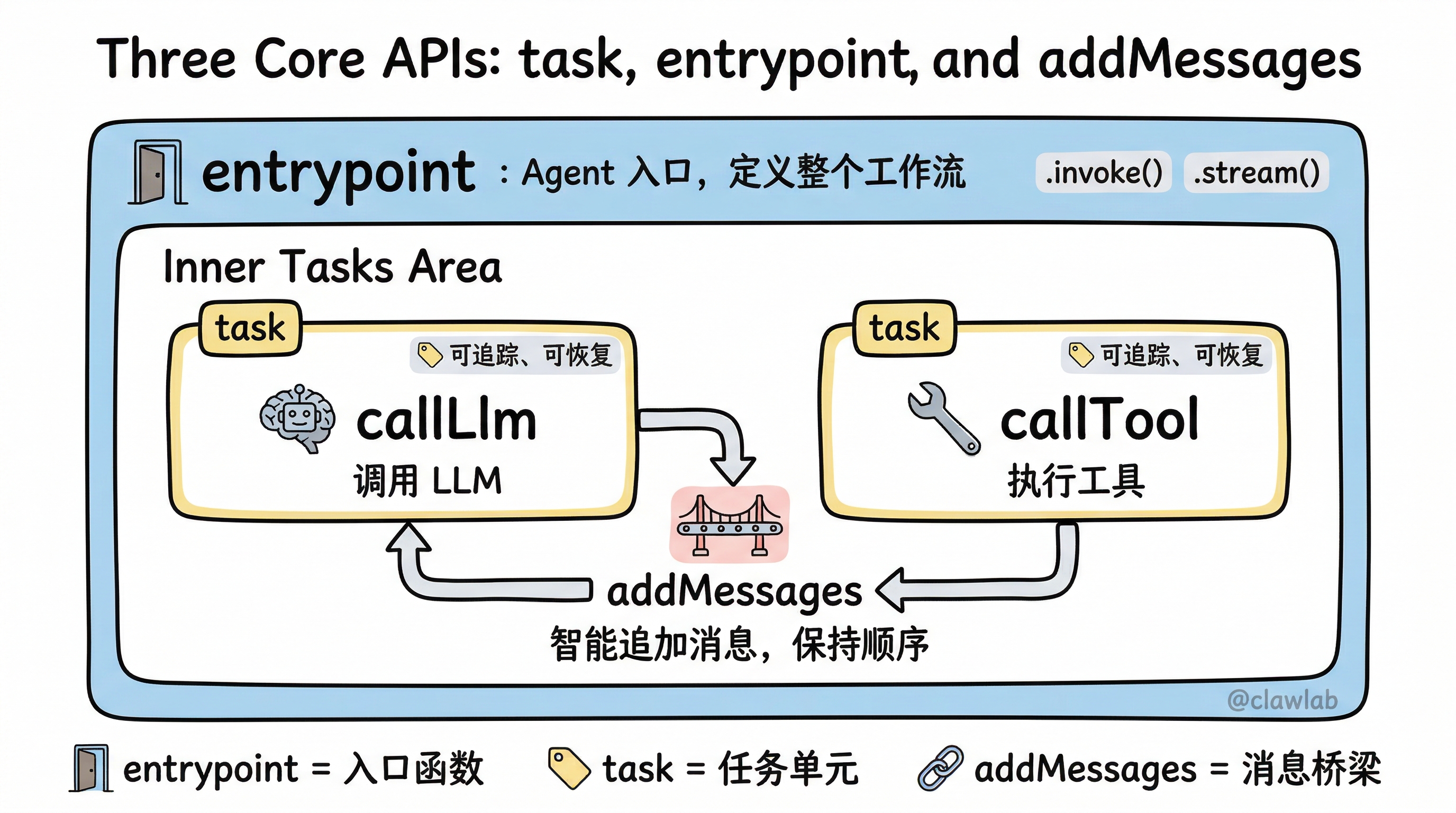
task 的作用:
- 包装一个普通函数,使其成为 LangGraph 可追踪的任务
- 自动记录执行信息(用于 LangSmith 追踪)
- 支持 Checkpointer 进行状态恢复
示例:LLM 调用任务
typescript
import { task } from "@langchain/langgraph";
import { ChatAnthropic } from "@langchain/anthropic";
import { SystemMessage, type BaseMessage } from "@langchain/core/messages";

const model = new ChatAnthropic({ model: "claude-sonnet-4-5-20250929" });

const callLlm = task(
  { name: "callLlm" },
  async (messages: BaseMessage[]) => {
    return model.invoke([
      new SystemMessage("你是一个有帮助的助手。"),
      ...messages,
    ]);
  }
);
💡 人话解读:
"
task就是给函数'贴标签',告诉系统'这是一个重要步骤,请记录下来'。功能上和普通函数一样,但能被追踪和恢复。"
示例:工具调用任务
typescript
import type { ToolCall } from "@langchain/core/messages/tool";

const callTool = task(
  { name: "callTool" },
  async (toolCall: ToolCall) => {
    const tool = toolsByName[toolCall.name];
    return tool.invoke(toolCall);
  }
);
2. entrypoint:定义 Agent 入口
typescript
import { entrypoint } from "@langchain/langgraph";

const agent = entrypoint(
  { name: "agentName" },
  async (input: InputType): Promise<OutputType> => {
    // Agent 主逻辑
    return result;
  }
);
entrypoint 的作用:
- 定义整个 Agent 的入口函数
- 返回一个可调用的 Agent 对象
- 支持
invoke()和stream()方法
示例:完整的计算器 Agent
typescript
import { entrypoint, addMessages } from "@langchain/langgraph";
import { HumanMessage, type BaseMessage } from "@langchain/core/messages";

const agent = entrypoint(
  { name: "calculatorAgent" },
  async (messages: BaseMessage[]) => {
    let modelResponse = await callLlm(messages);

    while (true) {
      if (!modelResponse.tool_calls?.length) {
        break;
      }

      const toolResults = await Promise.all(
        modelResponse.tool_calls.map(tc => callTool(tc))
      );

      messages = addMessages(messages, [modelResponse, ...toolResults]);
      modelResponse = await callLlm(messages);
    }

    return messages;
  }
);

// 调用 Agent
const result = await agent.invoke([
  new HumanMessage("计算 3 + 4")
]);
3. addMessages:消息追加工具
typescript
import { addMessages } from "@langchain/langgraph";

const newMessages = addMessages(existingMessages, [newMessage1, newMessage2]);
addMessages 的作用:
- 智能追加消息到消息列表
- 自动处理消息 ID 去重
- 保持消息顺序
💡 人话解读:
"在 Graph API 里,
MessagesValue自动帮你追加消息。在 Functional API 里,你需要手动调用addMessages来追加。"
完整示例:构建计算器 Agent
Step 1:定义工具和模型
typescript
import { ChatAnthropic } from "@langchain/anthropic";
import { tool } from "@langchain/core/tools";
import * as z from "zod";

const model = new ChatAnthropic({
  model: "claude-sonnet-4-5-20250929",
  temperature: 0,
});

const add = tool(({ a, b }) => a + b, {
  name: "add",
  description: "Add two numbers",
  schema: z.object({
    a: z.number().describe("First number"),
    b: z.number().describe("Second number"),
  }),
});

const multiply = tool(({ a, b }) => a * b, {
  name: "multiply",
  description: "Multiply two numbers",
  schema: z.object({
    a: z.number().describe("First number"),
    b: z.number().describe("Second number"),
  }),
});

const divide = tool(({ a, b }) => a / b, {
  name: "divide",
  description: "Divide two numbers",
  schema: z.object({
    a: z.number().describe("First number"),
    b: z.number().describe("Second number"),
  }),
});

const toolsByName = {
  [add.name]: add,
  [multiply.name]: multiply,
  [divide.name]: divide,
};
const tools = Object.values(toolsByName);
const modelWithTools = model.bindTools(tools);
Step 2:定义任务
typescript
import { task, entrypoint, addMessages } from "@langchain/langgraph";
import { SystemMessage, type BaseMessage } from "@langchain/core/messages";
import type { ToolCall } from "@langchain/core/messages/tool";

const callLlm = task(
  { name: "callLlm" },
  async (messages: BaseMessage[]) => {
    return modelWithTools.invoke([
      new SystemMessage("你是一个数学助手,使用工具进行精确计算。"),
      ...messages,
    ]);
  }
);

const callTool = task(
  { name: "callTool" },
  async (toolCall: ToolCall) => {
    const tool = toolsByName[toolCall.name];
    return tool.invoke(toolCall);
  }
);
Step 3:定义 Agent 入口
typescript
const agent = entrypoint(
  { name: "calculatorAgent" },
  async (messages: BaseMessage[]) => {
    let modelResponse = await callLlm(messages);

    while (true) {
      if (!modelResponse.tool_calls?.length) {
        break;
      }

      const toolResults = await Promise.all(
        modelResponse.tool_calls.map(tc => callTool(tc))
      );

      messages = addMessages(messages, [modelResponse, ...toolResults]);
      modelResponse = await callLlm(messages);
    }

    return addMessages(messages, [modelResponse]);
  }
);
Step 4:执行
typescript
import { HumanMessage } from "@langchain/core/messages";

const result = await agent.invoke([
  new HumanMessage("计算 (3 + 4) * 5")
]);

for (const message of result) {
  console.log(`[${message.getType()}]: ${message.text || message.content}`);
}
执行流程详解
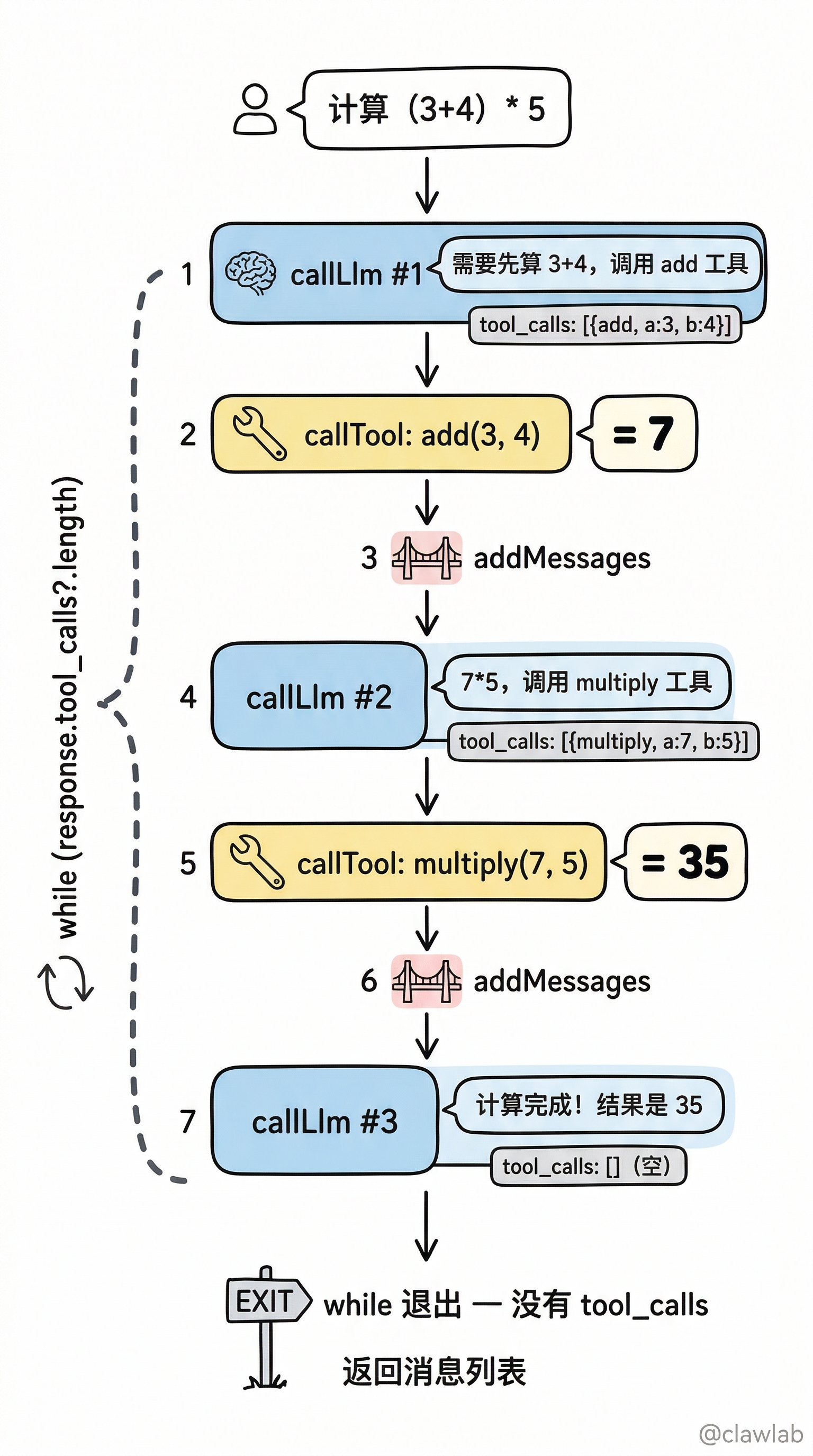
让我们追踪 "计算 (3 + 4) * 5" 的执行过程:
┌────────────────────────────────────────────────────────────────┐
│ 输入: [HumanMessage("计算 (3 + 4) * 5")]                        │
└────────────────────────────┬───────────────────────────────────┘
                             │
                             ▼
┌────────────────────────────────────────────────────────────────┐
│ 第一次 callLlm                                                  │
│ LLM: "需要先算 3 + 4,调用 add 工具"                             │
│ 返回: { tool_calls: [{ name: "add", args: { a: 3, b: 4 }}] }   │
└────────────────────────────┬───────────────────────────────────┘
                             │
                             ▼
┌────────────────────────────────────────────────────────────────┐
│ while 循环 - 检测到 tool_calls                                  │
│ 执行: callTool({ name: "add", args: { a: 3, b: 4 }})           │
│ 结果: 7                                                        │
└────────────────────────────┬───────────────────────────────────┘
                             │
                             ▼
┌────────────────────────────────────────────────────────────────┐
│ addMessages 追加工具结果                                        │
│ messages = [...原消息, AIMessage(tool_calls), ToolMessage(7)]  │
└────────────────────────────┬───────────────────────────────────┘
                             │
                             ▼
┌────────────────────────────────────────────────────────────────┐
│ 第二次 callLlm                                                  │
│ LLM: "好的,3+4=7,现在需要 7 * 5,调用 multiply"                │
│ 返回: { tool_calls: [{ name: "multiply", args: { a: 7, b: 5}}]}│
└────────────────────────────┬───────────────────────────────────┘
                             │
                             ▼
┌────────────────────────────────────────────────────────────────┐
│ while 循环 - 检测到 tool_calls                                  │
│ 执行: callTool({ name: "multiply", args: { a: 7, b: 5 }})      │
│ 结果: 35                                                       │
└────────────────────────────┬───────────────────────────────────┘
                             │
                             ▼
┌────────────────────────────────────────────────────────────────┐
│ 第三次 callLlm                                                  │
│ LLM: "计算完成!(3 + 4) * 5 = 35"                               │
│ 返回: { content: "结果是 35", tool_calls: [] }                  │
└────────────────────────────┬───────────────────────────────────┘
                             │
                             ▼
┌────────────────────────────────────────────────────────────────┐
│ while 循环 - 没有 tool_calls,退出循环                          │
│ 返回最终消息列表                                                │
└────────────────────────────────────────────────────────────────┘
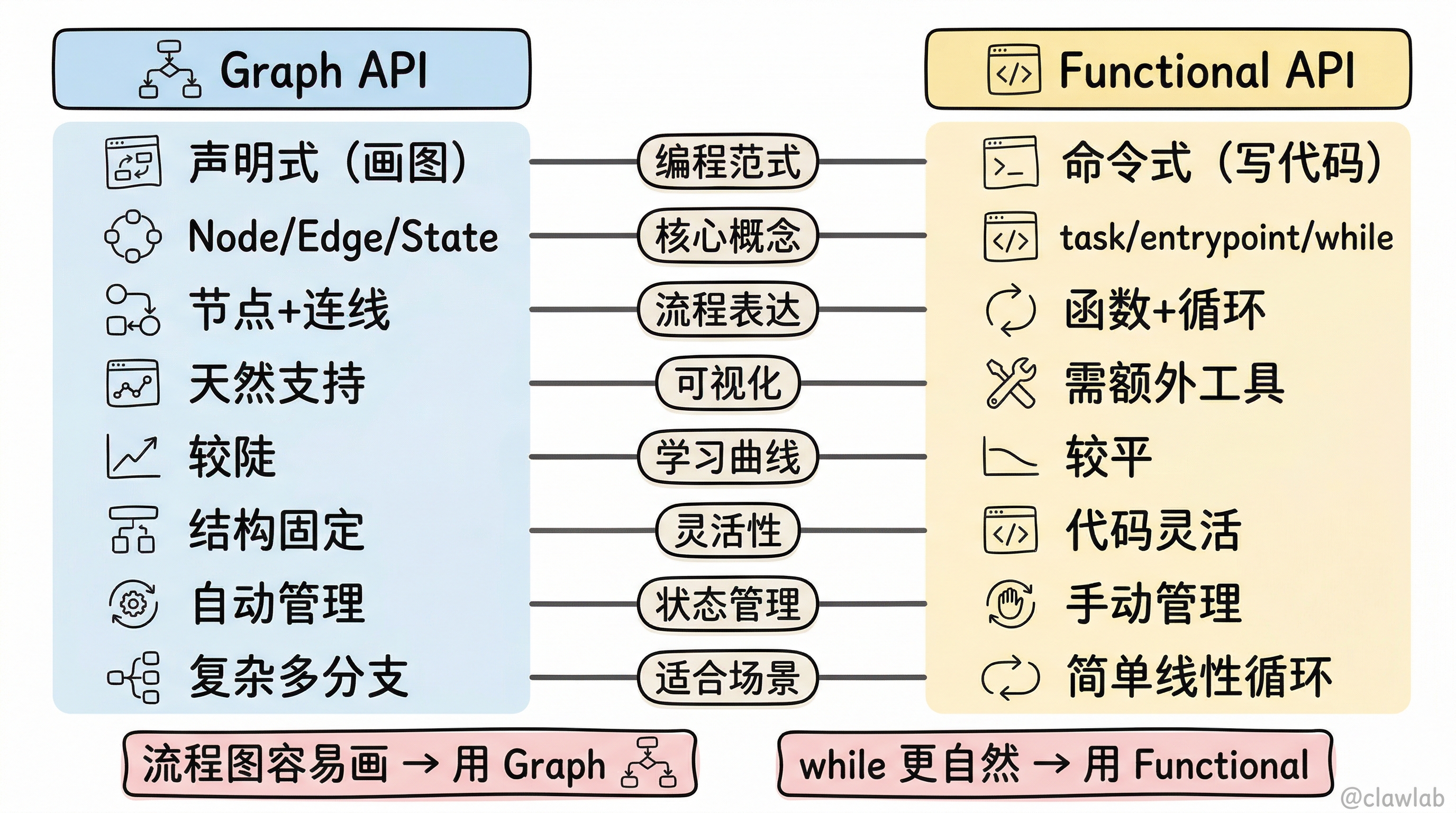
Graph API vs Functional API 对比
| 维度 | Graph API | Functional API |
|---|---|---|
| 编程范式 | 声明式(画图) | 命令式(写代码) |
| 核心概念 | Node、Edge、State | task、entrypoint、while |
| 流程表达 | 节点 + 连线 | 函数 + 循环 |
| 可视化 | 天然支持 | 需要额外工具 |
| 学习曲线 | 较陡(概念多) | 较平(像普通代码) |
| 灵活性 | 结构固定 | 代码灵活 |
| 状态管理 | 自动(State + Reducer) | 手动(变量 + addMessages) |
| 适合场景 | 复杂多分支流程 | 简单线性循环 |
同一个 Agent 的两种写法对比
Graph API 写法:
typescript
const agent = new StateGraph(State)
  .addNode("llm", llmNode)
  .addNode("tools", toolNode)
  .addEdge(START, "llm")
  .addConditionalEdges("llm", shouldContinue, ["tools", END])
  .addEdge("tools", "llm")
  .compile();
Functional API 写法:
typescript
const agent = entrypoint({ name: "agent" }, async (messages) => {
  let response = await callLlm(messages);
  while (response.tool_calls?.length) {
    const results = await Promise.all(response.tool_calls.map(callTool));
    messages = addMessages(messages, [response, ...results]);
    response = await callLlm(messages);
  }
  return messages;
});
💡 选择建议:
- 流程图容易画出来 → Graph API
- 用 while 循环更自然 → Functional API
- 需要可视化调试 → Graph API
- 快速原型验证 → Functional API
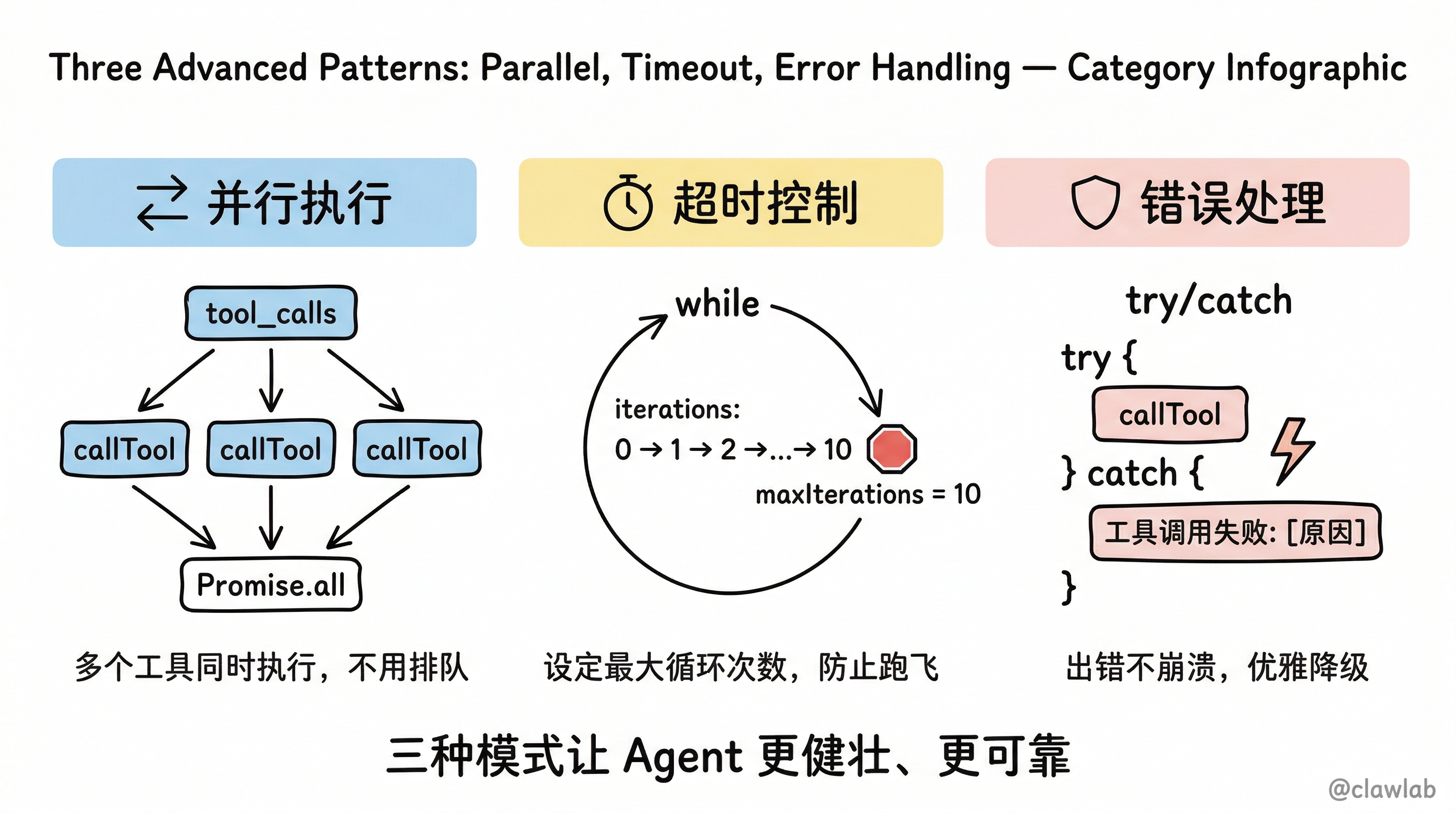
进阶用法
1. 并行执行工具
typescript
const agent = entrypoint({ name: "agent" }, async (messages) => {
  let response = await callLlm(messages);

  while (response.tool_calls?.length) {
    const toolResults = await Promise.all(
      response.tool_calls.map(tc => callTool(tc))
    );
    messages = addMessages(messages, [response, ...toolResults]);
    response = await callLlm(messages);
  }

  return messages;
});
2. 带超时的执行
typescript
const agent = entrypoint({ name: "agent" }, async (messages) => {
  let response = await callLlm(messages);
  let iterations = 0;
  const maxIterations = 10;

  while (response.tool_calls?.length && iterations < maxIterations) {
    iterations++;
    const toolResults = await Promise.all(
      response.tool_calls.map(tc => callTool(tc))
    );
    messages = addMessages(messages, [response, ...toolResults]);
    response = await callLlm(messages);
  }

  if (iterations >= maxIterations) {
    console.warn("达到最大迭代次数,强制退出");
  }

  return messages;
});
3. 错误处理
typescript
const callToolSafe = task({ name: "callToolSafe" }, async (toolCall: ToolCall) => {
  try {
    const tool = toolsByName[toolCall.name];
    return await tool.invoke(toolCall);
  } catch (error) {
    return {
      content: `工具调用失败: ${error.message}`,
      name: toolCall.name,
      tool_call_id: toolCall.id,
    };
  }
});
API 速查表
| API | 作用 | 示例 |
|---|---|---|
task({ name }, fn) | 定义可追踪的任务 | task({ name: "callLlm" }, fn) |
entrypoint({ name }, fn) | 定义 Agent 入口 | entrypoint({ name: "agent" }, fn) |
addMessages(msgs, newMsgs) | 追加消息 | addMessages(messages, [response]) |
agent.invoke(input) | 同步执行 | await agent.invoke(messages) |
agent.stream(input) | 流式执行 | await agent.stream(messages) |
常见错误与避坑指南
错误 1:忘记使用 addMessages
typescript
// ❌ 错误:直接 push 会导致追踪问题
messages.push(response);

// ✅ 正确:使用 addMessages
messages = addMessages(messages, [response]);
错误 2:无限循环
typescript
// ❌ 危险:没有退出条件
while (true) {
  response = await callLlm(messages);
  // 忘记检查 tool_calls...
}

// ✅ 安全:有明确的退出条件
while (response.tool_calls?.length) {
  // ...
}
错误 3:task 外直接调用异步操作
typescript
// ❌ 不推荐:无法被追踪
const response = await model.invoke(messages);

// ✅ 推荐:包装成 task
const callLlm = task({ name: "callLlm" }, async (messages) => {
  return model.invoke(messages);
});
const response = await callLlm(messages);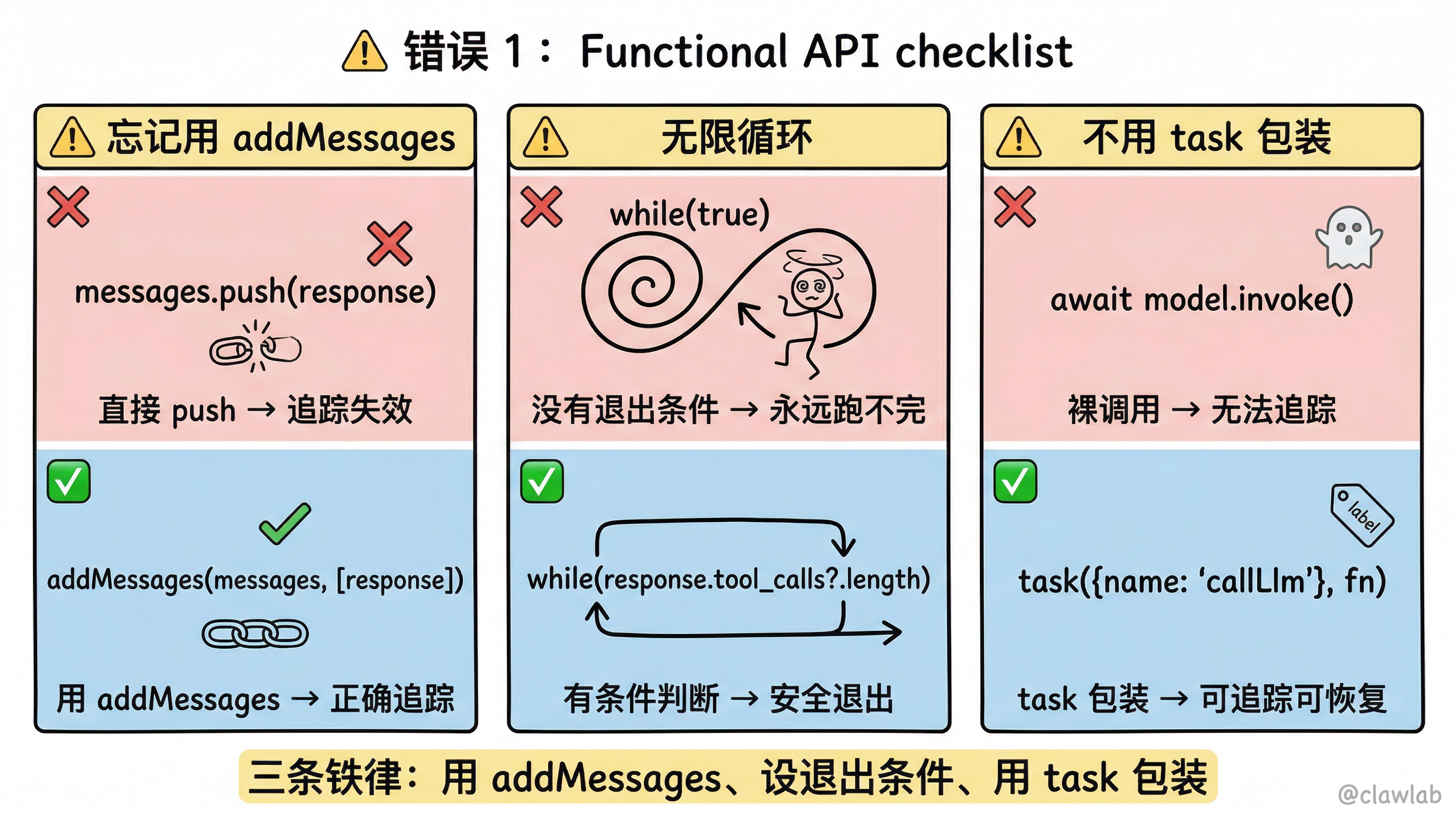
核心要点回顾
- task:包装函数使其可追踪,是 Functional API 的基本单元
- entrypoint:定义 Agent 入口,返回可调用的 Agent 对象
- addMessages:智能追加消息,替代 Graph API 的 MessagesValue
- while 循环:用传统循环控制工具调用,直观易懂
- 选择依据:简单循环用 Functional,复杂分支用 Graph
下一步学习
掌握了两种 API 风格,接下来学习具体的工作流模式:
- 🔄 08-工作流与 Agent:6 种核心工作流模式详解
- 💾 15-持久化机制:让你的 Agent 有记忆
- 🌊 20-流式处理详解:5 种流模式完全指南
📅 更新时间:2026-02-22