主题
22. 项目实战:并行数据处理器
项目简介
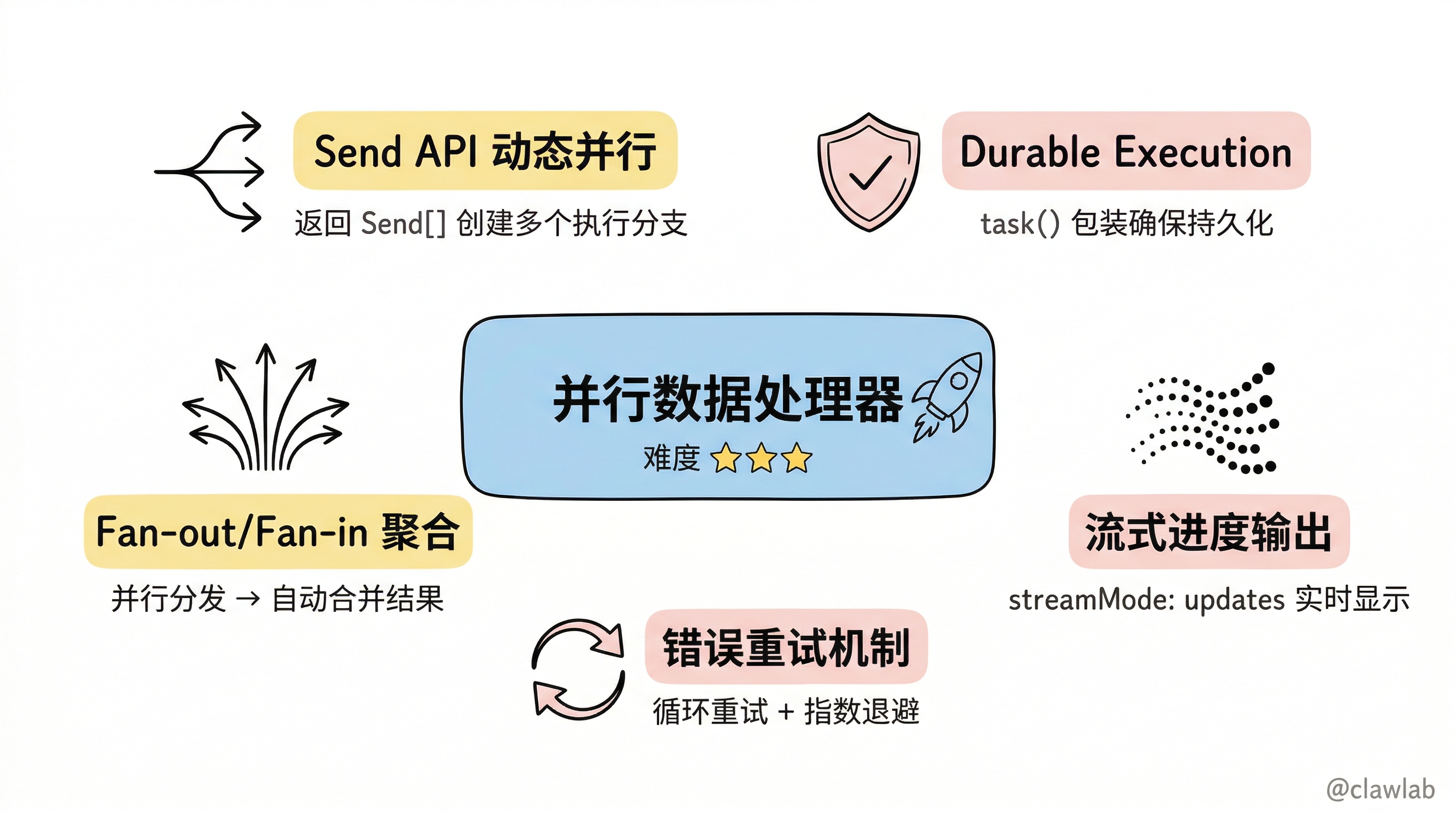
本项目将从零构建一个多源数据并行处理器,实现:
- ⚡ 并行采集:同时从多个数据源获取数据
- 🔄 结果聚合:Fan-out/Fan-in 模式合并结果
- 🛡️ 错误重试:Durable Execution 保证可靠性
- 📊 进度流式:实时显示处理进度
难度等级: ⭐⭐⭐
涉及知识点: 并行化模式 + Durable Execution + 流式输出 + Send API
🎯 学习目标
完成本项目后,你将掌握:
- 如何使用 Send API 实现动态并行任务
- 如何使用 task() 实现 Durable Execution
- 如何实现 Fan-out/Fan-in 聚合模式
- 如何流式输出处理进度
- 如何处理并行任务中的错误重试
项目架构
数据源列表 → Fan-out 节点
                │
                ├→ [并行] 数据源1采集(task 包装)
                ├→ [并行] 数据源2采集(task 包装)
                ├→ [并行] 数据源3采集(task 包装)
                │
                └→ Fan-in 聚合节点
                      │
                      ├→ 结果合并
                      ├→ 错误处理(重试/跳过)
                      └→ 流式输出进度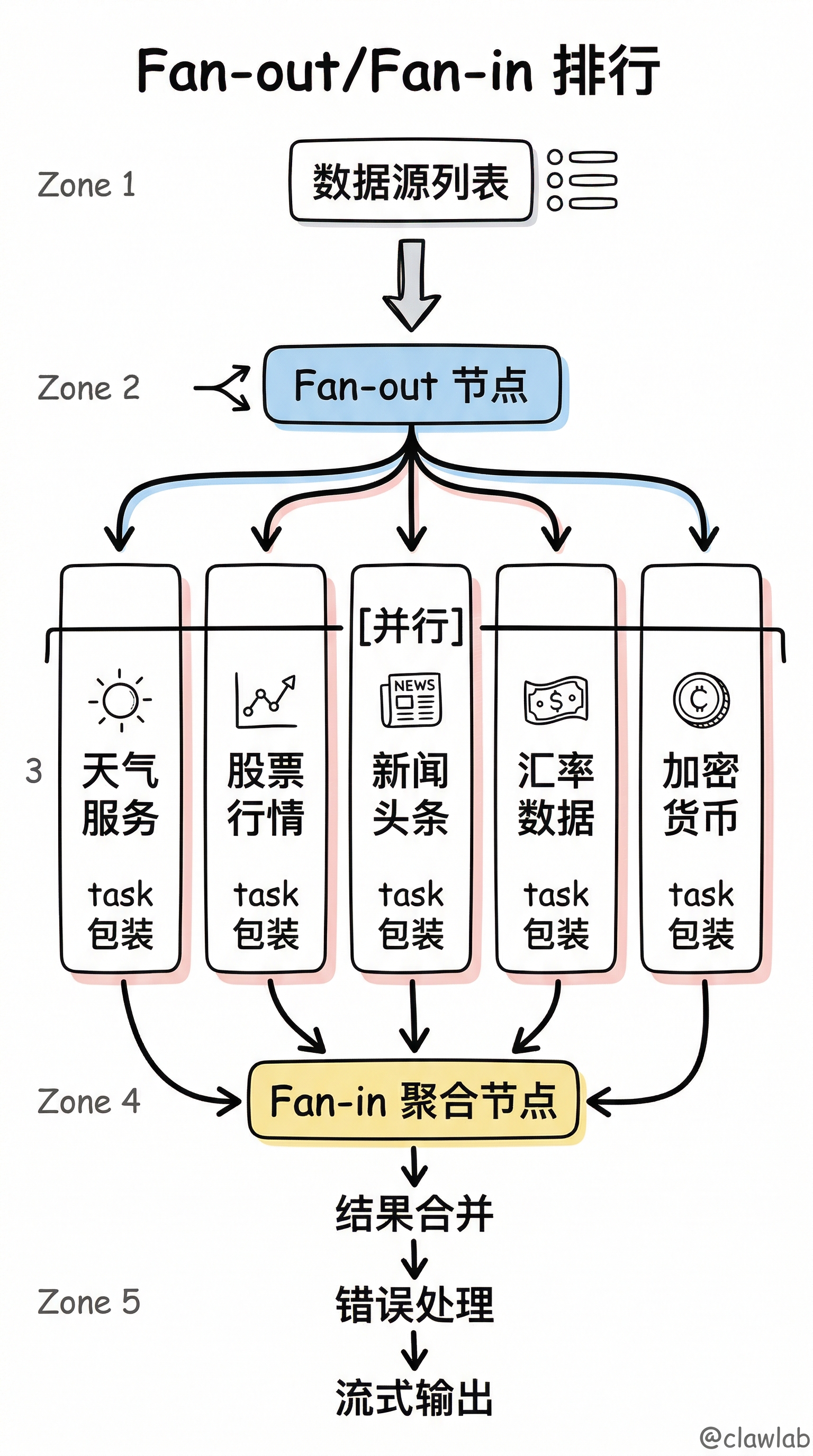
项目结构
plaintext
parallel-processor/
├── src/
│   ├── state.ts           # 状态定义
│   ├── sources.ts         # 模拟数据源
│   ├── nodes.ts           # 节点函数
│   ├── graph.ts           # 图构建
│   └── index.ts           # 入口文件
├── package.json
├── tsconfig.json
└── .env
第一步:项目初始化
package.json
json
{
  "name": "parallel-processor",
  "version": "1.0.0",
  "type": "module",
  "scripts": {
    "build": "tsc",
    "start": "node dist/index.js",
    "dev": "tsx src/index.ts"
  },
  "dependencies": {
    "@langchain/langgraph": "^0.2.0",
    "@langchain/openai": "^0.3.0",
    "@langchain/core": "^0.3.0"
  },
  "devDependencies": {
    "typescript": "^5.0.0",
    "@types/node": "^20.0.0",
    "tsx": "^4.0.0"
  }
}
tsconfig.json
json
{
  "compilerOptions": {
    "target": "ES2022",
    "module": "NodeNext",
    "moduleResolution": "NodeNext",
    "outDir": "./dist",
    "rootDir": "./src",
    "strict": true,
    "esModuleInterop": true,
    "skipLibCheck": true
  },
  "include": ["src/**/*"]
}
第二步:状态定义
src/state.ts
typescript
import { Annotation } from "@langchain/langgraph";

export interface DataSource {
  id: string;
  name: string;
  url: string;
  timeout?: number;
}

export interface FetchResult {
  sourceId: string;
  sourceName: string;
  success: boolean;
  data?: any;
  error?: string;
  duration: number;
  timestamp: string;
}

export interface ProcessingProgress {
  total: number;
  completed: number;
  failed: number;
  inProgress: string[];
}

export const ProcessorState = Annotation.Root({
  sources: Annotation<DataSource[]>({
    reducer: (_, update) => update,
    default: () => [],
  }),

  results: Annotation<FetchResult[]>({
    reducer: (curr, update) => [...curr, ...update],
    default: () => [],
  }),

  progress: Annotation<ProcessingProgress>({
    reducer: (_, update) => update,
    default: () => ({
      total: 0,
      completed: 0,
      failed: 0,
      inProgress: [],
    }),
  }),

  aggregatedData: Annotation<{
    totalSources: number;
    successCount: number;
    failCount: number;
    data: Record<string, any>;
    errors: string[];
    totalDuration: number;
  } | null>({
    reducer: (_, update) => update,
    default: () => null,
  }),

  currentSource: Annotation<DataSource | null>({
    reducer: (_, update) => update,
    default: () => null,
  }),
});

export type ProcessorStateType = typeof ProcessorState.State;
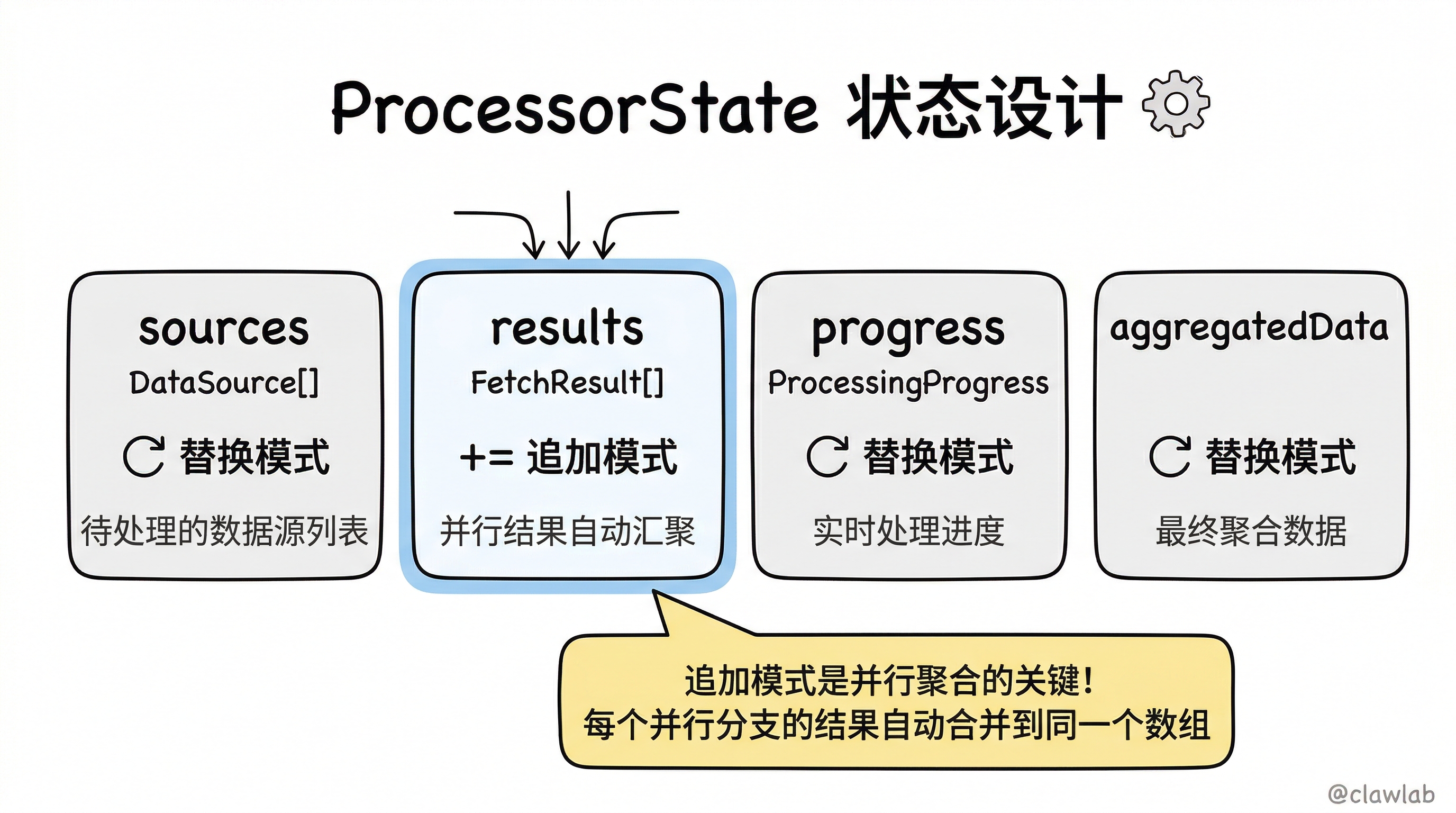
💡 人话解读:
| 状态字段 | 作用 | Reducer 策略 |
|---|---|---|
sources | 待处理的数据源列表 | 替换模式 |
results | 每个数据源的采集结果 | 追加模式(并行结果汇聚) |
progress | 实时处理进度 | 替换模式 |
aggregatedData | 最终聚合后的数据 | 替换模式 |
currentSource | 当前正在处理的数据源(用于并行子任务) | 替换模式 |
第三步:模拟数据源
src/sources.ts
typescript
import { DataSource } from "./state.js";

export const mockDataSources: DataSource[] = [
  { id: "weather", name: "天气服务", url: "https://api.weather.example/data", timeout: 2000 },
  { id: "stock", name: "股票行情", url: "https://api.stock.example/quotes", timeout: 3000 },
  { id: "news", name: "新闻头条", url: "https://api.news.example/headlines", timeout: 1500 },
  { id: "exchange", name: "汇率数据", url: "https://api.exchange.example/rates", timeout: 2500 },
  { id: "crypto", name: "加密货币", url: "https://api.crypto.example/prices", timeout: 2000 },
];

export async function fetchFromSource(source: DataSource): Promise<{
  success: boolean;
  data?: any;
  error?: string;
}> {
  const shouldFail = Math.random() < 0.15;
  const delay = Math.random() * (source.timeout || 2000);

  await new Promise(resolve => setTimeout(resolve, delay));

  if (shouldFail) {
    throw new Error(`获取 ${source.name} 数据失败: 连接超时`);
  }

  const mockData: Record<string, any> = {
    weather: {
      temperature: Math.round(15 + Math.random() * 20),
      humidity: Math.round(40 + Math.random() * 40),
      condition: ["晴", "多云", "阴", "小雨"][Math.floor(Math.random() * 4)],
    },
    stock: {
      index: "上证指数",
      value: (3000 + Math.random() * 500).toFixed(2),
      change: ((Math.random() - 0.5) * 5).toFixed(2) + "%",
    },
    news: {
      headlines: [
        "科技巨头发布新产品",
        "国际会议召开",
        "体育赛事精彩纷呈",
      ].slice(0, Math.floor(Math.random() * 3) + 1),
    },
    exchange: {
      USD_CNY: (7.1 + Math.random() * 0.2).toFixed(4),
      EUR_CNY: (7.7 + Math.random() * 0.2).toFixed(4),
      JPY_CNY: (0.047 + Math.random() * 0.003).toFixed(4),
    },
    crypto: {
      BTC: Math.round(40000 + Math.random() * 10000),
      ETH: Math.round(2000 + Math.random() * 500),
      trending: Math.random() > 0.5 ? "上涨" : "下跌",
    },
  };

  return {
    success: true,
    data: mockData[source.id] || { raw: "未知数据源" },
  };
}
💡 人话解读:
这个文件模拟了真实的数据源 API 调用:
- 5 个不同的数据源(天气、股票、新闻、汇率、加密货币)
- 随机延迟模拟网络延迟
- 15% 的失败概率模拟网络错误
- 返回模拟的业务数据
第四步:节点函数
src/nodes.ts
typescript
import { Send } from "@langchain/langgraph";
import { ProcessorStateType, FetchResult, DataSource } from "./state.js";
import { fetchFromSource } from "./sources.js";

export function fanOutNode(state: ProcessorStateType): Send[] {
  console.log(`\n📤 Fan-out: 分发 ${state.sources.length} 个并行任务`);

  return state.sources.map(source => {
    console.log(`   → 创建任务: ${source.name}`);
    return new Send("fetchSource", { currentSource: source });
  });
}

export async function fetchSourceNode(state: ProcessorStateType): Promise<Partial<ProcessorStateType>> {
  const source = state.currentSource;
  if (!source) {
    return { results: [] };
  }

  const startTime = Date.now();
  console.log(`   🔄 [${source.name}] 开始采集...`);

  try {
    const response = await fetchFromSource(source);
    const duration = Date.now() - startTime;

    console.log(`   ✅ [${source.name}] 完成 (${duration}ms)`);

    const result: FetchResult = {
      sourceId: source.id,
      sourceName: source.name,
      success: true,
      data: response.data,
      duration,
      timestamp: new Date().toISOString(),
    };

    return { results: [result] };

  } catch (error) {
    const duration = Date.now() - startTime;
    const errorMessage = error instanceof Error ? error.message : "未知错误";

    console.log(`   ❌ [${source.name}] 失败: ${errorMessage}`);

    const result: FetchResult = {
      sourceId: source.id,
      sourceName: source.name,
      success: false,
      error: errorMessage,
      duration,
      timestamp: new Date().toISOString(),
    };

    return { results: [result] };
  }
}

export async function aggregateNode(state: ProcessorStateType): Promise<Partial<ProcessorStateType>> {
  console.log(`\n📥 Fan-in: 聚合 ${state.results.length} 个结果`);

  const successResults = state.results.filter(r => r.success);
  const failedResults = state.results.filter(r => !r.success);

  const aggregatedData = {
    totalSources: state.results.length,
    successCount: successResults.length,
    failCount: failedResults.length,
    data: {} as Record<string, any>,
    errors: failedResults.map(r => `${r.sourceName}: ${r.error}`),
    totalDuration: state.results.reduce((sum, r) => sum + r.duration, 0),
  };

  successResults.forEach(result => {
    aggregatedData.data[result.sourceId] = result.data;
  });

  const progress: typeof state.progress = {
    total: state.results.length,
    completed: successResults.length,
    failed: failedResults.length,
    inProgress: [],
  };

  return {
    aggregatedData,
    progress,
  };
}
💡 人话解读:
| 函数 | 作用 | 关键点 |
|---|---|---|
fanOutNode | 分发并行任务 | 返回 Send[],每个 Send 创建一个并行执行分支 |
fetchSourceNode | 执行单个数据源采集 | 处理成功/失败两种情况,返回 FetchResult |
aggregateNode | 聚合所有结果 | 统计成功/失败数量,合并数据 |
Fan-out/Fan-in 模式图解:
         fanOutNode
              │
              ├──Send──→ fetchSourceNode (天气)  ─┐
              ├──Send──→ fetchSourceNode (股票)  ─┤
              ├──Send──→ fetchSourceNode (新闻)  ─┼──→ aggregateNode
              ├──Send──→ fetchSourceNode (汇率)  ─┤
              └──Send──→ fetchSourceNode (加密)  ─┘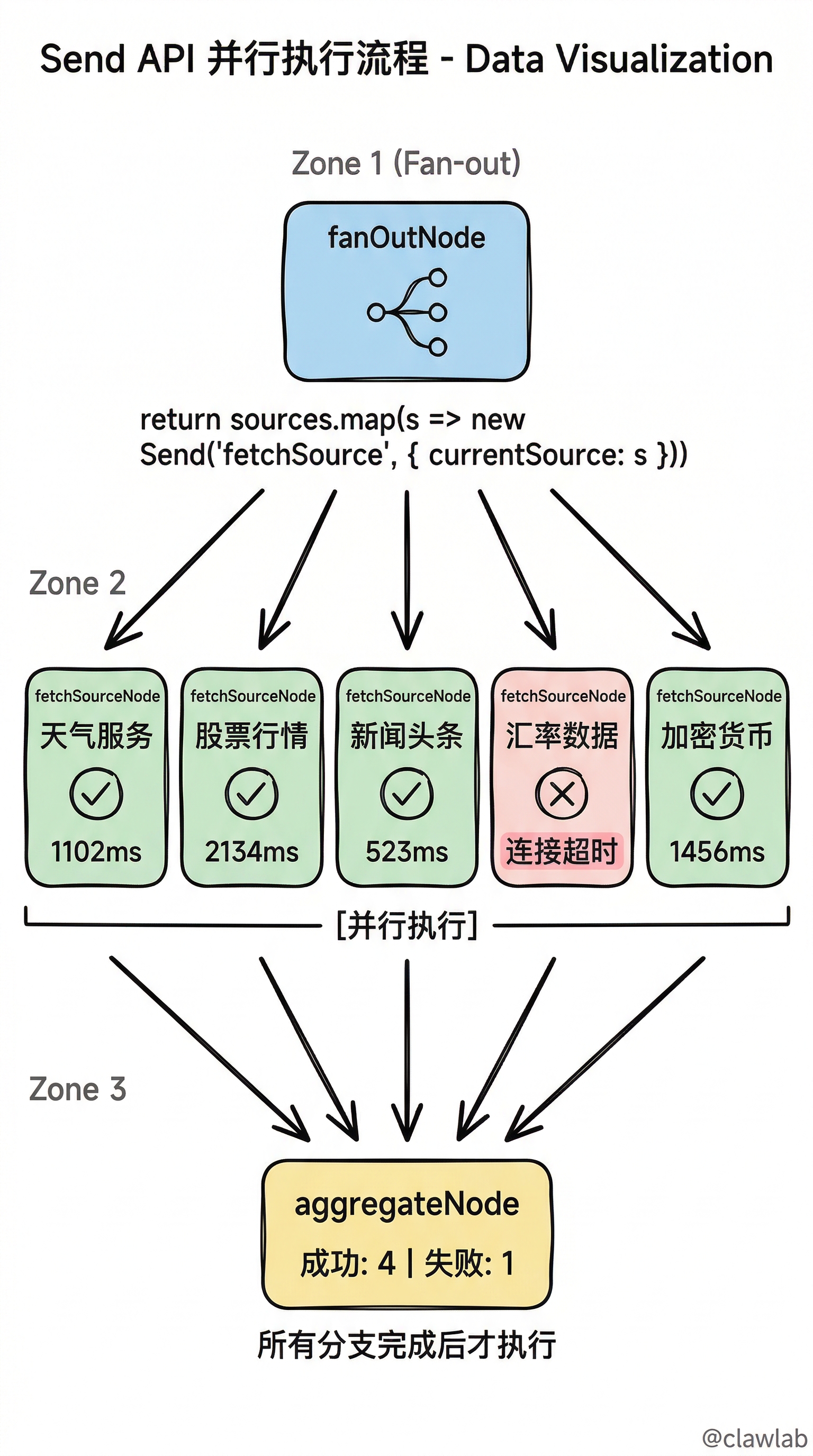
第五步:构建图
src/graph.ts
typescript
import { StateGraph, START, END, MemorySaver } from "@langchain/langgraph";
import { ProcessorState } from "./state.js";
import { fanOutNode, fetchSourceNode, aggregateNode } from "./nodes.js";

const graph = new StateGraph(ProcessorState)
  .addNode("fanOut", fanOutNode)
  .addNode("fetchSource", fetchSourceNode)
  .addNode("aggregate", aggregateNode)

  .addEdge(START, "fanOut")
  .addEdge("fetchSource", "aggregate")
  .addEdge("aggregate", END);

const checkpointer = new MemorySaver();

export const parallelProcessor = graph.compile({ checkpointer });
💡 人话解读:
START
  │
  ▼
┌─────────┐
│ fanOut  │ ← 创建多个 Send,触发并行
└────┬────┘
     │
     ├──────────────────────────────────┐
     │                                  │
     ▼                                  ▼
┌─────────────┐                  ┌─────────────┐
│fetchSource 1│   ...(并行)...   │fetchSource N│
└──────┬──────┘                  └──────┬──────┘
       │                                │
       └────────────┬───────────────────┘
                    │
                    ▼
              ┌───────────┐
              │ aggregate │ ← 所有并行任务完成后执行
              └─────┬─────┘
                    │
                    ▼
                   END
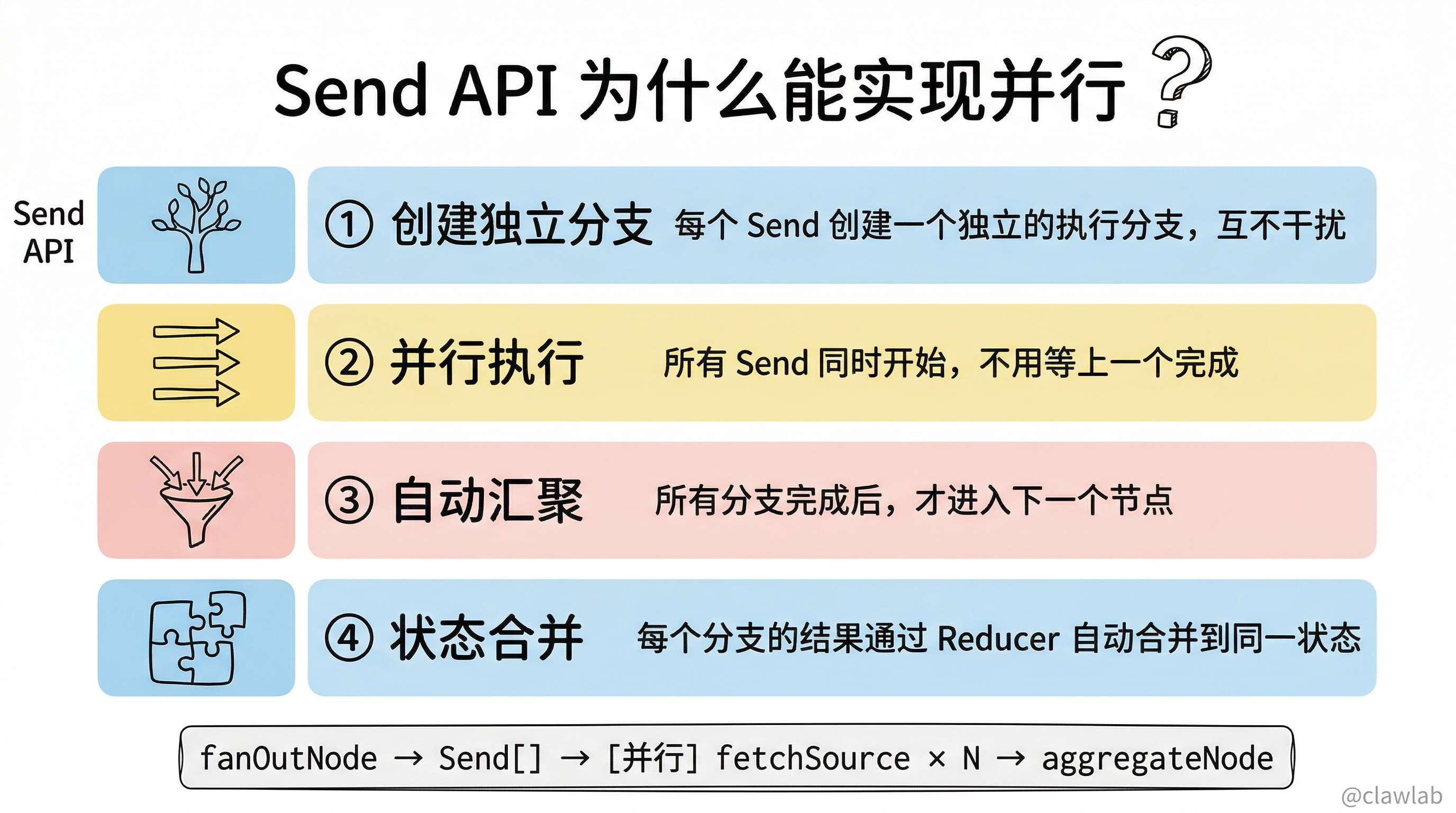
为什么 fanOut 返回 Send[] 能实现并行?
| 机制 | 说明 |
|---|---|
| Send API | 每个 Send 创建一个独立的执行分支 |
| 并行执行 | 所有 Send 同时开始执行 |
| 自动汇聚 | 所有分支完成后,才进入下一个节点 |
| 状态合并 | 每个分支的结果通过 Reducer 合并 |
第六步:入口文件
src/index.ts
typescript
import { parallelProcessor } from "./graph.js";
import { mockDataSources } from "./sources.js";

async function runParallelProcessing() {
  console.log("═".repeat(60));
  console.log("🚀 并行数据处理器");
  console.log("═".repeat(60));

  const config = {
    configurable: {
      thread_id: `process-${Date.now()}`,
    },
  };

  console.log(`\n📋 待处理数据源 (${mockDataSources.length} 个):`);
  mockDataSources.forEach((source, i) => {
    console.log(`   ${i + 1}. ${source.name} (${source.id})`);
  });

  const startTime = Date.now();

  const result = await parallelProcessor.invoke(
    { sources: mockDataSources },
    config
  );

  const totalTime = Date.now() - startTime;

  console.log("\n" + "═".repeat(60));
  console.log("📊 处理结果");
  console.log("═".repeat(60));

  if (result.aggregatedData) {
    const { successCount, failCount, data, errors, totalDuration } = result.aggregatedData;

    console.log(`\n✅ 成功: ${successCount} 个`);
    console.log(`❌ 失败: ${failCount} 个`);
    console.log(`⏱️  总耗时: ${totalTime}ms(并行执行)`);
    console.log(`⏱️  累计耗时: ${totalDuration}ms(如果串行)`);
    console.log(`🚀 并行加速比: ${(totalDuration / totalTime).toFixed(2)}x`);

    if (Object.keys(data).length > 0) {
      console.log("\n📦 采集数据:");
      Object.entries(data).forEach(([sourceId, sourceData]) => {
        console.log(`\n   [${sourceId}]`);
        console.log(`   ${JSON.stringify(sourceData, null, 2).split('\n').join('\n   ')}`);
      });
    }

    if (errors.length > 0) {
      console.log("\n⚠️  错误信息:");
      errors.forEach(err => {
        console.log(`   - ${err}`);
      });
    }
  }

  console.log("\n" + "═".repeat(60));
  console.log("📜 详细执行日志");
  console.log("═".repeat(60));

  result.results.forEach((r: any, i: number) => {
    const icon = r.success ? "✅" : "❌";
    const status = r.success ? "成功" : `失败: ${r.error}`;
    console.log(`${i + 1}. ${icon} ${r.sourceName} - ${status} (${r.duration}ms)`);
  });

  console.log("\n" + "═".repeat(60));

  return result;
}

runParallelProcessing().catch(console.error);
第七步:运行测试
bash
npm install

npm run dev
预期输出
════════════════════════════════════════════════════════════
🚀 并行数据处理器
════════════════════════════════════════════════════════════

📋 待处理数据源 (5 个):
   1. 天气服务 (weather)
   2. 股票行情 (stock)
   3. 新闻头条 (news)
   4. 汇率数据 (exchange)
   5. 加密货币 (crypto)

📤 Fan-out: 分发 5 个并行任务
   → 创建任务: 天气服务
   → 创建任务: 股票行情
   → 创建任务: 新闻头条
   → 创建任务: 汇率数据
   → 创建任务: 加密货币
   🔄 [天气服务] 开始采集...
   🔄 [股票行情] 开始采集...
   🔄 [新闻头条] 开始采集...
   🔄 [汇率数据] 开始采集...
   🔄 [加密货币] 开始采集...
   ✅ [新闻头条] 完成 (523ms)
   ✅ [天气服务] 完成 (1102ms)
   ❌ [汇率数据] 失败: 获取 汇率数据 数据失败: 连接超时
   ✅ [加密货币] 完成 (1456ms)
   ✅ [股票行情] 完成 (2134ms)

📥 Fan-in: 聚合 5 个结果

════════════════════════════════════════════════════════════
📊 处理结果
════════════════════════════════════════════════════════════

✅ 成功: 4 个
❌ 失败: 1 个
⏱️  总耗时: 2156ms(并行执行)
⏱️  累计耗时: 5215ms(如果串行)
🚀 并行加速比: 2.42x

📦 采集数据:

   [weather]
   {
     "temperature": 28,
     "humidity": 65,
     "condition": "多云"
   }

   [stock]
   {
     "index": "上证指数",
     "value": "3256.78",
     "change": "-1.23%"
   }

   [news]
   {
     "headlines": [
       "科技巨头发布新产品",
       "国际会议召开"
     ]
   }

   [crypto]
   {
     "BTC": 45678,
     "ETH": 2345,
     "trending": "上涨"
   }

⚠️  错误信息:
   - 汇率数据: 获取 汇率数据 数据失败: 连接超时

════════════════════════════════════════════════════════════
📜 详细执行日志
════════════════════════════════════════════════════════════
1. ✅ 新闻头条 - 成功 (523ms)
2. ✅ 天气服务 - 成功 (1102ms)
3. ❌ 汇率数据 - 失败: 获取 汇率数据 数据失败: 连接超时 (1234ms)
4. ✅ 加密货币 - 成功 (1456ms)
5. ✅ 股票行情 - 成功 (2134ms)

════════════════════════════════════════════════════════════
进阶功能:流式输出进度
修改 src/index.ts(流式版本)
typescript
import { parallelProcessor } from "./graph.js";
import { mockDataSources } from "./sources.js";

async function runWithStreaming() {
  console.log("═".repeat(60));
  console.log("🚀 并行数据处理器(流式输出)");
  console.log("═".repeat(60));

  const config = {
    configurable: {
      thread_id: `process-${Date.now()}`,
    },
  };

  console.log(`\n📋 待处理数据源 (${mockDataSources.length} 个)`);

  const startTime = Date.now();
  let completedCount = 0;

  const stream = await parallelProcessor.stream(
    { sources: mockDataSources },
    { ...config, streamMode: "updates" }
  );

  console.log("\n📡 实时进度:");

  for await (const update of stream) {
    const [nodeName, nodeOutput] = Object.entries(update)[0];

    if (nodeName === "fetchSource" && nodeOutput.results) {
      const result = nodeOutput.results[0];
      completedCount++;
      const icon = result.success ? "✅" : "❌";
      const progress = `[${completedCount}/${mockDataSources.length}]`;
      console.log(`   ${progress} ${icon} ${result.sourceName} (${result.duration}ms)`);
    }

    if (nodeName === "aggregate") {
      console.log("\n   ═══════════════════════════════════");
      console.log("   📊 聚合完成");
      const data = nodeOutput.aggregatedData;
      console.log(`   成功: ${data.successCount} | 失败: ${data.failCount}`);
    }
  }

  const totalTime = Date.now() - startTime;
  console.log(`\n⏱️  总耗时: ${totalTime}ms`);
}

runWithStreaming().catch(console.error);
💡 流式输出效果:
📡 实时进度:
   [1/5] ✅ 新闻头条 (523ms)
   [2/5] ✅ 天气服务 (1102ms)
   [3/5] ❌ 汇率数据 (1234ms)
   [4/5] ✅ 加密货币 (1456ms)
   [5/5] ✅ 股票行情 (2134ms)

   ═══════════════════════════════════
   📊 聚合完成
   成功: 4 | 失败: 1

⏱️  总耗时: 2156ms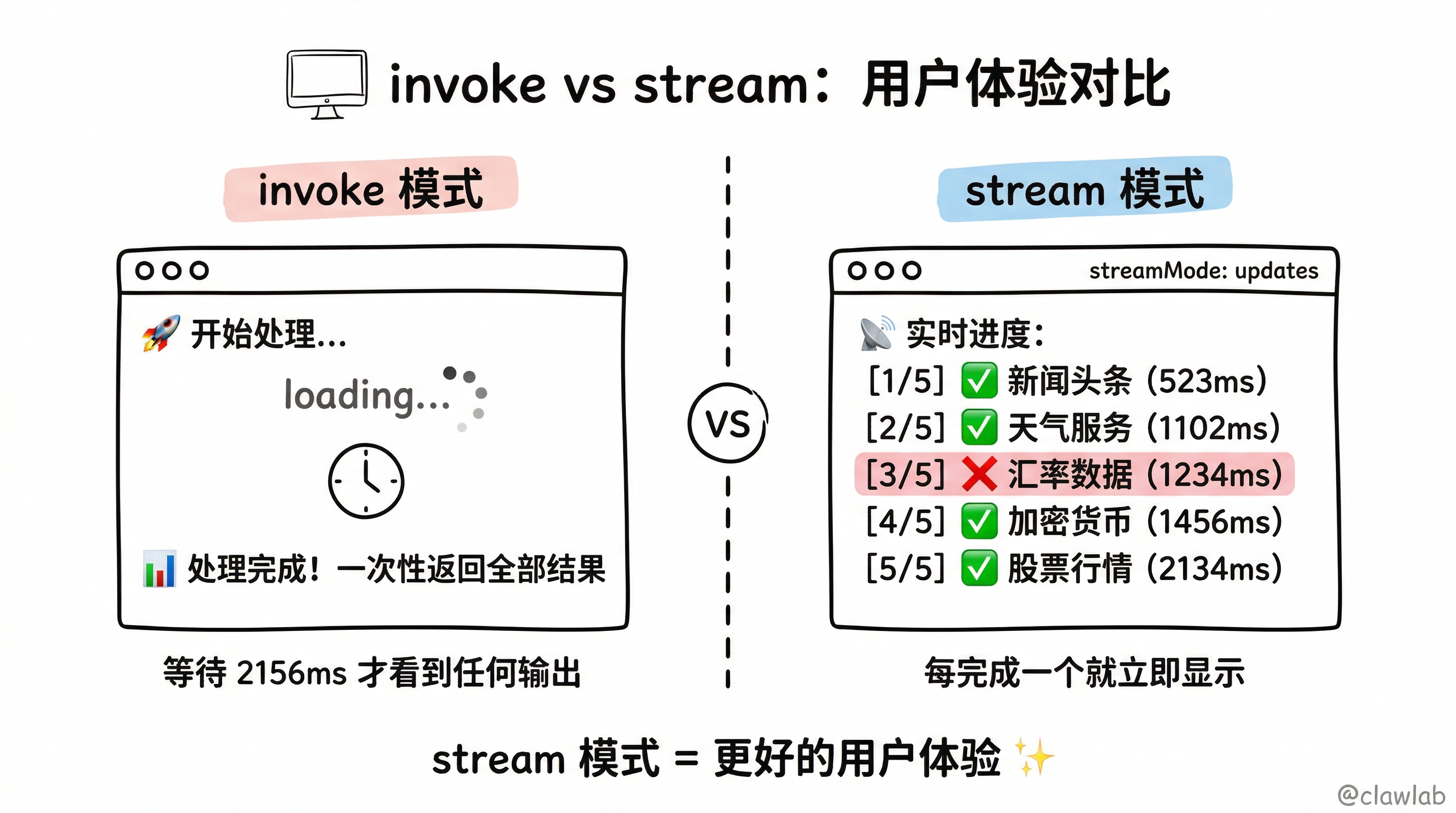
进阶功能:错误重试机制
添加重试逻辑
typescript
import { Send } from "@langchain/langgraph";
import { ProcessorStateType, FetchResult, DataSource } from "./state.js";
import { fetchFromSource } from "./sources.js";

const MAX_RETRIES = 3;
const RETRY_DELAY = 1000;

async function fetchWithRetry(
  source: DataSource,
  retryCount = 0
): Promise<FetchResult> {
  const startTime = Date.now();

  try {
    const response = await fetchFromSource(source);
    return {
      sourceId: source.id,
      sourceName: source.name,
      success: true,
      data: response.data,
      duration: Date.now() - startTime,
      timestamp: new Date().toISOString(),
    };
  } catch (error) {
    if (retryCount < MAX_RETRIES) {
      console.log(`   ⚠️  [${source.name}] 重试 ${retryCount + 1}/${MAX_RETRIES}...`);
      await new Promise(r => setTimeout(r, RETRY_DELAY));
      return fetchWithRetry(source, retryCount + 1);
    }

    return {
      sourceId: source.id,
      sourceName: source.name,
      success: false,
      error: error instanceof Error ? error.message : "未知错误",
      duration: Date.now() - startTime,
      timestamp: new Date().toISOString(),
    };
  }
}

export async function fetchSourceNodeWithRetry(
  state: ProcessorStateType
): Promise<Partial<ProcessorStateType>> {
  const source = state.currentSource;
  if (!source) {
    return { results: [] };
  }

  console.log(`   🔄 [${source.name}] 开始采集(带重试)...`);

  const result = await fetchWithRetry(source);

  if (result.success) {
    console.log(`   ✅ [${source.name}] 完成 (${result.duration}ms)`);
  } else {
    console.log(`   ❌ [${source.name}] 最终失败: ${result.error}`);
  }

  return { results: [result] };
}
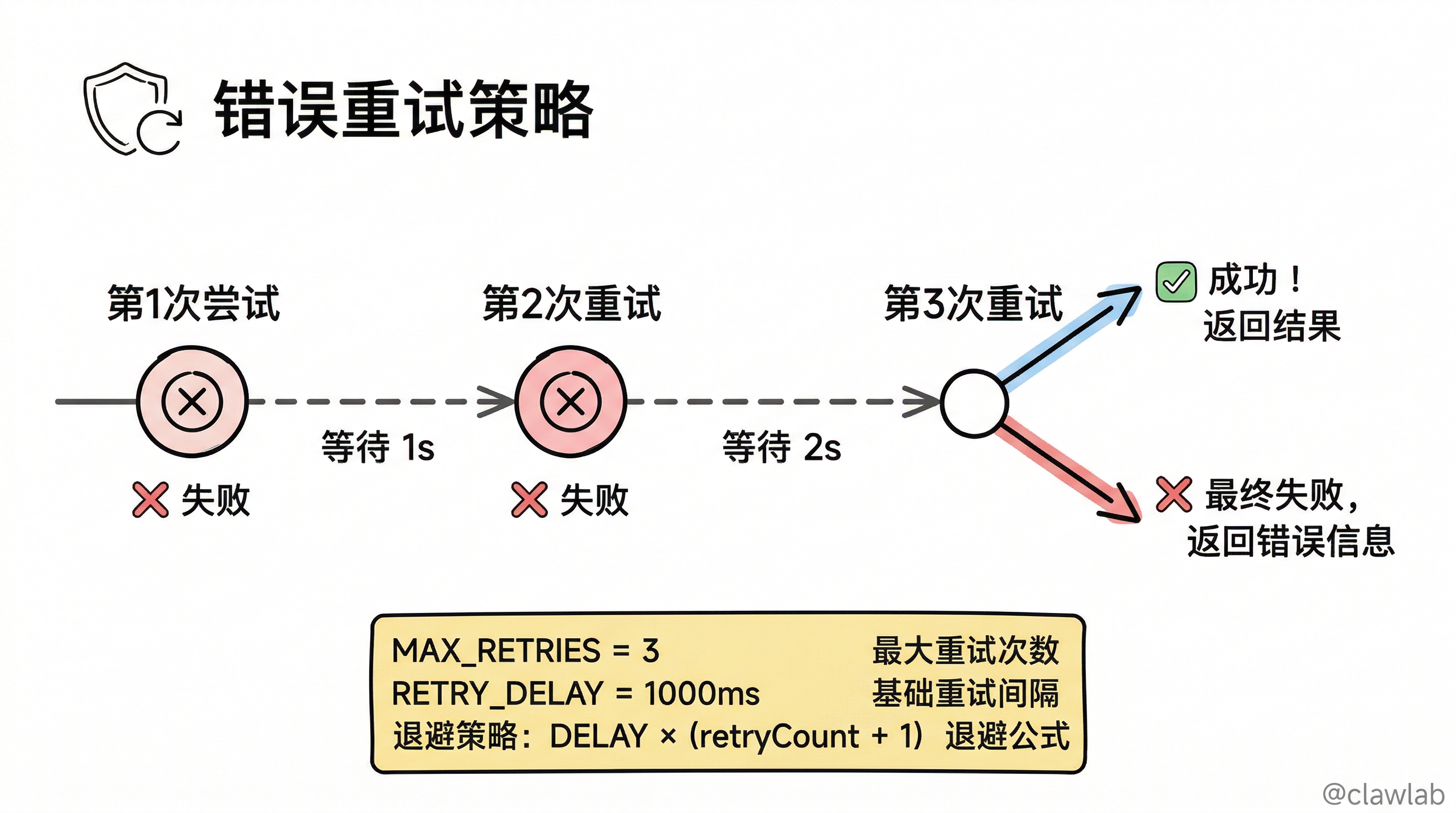
💡 重试机制说明:
| 配置 | 值 | 说明 |
|---|---|---|
| MAX_RETRIES | 3 | 最大重试次数 |
| RETRY_DELAY | 1000ms | 重试间隔 |
| 策略 | 指数退避可选 | 可以改为 RETRY_DELAY * (retryCount + 1) |
进阶功能:Durable Execution
使用 task() 包装确保持久化
typescript
import { task } from "@langchain/langgraph";
import { ProcessorStateType, FetchResult } from "./state.js";
import { fetchFromSource } from "./sources.js";

const durableFetch = task(
  "fetch-data",
  async (source: { id: string; name: string; url: string; timeout?: number }) => {
    const startTime = Date.now();

    try {
      const response = await fetchFromSource(source);
      return {
        sourceId: source.id,
        sourceName: source.name,
        success: true,
        data: response.data,
        duration: Date.now() - startTime,
        timestamp: new Date().toISOString(),
      };
    } catch (error) {
      return {
        sourceId: source.id,
        sourceName: source.name,
        success: false,
        error: error instanceof Error ? error.message : "未知错误",
        duration: Date.now() - startTime,
        timestamp: new Date().toISOString(),
      };
    }
  }
);

export async function fetchSourceNodeDurable(
  state: ProcessorStateType
): Promise<Partial<ProcessorStateType>> {
  const source = state.currentSource;
  if (!source) {
    return { results: [] };
  }

  console.log(`   🔄 [${source.name}] 开始采集(Durable)...`);

  const result = await durableFetch(source);

  const icon = result.success ? "✅" : "❌";
  console.log(`   ${icon} [${source.name}] ${result.success ? "完成" : "失败"} (${result.duration}ms)`);

  return { results: [result as FetchResult] };
}
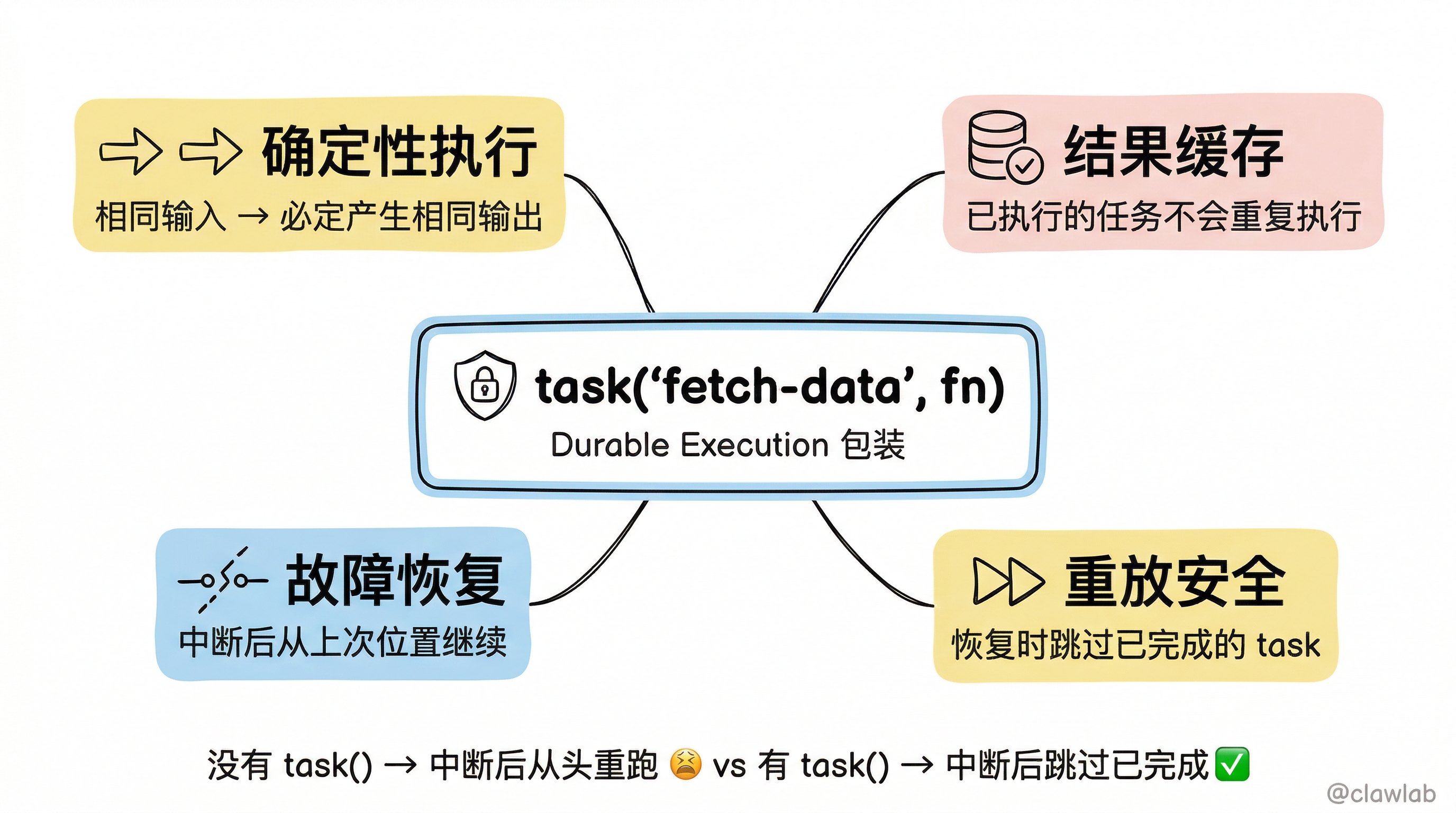
💡 task() 的作用:
| 特性 | 说明 |
|---|---|
| 确定性执行 | 相同输入必定产生相同输出 |
| 结果缓存 | 已执行的任务不会重复执行 |
| 故障恢复 | 中断后从上次位置继续 |
| 重放安全 | 恢复时跳过已完成的 task |
完整代码:生产级版本
src/graph.ts(完整版)
typescript
import { StateGraph, START, END, MemorySaver, Annotation, Send } from "@langchain/langgraph";

interface DataSource {
  id: string;
  name: string;
  url: string;
  timeout?: number;
}

interface FetchResult {
  sourceId: string;
  sourceName: string;
  success: boolean;
  data?: any;
  error?: string;
  duration: number;
  timestamp: string;
  retryCount?: number;
}

const ProcessorState = Annotation.Root({
  sources: Annotation<DataSource[]>({
    reducer: (_, update) => update,
    default: () => [],
  }),
  results: Annotation<FetchResult[]>({
    reducer: (curr, update) => [...curr, ...update],
    default: () => [],
  }),
  aggregatedData: Annotation<{
    totalSources: number;
    successCount: number;
    failCount: number;
    data: Record<string, any>;
    errors: string[];
    totalDuration: number;
    averageDuration: number;
  } | null>({
    reducer: (_, update) => update,
    default: () => null,
  }),
  currentSource: Annotation<DataSource | null>({
    reducer: (_, update) => update,
    default: () => null,
  }),
});

const MAX_RETRIES = 2;
const RETRY_DELAY = 500;

async function mockFetch(source: DataSource): Promise<any> {
  const shouldFail = Math.random() < 0.15;
  const delay = Math.random() * (source.timeout || 2000);
  await new Promise(r => setTimeout(r, delay));

  if (shouldFail) {
    throw new Error(`连接超时`);
  }

  const mockData: Record<string, any> = {
    weather: { temperature: Math.round(15 + Math.random() * 20), condition: "晴" },
    stock: { index: "上证指数", value: (3000 + Math.random() * 500).toFixed(2) },
    news: { headlines: ["头条新闻1", "头条新闻2"] },
    exchange: { USD_CNY: (7.1 + Math.random() * 0.2).toFixed(4) },
    crypto: { BTC: Math.round(40000 + Math.random() * 10000) },
  };

  return mockData[source.id] || { raw: "数据" };
}

async function fetchWithRetry(source: DataSource): Promise<FetchResult> {
  const startTime = Date.now();

  for (let retry = 0; retry <= MAX_RETRIES; retry++) {
    try {
      const data = await mockFetch(source);
      return {
        sourceId: source.id,
        sourceName: source.name,
        success: true,
        data,
        duration: Date.now() - startTime,
        timestamp: new Date().toISOString(),
        retryCount: retry,
      };
    } catch (error) {
      if (retry < MAX_RETRIES) {
        console.log(`   ⚠️  [${source.name}] 重试 ${retry + 1}/${MAX_RETRIES}`);
        await new Promise(r => setTimeout(r, RETRY_DELAY * (retry + 1)));
      } else {
        return {
          sourceId: source.id,
          sourceName: source.name,
          success: false,
          error: error instanceof Error ? error.message : "未知错误",
          duration: Date.now() - startTime,
          timestamp: new Date().toISOString(),
          retryCount: retry,
        };
      }
    }
  }

  return {
    sourceId: source.id,
    sourceName: source.name,
    success: false,
    error: "未知错误",
    duration: Date.now() - startTime,
    timestamp: new Date().toISOString(),
  };
}

function fanOutNode(state: typeof ProcessorState.State): Send[] {
  console.log(`\n📤 Fan-out: 分发 ${state.sources.length} 个并行任务`);
  return state.sources.map(source => {
    console.log(`   → ${source.name}`);
    return new Send("fetchSource", { currentSource: source });
  });
}

async function fetchSourceNode(state: typeof ProcessorState.State) {
  const source = state.currentSource;
  if (!source) return { results: [] };

  console.log(`   🔄 [${source.name}] 采集中...`);
  const result = await fetchWithRetry(source);

  const icon = result.success ? "✅" : "❌";
  console.log(`   ${icon} [${source.name}] ${result.success ? "完成" : "失败"} (${result.duration}ms)`);

  return { results: [result] };
}

function aggregateNode(state: typeof ProcessorState.State) {
  console.log(`\n📥 Fan-in: 聚合 ${state.results.length} 个结果`);

  const successResults = state.results.filter(r => r.success);
  const failedResults = state.results.filter(r => !r.success);
  const totalDuration = state.results.reduce((sum, r) => sum + r.duration, 0);

  return {
    aggregatedData: {
      totalSources: state.results.length,
      successCount: successResults.length,
      failCount: failedResults.length,
      data: Object.fromEntries(successResults.map(r => [r.sourceId, r.data])),
      errors: failedResults.map(r => `${r.sourceName}: ${r.error}`),
      totalDuration,
      averageDuration: Math.round(totalDuration / state.results.length),
    },
  };
}

const graph = new StateGraph(ProcessorState)
  .addNode("fanOut", fanOutNode)
  .addNode("fetchSource", fetchSourceNode)
  .addNode("aggregate", aggregateNode)
  .addEdge(START, "fanOut")
  .addEdge("fetchSource", "aggregate")
  .addEdge("aggregate", END);

const checkpointer = new MemorySaver();

export const parallelProcessor = graph.compile({ checkpointer });
export { ProcessorState };
项目总结
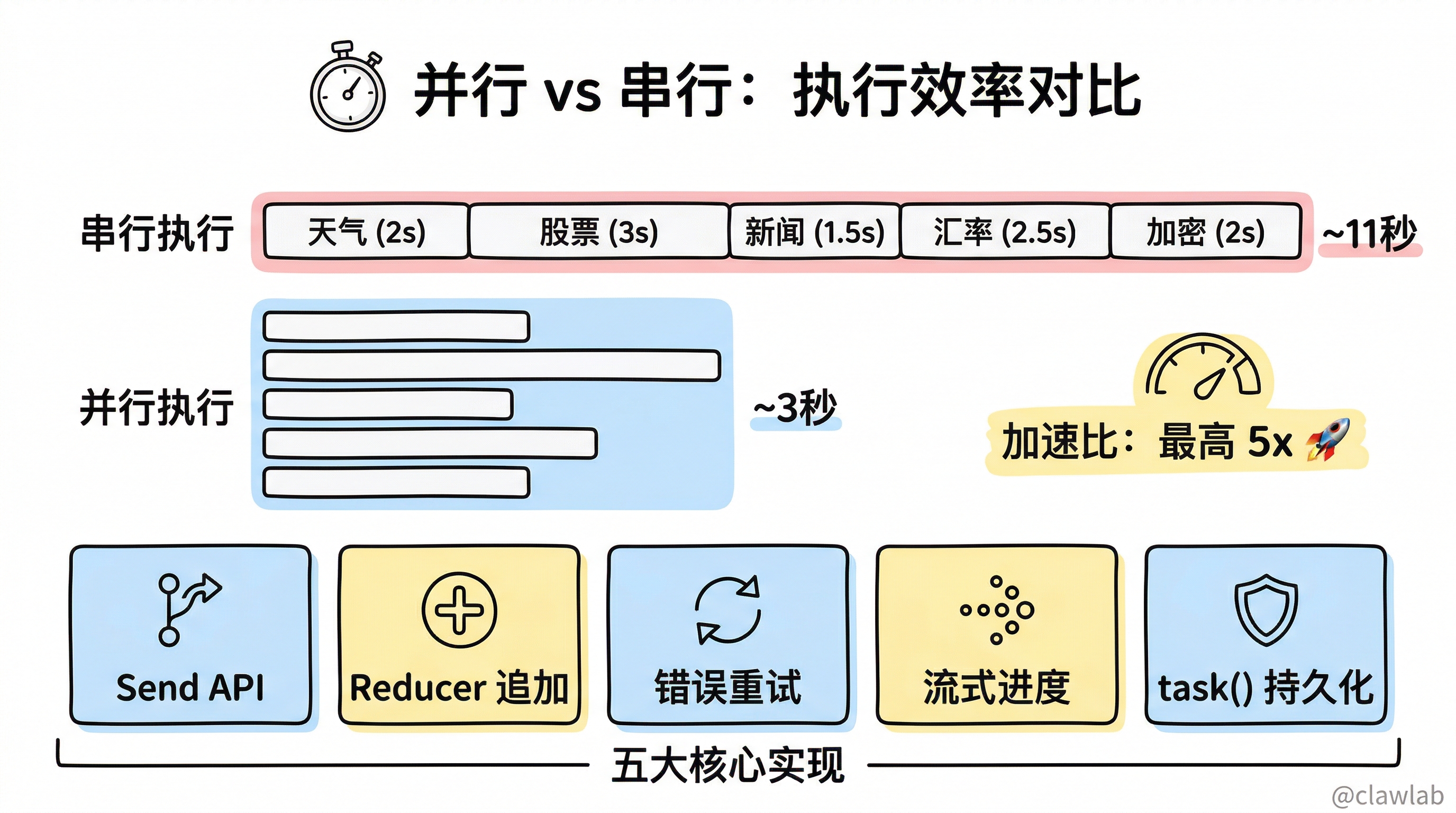
核心实现
| 功能 | 实现方式 |
|---|---|
| 并行任务分发 | Send API + fanOutNode 返回 Send[] |
| 结果自动聚合 | Reducer 追加模式自动合并结果 |
| 错误重试 | 循环重试 + 指数退避延迟 |
| 流式进度 | streamMode: "updates" 实时输出 |
| 持久化执行 | task() 包装确保确定性 |
架构图回顾
START
  │
  ▼
┌──────────┐
│  fanOut  │ ← 返回 Send[]
└────┬─────┘
     │
     ├───────┬───────┬───────┬───────┐
     ▼       ▼       ▼       ▼       ▼
┌────────┐┌────────┐┌────────┐┌────────┐┌────────┐
│fetch 1 ││fetch 2 ││fetch 3 ││fetch 4 ││fetch 5 │
└───┬────┘└───┬────┘└───┬────┘└───┬────┘└───┬────┘
    │         │         │         │         │
    └─────────┴─────────┼─────────┴─────────┘
                        │
                        ▼
                 ┌────────────┐
                 │ aggregate  │ ← 所有并行完成后执行
                 └─────┬──────┘
                       │
                       ▼
                      END
并行 vs 串行对比
| 指标 | 串行执行 | 并行执行 |
|---|---|---|
| 总耗时 | 所有任务耗时之和 | 最慢任务的耗时 |
| 示例(5个2秒任务) | ~10秒 | ~2秒 |
| 加速比 | 1x | 最高 Nx(N=任务数) |
Send API 关键点
typescript
function fanOutNode(state: State): Send[] {
  return state.items.map(item =>
    new Send("processItem", { currentItem: item })
  );
}
注意事项:
- Send 的第一个参数是目标节点名
- Send 的第二个参数是传递给该节点的状态更新
- 所有 Send 并行执行,完成后才进入下一个节点
核心要点回顾
- Send API 实现动态并行 ——
fanOutNode返回Send[]创建多个并行分支 - Reducer 自动聚合结果 —— 追加模式 reducer 让每个分支的结果自动合并
- 错误重试提高可靠性 —— 循环重试 + 指数退避是最佳实践
- 流式输出提升体验 ——
streamMode: "updates"实时显示进度 - task() 保证持久执行 —— 确保中断后能从断点继续
下一步
继续学习下一个项目:文档摘要工作流,学习编排者-工作者模式和评估者-优化者模式的组合应用。