主题
记忆系统:让 AI 拥有短期与长期记忆
简单来说
AI 应用需要两种记忆:短期记忆让 AI 记住"这次对话聊了什么",长期记忆让 AI 记住"这个用户是谁、喜欢什么"。LangGraph 通过 Checkpointer(短期)和 Memory Store(长期)实现了这两种能力。
🎯 本节目标
学完本节,你将能够:
- 理解短期记忆与长期记忆的区别
- 使用 Checkpointer 实现多轮对话
- 使用 Memory Store 实现跨会话记忆
- 掌握消息管理策略(裁剪、删除、摘要)
- 学会使用语义搜索查询记忆
核心痛点与解决方案
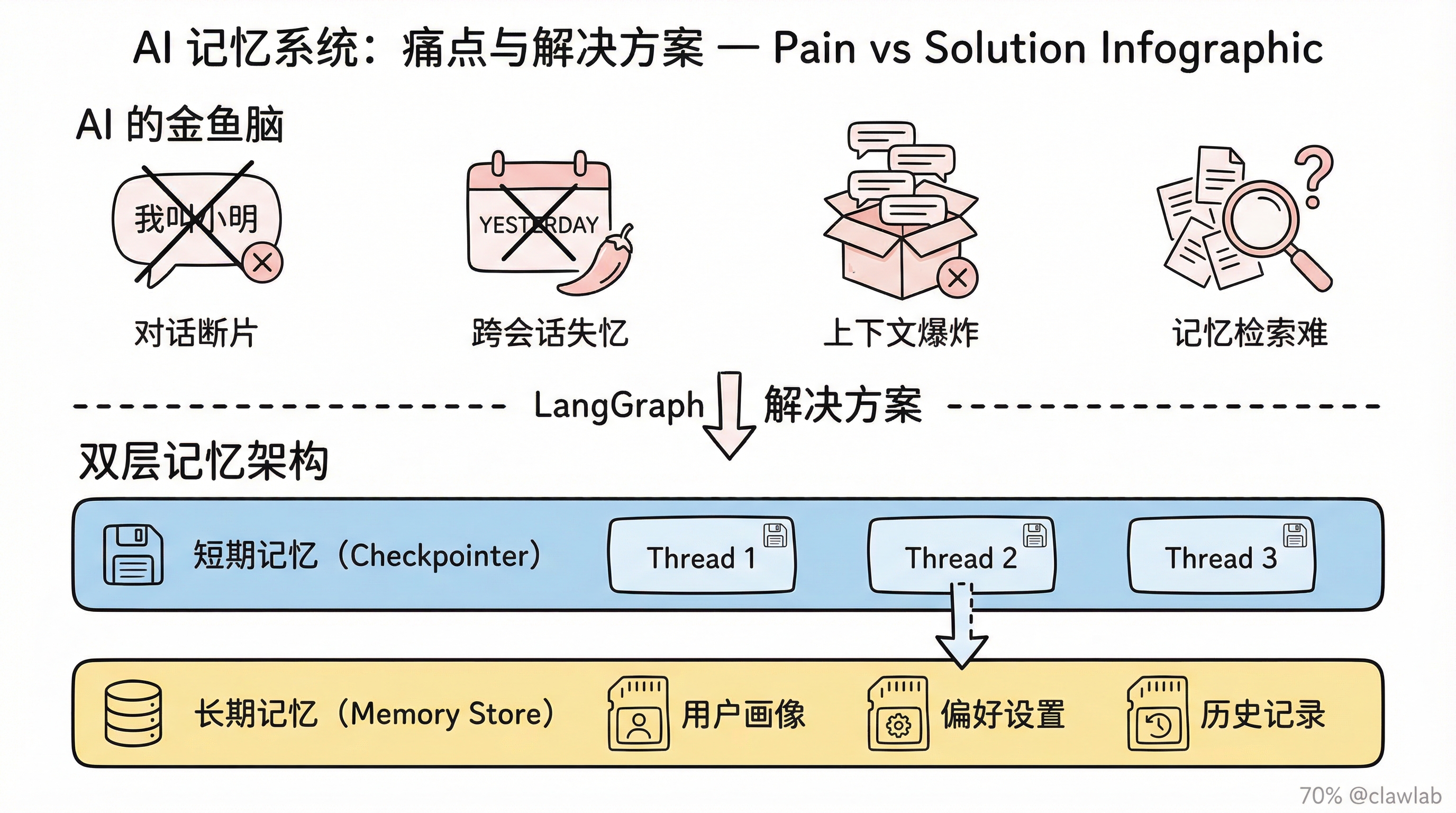
痛点:AI 的"金鱼脑"
| 痛点 | 具体表现 |
|---|---|
| 对话断片 | 用户说"我叫小明",下一句 AI 就忘了 |
| 跨会话失忆 | 用户昨天说过"不要辣的",今天又推荐辣菜 |
| 上下文爆炸 | 聊天记录太长,超出 LLM 的上下文窗口 |
| 记忆检索难 | 有了记忆不知道怎么找到相关的内容 |
解决:双层记忆架构
┌─────────────────────────────────────────────────┐
│                   LangGraph 记忆架构              │
├─────────────────────────────────────────────────┤
│                                                 │
│   短期记忆 (Checkpointer)                        │
│   ┌─────────────────────────────────────────┐  │
│   │ Thread 1: 今天下午的对话                  │  │
│   │ Thread 2: 昨天晚上的对话                  │  │
│   │ Thread 3: 上周的对话                     │  │
│   └─────────────────────────────────────────┘  │
│                      │                         │
│                      ▼                         │
│   长期记忆 (Memory Store)                       │
│   ┌─────────────────────────────────────────┐  │
│   │ 用户画像:小明,不吃辣,喜欢川菜(不辣版)   │  │
│   │ 偏好:晚上8点后不要推送消息                │  │
│   │ 历史:曾经投诉过配送慢的问题               │  │
│   └─────────────────────────────────────────┘  │
│                                                 │
└─────────────────────────────────────────────────┘
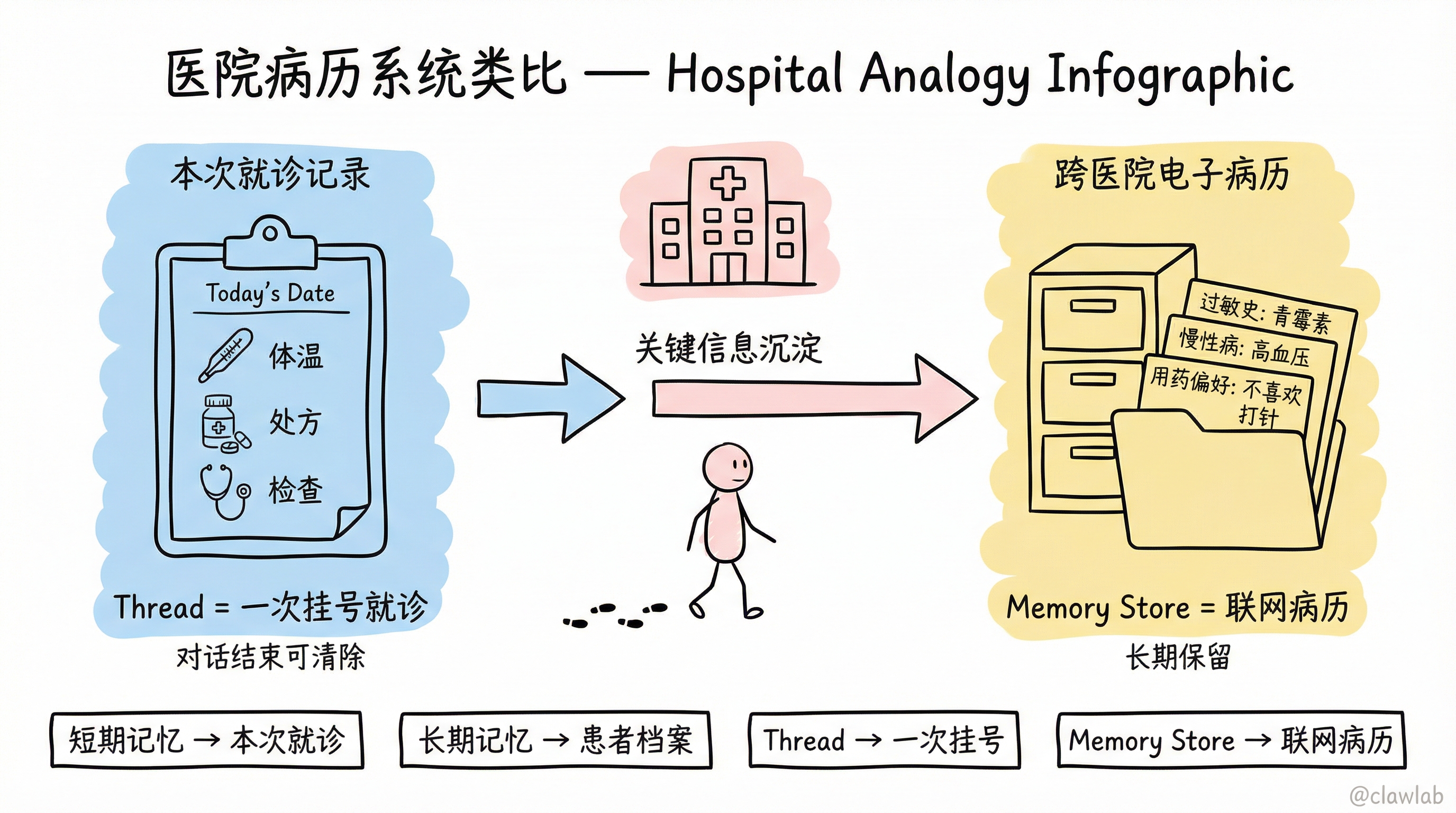
生活化类比:医院的病历系统
| 记忆类型 | 医院类比 | 说明 |
|---|---|---|
| 短期记忆 | 本次就诊记录 | 今天量了体温、做了什么检查、开了什么药 |
| 长期记忆 | 患者档案 | 过敏史、慢性病史、用药偏好 |
| Thread | 一次挂号就诊 | 从进医院到离开的完整过程 |
| Memory Store | 跨医院联网的电子病历 | 不管去哪家医院都能查到 |
一、短期记忆(对话记忆)
基础实现
typescript
import { MemorySaver, StateGraph, StateSchema, MessagesValue, GraphNode, START } from "@langchain/langgraph";
import { ChatAnthropic } from "@langchain/anthropic";

const State = new StateSchema({
  messages: MessagesValue,
});

const model = new ChatAnthropic({ model: "claude-haiku-4-5-20251001" });

const callModel: GraphNode<typeof State> = async (state) => {
  const response = await model.invoke(state.messages);
  return { messages: [response] };
};

const checkpointer = new MemorySaver();

const graph = new StateGraph(State)
  .addNode("call_model", callModel)
  .addEdge(START, "call_model")
  .compile({ checkpointer });

const config = { configurable: { thread_id: "1" } };

await graph.invoke(
  { messages: [{ role: "user", content: "Hi! I'm Bob" }] },
  config
);

await graph.invoke(
  { messages: [{ role: "user", content: "What's my name?" }] },
  config
);
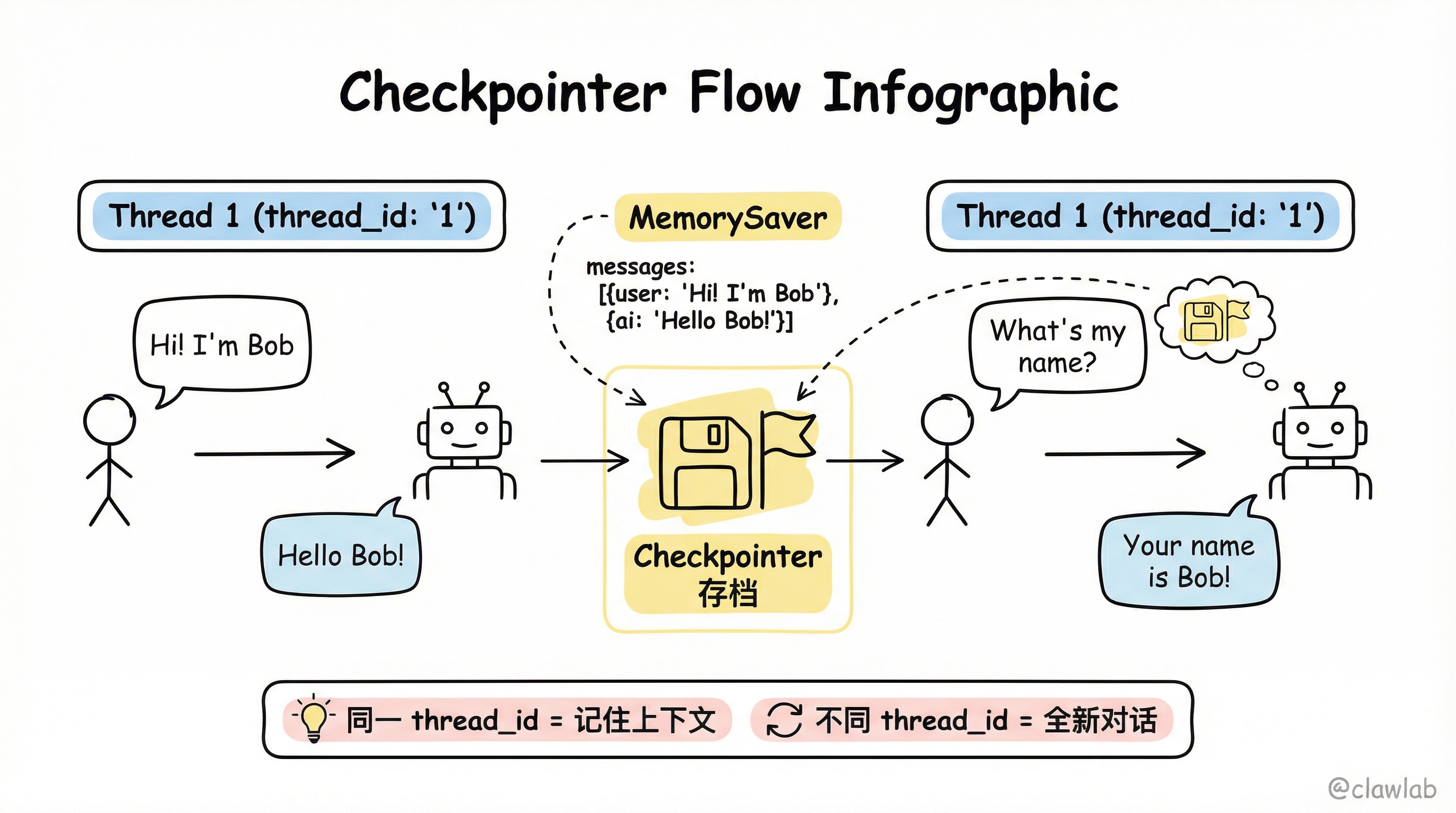
💡 人话解读: 只要 thread_id 相同,后续对话就能"记住"之前聊过的内容。
生产环境配置
typescript
import { PostgresSaver } from "@langchain/langgraph-checkpoint-postgres";

const DB_URI = "postgresql://user:pass@localhost:5432/mydb";
const checkpointer = PostgresSaver.fromConnString(DB_URI);

const graph = builder.compile({ checkpointer });
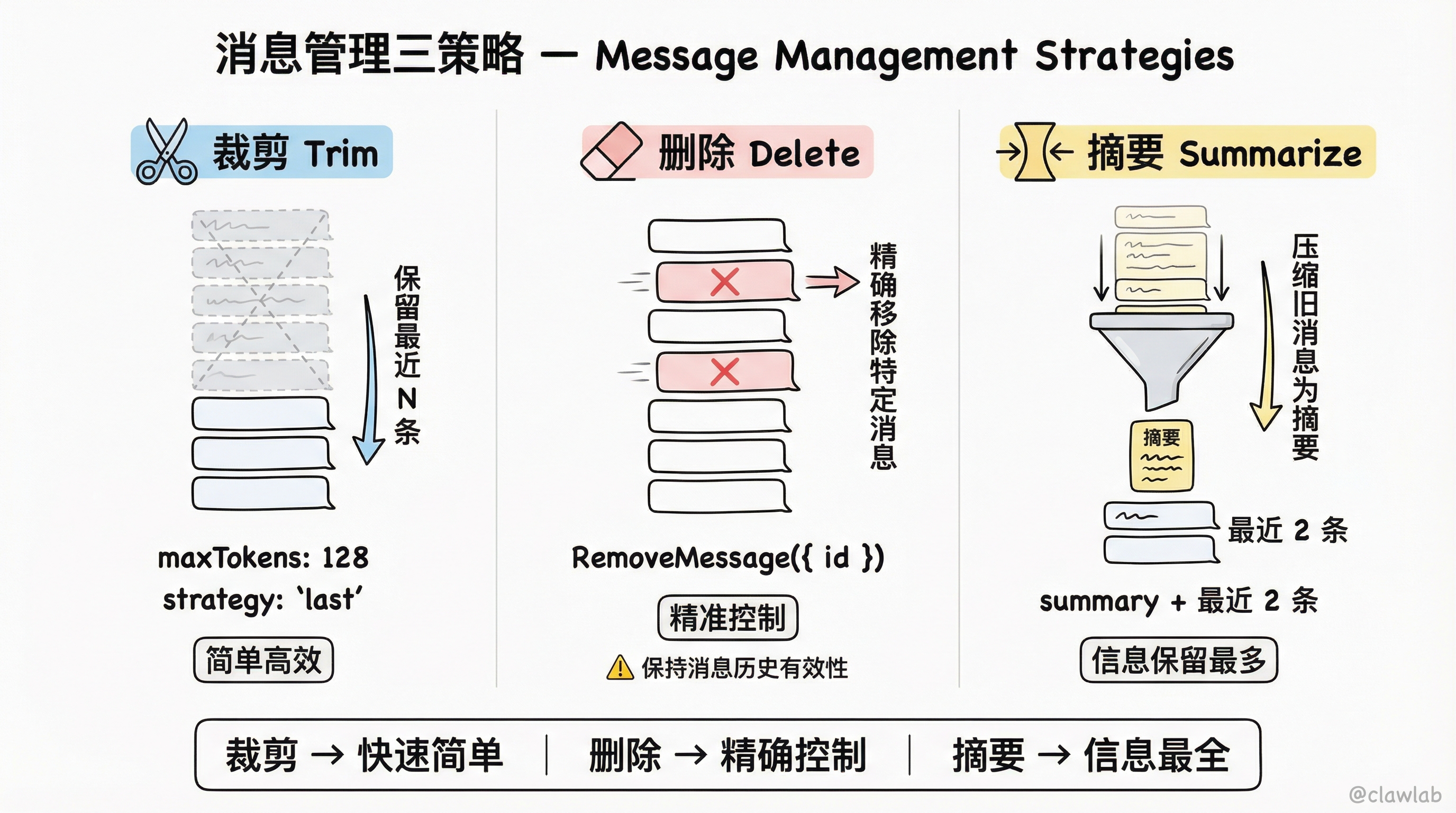
二、消息管理策略
当对话过长时,需要管理消息以避免超出 LLM 的上下文窗口。
策略 1:消息裁剪(Trim Messages)
保留最近 N 条消息,删除更早的消息。
typescript
import { trimMessages } from "@langchain/core/messages";

const callModel: GraphNode<typeof State> = async (state) => {
  const messages = trimMessages(state.messages, {
    strategy: "last",
    maxTokens: 128,
    startOn: "human",
    endOn: ["human", "tool"],
    tokenCounter: model,
  });

  const response = await model.invoke(messages);
  return { messages: [response] };
};
💡 人话解读: "只保留最近的消息,总 token 数不超过 128。确保以人类消息开头,以人类消息或工具消息结尾。"
策略 2:消息删除(Delete Messages)
主动删除特定消息。
typescript
import { RemoveMessage } from "@langchain/core/messages";

const deleteMessages: GraphNode<typeof State> = (state) => {
  const messages = state.messages;
  if (messages.length > 2) {
    return {
      messages: messages
        .slice(0, 2)
        .map((m) => new RemoveMessage({ id: m.id })),
    };
  }
  return {};
};
⚠️ 注意:删除消息时要确保结果仍然是有效的消息历史(如:必须以 user 消息开头,tool_calls 后必须有对应的 tool 结果)。
策略 3:消息摘要(Summarize Messages)
将早期消息压缩成摘要,保留关键信息的同时减少 token 数量。
typescript
import { StateSchema, MessagesValue, GraphNode } from "@langchain/langgraph";
import { RemoveMessage, HumanMessage } from "@langchain/core/messages";
import * as z from "zod";

const State = new StateSchema({
  messages: MessagesValue,
  summary: z.string().optional(),
});

const summarizeConversation: GraphNode<typeof State> = async (state) => {
  const summary = state.summary || "";

  let summaryMessage: string;
  if (summary) {
    summaryMessage = `之前的对话摘要: ${summary}\n\n请根据以上新消息扩展摘要:`;
  } else {
    summaryMessage = "请为以上对话创建摘要:";
  }

  const messages = [
    ...state.messages,
    new HumanMessage({ content: summaryMessage }),
  ];

  const response = await model.invoke(messages);

  const deleteMessages = state.messages
    .slice(0, -2)
    .map((m) => new RemoveMessage({ id: m.id }));

  return {
    summary: response.content as string,
    messages: deleteMessages,
  };
};
💡 人话解读: "把旧消息压缩成一段摘要,然后只保留最近 2 条消息 + 摘要。这样既保留了关键信息,又不会超出上下文限制。"
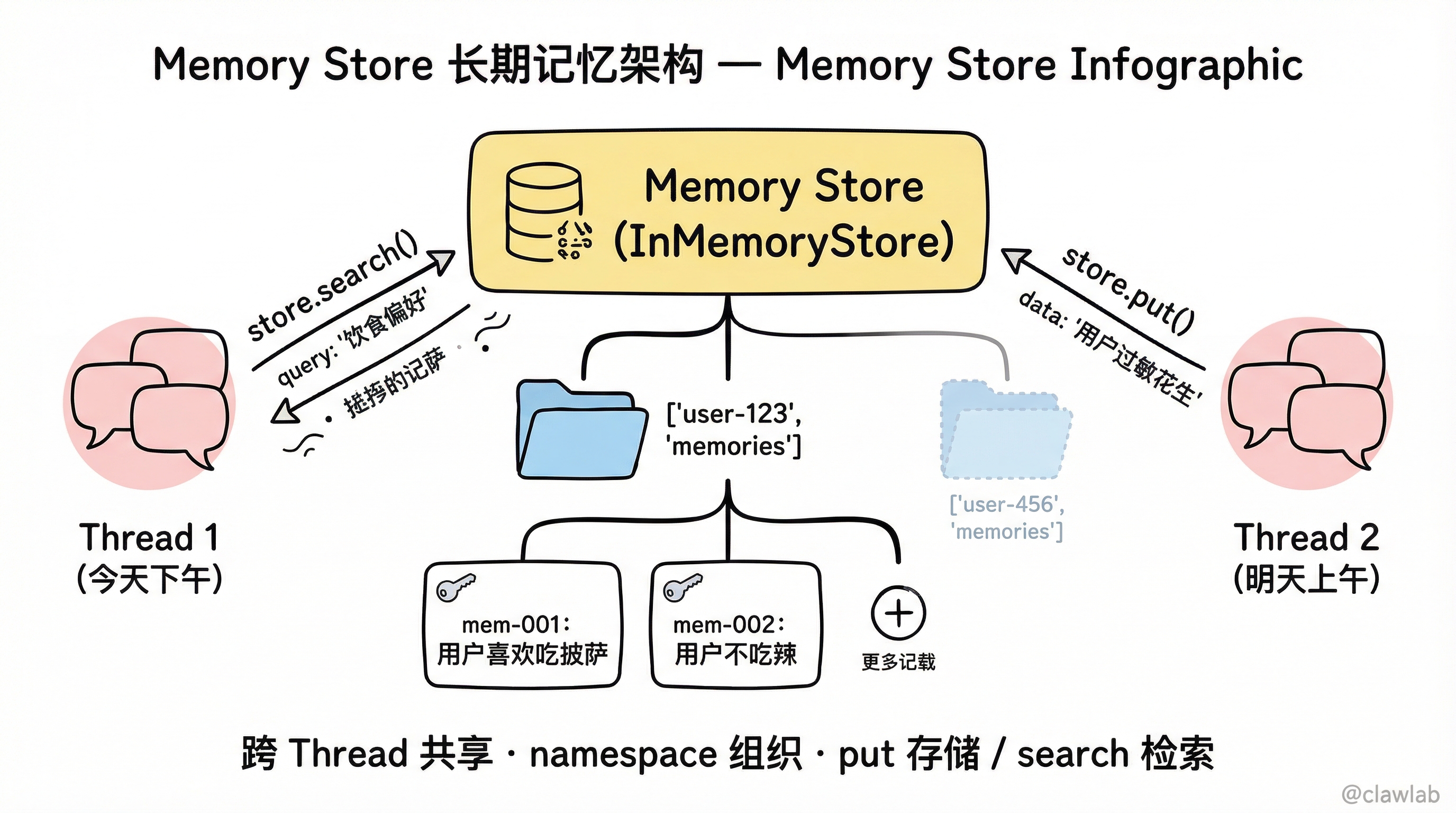
三、长期记忆(跨会话记忆)
基础实现
typescript
import { InMemoryStore, StateGraph, StateSchema, MessagesValue, GraphNode, START } from "@langchain/langgraph";
import { v4 as uuidv4 } from "uuid";

const store = new InMemoryStore();

const State = new StateSchema({
  messages: MessagesValue,
});

const callModel: GraphNode<typeof State> = async (state, runtime) => {
  const userId = runtime.context?.userId;
  const namespace = [userId, "memories"];

  const memories = await runtime.store?.search(namespace, {
    query: state.messages.at(-1)?.content,
    limit: 3,
  });

  const info = memories?.map((d) => d.value.data).join("\n") || "";

  const systemMsg = `你是一个有帮助的助手。用户信息: ${info}`;

  const response = await model.invoke([
    { role: "system", content: systemMsg },
    ...state.messages,
  ]);

  return { messages: [response] };
};

const graph = new StateGraph(State)
  .addNode("call_model", callModel)
  .addEdge(START, "call_model")
  .compile({ store });

await graph.invoke(
  { messages: [{ role: "user", content: "Hi" }] },
  { configurable: { thread_id: "1" }, context: { userId: "user-123" } }
);
存储和检索记忆
typescript
const userId = "user-123";
const namespace = [userId, "memories"];

await store.put(namespace, "mem-001", {
  data: "用户喜欢吃披萨",
});

await store.put(namespace, "mem-002", {
  data: "用户不吃辣",
});

const memories = await store.search(namespace, {
  query: "用户的饮食偏好",
  limit: 3,
});
生产环境配置
typescript
import { PostgresStore } from "@langchain/langgraph-checkpoint-postgres/store";

const DB_URI = "postgresql://user:pass@localhost:5432/mydb";
const store = PostgresStore.fromConnString(DB_URI);

const graph = builder.compile({ store });
四、语义搜索
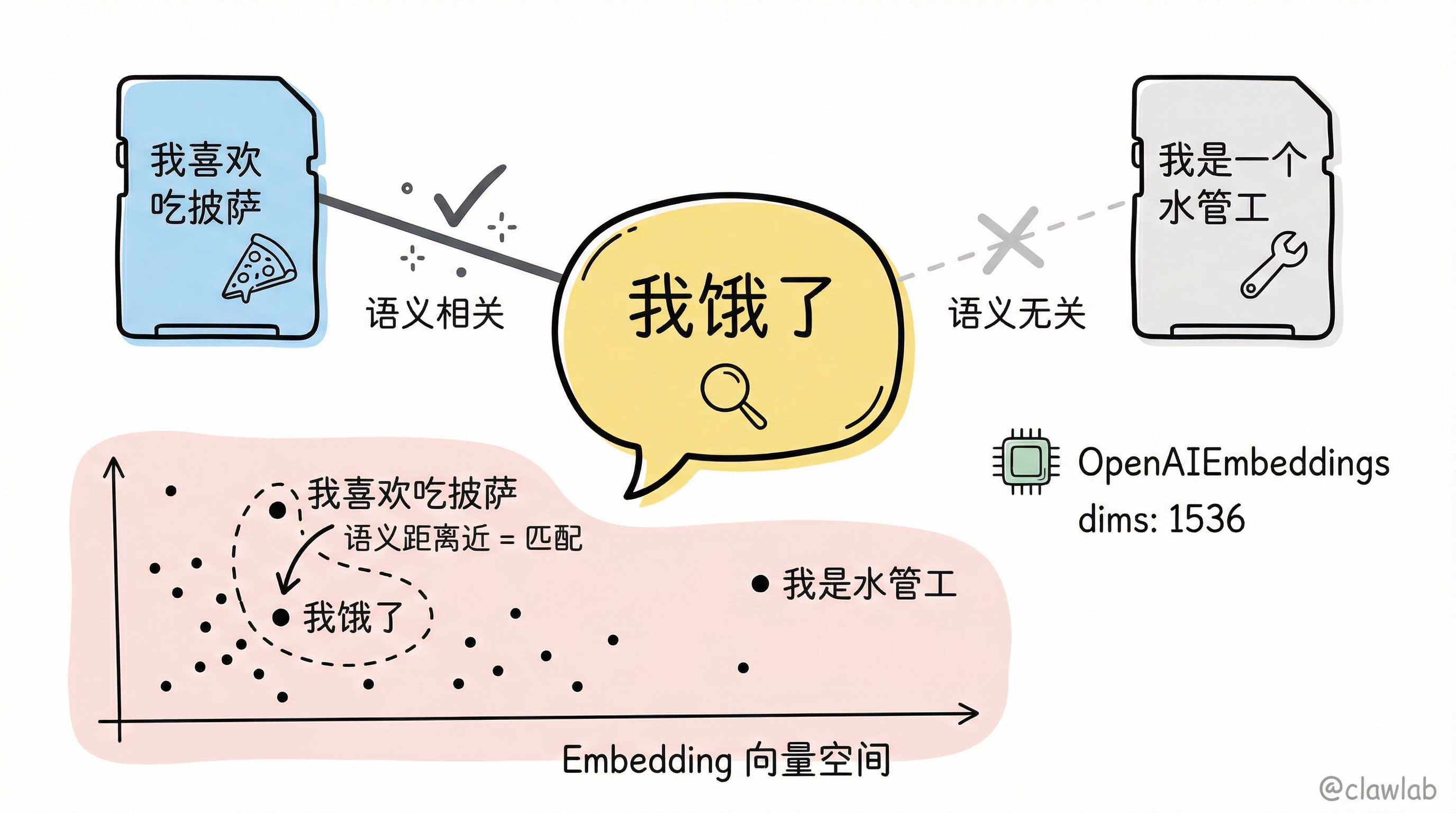
启用语义搜索让 AI 能够通过"意思"而不是关键词来检索记忆。
配置语义搜索
typescript
import { OpenAIEmbeddings } from "@langchain/openai";
import { InMemoryStore } from "@langchain/langgraph";

const embeddings = new OpenAIEmbeddings({ model: "text-embedding-3-small" });

const store = new InMemoryStore({
  index: {
    embeddings,
    dims: 1536,
  },
});
使用示例
typescript
await store.put(["user_123", "memories"], "1", { text: "我喜欢吃披萨" });
await store.put(["user_123", "memories"], "2", { text: "我是一个水管工" });

const items = await store.search(["user_123", "memories"], {
  query: "我饿了",
  limit: 1,
});
💡 人话解读: 用户说"我饿了",语义搜索会找到"我喜欢吃披萨"这条记忆,因为它们在语义上相关,即使没有共同的关键词。
完整示例:带语义搜索的聊天机器人
typescript
import { OpenAIEmbeddings, ChatOpenAI } from "@langchain/openai";
import { StateGraph, StateSchema, MessagesValue, GraphNode, START, InMemoryStore } from "@langchain/langgraph";

const State = new StateSchema({
  messages: MessagesValue,
});

const model = new ChatOpenAI({ model: "gpt-4.1-mini" });

const embeddings = new OpenAIEmbeddings({ model: "text-embedding-3-small" });
const store = new InMemoryStore({
  index: { embeddings, dims: 1536 },
});

await store.put(["user_123", "memories"], "1", { text: "我喜欢吃披萨" });
await store.put(["user_123", "memories"], "2", { text: "我是一个水管工" });

const chat: GraphNode<typeof State> = async (state, runtime) => {
  const items = await runtime.store.search(
    ["user_123", "memories"],
    { query: state.messages.at(-1)?.content, limit: 2 }
  );

  const memories = items.map((item) => item.value.text).join("\n");
  const memoriesText = memories ? `## 用户记忆\n${memories}` : "";

  const response = await model.invoke([
    { role: "system", content: `你是一个有帮助的助手。\n${memoriesText}` },
    ...state.messages,
  ]);

  return { messages: [response] };
};

const graph = new StateGraph(State)
  .addNode("chat", chat)
  .addEdge(START, "chat")
  .compile({ store });
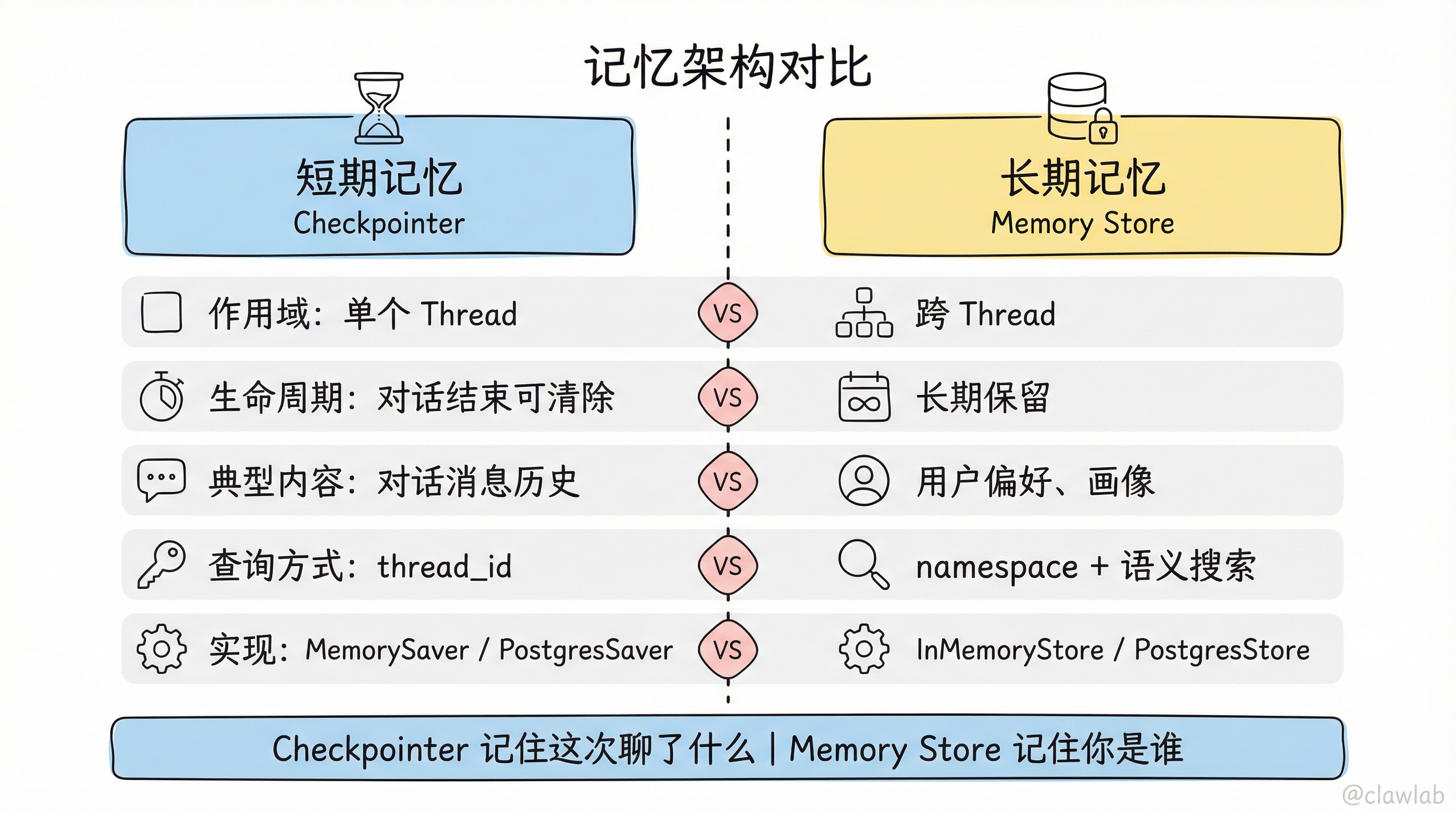
五、记忆架构对比
| 方面 | 短期记忆 (Checkpointer) | 长期记忆 (Memory Store) |
|---|---|---|
| 作用域 | 单个 Thread | 跨 Thread |
| 生命周期 | 对话结束可能清除 | 长期保留 |
| 典型内容 | 对话消息历史 | 用户偏好、画像 |
| 查询方式 | 按 thread_id | 按 namespace + 语义搜索 |
| 实现 | MemorySaver / PostgresSaver | InMemoryStore / PostgresStore |
六、最佳实践
短期记忆
| 实践 | 说明 |
|---|---|
| ✅ 使用消息摘要 | 长对话压缩为摘要 |
| ✅ 设置 maxTokens | 防止超出上下文窗口 |
| ✅ 生产环境用 PostgresSaver | 数据持久化 |
长期记忆
| 实践 | 说明 |
|---|---|
| ✅ 使用语义搜索 | 更智能的记忆检索 |
| ✅ 合理设计 namespace | 按用户、类型组织 |
| ✅ 定期清理过期记忆 | 避免数据膨胀 |
核心要点回顾
- 短期记忆:通过 Checkpointer 实现,用于多轮对话
- 长期记忆:通过 Memory Store 实现,用于跨会话记忆
- 消息管理:裁剪、删除、摘要三种策略
- 语义搜索:通过 Embedding 实现智能记忆检索
- 生产环境:PostgresSaver + PostgresStore
下一步学习
掌握了记忆系统,接下来:
📅 更新时间:2026-02-22