主题
工作流与 Agent:6 种核心模式详解
简单来说
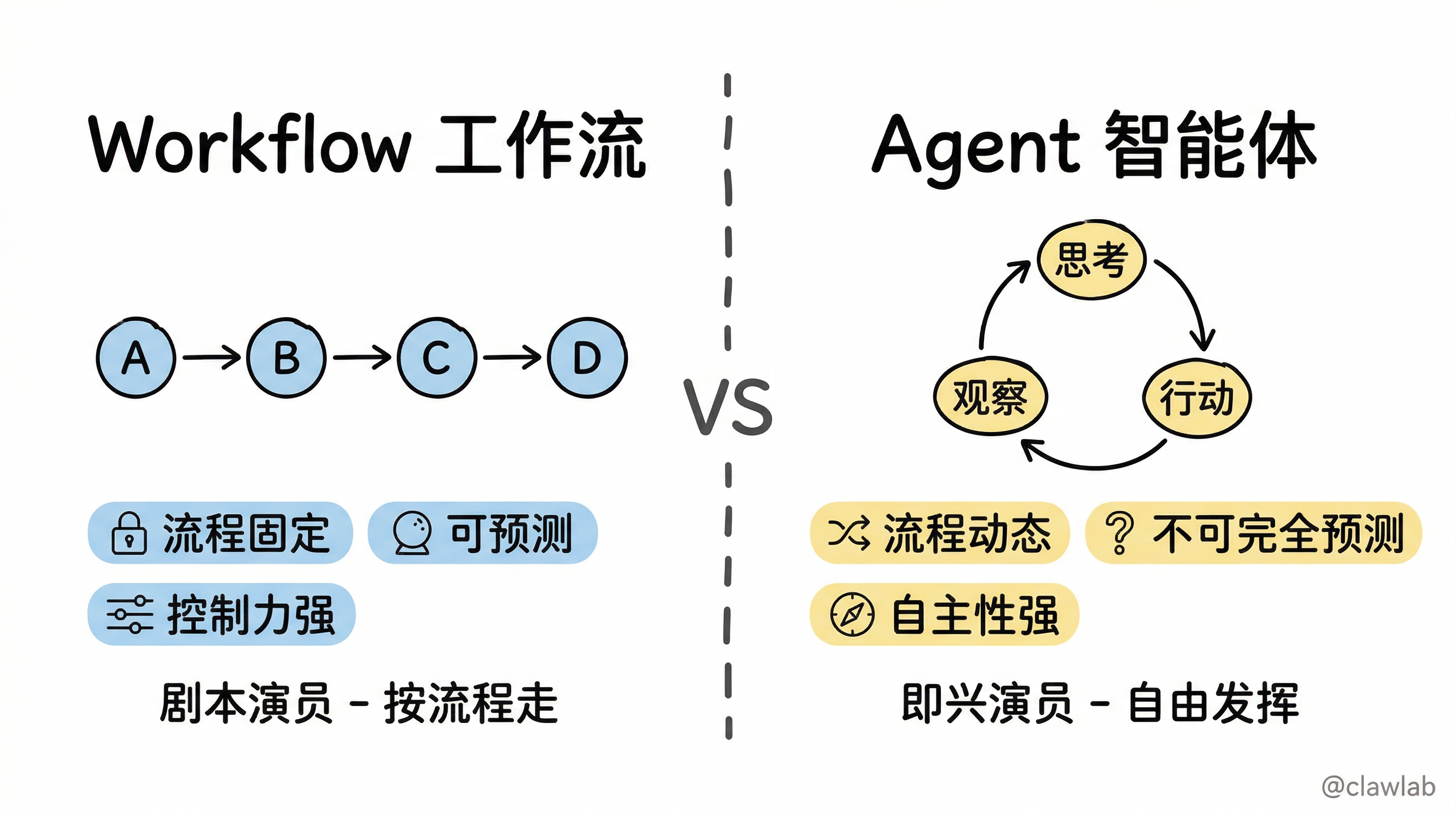
LangGraph 提供了 6 种核心工作流模式,就像搭乐高一样,你可以根据业务需求选择合适的"积木"来组装你的 AI 应用。Workflow(工作流) 是预设好的"剧本",Agent(智能体) 是自由发挥的"演员"。
🎯 本节目标
学完本节,你将能够:
- 理解 Workflow 与 Agent 的本质区别
- 掌握 6 种核心工作流模式的适用场景
- 能够根据业务需求选择合适的模式
- 学会组合使用多种模式构建复杂应用
核心痛点与解决方案
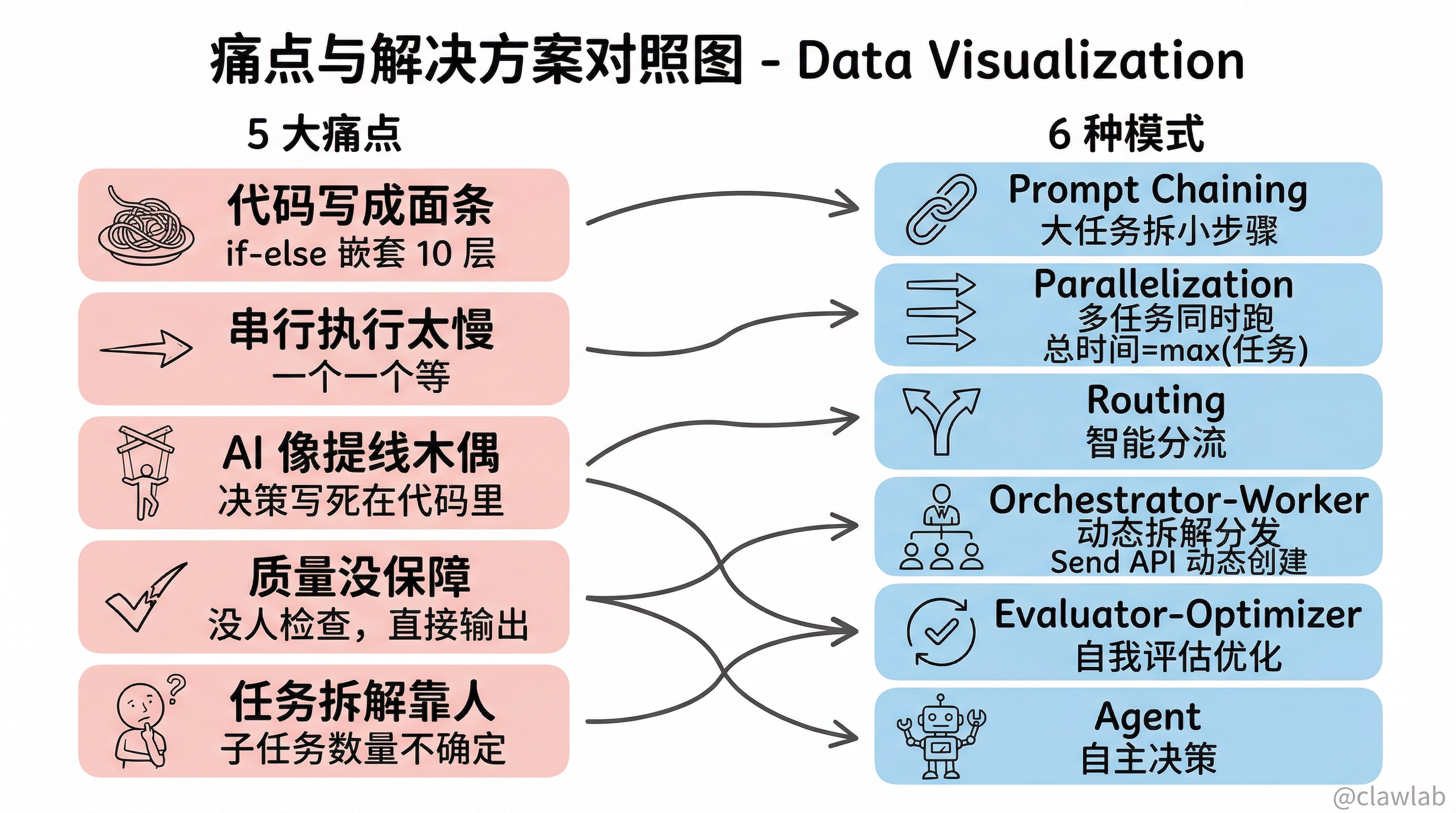
痛点:没有这些模式之前,我们有多惨?
| 痛点 | 具体表现 |
|---|---|
| 代码写成面条 | 当任务复杂时,代码里全是 if-else 嵌套 10 层 |
| 串行执行太慢 | 明明可以同时干的事,非要一个一个等 |
| AI 像提线木偶 | 所有决策都要写死在代码里,AI 没有自主判断 |
| 质量没保障 | AI 生成的内容好不好?没人检查,直接输出 |
| 任务拆解靠人 | 子任务数量不确定时,代码写死就 GG |
解决:6 种工作流模式
| 模式 | 解决的问题 | 适用场景 |
|---|---|---|
| Prompt Chaining | 把大任务拆成小步骤,可控 | 翻译、内容生成、数据处理 |
| Parallelization | 多个任务同时跑,速度起飞 | 多维度分析、批量处理 |
| Routing | 智能分流,不同问题走不同路 | 客服分流、意图识别 |
| Orchestrator-Worker | 动态拆解任务,分发执行 | 报告生成、代码重构 |
| Evaluator-Optimizer | 自我评估,迭代优化 | 内容润色、翻译校对 |
| Agent | 自主决策,工具调用循环 | 复杂问题求解、任务自动化 |
生活化类比:内容创作公司
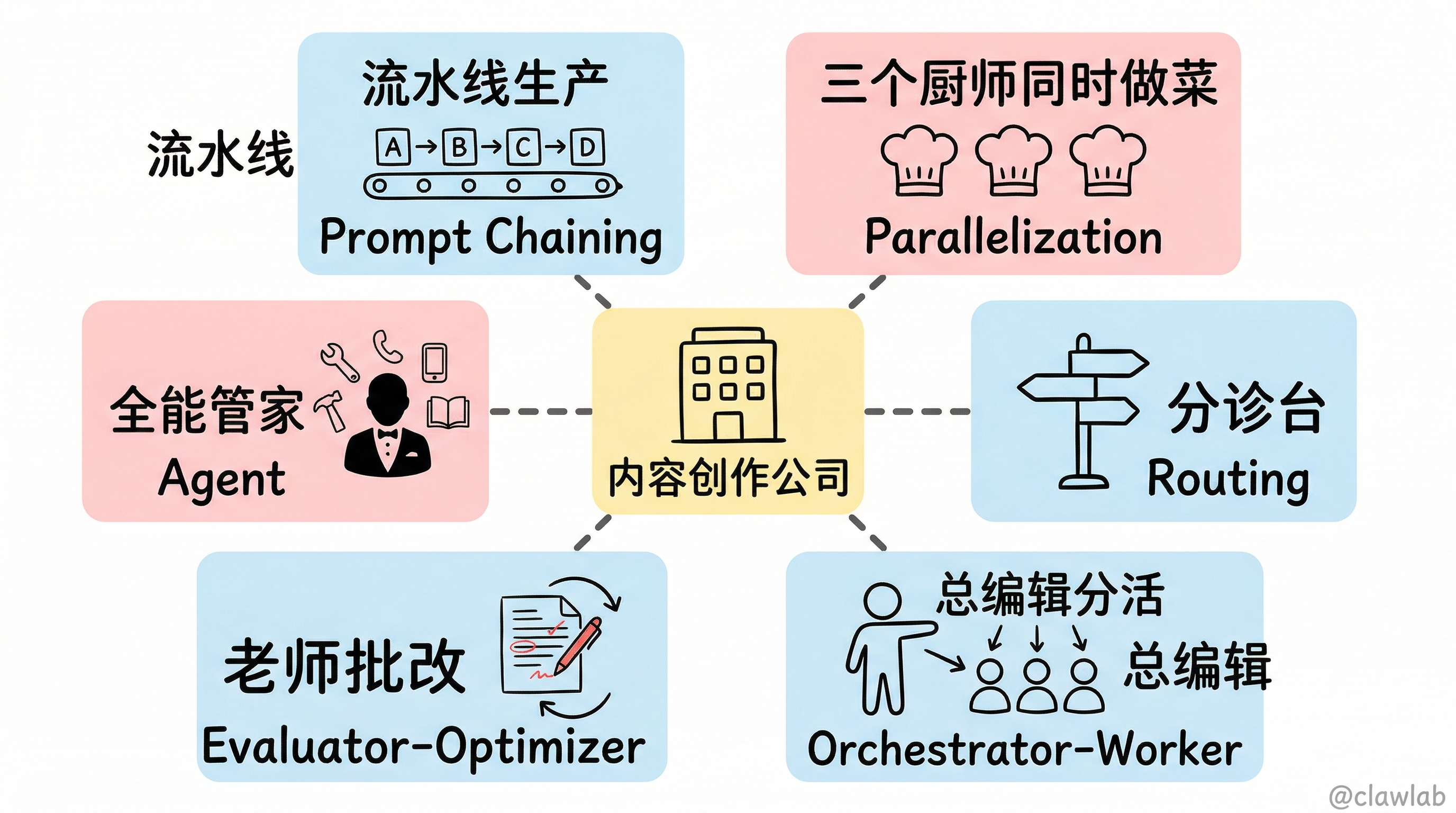
把 LangGraph 想象成一家"内容创作公司":
| 模式 | 公司类比 |
|---|---|
| Prompt Chaining | 流水线生产 - 底盘 → 发动机 → 内饰 → 质检 |
| Parallelization | 三个厨师同时做菜,而不是一个人做完再做下一个 |
| Routing | 医院分诊台 - 头疼去神经内科,肚子疼去消化科 |
| Orchestrator-Worker | 总编辑分活给实习生,最后汇总成稿 |
| Evaluator-Optimizer | 老师批改作文,不及格退回重写 |
| Agent | 全能管家 - 自己决定用什么工具解决问题 |
Workflow vs Agent:核心区别
┌─────────────────────────────────────────────────────────────┐
│                    Workflow vs Agent                        │
├─────────────────────────────────────────────────────────────┤
│                                                             │
│   Workflow (工作流)           Agent (智能体)                 │
│   ┌─────────────────┐        ┌─────────────────┐           │
│   │ 预设好的路径     │        │ 动态决策的循环   │           │
│   │ A → B → C → D   │        │ 思考 → 行动 →   │           │
│   │                 │        │ 观察 → 思考...   │           │
│   └─────────────────┘        └─────────────────┘           │
│                                                             │
│   特点:                     特点:                         │
│   - 流程固定                 - 流程动态                     │
│   - 可预测                   - 不可完全预测                 │
│   - 控制力强                 - 自主性强                     │
│                                                             │
└─────────────────────────────────────────────────────────────┘
模式一:Prompt Chaining(提示链)
什么是 Prompt Chaining?
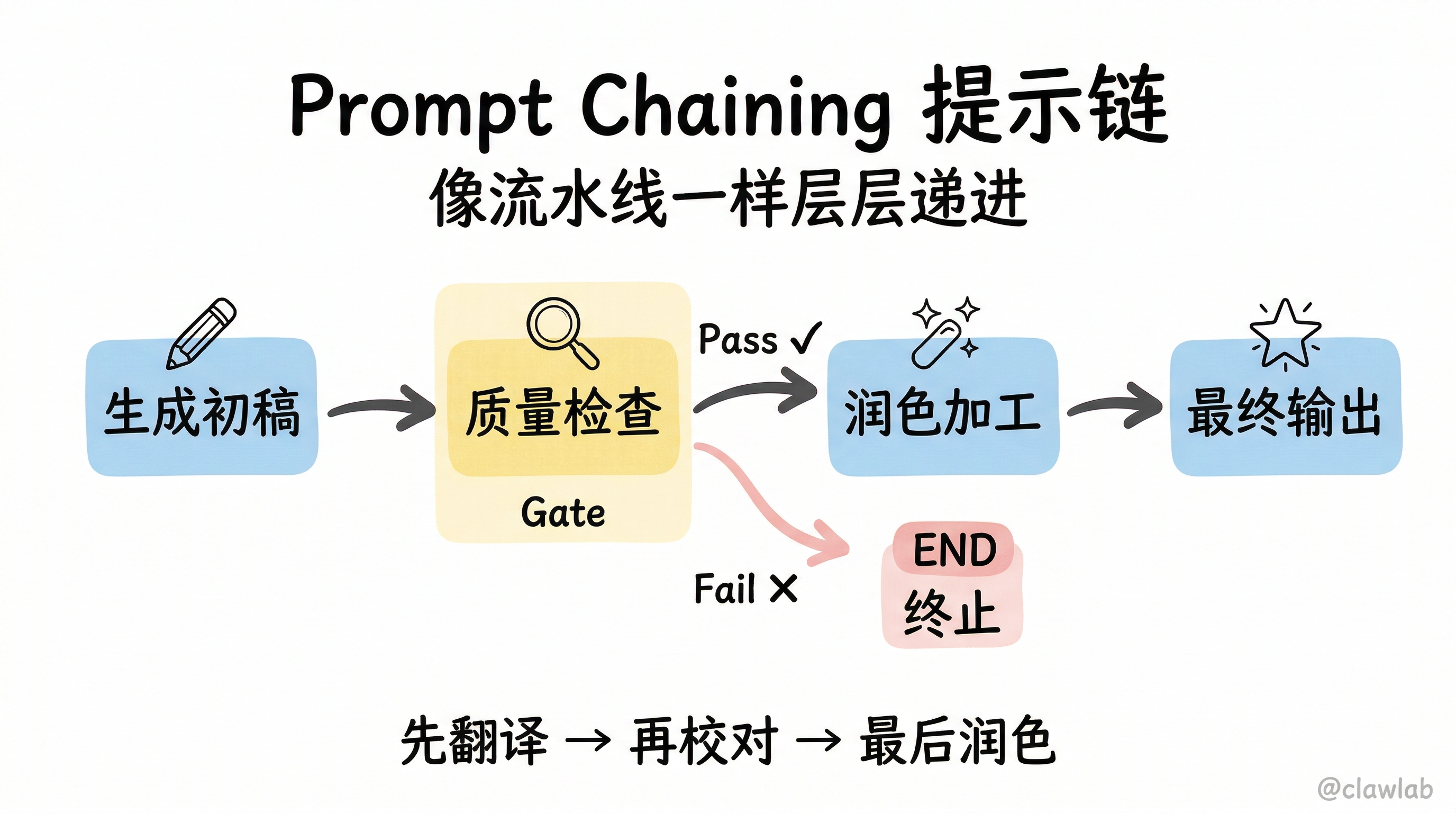
就像流水线生产:每个 LLM 调用处理上一步的输出,层层递进,最终得到高质量结果。
┌──────────┐    ┌──────────┐    ┌──────────┐    ┌──────────┐
│ 生成初稿  │ → │ 质量检查  │ → │ 润色加工  │ → │ 最终输出  │
└──────────┘    └──────────┘    └──────────┘    └──────────┘
适用场景
- 文档翻译(先翻译 → 再校对 → 最后润色)
- 内容生成(先写大纲 → 再扩写 → 最后优化)
- 数据处理(先提取 → 再清洗 → 最后格式化)
代码示例
typescript
import { StateGraph, StateSchema, GraphNode, ConditionalEdgeRouter, START, END } from "@langchain/langgraph";
import { ChatAnthropic } from "@langchain/anthropic";
import * as z from "zod";

const llm = new ChatAnthropic({ model: "claude-sonnet-4-5-20250929" });

const State = new StateSchema({
  topic: z.string(),
  joke: z.string(),
  improvedJoke: z.string(),
  finalJoke: z.string(),
});

const generateJoke: GraphNode<typeof State> = async (state) => {
  const msg = await llm.invoke(`Write a short joke about ${state.topic}`);
  return { joke: msg.content as string };
};

const checkPunchline: ConditionalEdgeRouter<typeof State, "improveJoke"> = (state) => {
  if (state.joke?.includes("?") || state.joke?.includes("!")) {
    return "Pass";
  }
  return "Fail";
};

const improveJoke: GraphNode<typeof State> = async (state) => {
  const msg = await llm.invoke(`Make this joke funnier: ${state.joke}`);
  return { improvedJoke: msg.content as string };
};

const polishJoke: GraphNode<typeof State> = async (state) => {
  const msg = await llm.invoke(`Add a surprising twist: ${state.improvedJoke}`);
  return { finalJoke: msg.content as string };
};

const chain = new StateGraph(State)
  .addNode("generateJoke", generateJoke)
  .addNode("improveJoke", improveJoke)
  .addNode("polishJoke", polishJoke)
  .addEdge(START, "generateJoke")
  .addConditionalEdges("generateJoke", checkPunchline, {
    Pass: "improveJoke",
    Fail: END
  })
  .addEdge("improveJoke", "polishJoke")
  .addEdge("polishJoke", END)
  .compile();

const result = await chain.invoke({ topic: "cats" });
console.log("最终笑话:", result.finalJoke);
💡 人话解读:
"先让 AI 写个笑话 → 检查有没有包袱(问号或感叹号)→ 有就继续加工润色 → 没有就直接结束(可能是残次品)"
模式二:Parallelization(并行化)
什么是 Parallelization?
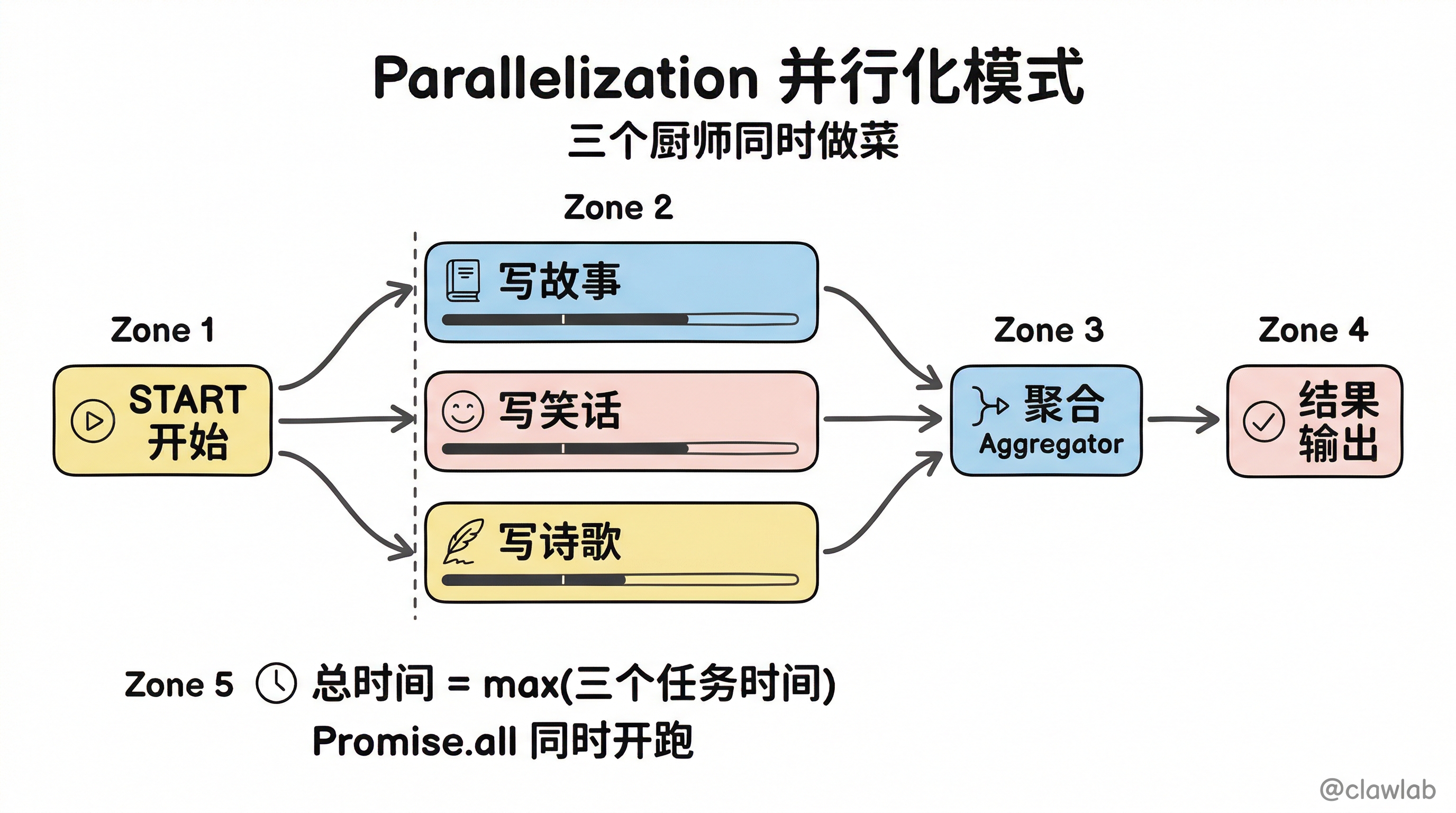
就像三个厨师同时做菜:多个独立任务同时执行,最后汇总结果,速度起飞!
         ┌→ [写故事] ─┐
[开始] ──┼→ [写笑话] ──┼→ [汇总] → [结束]
         └→ [写诗歌] ─┘
适用场景
- 多维度内容生成(同时生成故事、笑话、诗歌)
- 多数据源聚合(同时查询多个 API)
- 批量处理(同时处理多个文档)
代码示例
typescript
import { StateGraph, StateSchema, GraphNode, START, END } from "@langchain/langgraph";
import * as z from "zod";

const State = new StateSchema({
  topic: z.string(),
  joke: z.string(),
  story: z.string(),
  poem: z.string(),
  combinedOutput: z.string(),
});

const generateJoke: GraphNode<typeof State> = async (state) => {
  const msg = await llm.invoke(`Write a joke about ${state.topic}`);
  return { joke: msg.content as string };
};

const generateStory: GraphNode<typeof State> = async (state) => {
  const msg = await llm.invoke(`Write a story about ${state.topic}`);
  return { story: msg.content as string };
};

const generatePoem: GraphNode<typeof State> = async (state) => {
  const msg = await llm.invoke(`Write a poem about ${state.topic}`);
  return { poem: msg.content as string };
};

const aggregator: GraphNode<typeof State> = async (state) => {
  const combined = `主题: ${state.topic}

【故事】
${state.story}

【笑话】
${state.joke}

【诗歌】
${state.poem}`;
  return { combinedOutput: combined };
};

const parallelWorkflow = new StateGraph(State)
  .addNode("joke", generateJoke)
  .addNode("story", generateStory)
  .addNode("poem", generatePoem)
  .addNode("aggregator", aggregator)
  .addEdge(START, "joke")
  .addEdge(START, "story")
  .addEdge(START, "poem")
  .addEdge("joke", "aggregator")
  .addEdge("story", "aggregator")
  .addEdge("poem", "aggregator")
  .addEdge("aggregator", END)
  .compile();

const result = await parallelWorkflow.invoke({ topic: "cats" });
console.log(result.combinedOutput);
💡 人话解读:
"三个节点都从 START 出发 = 同时开跑!都到 aggregator 才继续 = 等最慢的那个完成才汇总。总时间 = max(三个任务时间)"
Functional API 写法
typescript
import { task, entrypoint } from "@langchain/langgraph";

const generateJoke = task("joke", async (topic: string) => {
  const msg = await llm.invoke(`Write a joke about ${topic}`);
  return msg.content;
});

const generateStory = task("story", async (topic: string) => {
  const msg = await llm.invoke(`Write a story about ${topic}`);
  return msg.content;
});

const generatePoem = task("poem", async (topic: string) => {
  const msg = await llm.invoke(`Write a poem about ${topic}`);
  return msg.content;
});

const workflow = entrypoint("parallel", async (topic: string) => {
  const [joke, story, poem] = await Promise.all([
    generateJoke(topic),
    generateStory(topic),
    generatePoem(topic),
  ]);

  return { joke, story, poem };
});
💡 人话解读:
"
Promise.all就是并行的秘诀!三个任务同时开跑,全部完成才返回。"
模式三:Routing(路由)
什么是 Routing?
就像医院分诊台:根据输入的类型,智能分流到不同的处理节点。
                   ┌→ [故事专家] → ┐
[用户请求] → [分诊] ┼→ [笑话专家] → ┼→ [输出]
                   └→ [诗人] ────→ ┘
适用场景
- 客服分流(退款/物流/投诉走不同处理流程)
- 意图识别(问天气/问股票/闲聊走不同路径)
- 内容分类(技术问题/业务问题/其他问题)
代码示例
typescript
import { StateGraph, StateSchema, GraphNode, ConditionalEdgeRouter, START, END } from "@langchain/langgraph";
import * as z from "zod";

const routeSchema = z.object({
  step: z.enum(["poem", "story", "joke"]).describe("Next step"),
});

const router = llm.withStructuredOutput(routeSchema);

const State = new StateSchema({
  input: z.string(),
  decision: z.string(),
  output: z.string(),
});

const routerNode: GraphNode<typeof State> = async (state) => {
  const decision = await router.invoke([
    { role: "system", content: "Route to story, joke, or poem based on request." },
    { role: "user", content: state.input },
  ]);
  return { decision: decision.step };
};

const storyNode: GraphNode<typeof State> = async (state) => {
  const result = await llm.invoke([
    { role: "system", content: "You are an expert storyteller." },
    { role: "user", content: state.input },
  ]);
  return { output: result.content as string };
};

const jokeNode: GraphNode<typeof State> = async (state) => {
  const result = await llm.invoke([
    { role: "system", content: "You are an expert comedian." },
    { role: "user", content: state.input },
  ]);
  return { output: result.content as string };
};

const poemNode: GraphNode<typeof State> = async (state) => {
  const result = await llm.invoke([
    { role: "system", content: "You are an expert poet." },
    { role: "user", content: state.input },
  ]);
  return { output: result.content as string };
};

const routeDecision: ConditionalEdgeRouter<typeof State, "storyNode" | "jokeNode" | "poemNode"> = (state) => {
  if (state.decision === "story") return "storyNode";
  if (state.decision === "joke") return "jokeNode";
  return "poemNode";
};

const routerWorkflow = new StateGraph(State)
  .addNode("router", routerNode)
  .addNode("storyNode", storyNode)
  .addNode("jokeNode", jokeNode)
  .addNode("poemNode", poemNode)
  .addEdge(START, "router")
  .addConditionalEdges("router", routeDecision, ["storyNode", "jokeNode", "poemNode"])
  .addEdge("storyNode", END)
  .addEdge("jokeNode", END)
  .addEdge("poemNode", END)
  .compile();

const result = await routerWorkflow.invoke({ input: "Tell me a joke about cats" });
console.log(result.output);
💡 人话解读:
"用户说'讲个笑话'→ 路由节点判断是 joke → 走 jokeNode → 喜剧专家来处理。不同请求走不同专家,专业的事交给专业的人!"
模式四:Orchestrator-Worker(编排者-工作者)
什么是 Orchestrator-Worker?
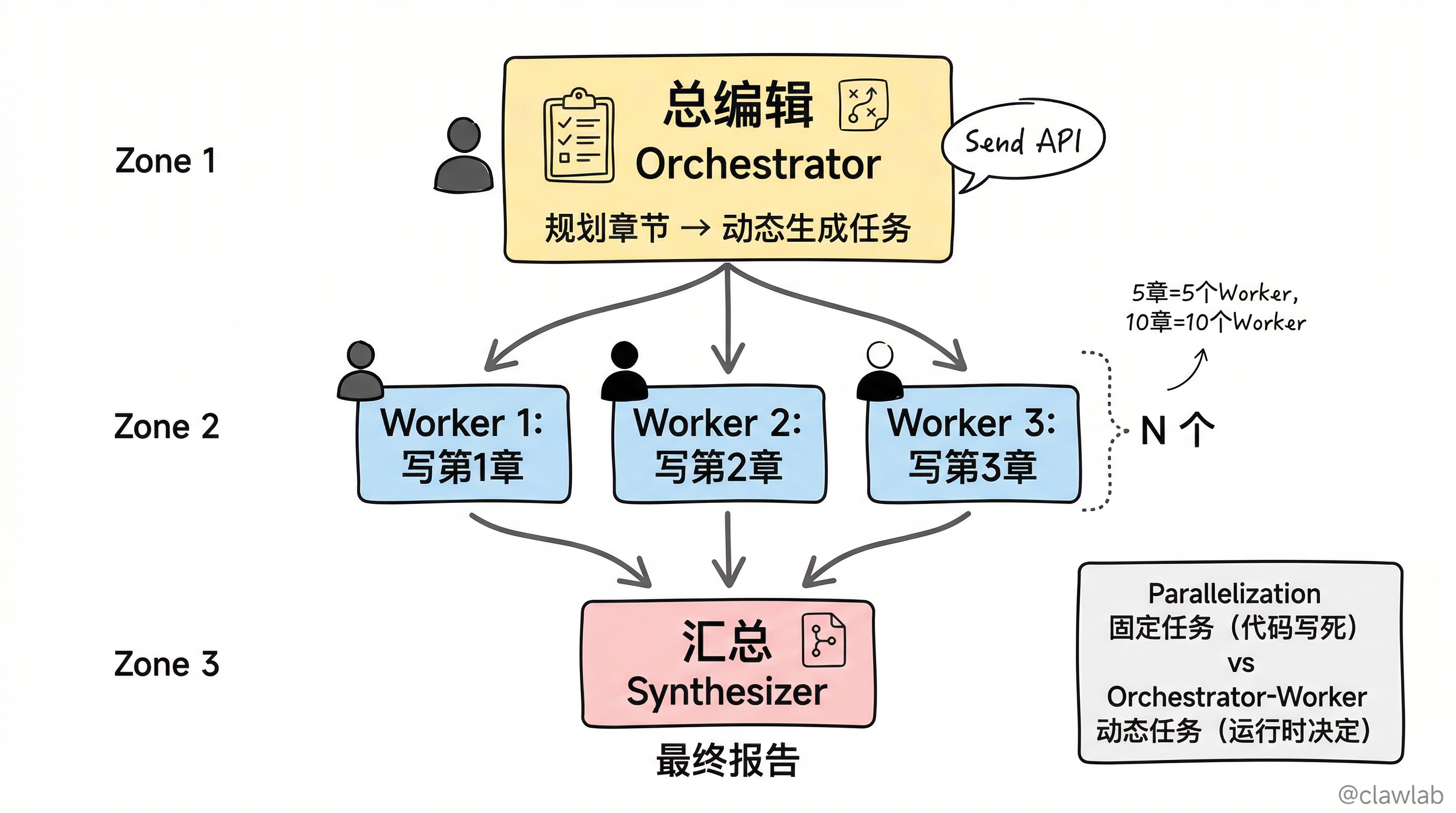
就像总编辑带实习生写报告:
- 总编辑(Orchestrator) 规划章节
- 实习生们(Workers) 同时写各自的章节
- 总编辑 汇总成最终报告
                    ┌→ [Worker1: 写第1章] ─┐
[总编辑: 规划] ────┼→ [Worker2: 写第2章] ──┼→ [总编辑: 汇总]
                    └→ [Worker3: 写第3章] ─┘
与 Parallelization 的区别
| 方面 | Parallelization | Orchestrator-Worker |
|---|---|---|
| 任务数量 | 固定(代码写死) | 动态(运行时决定) |
| 任务来源 | 预先定义 | 由 Orchestrator 规划 |
| 适用场景 | 子任务明确 | 子任务需要动态生成 |
代码示例(Send API)
typescript
import { StateGraph, StateSchema, ReducedValue, GraphNode, Send, START, END } from "@langchain/langgraph";
import * as z from "zod";

const sectionSchema = z.object({
  name: z.string(),
  description: z.string(),
});

const sectionsSchema = z.object({
  sections: z.array(sectionSchema),
});

const planner = llm.withStructuredOutput(sectionsSchema);

const State = new StateSchema({
  topic: z.string(),
  sections: z.array(sectionSchema),
  completedSections: new ReducedValue(
    z.array(z.string()).default(() => []),
    { reducer: (a, b) => a.concat(b) }
  ),
  finalReport: z.string(),
});

const WorkerState = new StateSchema({
  section: sectionSchema,
  completedSections: new ReducedValue(
    z.array(z.string()).default(() => []),
    { reducer: (a, b) => a.concat(b) }
  ),
});

const orchestrator: GraphNode<typeof State> = async (state) => {
  const plan = await planner.invoke([
    { role: "system", content: "Generate a report plan with sections." },
    { role: "user", content: `Topic: ${state.topic}` },
  ]);
  return { sections: plan.sections };
};

const worker: GraphNode<typeof WorkerState> = async (state) => {
  const section = await llm.invoke([
    { role: "system", content: "Write a report section." },
    { role: "user", content: `Section: ${state.section.name}\nDescription: ${state.section.description}` },
  ]);
  return { completedSections: [section.content as string] };
};

const synthesizer: GraphNode<typeof State> = async (state) => {
  const report = state.completedSections.join("\n\n---\n\n");
  return { finalReport: report };
};

const assignWorkers = (state: z.infer<typeof State.schema>) => {
  return state.sections.map((section) => new Send("worker", { section }));
};

const workflow = new StateGraph(State)
  .addNode("orchestrator", orchestrator)
  .addNode("worker", worker)
  .addNode("synthesizer", synthesizer)
  .addEdge(START, "orchestrator")
  .addConditionalEdges("orchestrator", assignWorkers, ["worker"])
  .addEdge("worker", "synthesizer")
  .addEdge("synthesizer", END)
  .compile();

const result = await workflow.invoke({ topic: "LLM Scaling Laws" });
console.log(result.finalReport);
💡 人话解读:
"
SendAPI 是关键!总编辑规划出几个章节,就动态生成几个 worker。5 章就 5 个 worker,10 章就 10 个 worker。全部写完汇总成最终报告。"
模式五:Evaluator-Optimizer(评估者-优化者)
什么是 Evaluator-Optimizer?
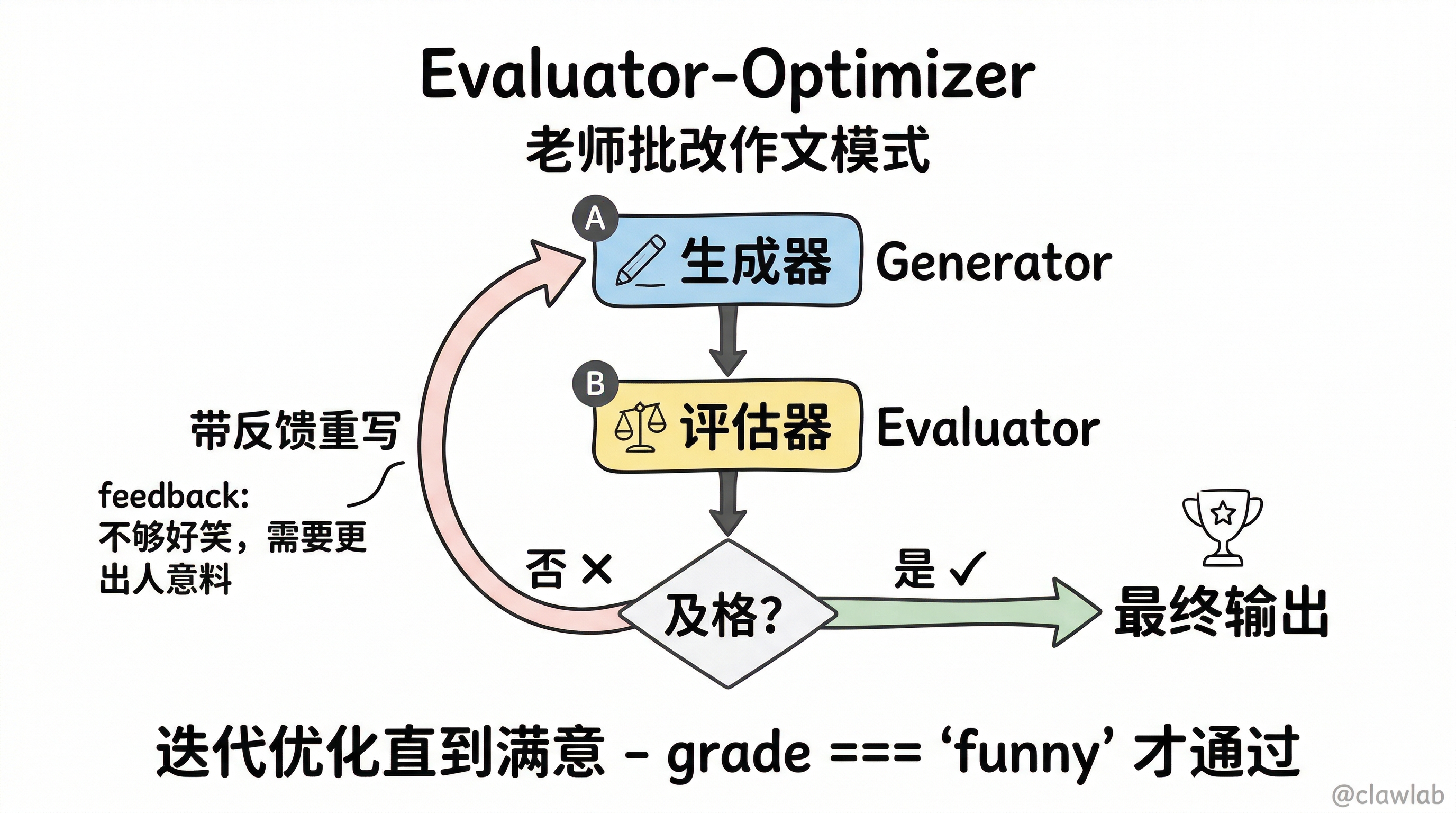
就像老师批改作文:学生写 → 老师评 → 不及格就退回重写 → 循环直到满意。
┌→ [生成器: 写内容] ────────────────┐
│         ↓                        │
│  [评估器: 打分+反馈]              │
│         ↓                        │
│    及格?─── 是 ─→ 输出          │
│      │                           │
│     否                           │
│      └───────────────────────────┘
适用场景
- 内容质量优化(笑话要好笑、文案要吸引人)
- 翻译校对(语义要准确)
- 代码审查(功能要正确)
代码示例
typescript
import { StateGraph, StateSchema, GraphNode, ConditionalEdgeRouter, START, END } from "@langchain/langgraph";
import * as z from "zod";

const feedbackSchema = z.object({
  grade: z.enum(["funny", "not funny"]),
  feedback: z.string(),
});

const evaluator = llm.withStructuredOutput(feedbackSchema);

const State = new StateSchema({
  topic: z.string(),
  joke: z.string(),
  feedback: z.string(),
  grade: z.string(),
});

const generator: GraphNode<typeof State> = async (state) => {
  let prompt = `Write a joke about ${state.topic}`;
  if (state.feedback) {
    prompt += `. Consider this feedback: ${state.feedback}`;
  }
  const msg = await llm.invoke(prompt);
  return { joke: msg.content as string };
};

const evaluatorNode: GraphNode<typeof State> = async (state) => {
  const result = await evaluator.invoke(`Grade this joke: ${state.joke}`);
  return { grade: result.grade, feedback: result.feedback };
};

const routeGrade: ConditionalEdgeRouter<typeof State, "generator"> = (state) => {
  if (state.grade === "funny") return "Accepted";
  return "Rejected";
};

const optimizerWorkflow = new StateGraph(State)
  .addNode("generator", generator)
  .addNode("evaluator", evaluatorNode)
  .addEdge(START, "generator")
  .addEdge("generator", "evaluator")
  .addConditionalEdges("evaluator", routeGrade, {
    Accepted: END,
    Rejected: "generator",
  })
  .compile();

const result = await optimizerWorkflow.invoke({ topic: "cats" });
console.log("最终通过的笑话:", result.joke);
💡 人话解读:
"生成器写笑话 → 评估器打分 → 好笑就过 → 不好笑就带着反馈意见重写 → 循环直到好笑为止。这就是迭代优化的精髓!"
Functional API 写法
typescript
import { task, entrypoint } from "@langchain/langgraph";

const generate = task("generate", async (params: { topic: string; feedback?: string }) => {
  let prompt = `Write a joke about ${params.topic}`;
  if (params.feedback) {
    prompt += `. Feedback: ${params.feedback}`;
  }
  const msg = await llm.invoke(prompt);
  return msg.content;
});

const evaluate = task("evaluate", async (joke: string) => {
  return evaluator.invoke(`Grade this joke: ${joke}`);
});

const workflow = entrypoint("optimizer", async (topic: string) => {
  let feedback: string | undefined;
  let joke: string;

  while (true) {
    joke = await generate({ topic, feedback });
    const grade = await evaluate(joke);

    if (grade.grade === "funny") {
      break;
    }
    feedback = grade.feedback;
  }

  return joke;
});
模式六:Agent(工具调用智能体)
什么是 Agent?
就像全能管家:你只需要说目标,管家自己决定用什么工具、怎么解决问题。
┌→ [LLM 思考: 需要用什么工具?] ─────────────────────┐
│              ↓                                     │
│         有工具调用?                               │
│          ↓      ↓                                  │
│         是     否 → 输出最终答案                   │
│          ↓                                         │
│     [执行工具]                                     │
│          ↓                                         │
│     [把结果告诉 LLM]                               │
│          └─────────────────────────────────────────┘
适用场景
- 复杂问题求解(需要多步推理)
- 任务自动化(需要调用多个 API)
- 自主决策(解决路径不确定)
代码示例
typescript
import { StateGraph, StateSchema, MessagesValue, GraphNode, ConditionalEdgeRouter, START, END } from "@langchain/langgraph";
import { ToolNode } from "@langchain/langgraph/prebuilt";
import { tool } from "@langchain/core/tools";
import { AIMessage } from "@langchain/core/messages";
import * as z from "zod";

const add = tool(({ a, b }) => a + b, {
  name: "add",
  description: "Add two numbers",
  schema: z.object({ a: z.number(), b: z.number() }),
});

const multiply = tool(({ a, b }) => a * b, {
  name: "multiply",
  description: "Multiply two numbers",
  schema: z.object({ a: z.number(), b: z.number() }),
});

const divide = tool(({ a, b }) => a / b, {
  name: "divide",
  description: "Divide two numbers",
  schema: z.object({ a: z.number(), b: z.number() }),
});

const tools = [add, multiply, divide];
const llmWithTools = llm.bindTools(tools);

const State = new StateSchema({
  messages: MessagesValue,
});

const llmCall: GraphNode<typeof State> = async (state) => {
  const result = await llmWithTools.invoke([
    { role: "system", content: "You are a helpful math assistant." },
    ...state.messages,
  ]);
  return { messages: [result] };
};

const toolNode = new ToolNode(tools);

const shouldContinue: ConditionalEdgeRouter<typeof State, "tools"> = (state) => {
  const lastMessage = state.messages.at(-1);
  if (lastMessage && AIMessage.isInstance(lastMessage) && lastMessage.tool_calls?.length) {
    return "tools";
  }
  return END;
};

const agent = new StateGraph(State)
  .addNode("llm", llmCall)
  .addNode("tools", toolNode)
  .addEdge(START, "llm")
  .addConditionalEdges("llm", shouldContinue, ["tools", END])
  .addEdge("tools", "llm")
  .compile();

const result = await agent.invoke({
  messages: [{ role: "user", content: "Calculate (3 + 4) * 5" }],
});

console.log(result.messages.at(-1)?.content);
💡 人话解读:
"用户问'计算 (3+4)*5'→ LLM 想'先要加'→ 调用 add(3,4)=7 → 结果告诉 LLM → LLM 想'再乘'→ 调用 multiply(7,5)=35 → 结果告诉 LLM → LLM 说'搞定了,答案是35'→ 结束。循环多少次、用什么工具,都是 AI 自己决定的!"
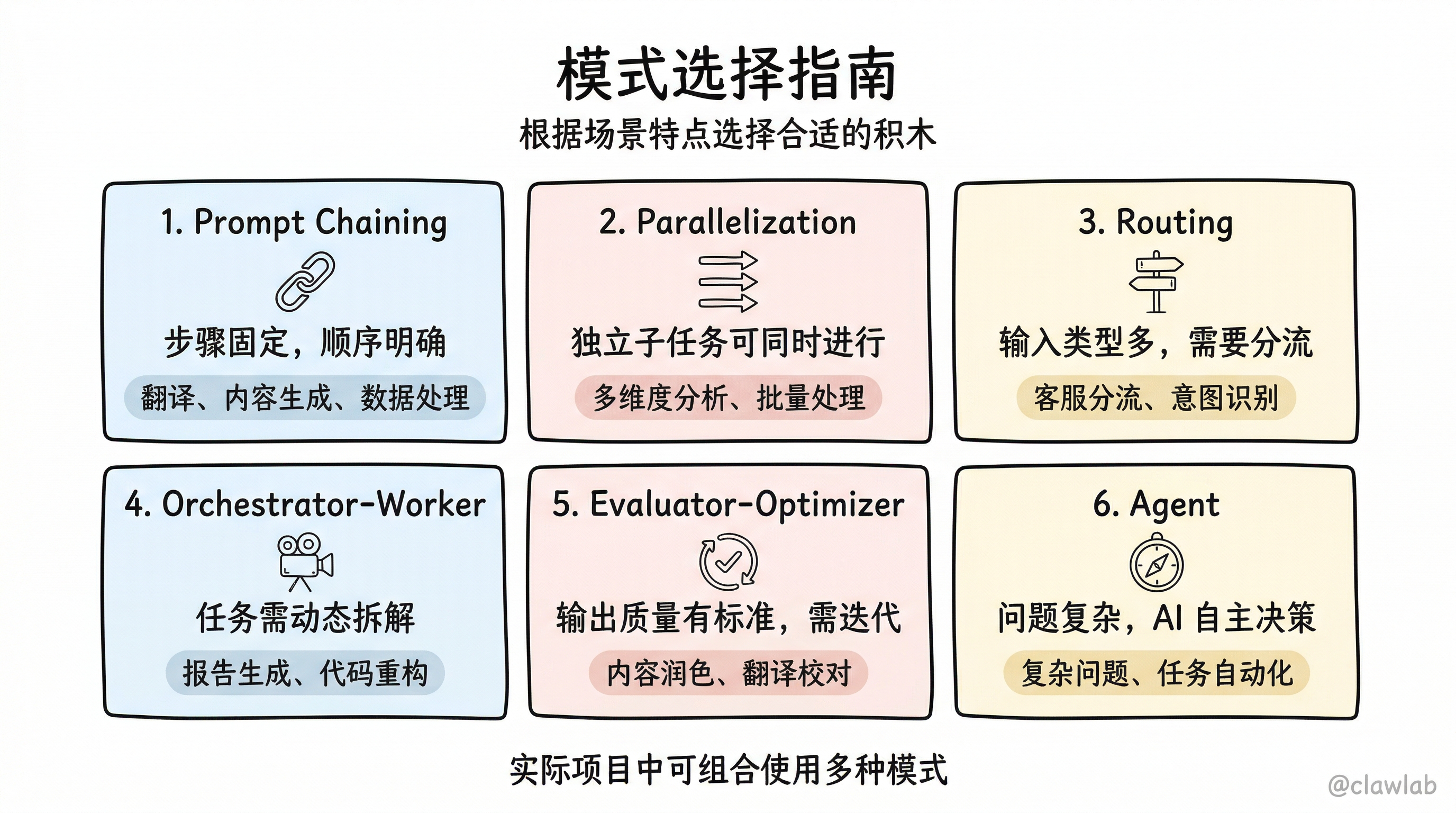
模式选择指南
| 场景特点 | 推荐模式 |
|---|---|
| 任务步骤固定、顺序明确 | Prompt Chaining |
| 多个独立子任务可同时进行 | Parallelization |
| 输入类型多,需要分流处理 | Routing |
| 任务需要动态拆解,子任务数量不定 | Orchestrator-Worker |
| 输出质量有明确标准,需要迭代优化 | Evaluator-Optimizer |
| 问题复杂、解决路径不确定、需要 AI 自主决策 | Agent |
组合使用示例
实际项目中,往往需要组合多种模式:
用户请求
    │
    ▼
[Routing: 意图识别]
    │
    ├─→ 简单问答 → [Prompt Chaining: 回复生成]
    │
    ├─→ 报告生成 → [Orchestrator-Worker: 章节并行]
    │                        │
    │                        ▼
    │              [Evaluator-Optimizer: 质量优化]
    │
    └─→ 复杂任务 → [Agent: 自主决策循环]
核心要点回顾
- Workflow vs Agent:Workflow 是剧本演员(按流程走),Agent 是即兴演员(自由发挥)
- 6 种模式各有所长:根据任务特点选择,也可以组合使用
- Parallelization 提速:多个独立任务同时跑
- Routing 分流:不同类型走不同路径
- Orchestrator-Worker 动态拆解:Send API 是关键
- Evaluator-Optimizer 质量把控:循环优化直到满意
- Agent 自主决策:工具调用循环,AI 自己决定怎么干
下一步学习
掌握了工作流模式,接下来学习持久化和流式处理:
📅 更新时间:2026-02-22