主题
15. 子图构建:模块化你的复杂系统
简单来说
Subgraph(子图)就是"图中图" —— 把一个完整的 Graph 塞进另一个 Graph 里当节点用,实现复杂系统的模块化拆分。就像俄罗斯套娃,大图套小图,让你能把复杂的 AI 工作流拆成独立模块,各自开发、测试,最后组装成完整系统。
🎯 本节目标
学完本节,你将能够回答:
- 什么时候应该使用子图?
- 两种子图模式(函数调用 vs 直接添加)有什么区别?
- 子图与父图如何共享状态?如何隔离状态?
- 如何流式输出子图的执行过程?
- 子图的持久化(Checkpointer)如何配置?
核心痛点与解决方案
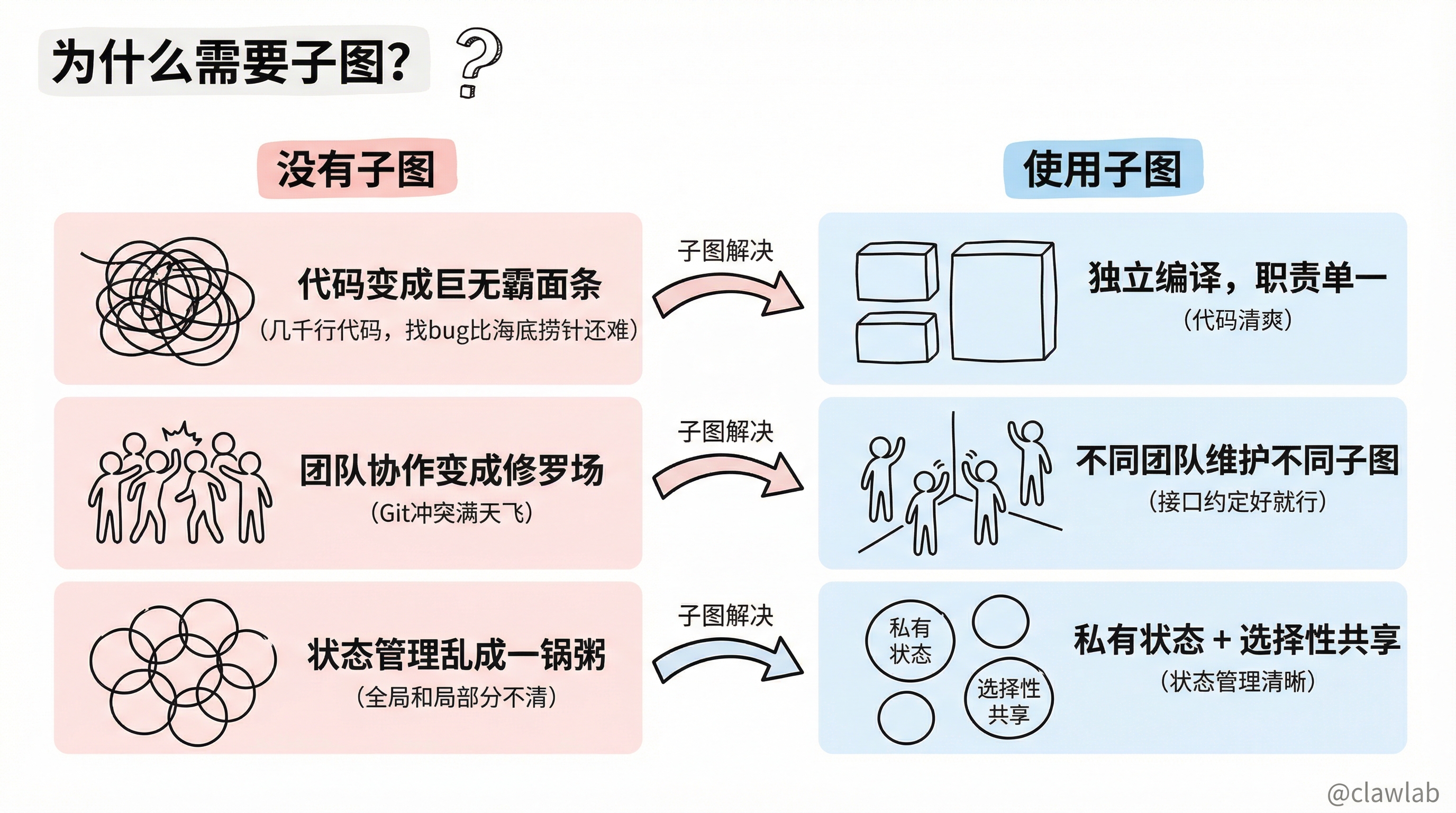
痛点:没有子图时的三大噩梦
| 噩梦 | 描述 |
|---|---|
| 代码变成"巨无霸面条" | 所有逻辑挤在一个 Graph 里,几千行代码,找 bug 比海底捞针还难 |
| 团队协作变成"修罗场" | 10 人团队都在同一个文件改代码,Git 冲突满天飞 |
| 状态管理乱成一锅粥 | 几十个状态变量混在一起,全局和局部分不清 |
解决:子图带来的三大福音
| 问题 | 子图的解决方案 |
|---|---|
| 代码臃肿 | 每个子图独立编译,职责单一,代码清爽 |
| 团队协作困难 | 不同团队维护不同子图,只要接口约定好就行 |
| 状态管理混乱 | 子图可以有私有状态,也可以选择性共享 |
生活化类比
🏢 类比:公司的部门协作
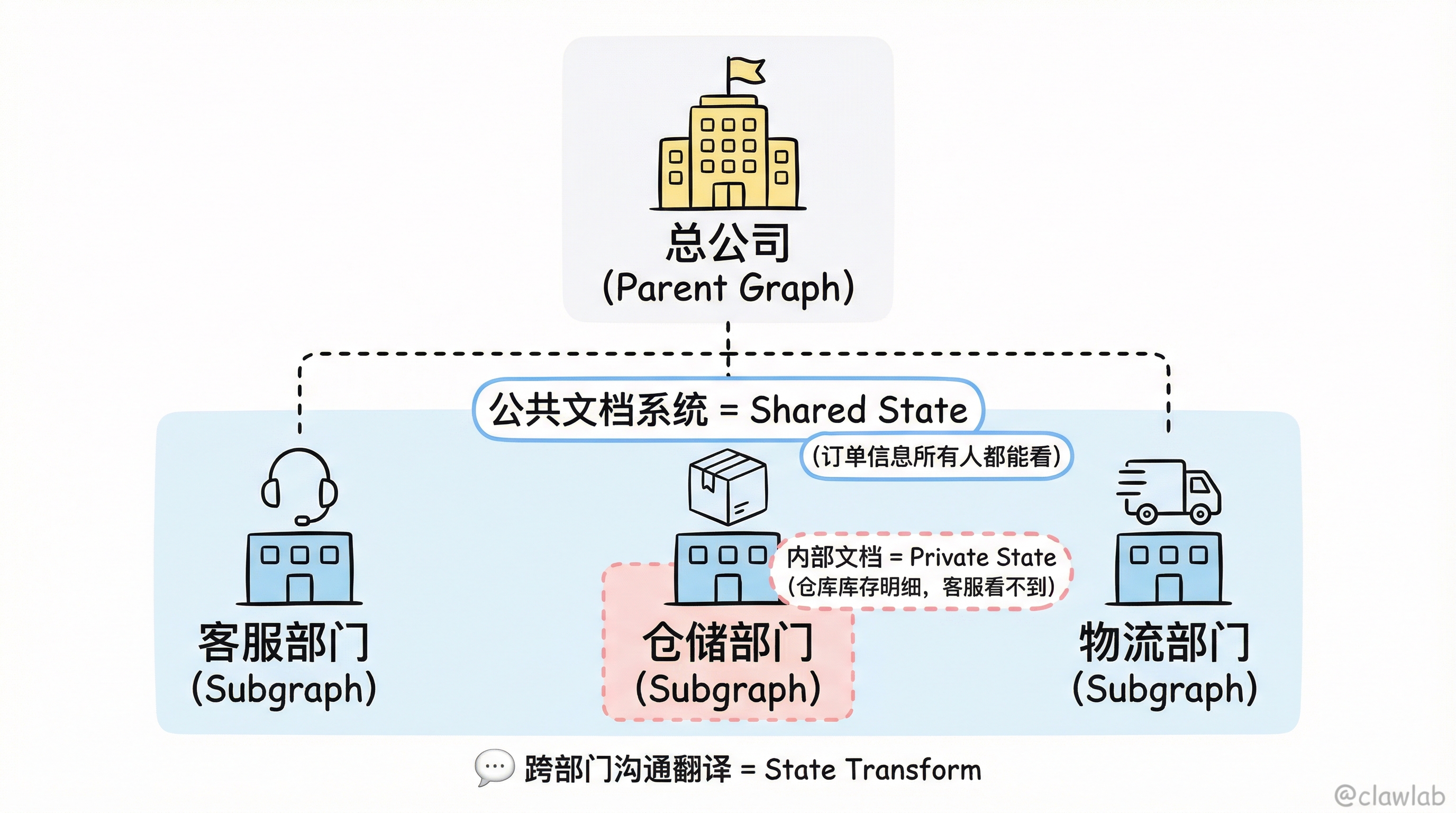
把 LangGraph 想象成一家大公司,Subgraph 就是公司里的各个部门。
                   ┌─────────────────────────┐
                   │    总公司 (Parent Graph)  │
                   └─────────────────────────┘
                              │
         ┌────────────────────┼────────────────────┐
         │                    │                    │
   ┌───────────┐        ┌───────────┐       ┌───────────┐
   │  客服部门  │        │  仓储部门  │       │  物流部门  │
   │ (Subgraph)│        │ (Subgraph)│       │ (Subgraph)│
└───────────┘ └───────────┘ └───────────┘| LangGraph 概念 | 公司类比 |
|---|---|
| Parent Graph | 总公司总部,协调各部门 |
| Subgraph | 各个部门,有自己的内部流程 |
| Shared State | 公司公共文档系统(订单信息所有人都能看) |
| Private State | 部门内部文档(仓库库存明细,客服看不到) |
| State Transform | 跨部门沟通的"翻译"(客服说"退货",仓储理解为"准备收货") |
两种子图模式
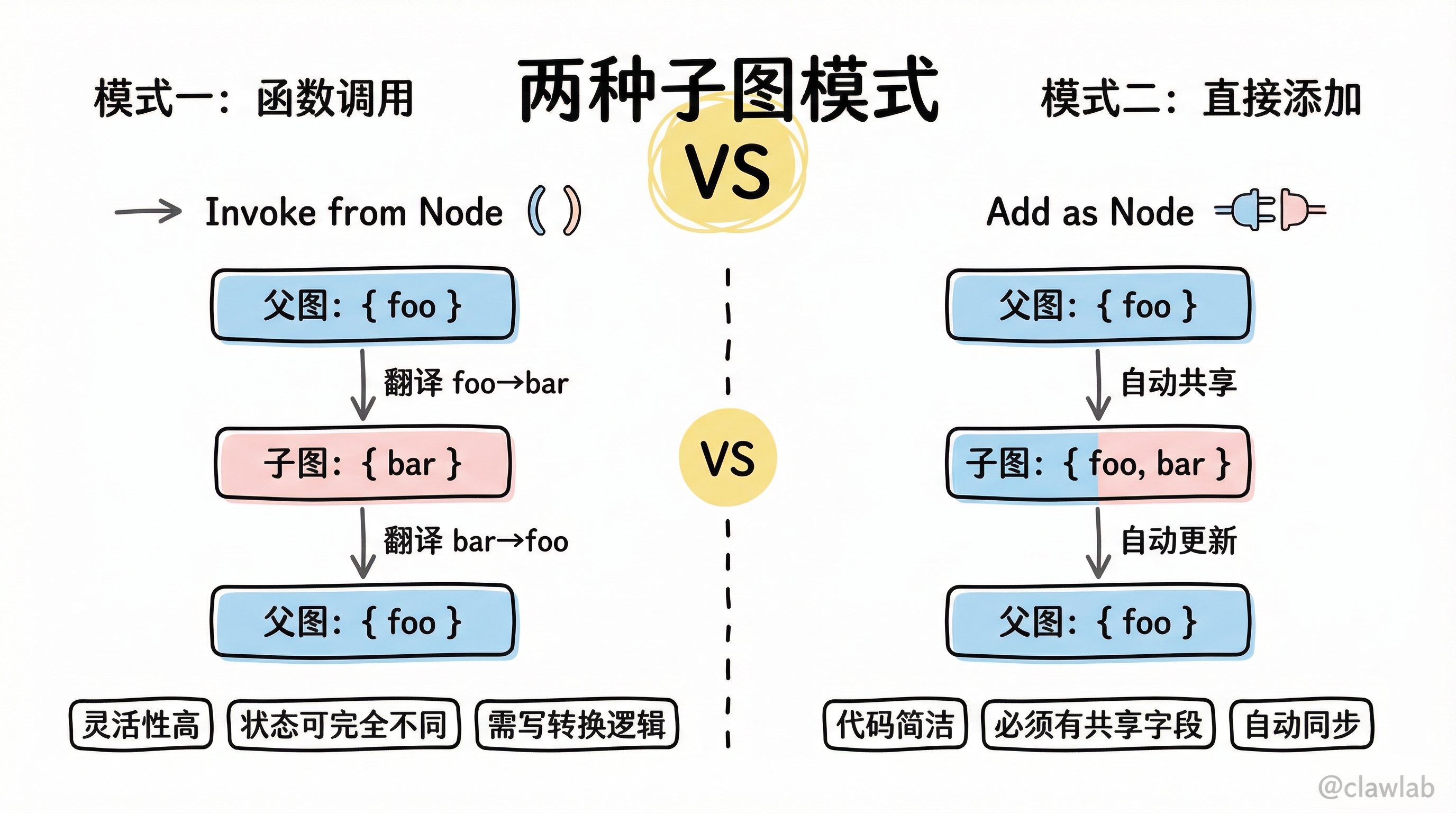
模式对比
| 特性 | 函数调用模式 | 直接添加模式 |
|---|---|---|
| 状态共享 | 可以完全不同 | 必须有共享字段 |
| 灵活性 | 高(可随意转换) | 中等 |
| 代码量 | 较多(需写转换逻辑) | 较少 |
| 适用场景 | 异构系统集成 | 同构模块复用 |
架构图
┌─────────────────────────────────────────────────────────────────┐
│                         两种子图模式                             │
└─────────────────────────────────────────────────────────────────┘
                              │
          ┌───────────────────┴───────────────────┐
          │                                       │
          ▼                                       ▼
┌─────────────────────┐               ┌─────────────────────┐
│  模式一:函数调用     │               │  模式二:直接添加     │
│  (Invoke from Node) │               │  (Add as Node)      │
├─────────────────────┤               ├─────────────────────┤
│                     │               │                     │
│  父图: { foo }      │               │  父图: { foo }      │
│       │             │               │       │             │
│       ▼ 翻译        │               │       ▼ 自动共享    │
│  子图: { bar }      │               │  子图: { foo, bar } │
│       │             │               │       │             │
│       ▼ 翻译回来    │               │       ▼ 自动更新    │
│  父图: { foo }      │               │  父图: { foo }      │
│                     │               │                     │
└─────────────────────┘               └─────────────────────┘
模式一:函数调用(Invoke from Node)
当子图和父图的状态结构完全不同时,需要在节点函数内手动调用子图并转换状态。
基础示例
typescript
import { StateGraph, Annotation, START, END } from "@langchain/langgraph";

const SubgraphState = Annotation.Root({
  bar: Annotation<string>(),
});

const subgraph = new StateGraph(SubgraphState)
  .addNode("subNode", (state) => {
    return { bar: "processed: " + state.bar };
  })
  .addEdge(START, "subNode")
  .addEdge("subNode", END)
  .compile();

const ParentState = Annotation.Root({
  foo: Annotation<string>(),
});

const parentGraph = new StateGraph(ParentState)
  .addNode("callSubgraph", async (state) => {
    const subgraphOutput = await subgraph.invoke({ bar: state.foo });
    return { foo: subgraphOutput.bar };
  })
  .addEdge(START, "callSubgraph")
  .addEdge("callSubgraph", END)
  .compile();

const result = await parentGraph.invoke({ foo: "hello" });
console.log(result);
// { foo: 'processed: hello' }
💡 人话解读:
"父图说中文(foo),子图说英文(bar)。节点函数就是翻译官:先把 foo 翻译成 bar 传给子图,子图处理完后再把 bar 翻译回 foo。"
完整示例:多层嵌套
typescript
import { StateGraph, Annotation, START, END } from "@langchain/langgraph";

const GrandchildState = Annotation.Root({
  grandchildKey: Annotation<string>(),
});

const grandchildGraph = new StateGraph(GrandchildState)
  .addNode("grandchildNode", (state) => {
    return { grandchildKey: state.grandchildKey + ", how are you" };
  })
  .addEdge(START, "grandchildNode")
  .addEdge("grandchildNode", END)
  .compile();

const ChildState = Annotation.Root({
  childKey: Annotation<string>(),
});

const childGraph = new StateGraph(ChildState)
  .addNode("childNode", async (state) => {
    const grandchildInput = { grandchildKey: state.childKey };
    const grandchildOutput = await grandchildGraph.invoke(grandchildInput);
    return { childKey: grandchildOutput.grandchildKey + " today?" };
  })
  .addEdge(START, "childNode")
  .addEdge("childNode", END)
  .compile();

const ParentState = Annotation.Root({
  parentKey: Annotation<string>(),
});

const parentGraph = new StateGraph(ParentState)
  .addNode("greet", (state) => {
    return { parentKey: "Hi " + state.parentKey };
  })
  .addNode("callChild", async (state) => {
    const childInput = { childKey: state.parentKey };
    const childOutput = await childGraph.invoke(childInput);
    return { parentKey: childOutput.childKey };
  })
  .addNode("farewell", (state) => {
    return { parentKey: state.parentKey + " Bye!" };
  })
  .addEdge(START, "greet")
  .addEdge("greet", "callChild")
  .addEdge("callChild", "farewell")
  .addEdge("farewell", END)
  .compile();

const result = await parentGraph.invoke({ parentKey: "Bob" });
console.log(result);
// { parentKey: 'Hi Bob, how are you today? Bye!' }执行流程:
父图 greet: "Bob" → "Hi Bob"
    ↓ 翻译传给子图
子图 childNode: "Hi Bob"
    ↓ 翻译传给孙图
孙图 grandchildNode: "Hi Bob" → "Hi Bob, how are you"
    ↓ 翻译回子图
子图返回: "Hi Bob, how are you today?"
    ↓ 翻译回父图
父图 farewell: → "Hi Bob, how are you today? Bye!"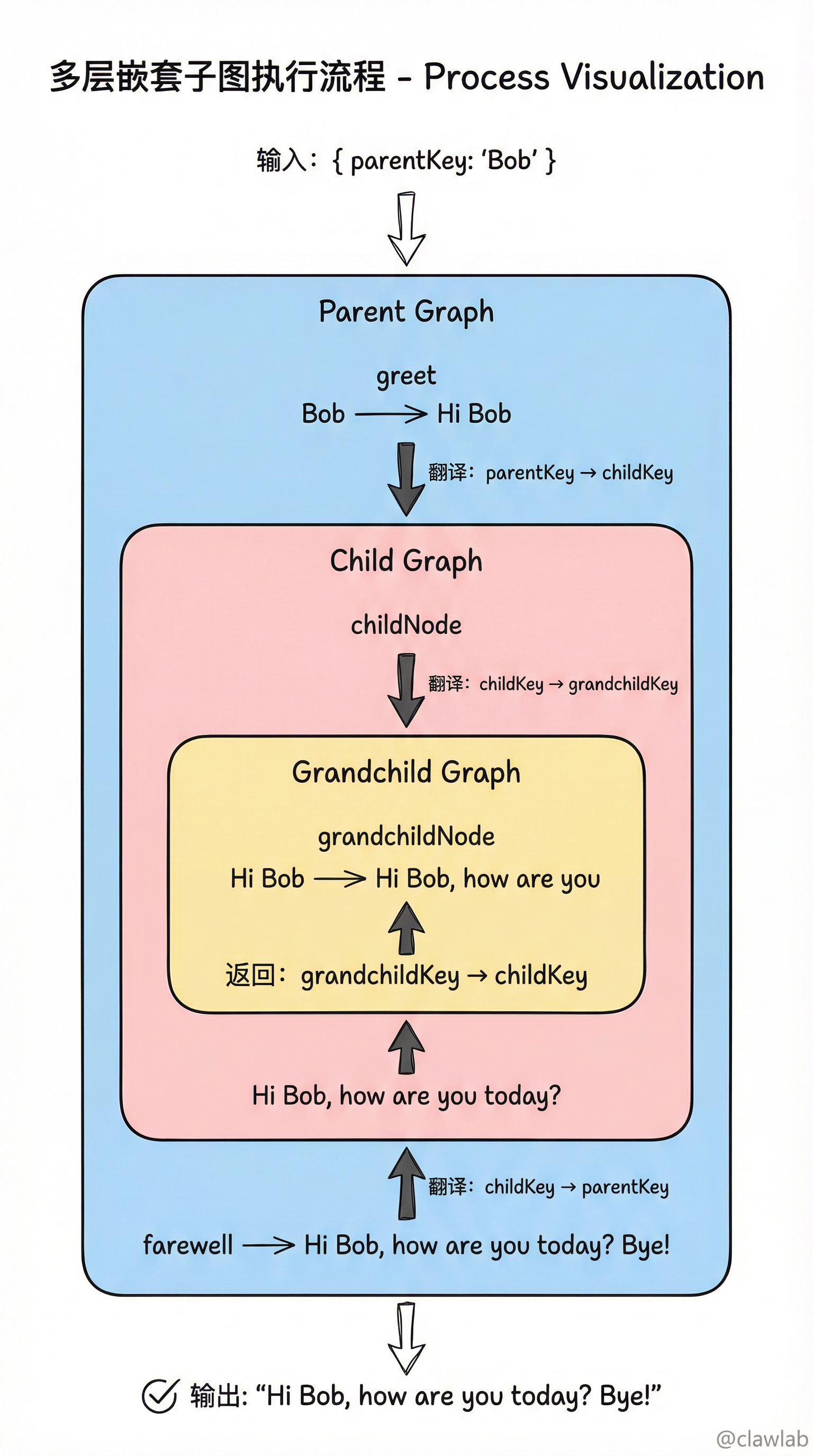
模式二:直接添加(Add as Node)
当子图和父图共享部分状态字段时,可以直接把编译好的子图作为节点添加。
基础示例
typescript
import { StateGraph, Annotation, START, END } from "@langchain/langgraph";

const SharedState = Annotation.Root({
  foo: Annotation<string>(),
});

const subgraph = new StateGraph(SharedState)
  .addNode("subNode", (state) => {
    return { foo: "subgraph processed: " + state.foo };
  })
  .addEdge(START, "subNode")
  .addEdge("subNode", END)
  .compile();

const parentGraph = new StateGraph(SharedState)
  .addNode("parentNode", (state) => {
    return { foo: "parent: " + state.foo };
  })
  .addNode("subgraphNode", subgraph)
  .addEdge(START, "parentNode")
  .addEdge("parentNode", "subgraphNode")
  .addEdge("subgraphNode", END)
  .compile();

const result = await parentGraph.invoke({ foo: "hello" });
console.log(result);
// { foo: 'subgraph processed: parent: hello' }
💡 人话解读:
"父图和子图都说普通话(foo),不需要翻译。直接把子图当节点添加,状态自动同步。"
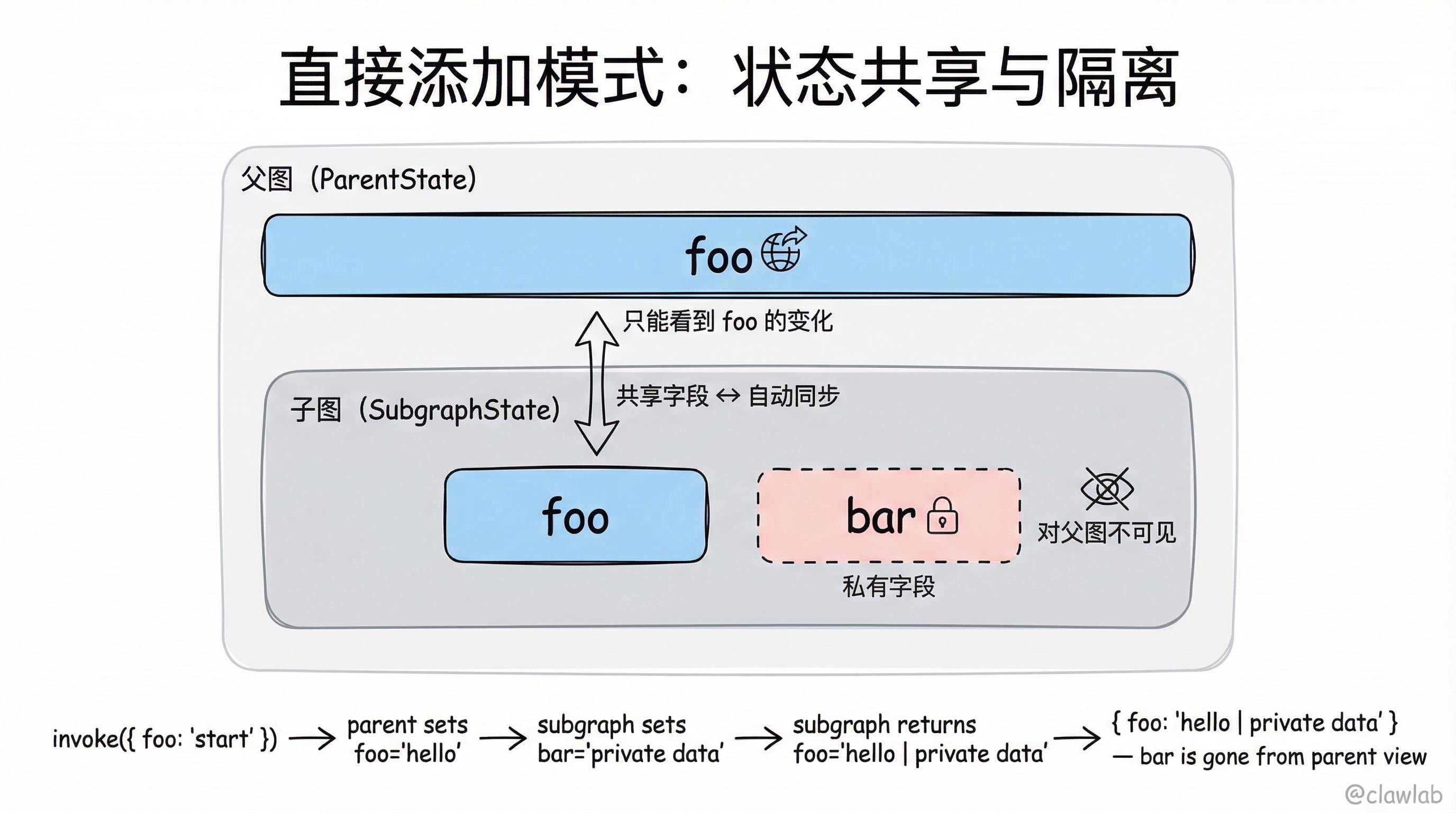
子图有私有状态的情况
typescript
import { StateGraph, Annotation, START, END } from "@langchain/langgraph";

const SubgraphState = Annotation.Root({
  foo: Annotation<string>(),
  bar: Annotation<string>(),
});

const subgraph = new StateGraph(SubgraphState)
  .addNode("subNode1", (state) => {
    return { bar: "private data" };
  })
  .addNode("subNode2", (state) => {
    return { foo: state.foo + " | " + state.bar };
  })
  .addEdge(START, "subNode1")
  .addEdge("subNode1", "subNode2")
  .addEdge("subNode2", END)
  .compile();

const ParentState = Annotation.Root({
  foo: Annotation<string>(),
});

const parentGraph = new StateGraph(ParentState)
  .addNode("parentNode", (state) => {
    return { foo: "hello" };
  })
  .addNode("subgraphNode", subgraph)
  .addEdge(START, "parentNode")
  .addEdge("parentNode", "subgraphNode")
  .addEdge("subgraphNode", END)
  .compile();

const result = await parentGraph.invoke({ foo: "start" });
console.log(result);
// { foo: 'hello | private data' }
💡 人话解读:
"子图有两个字段:foo 是共享的,bar 是私有的。父图只能看到 foo 的变化,bar 对父图'不可见'。"
子图持久化
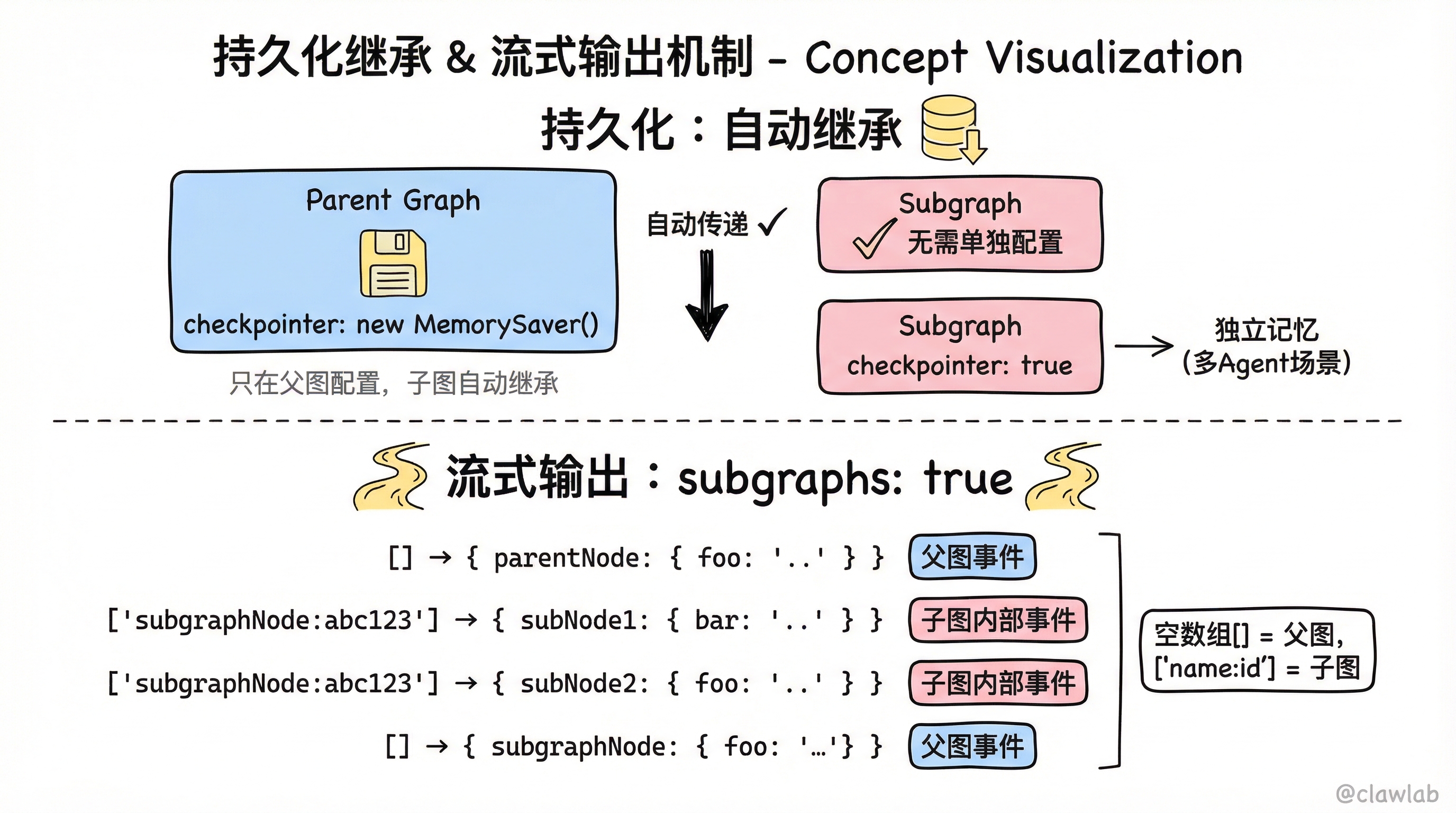
自动继承(推荐)
只需在父图配置 Checkpointer,子图自动继承:
typescript
import { MemorySaver } from "@langchain/langgraph";

const subgraph = new StateGraph(SubgraphState)
  .addNode("subNode", subNode)
  .addEdge(START, "subNode")
  .compile();

const parentGraph = new StateGraph(ParentState)
  .addNode("subgraphNode", subgraph)
  .addEdge(START, "subgraphNode")
  .compile({ checkpointer: new MemorySaver() });
子图独立记忆
如果希望子图有独立的记忆(如多 Agent 系统中每个 Agent 记住自己的对话历史):
typescript
const subgraph = new StateGraph(SubgraphState)
  .addNode("subNode", subNode)
  .addEdge(START, "subNode")
  .compile({ checkpointer: true });
流式输出子图
开启子图流式输出
typescript
for await (const chunk of await parentGraph.stream(
  { foo: "hello" },
  {
    subgraphs: true,
    streamMode: "updates",
  }
)) {
  console.log(chunk);
}输出示例:
[[], { parentNode: { foo: 'parent: hello' } }]
[['subgraphNode:abc123'], { subNode1: { bar: 'private' } }]
[['subgraphNode:abc123'], { subNode2: { foo: 'parent: hello | private' } }]
[[], { subgraphNode: { foo: 'parent: hello | private' } }]
💡 人话解读:
"返回的是
[namespace, data]元组。空数组[]表示父图,['subgraphNode:abc123']表示子图。这样能看到子图内部每个节点的执行情况。"
查看子图状态
当启用持久化后,可以查看子图的状态:
typescript
const config = { configurable: { thread_id: "1" } };

await parentGraph.invoke({ foo: "hello" }, config);

const parentState = await parentGraph.getState(config);
console.log("父图状态:", parentState);

const subgraphState = await parentGraph.getState(config, { subgraphs: true });
console.log("子图状态:", subgraphState.tasks[0].state);
⚠️ 注意:只有静态可发现的子图(直接添加或在节点函数中调用)才能查看状态。在 Tool 函数内调用的子图无法通过这种方式查看。
完整业务场景:电商智能客服系统
typescript
import { StateGraph, Annotation, START, END, MemorySaver } from "@langchain/langgraph";

const ProductState = Annotation.Root({
  query: Annotation<string>(),
  products: Annotation<string[]>({
    reducer: (curr, update) => update,
    default: () => [],
  }),
});

const productAgent = new StateGraph(ProductState)
  .addNode("search", (state) => {
    const results = [`商品A-${state.query}`, `商品B-${state.query}`];
    return { products: results };
  })
  .addNode("recommend", (state) => {
    return { query: `推荐: ${state.products.join(", ")}` };
  })
  .addEdge(START, "search")
  .addEdge("search", "recommend")
  .addEdge("recommend", END)
  .compile();

const OrderState = Annotation.Root({
  query: Annotation<string>(),
  orderInfo: Annotation<string>(),
});

const orderAgent = new StateGraph(OrderState)
  .addNode("fetch", (state) => {
    return { orderInfo: `订单信息: ${state.query}` };
  })
  .addEdge(START, "fetch")
  .addEdge("fetch", END)
  .compile();

const MainState = Annotation.Root({
  userInput: Annotation<string>(),
  intent: Annotation<string>(),
  response: Annotation<string>(),
});

const router = (state: typeof MainState.State) => {
  if (state.userInput.includes("商品") || state.userInput.includes("推荐")) {
    return { intent: "product" };
  } else if (state.userInput.includes("订单")) {
    return { intent: "order" };
  }
  return { intent: "unknown" };
};

const callProductAgent = async (state: typeof MainState.State) => {
  const result = await productAgent.invoke({ query: state.userInput });
  return { response: result.query };
};

const callOrderAgent = async (state: typeof MainState.State) => {
  const result = await orderAgent.invoke({ query: state.userInput });
  return { response: result.orderInfo };
};

const handleUnknown = (state: typeof MainState.State) => {
  return { response: "抱歉,我不太理解您的问题" };
};

const routeByIntent = (state: typeof MainState.State) => {
  switch (state.intent) {
    case "product": return "productAgent";
    case "order": return "orderAgent";
    default: return "unknown";
  }
};

const mainGraph = new StateGraph(MainState)
  .addNode("router", router)
  .addNode("productAgent", callProductAgent)
  .addNode("orderAgent", callOrderAgent)
  .addNode("unknown", handleUnknown)
  .addEdge(START, "router")
  .addConditionalEdges("router", routeByIntent, [
    "productAgent",
    "orderAgent",
    "unknown",
  ])
  .addEdge("productAgent", END)
  .addEdge("orderAgent", END)
  .addEdge("unknown", END)
  .compile({ checkpointer: new MemorySaver() });

async function main() {
  console.log("=== 电商智能客服 ===\n");

  const config1 = { configurable: { thread_id: "user-001" } };
  const result1 = await mainGraph.invoke(
    { userInput: "帮我推荐一些商品" },
    config1
  );
  console.log("用户: 帮我推荐一些商品");
  console.log("客服:", result1.response);

  console.log("");

  const config2 = { configurable: { thread_id: "user-002" } };
  const result2 = await mainGraph.invoke(
    { userInput: "查询我的订单" },
    config2
  );
  console.log("用户: 查询我的订单");
  console.log("客服:", result2.response);
}

main();执行效果:
=== 电商智能客服 ===

用户: 帮我推荐一些商品
客服: 推荐: 商品A-帮我推荐一些商品, 商品B-帮我推荐一些商品

用户: 查询我的订单
客服: 订单信息: 查询我的订单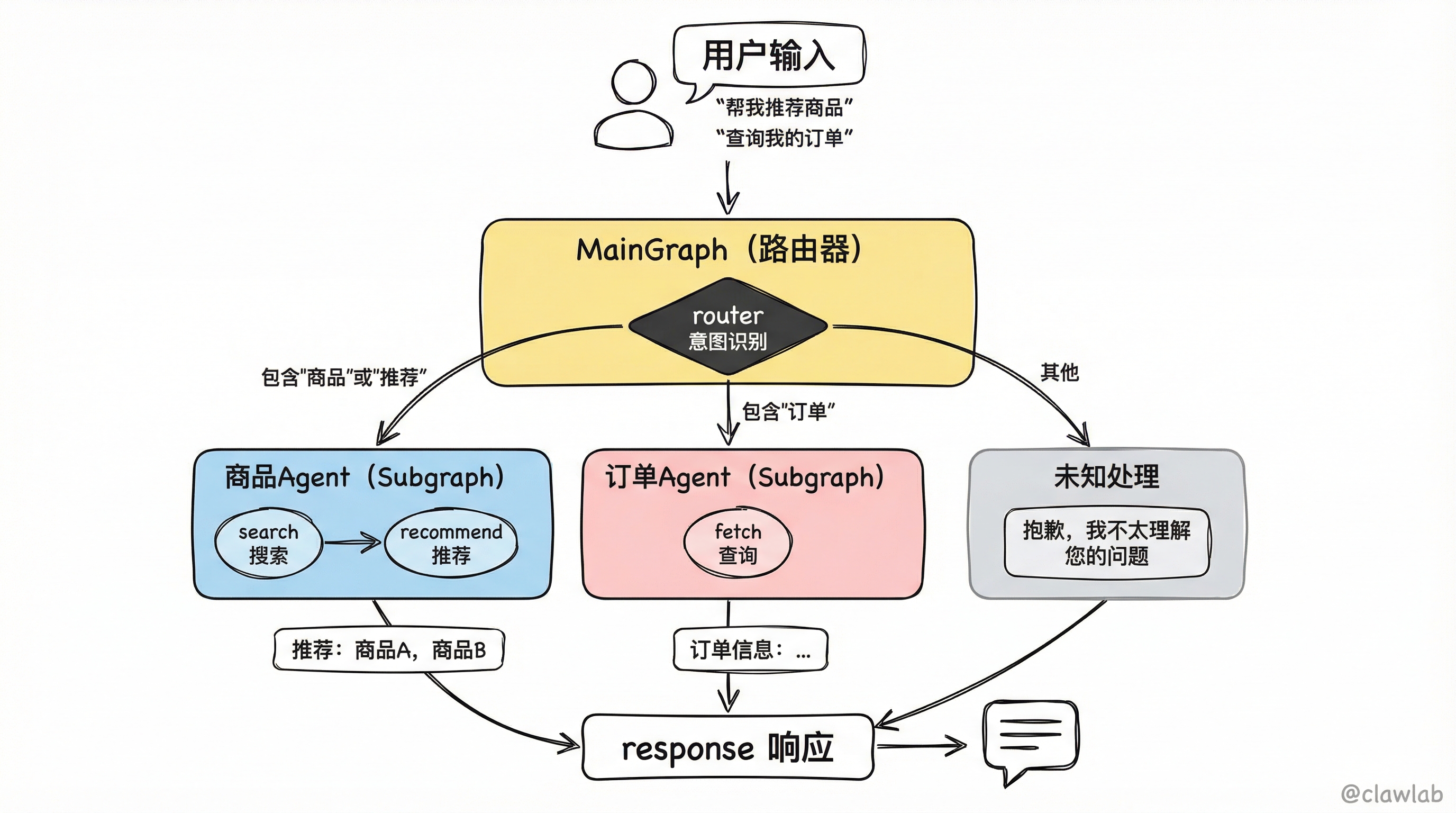
模式选择指南
| 场景 | 推荐模式 | 原因 |
|---|---|---|
| 子图状态与父图完全不同 | 函数调用 | 需要手动转换状态 |
| 子图与父图共享核心状态 | 直接添加 | 自动同步,代码简洁 |
| 多 Agent 系统,各自独立对话 | 函数调用 + 独立记忆 | 隔离各 Agent 的对话历史 |
| 复用同一套流程在不同场景 | 直接添加 | 简单复用,统一接口 |
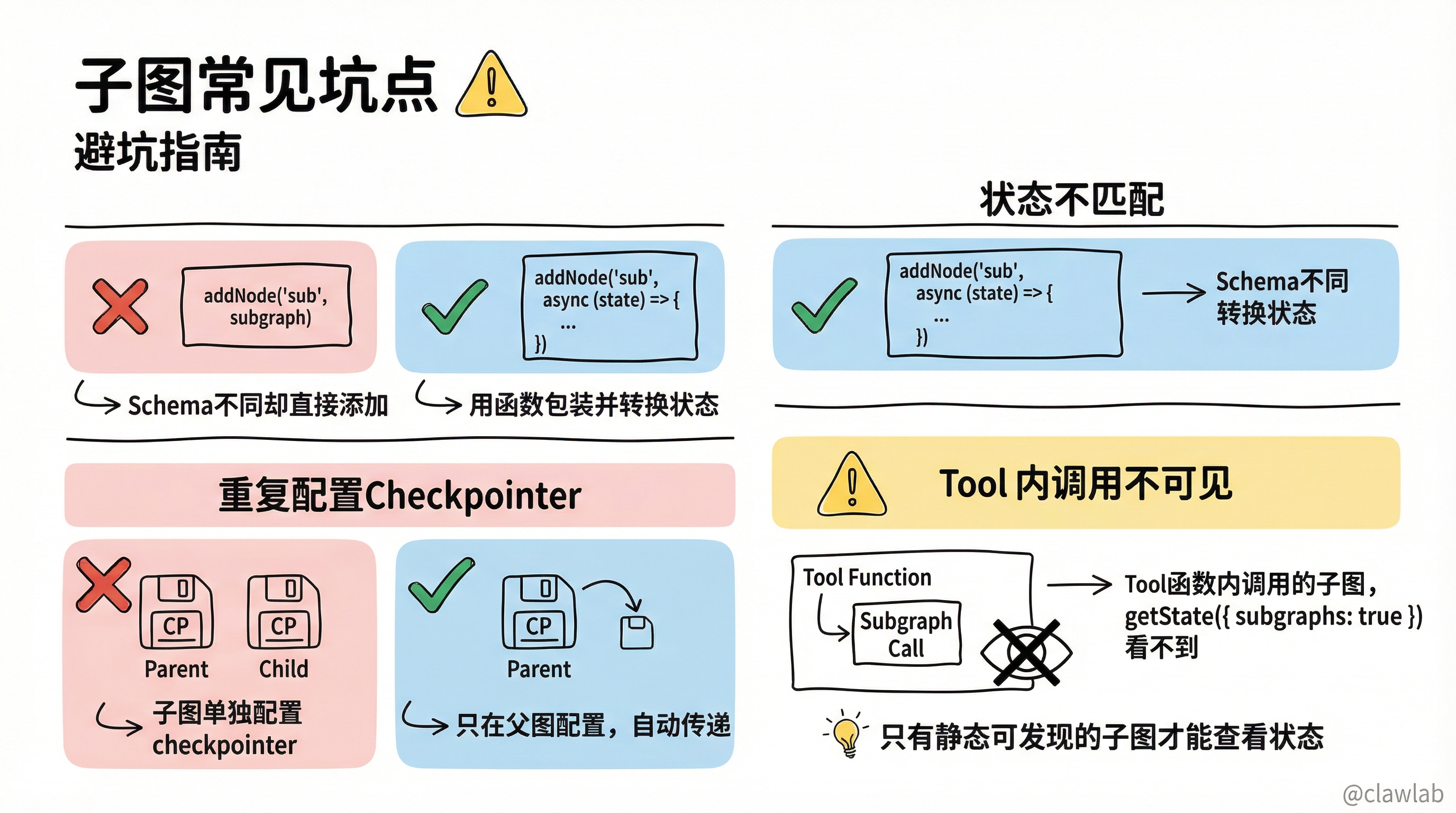
常见坑点
坑点 1:状态不匹配
❌ 错误:子图和父图 Schema 不同却直接添加
typescript
const subgraph = new StateGraph(DifferentState).compile();
const parent = new StateGraph(ParentState)
  .addNode("sub", subgraph);
✅ 正确:用函数包装并转换状态
typescript
const parent = new StateGraph(ParentState)
  .addNode("sub", async (state) => {
    const result = await subgraph.invoke({ bar: state.foo });
    return { foo: result.bar };
  });
坑点 2:重复配置 Checkpointer
子图不需要单独配置 checkpointer,父图配置了会自动传递。
坑点 3:Tool 内调用子图无法查看状态
LangGraph 只能静态发现直接添加或节点函数调用的子图。Tool 函数内调用的子图,getState({ subgraphs: true }) 看不到。
总结对比表
| 概念 | 作用 | 关键点 |
|---|---|---|
| 函数调用模式 | 子图与父图状态完全不同 | 需手动转换状态 |
| 直接添加模式 | 子图与父图共享状态 | 自动同步,代码简洁 |
| subgraphs: true | 流式输出子图过程 | 能看到子图内部节点执行 |
| checkpointer: true | 子图独立记忆 | 多 Agent 场景使用 |
核心要点回顾
子图 = 图中图 —— 把复杂系统拆成可独立开发、测试的小模块
两种模式:状态不同用"函数调用",状态共享用"直接添加"
持久化自动继承 —— 只在父图配置 Checkpointer 即可
流式输出 —— 设置
subgraphs: true查看子图内部执行选择公式:
大型 AI 系统 = 主图(协调者) + 多个子图(专业执行者)
下一步学习
- 第 16 章:应用结构 - 学习 LangGraph 项目的最佳组织方式
- 第 17 章:LangSmith Studio - 学习可视化调试工具