主题
24. 项目实战:自主研究 Agent
项目简介
本项目将从零构建一个自主研究 Agent,实现:
- 🤖 自主决策:LLM 自主选择下一步行动
- 🔧 工具调用:搜索、阅读、笔记等多种工具
- 🔄 多轮推理:循环调用工具直到完成研究
- 👤 人机协作:关键决策点暂停等待用户确认
- 🧠 长期记忆:跨会话保存研究成果
难度等级: ⭐⭐⭐⭐⭐
涉及知识点: Agent 模式 + ToolNode + HITL + 长期记忆 + Memory Store
🎯 学习目标
完成本项目后,你将掌握:
- 如何构建真正自主决策的 Agent
- 如何定义和使用多种工具
- 如何实现工具调用循环
- 如何在关键点引入人机协作
- 如何实现跨会话的长期记忆
项目架构
研究问题 → Research Agent
              │
              ├→ LLM 推理(选择行动)
              │
              ├→ 工具调用循环
              │   ├→ 搜索工具
              │   ├→ 阅读工具
              │   └→ 笔记工具
              │
              ├→ shouldContinue 判断
              │   ├→ 需要更多信息 → 继续调用工具
              │   ├→ 需要用户确认 → interrupt()
              │   └→ 研究完成 → 输出结论
              │
              └→ 长期记忆存储(跨会话复用)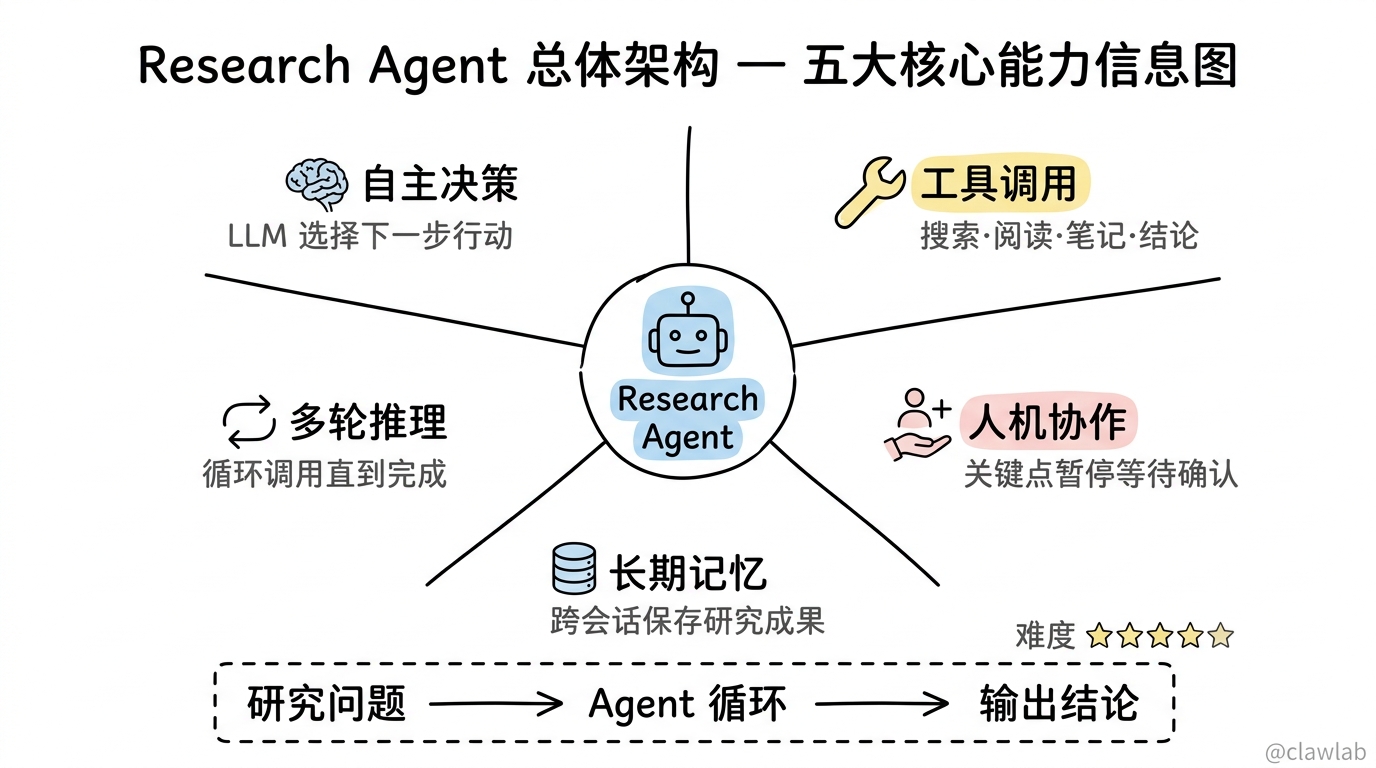
项目结构
plaintext
research-agent/
├── src/
│   ├── state.ts           # 状态定义
│   ├── tools.ts           # 工具定义
│   ├── nodes.ts           # 节点函数
│   ├── memory.ts          # 记忆存储
│   ├── graph.ts           # 图构建
│   └── index.ts           # 入口文件
├── package.json
├── tsconfig.json
└── .env
第一步:项目初始化
package.json
json
{
  "name": "research-agent",
  "version": "1.0.0",
  "type": "module",
  "scripts": {
    "build": "tsc",
    "start": "node dist/index.js",
    "dev": "tsx src/index.ts"
  },
  "dependencies": {
    "@langchain/langgraph": "^0.2.0",
    "@langchain/openai": "^0.3.0",
    "@langchain/core": "^0.3.0"
  },
  "devDependencies": {
    "typescript": "^5.0.0",
    "@types/node": "^20.0.0",
    "tsx": "^4.0.0"
  }
}
.env
bash
OPENAI_API_KEY=sk-xxx...第二步:状态定义
src/state.ts
typescript
import { Annotation } from "@langchain/langgraph";
import { BaseMessage } from "@langchain/core/messages";

export interface ResearchNote {
  id: string;
  topic: string;
  content: string;
  source: string;
  timestamp: string;
}

export interface SearchResult {
  title: string;
  snippet: string;
  url: string;
}

export const ResearchState = Annotation.Root({
  messages: Annotation<BaseMessage[]>({
    reducer: (curr, update) => [...curr, ...update],
    default: () => [],
  }),

  researchTopic: Annotation<string>({
    reducer: (_, update) => update,
    default: () => "",
  }),

  notes: Annotation<ResearchNote[]>({
    reducer: (curr, update) => [...curr, ...update],
    default: () => [],
  }),

  searchResults: Annotation<SearchResult[]>({
    reducer: (curr, update) => [...curr, ...update],
    default: () => [],
  }),

  currentPhase: Annotation<"searching" | "reading" | "analyzing" | "concluding" | "complete">({
    reducer: (_, update) => update,
    default: () => "searching",
  }),

  researchDepth: Annotation<number>({
    reducer: (_, update) => update,
    default: () => 0,
  }),

  maxDepth: Annotation<number>({
    reducer: (_, update) => update,
    default: () => 3,
  }),

  finalConclusion: Annotation<string>({
    reducer: (_, update) => update,
    default: () => "",
  }),

  requiresHumanApproval: Annotation<boolean>({
    reducer: (_, update) => update,
    default: () => false,
  }),

  userId: Annotation<string>({
    reducer: (_, update) => update,
    default: () => "",
  }),
});

export type ResearchStateType = typeof ResearchState.State;
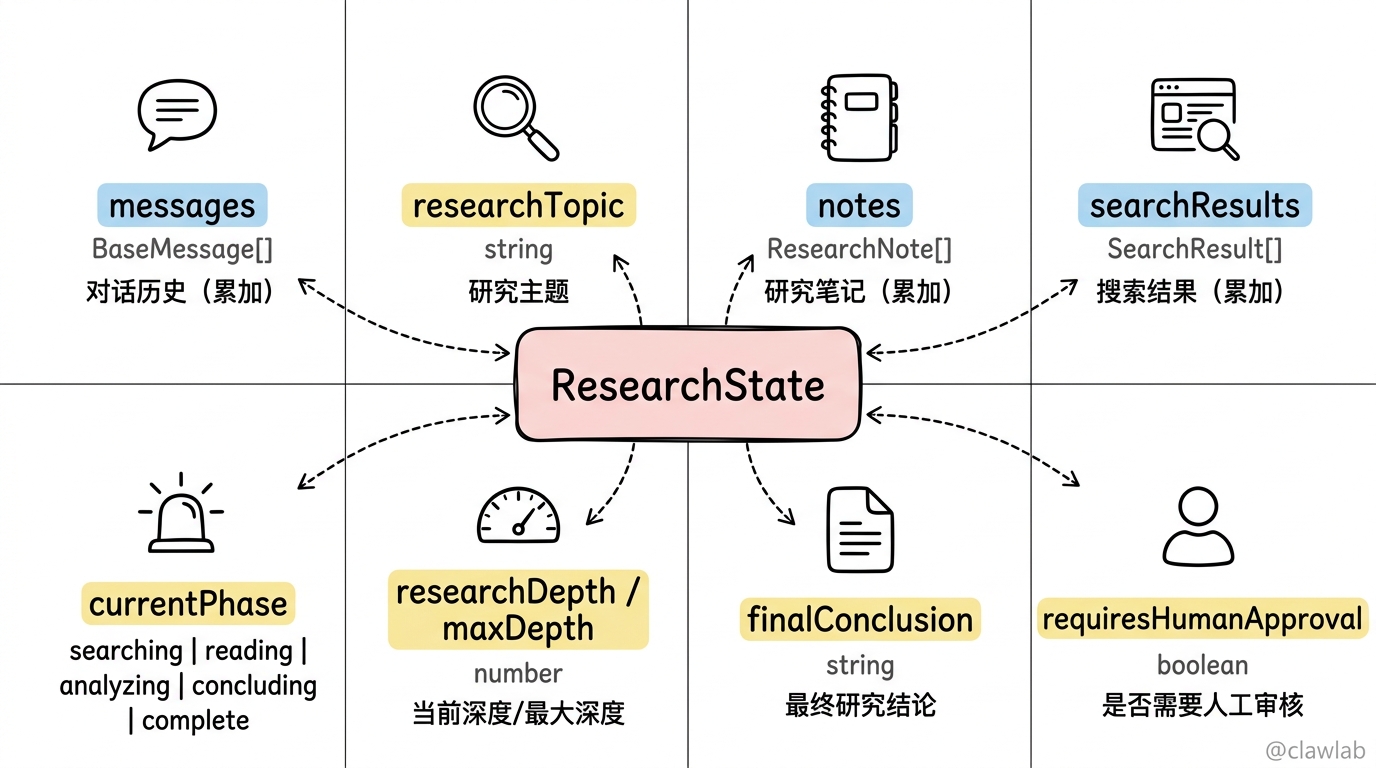
💡 人话解读:
| 状态字段 | 作用 | 说明 |
|---|---|---|
messages | 对话历史 | 包含用户输入和 AI 回复 |
researchTopic | 研究主题 | 当前研究的问题 |
notes | 研究笔记 | Agent 收集的信息片段 |
searchResults | 搜索结果 | 从搜索工具获取的结果 |
currentPhase | 当前阶段 | 跟踪研究进度 |
researchDepth | 研究深度 | 已进行的研究轮数 |
finalConclusion | 最终结论 | 研究完成后的总结 |
第三步:工具定义
src/tools.ts
typescript
import { tool } from "@langchain/core/tools";
import { z } from "zod";

export const searchTool = tool(
  async ({ query }: { query: string }) => {
    console.log(`   🔍 搜索: "${query}"`);

    await new Promise(r => setTimeout(r, 500 + Math.random() * 1000));

    const mockResults = [
      {
        title: `${query} - 详细解析`,
        snippet: `这是关于"${query}"的权威解释。该主题涉及多个方面,包括基础概念、应用场景和最新发展...`,
        url: `https://example.com/article/${encodeURIComponent(query)}`,
      },
      {
        title: `${query}的最新研究进展`,
        snippet: `2024年最新研究表明,${query}领域取得了重大突破。研究人员发现了新的方法和技术...`,
        url: `https://research.example.com/${encodeURIComponent(query)}`,
      },
      {
        title: `深入理解${query}`,
        snippet: `本文将深入探讨${query}的核心原理。从基础理论到实践应用,全面解析这一重要概念...`,
        url: `https://tutorial.example.com/${encodeURIComponent(query)}`,
      },
    ];

    return JSON.stringify(mockResults, null, 2);
  },
  {
    name: "search",
    description: "搜索互联网获取相关信息。用于查找特定主题的资料、新闻或研究。",
    schema: z.object({
      query: z.string().describe("搜索关键词"),
    }),
  }
);

export const readUrlTool = tool(
  async ({ url }: { url: string }) => {
    console.log(`   📖 阅读: ${url}`);

    await new Promise(r => setTimeout(r, 800 + Math.random() * 1200));

    const mockContent = `
# 文章内容

这是从 ${url} 获取的模拟文章内容。

## 主要观点

1. 该主题具有重要的理论价值和实践意义
2. 最新研究表明,相关技术正在快速发展
3. 专家建议关注以下几个方面:
   - 基础理论的深入理解
   - 实际应用场景的探索
   - 潜在风险和挑战的评估

## 数据支持

根据最新统计数据:
- 相关领域的投资增长了 45%
- 应用案例数量增加了 3 倍
- 用户满意度达到 92%

## 结论

综上所述,这是一个值得深入研究的重要领域。
    `.trim();

    return mockContent;
  },
  {
    name: "read_url",
    description: "阅读指定 URL 的网页内容。用于深入了解搜索结果中的具体文章。",
    schema: z.object({
      url: z.string().describe("要阅读的网页 URL"),
    }),
  }
);

export const takeNoteTool = tool(
  async ({ topic, content, source }: { topic: string; content: string; source: string }) => {
    console.log(`   📝 记录笔记: ${topic}`);

    const note = {
      id: `note-${Date.now()}`,
      topic,
      content,
      source,
      timestamp: new Date().toISOString(),
    };

    return JSON.stringify(note);
  },
  {
    name: "take_note",
    description: "记录研究笔记。用于保存重要的发现、观点或数据。",
    schema: z.object({
      topic: z.string().describe("笔记主题"),
      content: z.string().describe("笔记内容"),
      source: z.string().describe("信息来源"),
    }),
  }
);

export const concludeTool = tool(
  async ({ conclusion }: { conclusion: string }) => {
    console.log(`   📋 生成结论`);
    return conclusion;
  },
  {
    name: "conclude",
    description: "完成研究并生成最终结论。只有在收集足够信息后才使用。",
    schema: z.object({
      conclusion: z.string().describe("研究结论"),
    }),
  }
);

export const allTools = [searchTool, readUrlTool, takeNoteTool, concludeTool];
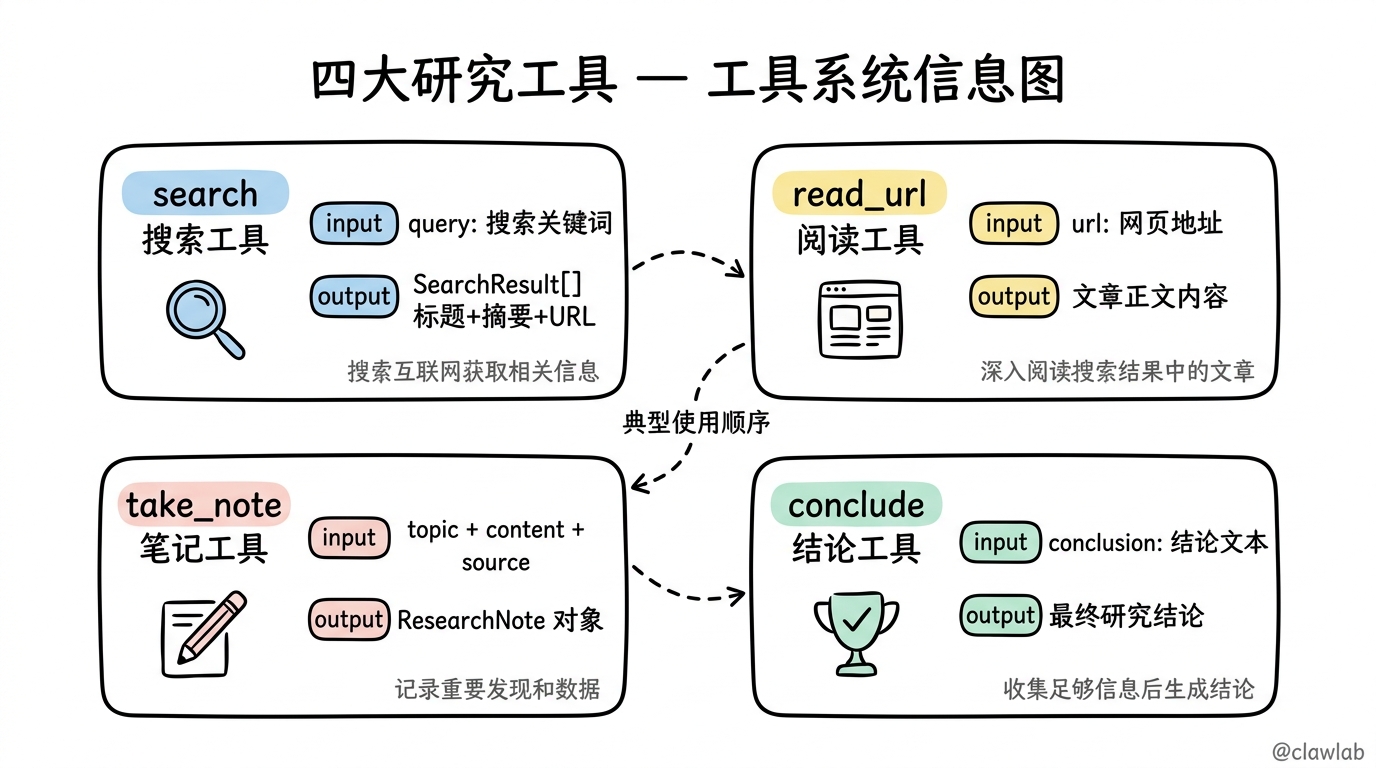
💡 工具说明:
| 工具 | 用途 | 输入 | 输出 |
|---|---|---|---|
search | 搜索互联网 | 查询关键词 | 搜索结果列表 |
read_url | 阅读网页 | URL | 网页内容 |
take_note | 记录笔记 | 主题、内容、来源 | 笔记对象 |
conclude | 生成结论 | 结论文本 | 最终结论 |
第四步:节点函数
src/nodes.ts
typescript
import { ChatOpenAI } from "@langchain/openai";
import { HumanMessage, AIMessage, SystemMessage, ToolMessage } from "@langchain/core/messages";
import { ToolNode } from "@langchain/langgraph/prebuilt";
import { interrupt } from "@langchain/langgraph";
import { ResearchStateType, ResearchNote } from "./state.js";
import { allTools } from "./tools.js";

const llm = new ChatOpenAI({
  model: "gpt-4o-mini",
  temperature: 0.7,
}).bindTools(allTools);

const toolNode = new ToolNode(allTools);

const SYSTEM_PROMPT = `你是一个专业的研究助手 Agent。你的任务是深入研究用户提出的问题。

你可以使用以下工具:
1. search - 搜索互联网获取信息
2. read_url - 阅读具体网页内容
3. take_note - 记录重要发现
4. conclude - 完成研究并生成结论

研究流程:
1. 首先使用 search 搜索相关信息
2. 选择有价值的结果,使用 read_url 深入阅读
3. 使用 take_note 记录关键发现
4. 如果信息不足,继续搜索和阅读
5. 当收集足够信息后,使用 conclude 生成最终结论

注意事项:
- 每次只调用一个工具
- 确保研究全面、客观
- 记录所有重要信息的来源
- 最终结论应该有理有据`;

export async function agentNode(state: ResearchStateType) {
  console.log(`\n🤖 Agent 思考中... (深度: ${state.researchDepth}/${state.maxDepth})`);

  const systemMessage = new SystemMessage(SYSTEM_PROMPT);

  const contextMessage = new HumanMessage(`
当前研究状态:
- 主题: ${state.researchTopic}
- 阶段: ${state.currentPhase}
- 已收集笔记数: ${state.notes.length}
- 搜索结果数: ${state.searchResults.length}
- 研究深度: ${state.researchDepth}/${state.maxDepth}

${state.notes.length > 0 ? `已收集的笔记:\n${state.notes.map(n => `- ${n.topic}: ${n.content.slice(0, 100)}...`).join('\n')}` : ''}

请决定下一步行动。如果信息足够,可以生成结论。`);

  const response = await llm.invoke([
    systemMessage,
    ...state.messages,
    contextMessage,
  ]);

  if (response.tool_calls && response.tool_calls.length > 0) {
    const toolCall = response.tool_calls[0];
    console.log(`   → 决定调用工具: ${toolCall.name}`);
  } else {
    console.log(`   → Agent 回复(无工具调用)`);
  }

  return {
    messages: [response],
    researchDepth: state.researchDepth + 1,
  };
}

export async function toolExecutorNode(state: ResearchStateType) {
  console.log(`\n🔧 执行工具调用`);

  const result = await toolNode.invoke(state);

  const lastMessage = state.messages[state.messages.length - 1];
  if (lastMessage && "tool_calls" in lastMessage) {
    const toolCalls = (lastMessage as AIMessage).tool_calls;
    if (toolCalls && toolCalls.length > 0) {
      const toolName = toolCalls[0].name;

      if (toolName === "take_note") {
        try {
          const toolMessage = result.messages[result.messages.length - 1] as ToolMessage;
          const noteData = JSON.parse(toolMessage.content as string);
          return {
            ...result,
            notes: [noteData as ResearchNote],
          };
        } catch (e) {
        }
      }

      if (toolName === "search") {
        try {
          const toolMessage = result.messages[result.messages.length - 1] as ToolMessage;
          const searchResults = JSON.parse(toolMessage.content as string);
          return {
            ...result,
            searchResults: searchResults,
            currentPhase: "reading" as const,
          };
        } catch (e) {
        }
      }

      if (toolName === "conclude") {
        const toolMessage = result.messages[result.messages.length - 1] as ToolMessage;
        return {
          ...result,
          finalConclusion: toolMessage.content as string,
          currentPhase: "complete" as const,
        };
      }
    }
  }

  return result;
}

export function shouldContinue(state: ResearchStateType): string {
  const lastMessage = state.messages[state.messages.length - 1];

  if (!lastMessage) {
    return "end";
  }

  if ("tool_calls" in lastMessage) {
    const toolCalls = (lastMessage as AIMessage).tool_calls;

    if (toolCalls && toolCalls.length > 0) {
      const toolName = toolCalls[0].name;

      if (toolName === "conclude") {
        console.log(`   → 准备生成结论`);
        return "tools";
      }

      if (state.researchDepth >= state.maxDepth * 2) {
        console.log(`   → 达到最大研究深度,强制结束`);
        return "end";
      }

      console.log(`   → 继续工具调用`);
      return "tools";
    }
  }

  console.log(`   → 研究完成`);
  return "end";
}

export async function humanReviewNode(state: ResearchStateType) {
  console.log(`\n👤 等待人工审核...`);

  const reviewData = interrupt({
    type: "research_review",
    message: "请审核当前研究进度",
    currentNotes: state.notes,
    searchResults: state.searchResults,
    conclusion: state.finalConclusion,
    options: ["approve", "continue_research", "modify"],
  });

  const { action, feedback } = reviewData as {
    action: "approve" | "continue_research" | "modify";
    feedback?: string;
  };

  if (action === "approve") {
    console.log(`   ✅ 人工审核通过`);
    return {
      currentPhase: "complete" as const,
    };
  }

  if (action === "continue_research") {
    console.log(`   🔄 继续研究: ${feedback || ""}`);
    return {
      messages: [new HumanMessage(feedback || "请继续深入研究")],
      currentPhase: "searching" as const,
      researchDepth: state.researchDepth,
    };
  }

  console.log(`   ✏️  需要修改: ${feedback || ""}`);
  return {
    messages: [new HumanMessage(feedback || "请根据反馈修改结论")],
    currentPhase: "analyzing" as const,
  };
}

export function routeAfterTools(state: ResearchStateType): string {
  if (state.currentPhase === "complete") {
    if (state.requiresHumanApproval) {
      return "human_review";
    }
    return "end";
  }

  return "agent";
}
💡 Agent 循环说明:
                  ┌──────────────────────┐
                  │                      │
                  ▼                      │
START → agent → shouldContinue ─────────┤
          │           │                 │
          │           │                 │
          │       tools=true            │
          │           │                 │
          │           ▼                 │
          │    ┌──────────────┐         │
          │    │ toolExecutor │         │
          │    └──────┬───────┘         │
          │           │                 │
          │           ▼                 │
          │    routeAfterTools ─────────┘
          │           │
          │       complete
          │           │
          │           ▼
          │    human_review (可选)
          │           │
          └───────────▼
                    END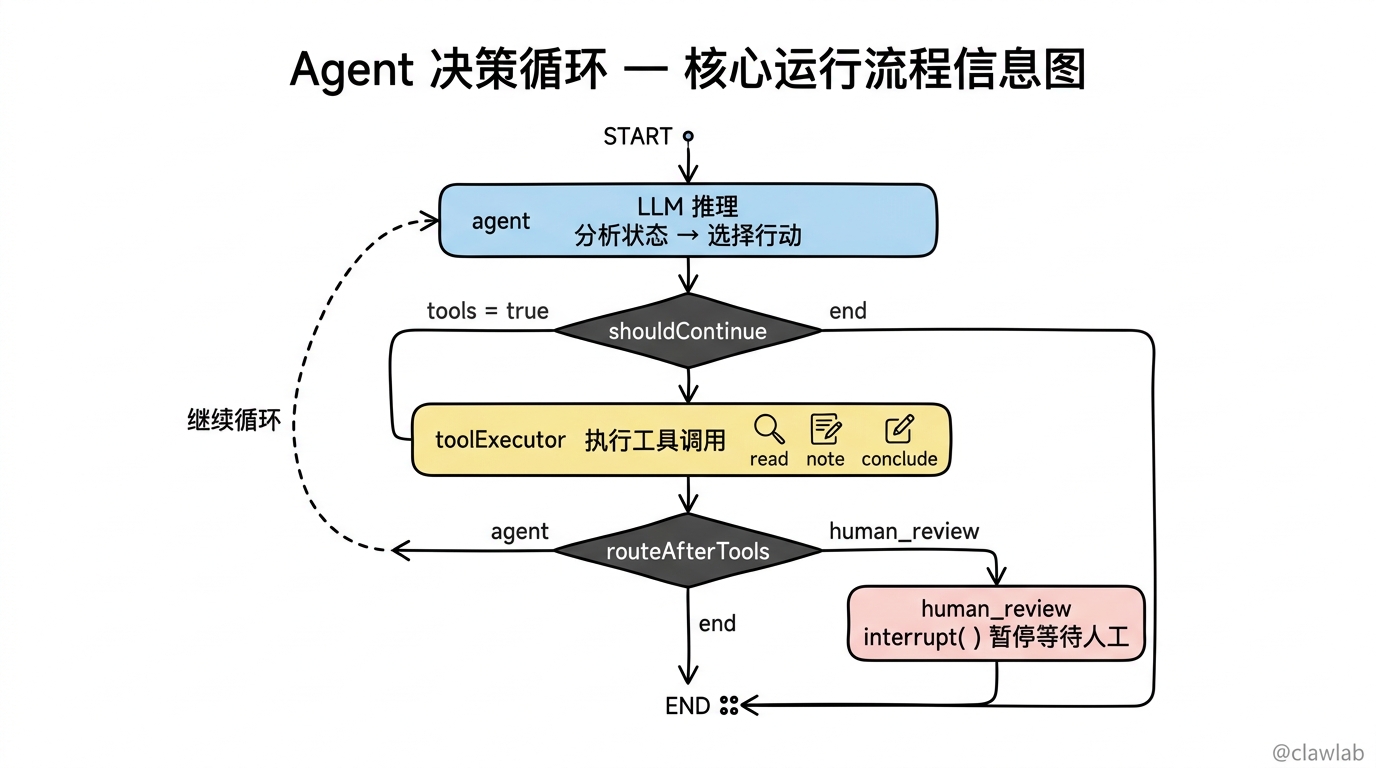
第五步:长期记忆
src/memory.ts
typescript
import { InMemoryStore } from "@langchain/langgraph";
import { ResearchNote } from "./state.js";

export const memoryStore = new InMemoryStore();

export interface UserResearchHistory {
  userId: string;
  topics: string[];
  notes: ResearchNote[];
  conclusions: string[];
  lastUpdated: string;
}

export async function saveResearchToMemory(
  userId: string,
  topic: string,
  notes: ResearchNote[],
  conclusion: string
) {
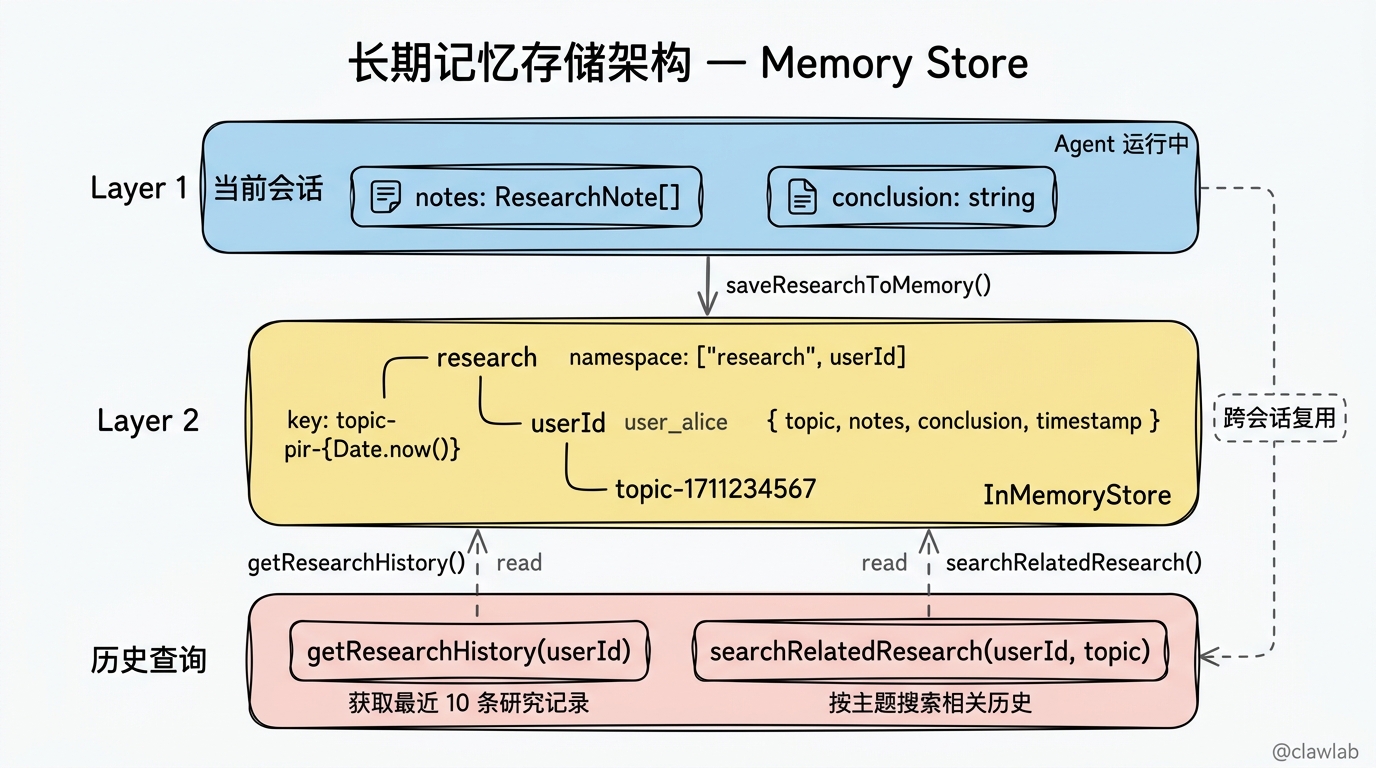
  const namespace = ["research", userId];
  const key = `topic-${Date.now()}`;

  await memoryStore.put(namespace, key, {
    topic,
    notes,
    conclusion,
    timestamp: new Date().toISOString(),
  });

  console.log(`   💾 已保存研究记录到长期记忆: ${topic}`);
}

export async function getResearchHistory(userId: string) {
  const namespace = ["research", userId];
  const items = await memoryStore.search(namespace, { limit: 10 });

  return items.map(item => item.value);
}

export async function searchRelatedResearch(userId: string, topic: string) {
  const namespace = ["research", userId];
  const items = await memoryStore.search(namespace, {
    limit: 5,
  });

  return items
    .filter(item => {
      const value = item.value as { topic?: string };
      return value.topic?.toLowerCase().includes(topic.toLowerCase());
    })
    .map(item => item.value);
}
💡 长期记忆说明:
| 功能 | 作用 |
|---|---|
saveResearchToMemory | 保存研究结果到 Memory Store |
getResearchHistory | 获取用户的研究历史 |
searchRelatedResearch | 搜索相关的历史研究 |
第六步:构建图
src/graph.ts
typescript
import { StateGraph, START, END, MemorySaver } from "@langchain/langgraph";
import { ResearchState } from "./state.js";
import {
  agentNode,
  toolExecutorNode,
  shouldContinue,
  humanReviewNode,
  routeAfterTools,
} from "./nodes.js";
import { memoryStore } from "./memory.js";

const graph = new StateGraph(ResearchState)
  .addNode("agent", agentNode)
  .addNode("tools", toolExecutorNode)
  .addNode("human_review", humanReviewNode)

  .addEdge(START, "agent")
  .addConditionalEdges("agent", shouldContinue, {
    tools: "tools",
    end: END,
  })
  .addConditionalEdges("tools", routeAfterTools, {
    agent: "agent",
    human_review: "human_review",
    end: END,
  })
  .addEdge("human_review", END);

const checkpointer = new MemorySaver();

export const researchAgent = graph.compile({
  checkpointer,
  store: memoryStore,
});
💡 流程图:
START
  │
  ▼
┌─────────┐
│  agent  │ ← LLM 决策:选择工具或结束
└────┬────┘
     │
     ▼
┌─────────────────┐
│  shouldContinue │
└───────┬─────────┘
        │
   ┌────┴────┐
   │         │
 tools      end
   │         │
   ▼         ▼
┌───────┐   END
│ tools │ ← 执行工具
└───┬───┘
    │
    ▼
┌───────────────┐
│routeAfterTools│
└───────┬───────┘
        │
   ┌────┼────────┐
   │    │        │
 agent end   human_review
   │    │        │
   │    ▼        ▼
   │   END  ┌──────────────┐
   │        │ human_review │
   │        └──────┬───────┘
   │               │
   └───────────────┤
                   ▼
                  END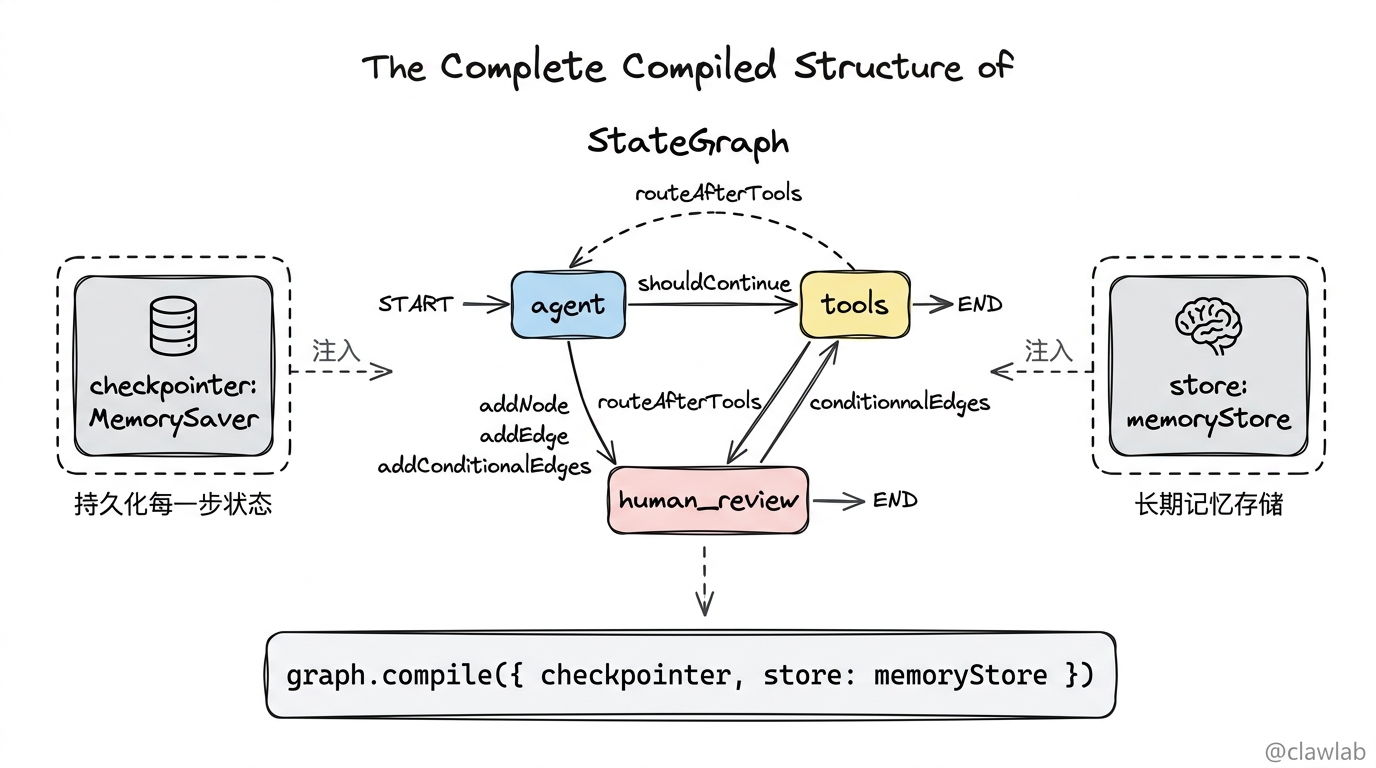
第七步:入口文件
src/index.ts
typescript
import { researchAgent } from "./graph.js";
import { HumanMessage } from "@langchain/core/messages";
import { Command } from "@langchain/langgraph";
import { saveResearchToMemory, getResearchHistory } from "./memory.js";

async function runResearch(topic: string, userId: string = "default_user") {
  console.log("═".repeat(60));
  console.log("🔬 自主研究 Agent");
  console.log("═".repeat(60));
  console.log(`\n📚 研究主题: ${topic}`);
  console.log(`👤 用户 ID: ${userId}`);

  const history = await getResearchHistory(userId);
  if (history.length > 0) {
    console.log(`\n📜 历史研究记录: ${history.length} 条`);
  }

  const config = {
    configurable: {
      thread_id: `research-${Date.now()}`,
      user_id: userId,
    },
  };

  const startTime = Date.now();

  let result = await researchAgent.invoke(
    {
      messages: [new HumanMessage(`请帮我研究以下主题:${topic}`)],
      researchTopic: topic,
      maxDepth: 3,
      userId,
      requiresHumanApproval: false,
    },
    config
  );

  while (true) {
    const state = await researchAgent.getState(config);

    if (!state.next || state.next.length === 0) {
      break;
    }

    const interruptValue = state.tasks?.[0]?.interrupts?.[0]?.value;
    if (interruptValue) {
      console.log("\n⏸️  等待人工审核...");

      const decision = await simulateHumanReview(interruptValue);
      result = await researchAgent.invoke(
        new Command({ resume: decision }),
        config
      );
    } else {
      break;
    }
  }

  const totalTime = Date.now() - startTime;

  console.log("\n" + "═".repeat(60));
  console.log("📊 研究结果");
  console.log("═".repeat(60));

  console.log(`\n⏱️  总耗时: ${totalTime}ms`);
  console.log(`📝 收集笔记: ${result.notes?.length || 0} 条`);
  console.log(`🔍 搜索次数: ${result.searchResults?.length || 0}`);
  console.log(`🔄 研究深度: ${result.researchDepth}`);

  if (result.notes && result.notes.length > 0) {
    console.log("\n📓 研究笔记:");
    result.notes.forEach((note: any, i: number) => {
      console.log(`\n   [${i + 1}] ${note.topic}`);
      console.log(`   ${note.content.slice(0, 150)}...`);
      console.log(`   来源: ${note.source}`);
    });
  }

  if (result.finalConclusion) {
    console.log("\n" + "─".repeat(60));
    console.log("📋 研究结论:");
    console.log("─".repeat(60));
    console.log(result.finalConclusion);
    console.log("─".repeat(60));

    if (result.notes && result.notes.length > 0) {
      await saveResearchToMemory(
        userId,
        topic,
        result.notes,
        result.finalConclusion
      );
    }
  }

  console.log("\n" + "═".repeat(60));

  return result;
}

async function simulateHumanReview(interruptValue: any): Promise<any> {
  console.log(`\n   审核内容: ${interruptValue.message}`);
  console.log(`   当前笔记: ${interruptValue.currentNotes?.length || 0} 条`);

  await new Promise(r => setTimeout(r, 500));

  return {
    action: "approve",
    feedback: "研究内容充分,可以生成最终结论",
  };
}

async function main() {
  await runResearch("大型语言模型(LLM)的工作原理", "user_alice");

  console.log("\n\n");

  await runResearch("Transformer 架构的核心概念", "user_alice");
}

main().catch(console.error);
第八步:运行测试
bash
npm install

npm run dev
预期输出
════════════════════════════════════════════════════════════
🔬 自主研究 Agent
════════════════════════════════════════════════════════════

📚 研究主题: 大型语言模型(LLM)的工作原理
👤 用户 ID: user_alice

🤖 Agent 思考中... (深度: 0/3)
   → 决定调用工具: search

🔧 执行工具调用
   🔍 搜索: "大型语言模型 LLM 工作原理"

🤖 Agent 思考中... (深度: 1/3)
   → 决定调用工具: read_url

🔧 执行工具调用
   📖 阅读: https://example.com/article/大型语言模型%20LLM%20工作原理

🤖 Agent 思考中... (深度: 2/3)
   → 决定调用工具: take_note

🔧 执行工具调用
   📝 记录笔记: LLM基础原理

🤖 Agent 思考中... (深度: 3/3)
   → 决定调用工具: search

🔧 执行工具调用
   🔍 搜索: "Transformer 注意力机制"

🤖 Agent 思考中... (深度: 4/3)
   → 决定调用工具: take_note

🔧 执行工具调用
   📝 记录笔记: Transformer架构

🤖 Agent 思考中... (深度: 5/3)
   → 决定调用工具: conclude

🔧 执行工具调用
   📋 生成结论
   → 研究完成

════════════════════════════════════════════════════════════
📊 研究结果
════════════════════════════════════════════════════════════

⏱️  总耗时: 8523ms
📝 收集笔记: 2 条
🔍 搜索次数: 6
🔄 研究深度: 6

📓 研究笔记:

   [1] LLM基础原理
   大型语言模型是基于深度学习的自然语言处理模型,通过在海量文本数据上训练,学习语言的统计规律和语义关系...
   来源: https://example.com/article/大型语言模型%20LLM%20工作原理

   [2] Transformer架构
   Transformer是LLM的核心架构,其创新在于自注意力机制,能够捕捉长距离依赖关系...
   来源: https://research.example.com/Transformer%20注意力机制

────────────────────────────────────────────────────────────
📋 研究结论:
────────────────────────────────────────────────────────────
大型语言模型(LLM)是基于 Transformer 架构的深度学习模型,其核心工作原理包括:

1. **Transformer 架构**:采用自注意力机制,能够并行处理序列数据,有效捕捉长距离依赖关系。

2. **预训练过程**:在海量文本数据上进行无监督学习,学习语言的统计规律和语义表示。

3. **自注意力机制**:通过 Query、Key、Value 的点积运算,计算序列中各位置之间的关联权重。

4. **规模效应**:模型参数规模的增大带来能力的涌现,展现出零样本和少样本学习能力。

5. **微调与对齐**:通过指令微调和 RLHF 等技术,使模型输出更符合人类期望。

综上所述,LLM 通过大规模预训练和精细调优,实现了强大的自然语言理解和生成能力。
────────────────────────────────────────────────────────────
   💾 已保存研究记录到长期记忆: 大型语言模型(LLM)的工作原理

════════════════════════════════════════════════════════════
进阶功能:带人工审核的版本
启用人工审核
typescript
const result = await researchAgent.invoke(
  {
    messages: [new HumanMessage(`请帮我研究以下主题:${topic}`)],
    researchTopic: topic,
    maxDepth: 3,
    userId,
    requiresHumanApproval: true,
  },
  config
);
交互式审核
typescript
async function realHumanReview(interruptValue: any): Promise<any> {
  console.log("\n" + "─".repeat(40));
  console.log("🔔 需要人工审核");
  console.log("─".repeat(40));
  console.log(`笔记数: ${interruptValue.currentNotes?.length || 0}`);
  console.log(`结论预览: ${interruptValue.conclusion?.slice(0, 200)}...`);
  console.log("─".repeat(40));

  const readline = require("readline");
  const rl = readline.createInterface({
    input: process.stdin,
    output: process.stdout,
  });

  return new Promise((resolve) => {
    rl.question("操作 (approve/continue/modify): ", (action: string) => {
      rl.question("反馈 (可选): ", (feedback: string) => {
        rl.close();
        resolve({
          action: action || "approve",
          feedback: feedback || undefined,
        });
      });
    });
  });
}
Agent 模式核心概念
Agent 循环
┌─────────────────────────────────────────────────────────────┐
│                       Agent 循环                            │
├─────────────────────────────────────────────────────────────┤
│                                                             │
│   用户输入 → LLM 推理 → 选择行动                            │
│                │                                            │
│                ▼                                            │
│        ┌───────────────┐                                    │
│        │  工具调用?    │                                   │
│        └───────┬───────┘                                    │
│                │                                            │
│         是     │      否                                    │
│         │      │       │                                    │
│         ▼      │       ▼                                    │
│    ┌────────┐  │   ┌─────────┐                              │
│    │执行工具│  │   │生成回复 │                              │
│    └───┬────┘  │   └────┬────┘                              │
│        │       │        │                                   │
│        ▼       │        ▼                                   │
│   工具结果 ────┴──→ 输出给用户                              │
│        │                                                    │
│        └──────→ 继续循环                                    │
│                                                             │
└─────────────────────────────────────────────────────────────┘
关键代码模式
typescript
const llm = new ChatOpenAI({ model: "gpt-4o-mini" }).bindTools(tools);

function shouldContinue(state: State): string {
  const lastMessage = state.messages[state.messages.length - 1];

  if ("tool_calls" in lastMessage && lastMessage.tool_calls?.length > 0) {
    return "tools";
  }

  return "end";
}
项目总结
核心实现
| 功能 | 实现方式 |
|---|---|
| 自主决策 | LLM + bindTools |
| 工具执行 | ToolNode |
| 循环控制 | shouldContinue 条件路由 |
| 人机协作 | interrupt() + Command({ resume }) |
| 长期记忆 | InMemoryStore |
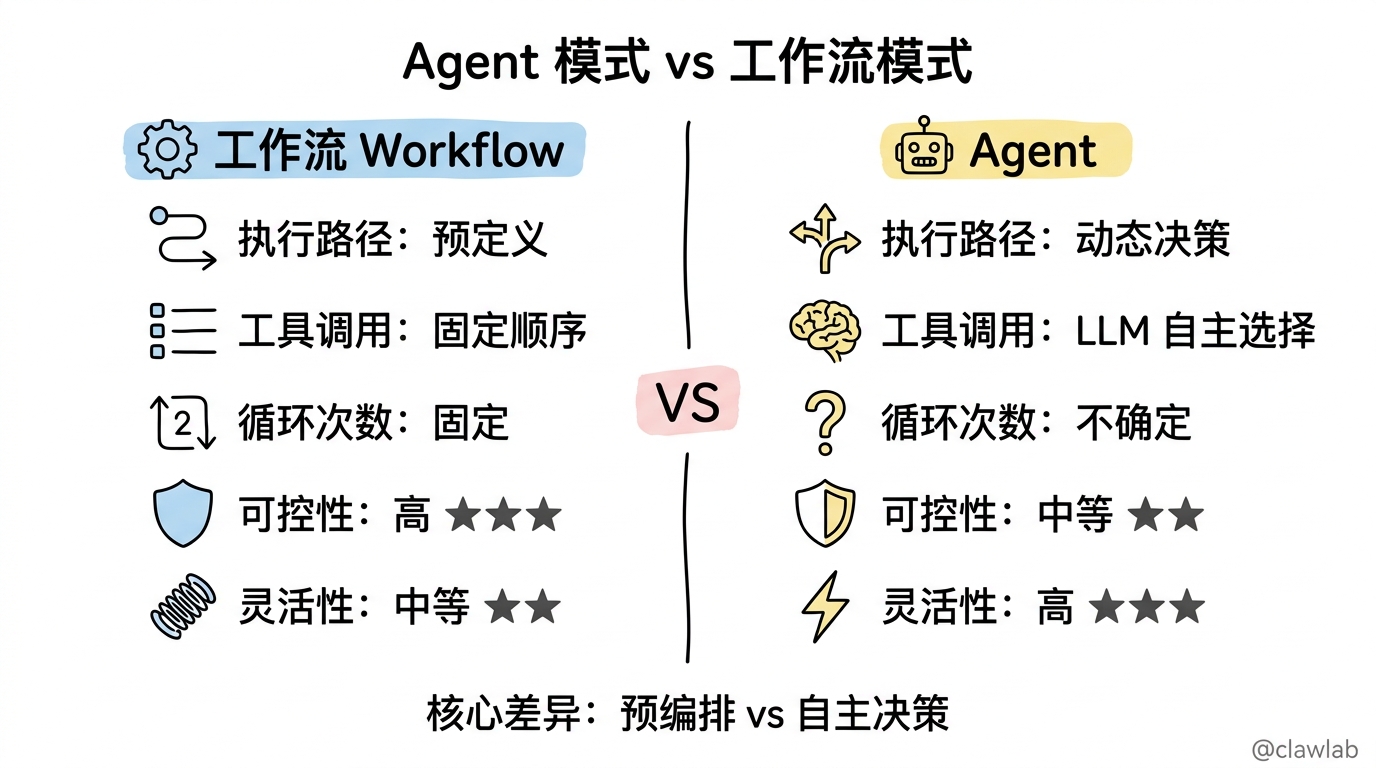
Agent vs 工作流对比
| 特性 | 工作流 | Agent |
|---|---|---|
| 执行路径 | 预定义 | 动态决策 |
| 工具调用 | 固定顺序 | LLM 自主选择 |
| 循环次数 | 固定 | 不确定 |
| 可控性 | 高 | 中等 |
| 灵活性 | 中等 | 高 |
架构图回顾
START
  │
  ▼
┌─────────────────────────────────────────┐
│              Agent 节点                  │
│  ┌─────────────────────────────────┐    │
│  │         LLM 推理               │    │
│  │  (分析状态,选择下一步行动)    │    │
│  └─────────────┬───────────────────┘    │
│                │                        │
│        ┌───────┴───────┐                │
│        │               │                │
│    有工具调用      无工具调用            │
│        │               │                │
│        ▼               ▼                │
│    返回工具请求    返回文本回复          │
└────────┬───────────────┬────────────────┘
         │               │
         ▼               ▼
    ┌─────────┐        END
    │  Tools  │
    └────┬────┘
         │
         ▼
    继续 Agent 循环
核心要点回顾
- bindTools 绑定工具 —— 让 LLM 知道可以使用哪些工具
- ToolNode 执行工具 —— 内置的工具执行节点
- shouldContinue 控制循环 —— 判断是否需要继续调用工具
- interrupt() 人机协作 —— 关键决策点暂停等待人工
- Memory Store 长期记忆 —— 跨会话保存研究成果
下一步
继续学习下一个项目:多 Agent 协作系统,学习如何让多个 Agent 协同工作完成复杂任务。