主题
13. 流式处理详解
简单来说
Streaming(流式处理)就是让 AI 回复"边想边说",而不是"憋半天一口气全吐出来"。 LangGraph 提供 5 种流模式,让你能实时获取 LLM 输出、图状态变化和自定义进度信息,大幅提升用户体验。
🎯 本节目标
学完本节,你将能够回答:
- LangGraph 支持哪 5 种流模式?各自适用什么场景?
- 如何实现 LLM 输出的"打字机效果"?
- 如何推送自定义的进度信息给前端?
- 子图的流式输出如何配置?
- 多个 LLM 调用时,如何只流式输出特定的那个?
核心痛点与解决方案
痛点:用户盯着空白屏幕等到焦虑
| 场景 | 传统 invoke() 的问题 | 用户感受 |
|---|---|---|
| 长文本生成 | 等 30 秒才有反应 | "它是不是挂了?" |
| 多步骤任务 | 看不到中间进度 | "到底在干嘛?" |
| 复杂 Agent | 工具调用很慢 | "我要不要刷新?" |
| 子图嵌套 | 只看到最终结果 | "中间都发生了啥?" |
解决:像直播一样实时推送
传统方式(invoke):
用户输入 ──────────────────────────────────────────→ [等待30秒] → 完整结果

流式方式(stream):
用户输入 → token1 → token2 → token3 → ... → tokenN → 结束
          ↓        ↓        ↓              ↓
         实时显示  实时显示  实时显示      实时显示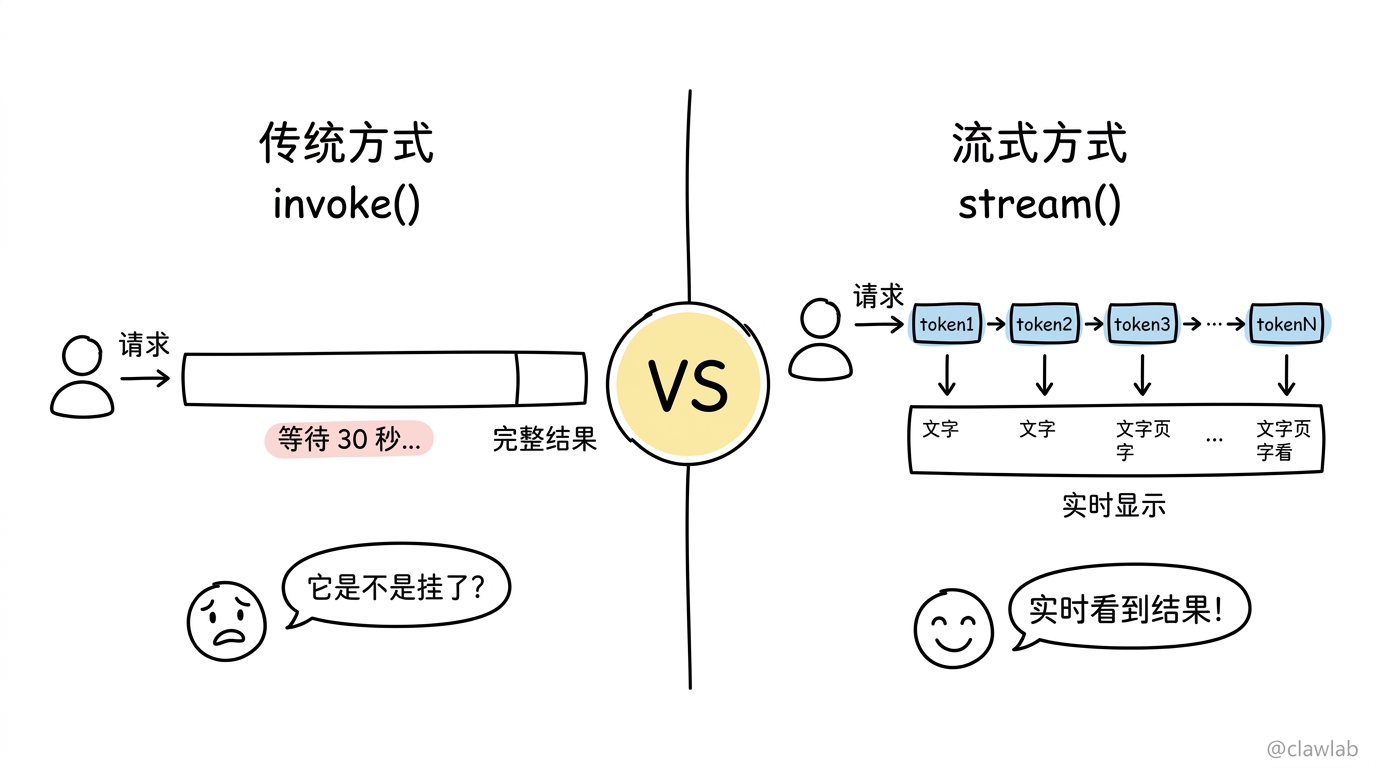
生活化类比
🏭 类比:外卖配送追踪系统
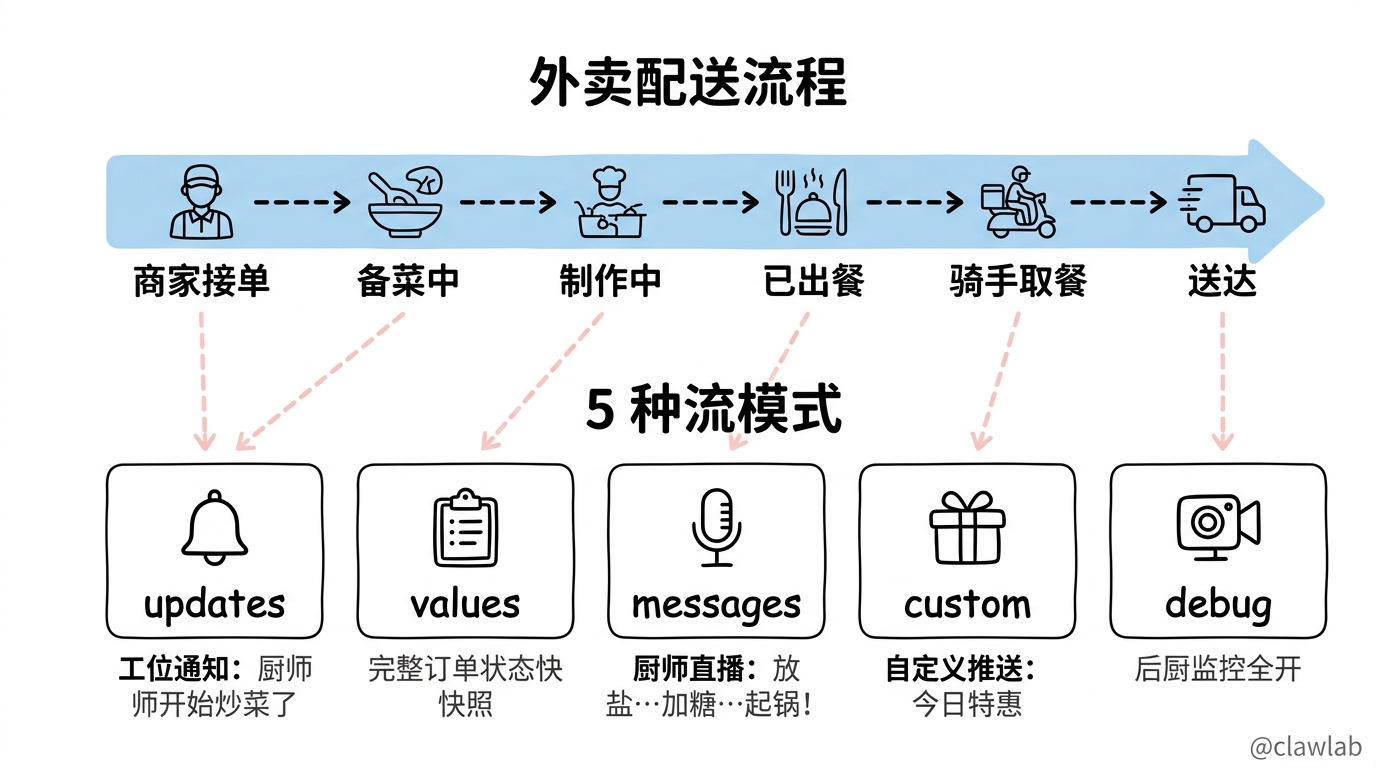
把 LangGraph 的 Streaming 想象成一个外卖 App 的实时配送追踪:
| LangGraph 概念 | 外卖类比 |
|---|---|
| Graph(图) | 整个餐厅的出餐流程 |
| Node(节点) | 各个工位:备菜员、厨师、打包员 |
| State(状态) | 订单的当前状态 |
updates 模式 | "厨师开始炒菜了"、"打包员正在装盒" |
values 模式 | "订单123,已备菜,正在炒制,预计5分钟" |
messages 模式 | 厨师直播:"现在放盐……加点糖……起锅!" |
custom 模式 | 自定义推送:"本店今日特惠已加入您的订单" |
debug 模式 | 后厨监控全开:原料库存、燃气火力、冷链温度… |
没有 Streaming:点完外卖只能等,直到骑手敲门。
有了 Streaming:
商家已接单 → 备菜中 → 制作中 → 已出餐 → 骑手已取餐 → 距您还有2公里整个过程透明可见,焦虑感大大降低!
5 种流模式详解
模式速查表
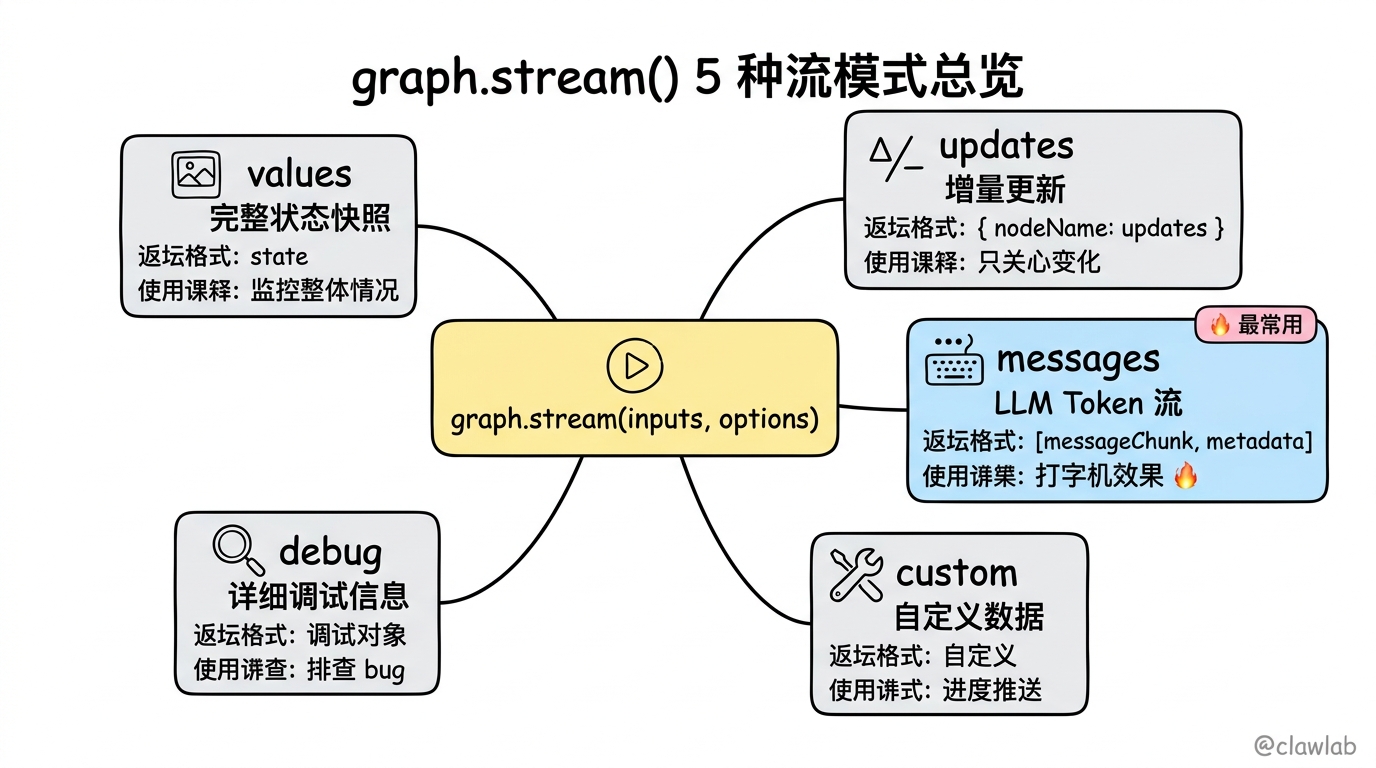
| 模式 | 大白话解释 | 适用场景 |
|---|---|---|
values | 每一步都给你完整的当前状态快照 | 需要随时知道"整体是什么情况" |
updates | 只告诉你这一步改变了什么(增量) | 只关心变化,节省带宽 |
messages | 一个 token 一个 token 地推送 LLM 输出 | 实现打字机效果 🔥 最常用 |
custom | 你自己定义的任意数据 | 推送进度条、状态提示 |
debug | 把能给的信息全给你,事无巨细 | 调试问题,排查 bug |
流程图
┌─────────────────────────────────────────────────────────────┐
│                    graph.stream(inputs, options)            │
└─────────────────────────────────────────────────────────────┘
                              │
        ┌─────────────────────┼─────────────────────┐
        │                     │                     │
        ▼                     ▼                     ▼
   ┌─────────┐          ┌─────────┐          ┌─────────┐
   │ values  │          │ updates │          │messages │
   └────┬────┘          └────┬────┘          └────┬────┘
        │                    │                    │
   完整状态快照          状态增量更新         LLM Token 流
                              │
        ┌─────────────────────┼─────────────────────┐
        │                                           │
        ▼                                           ▼
   ┌─────────┐                                ┌─────────┐
   │ custom  │                                │  debug  │
   └────┬────┘                                └────┬────┘
        │                                          │
   自定义数据推送                              详细调试信息
基础用法
1. updates 模式:只看变化
typescript
import { StateGraph, Annotation, START, END } from "@langchain/langgraph";

const State = Annotation.Root({
  topic: Annotation<string>(),
  joke: Annotation<string>(),
});

const graph = new StateGraph(State)
  .addNode("refineTopic", (state) => {
    return { topic: state.topic + " and cats" };
  })
  .addNode("generateJoke", (state) => {
    return { joke: `This is a joke about ${state.topic}` };
  })
  .addEdge(START, "refineTopic")
  .addEdge("refineTopic", "generateJoke")
  .addEdge("generateJoke", END)
  .compile();

for await (const chunk of await graph.stream(
  { topic: "ice cream" },
  { streamMode: "updates" }
)) {
  console.log(chunk);
}输出:
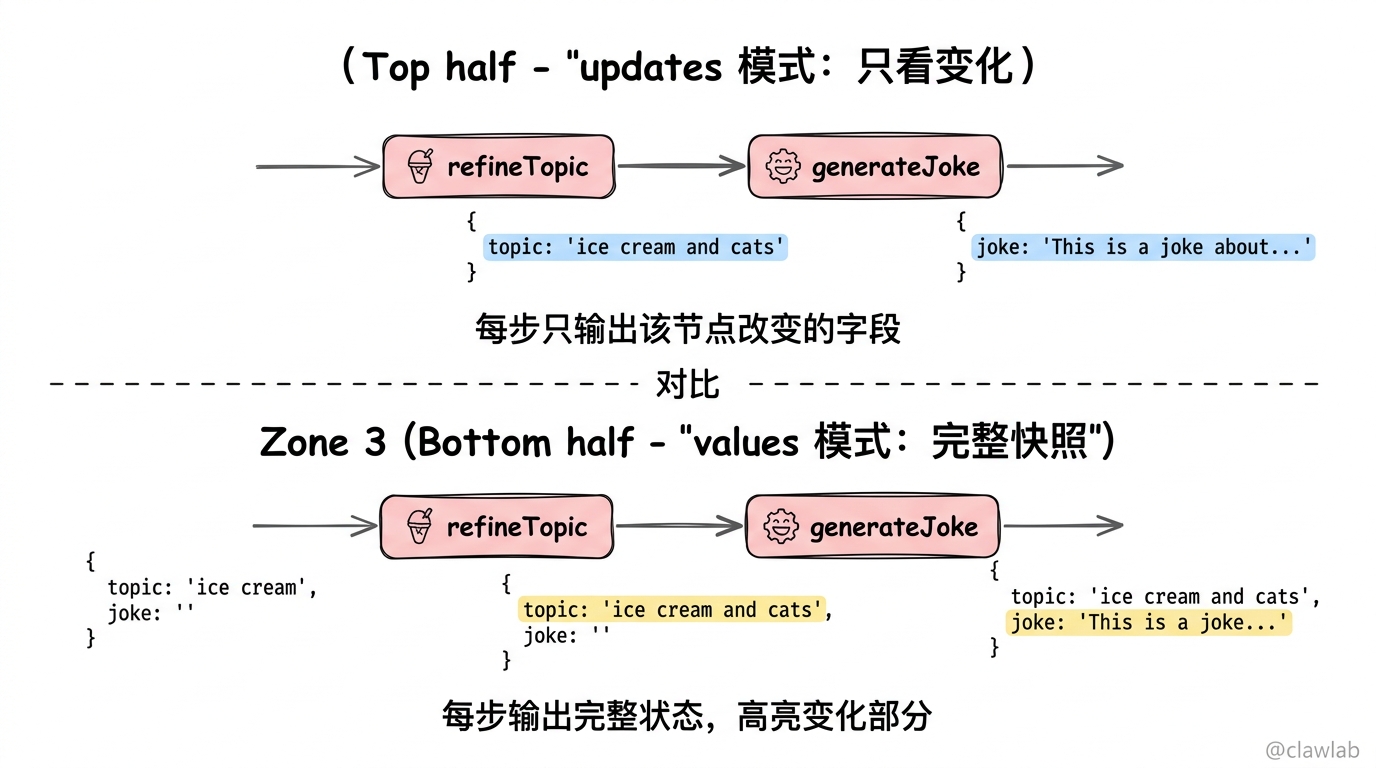
{ refineTopic: { topic: 'ice cream and cats' } }
{ generateJoke: { joke: 'This is a joke about ice cream and cats' } }
💡 人话解读:
"每当有节点执行完,就告诉我这个节点改了啥。第一行是
refineTopic节点把 topic 改成了ice cream and cats,第二行是generateJoke节点生成了笑话。"
2. values 模式:看完整状态
typescript
for await (const chunk of await graph.stream(
  { topic: "ice cream" },
  { streamMode: "values" }
)) {
  console.log(chunk);
}输出:
{ topic: 'ice cream', joke: '' }
{ topic: 'ice cream and cats', joke: '' }
{ topic: 'ice cream and cats', joke: 'This is a joke about ice cream and cats' }
💡 人话解读:
"每一步都给我完整的状态快照。第一行是初始状态,第二行是
refineTopic执行后的完整状态,第三行是最终状态。"
3. messages 模式:LLM 打字机效果 🔥
这是实现"打字机效果"的核心模式:
typescript
import { ChatOpenAI } from "@langchain/openai";
import { StateGraph, Annotation, START, END } from "@langchain/langgraph";

const State = Annotation.Root({
  topic: Annotation<string>(),
  joke: Annotation<string>(),
});

const model = new ChatOpenAI({ model: "gpt-4o-mini" });

const callModel = async (state: typeof State.State) => {
  const response = await model.invoke([
    { role: "user", content: `Generate a joke about ${state.topic}` },
  ]);
  return { joke: response.content };
};

const graph = new StateGraph(State)
  .addNode("callModel", callModel)
  .addEdge(START, "callModel")
  .addEdge("callModel", END)
  .compile();

for await (const [messageChunk, metadata] of await graph.stream(
  { topic: "ice cream" },
  { streamMode: "messages" }
)) {
  if (messageChunk.content) {
    process.stdout.write(messageChunk.content as string);
  }
}输出效果(逐字显示):
Why did the ice cream go to therapy? Because it had too many toppings and couldn't stop melting down!💡 人话解读:
"LLM 每生成一个 token,就立刻推给我。用户看到的效果就是文字一个一个往外蹦,就像有人在实时打字一样。"
返回值结构:
typescript
[messageChunk, metadata]messageChunk:LLM 生成的 token 片段metadata:元数据,包含节点名、标签等信息
4. custom 模式:推送自定义数据
当你需要推送进度条、状态提示等自定义信息时:
typescript
import { StateGraph, Annotation, START, END, LangGraphRunnableConfig } from "@langchain/langgraph";

const State = Annotation.Root({
  query: Annotation<string>(),
  result: Annotation<string>(),
});

const processData = async (
  state: typeof State.State,
  config: LangGraphRunnableConfig
) => {
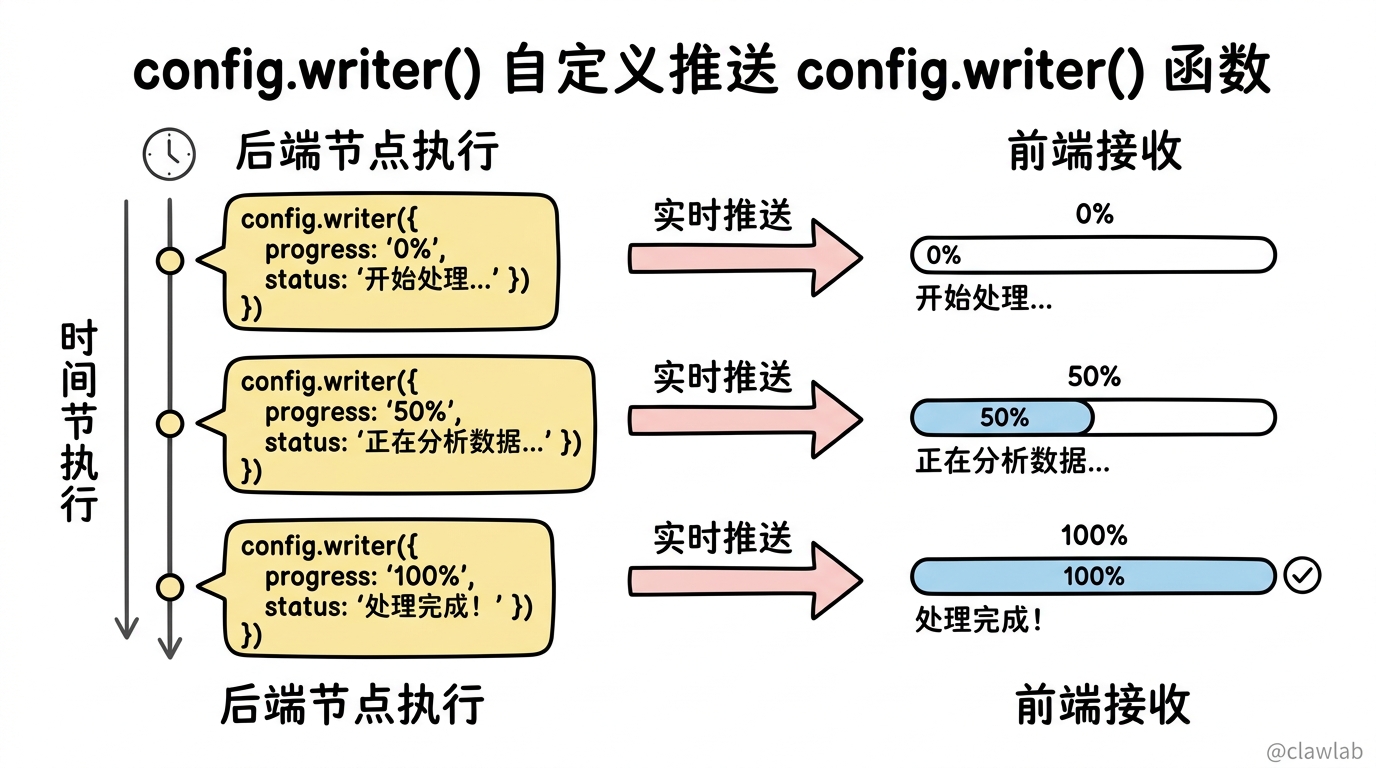
  config.writer?.({ progress: "0%", status: "开始处理..." });

  await new Promise(resolve => setTimeout(resolve, 1000));
  config.writer?.({ progress: "50%", status: "正在分析数据..." });

  await new Promise(resolve => setTimeout(resolve, 1000));
  config.writer?.({ progress: "100%", status: "处理完成!" });

  return { result: "处理结果:数据分析完成" };
};

const graph = new StateGraph(State)
  .addNode("processData", processData)
  .addEdge(START, "processData")
  .addEdge("processData", END)
  .compile();

for await (const chunk of await graph.stream(
  { query: "分析销售数据" },
  { streamMode: "custom" }
)) {
  console.log(chunk);
}输出:
{ progress: '0%', status: '开始处理...' }
{ progress: '50%', status: '正在分析数据...' }
{ progress: '100%', status: '处理完成!' }
💡 人话解读:
"我在节点里用
config.writer()手动推送了 3 次进度信息。前端可以根据这些信息更新进度条,让用户知道后台正在干活。"
5. debug 模式:调试利器
typescript
for await (const chunk of await graph.stream(
  { topic: "ice cream" },
  { streamMode: "debug" }
)) {
  console.log(JSON.stringify(chunk, null, 2));
}输出(信息非常详细):
json
{
  "type": "task",
  "timestamp": "2024-01-15T10:30:00.000Z",
  "step": 1,
  "payload": {
    "name": "refineTopic",
    "input": { "topic": "ice cream" },
    "triggers": ["start:refineTopic"]
  }
}
💡 人话解读:
"把执行过程中的所有细节都给我,包括时间戳、步骤编号、节点名称、输入输出等。调试问题时超有用,但信息量很大,生产环境别开。"
多模式组合
可以同时使用多种流模式:
typescript
for await (const [mode, chunk] of await graph.stream(
  { topic: "ice cream" },
  { streamMode: ["updates", "custom"] }
)) {
  console.log(`[${mode}]`, chunk);
}输出:
[custom] { progress: '0%', status: '开始处理...' }
[updates] { refineTopic: { topic: 'ice cream and cats' } }
[custom] { progress: '100%', status: '处理完成!' }
[updates] { generateJoke: { joke: '...' } }
💡 人话解读:
"我想同时看到状态更新和自定义进度。返回的是
[mode, chunk]元组,mode告诉我这条数据来自哪个流模式。"
子图流式输出
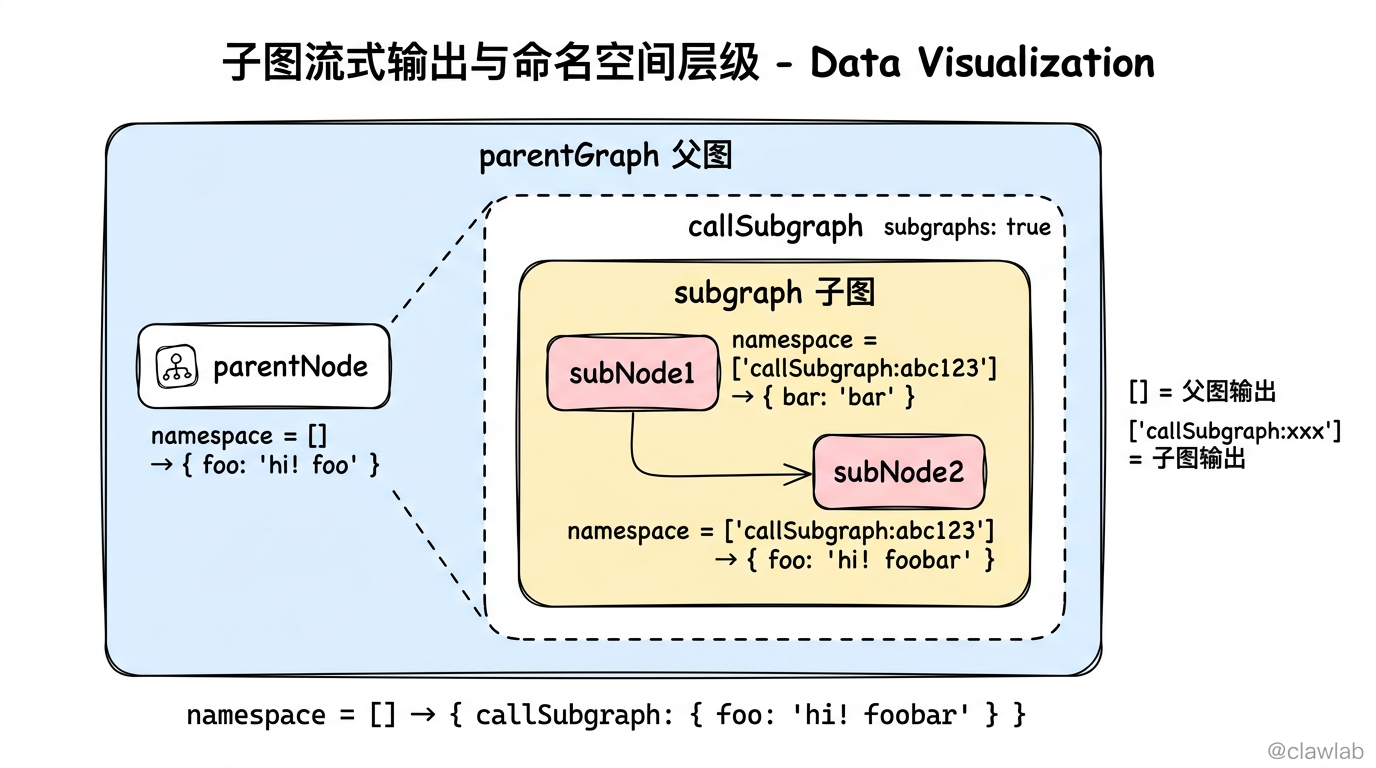
当图中嵌套了子图时,默认只能看到父图的输出。设置 subgraphs: true 后可以看到子图内部的执行细节:
typescript
import { StateGraph, Annotation, START, END } from "@langchain/langgraph";

const SubgraphState = Annotation.Root({
  foo: Annotation<string>(),
  bar: Annotation<string>(),
});

const subgraph = new StateGraph(SubgraphState)
  .addNode("subNode1", (state) => ({ bar: "bar" }))
  .addNode("subNode2", (state) => ({ foo: state.foo + state.bar }))
  .addEdge(START, "subNode1")
  .addEdge("subNode1", "subNode2")
  .addEdge("subNode2", END)
  .compile();

const ParentState = Annotation.Root({
  foo: Annotation<string>(),
});

const parentGraph = new StateGraph(ParentState)
  .addNode("parentNode", (state) => ({ foo: "hi! " + state.foo }))
  .addNode("callSubgraph", subgraph)
  .addEdge(START, "parentNode")
  .addEdge("parentNode", "callSubgraph")
  .addEdge("callSubgraph", END)
  .compile();

for await (const chunk of await parentGraph.stream(
  { foo: "foo" },
  {
    subgraphs: true,
    streamMode: "updates",
  }
)) {
  console.log(chunk);
}输出:
[[], { parentNode: { foo: 'hi! foo' } }]
[['callSubgraph:abc123'], { subNode1: { bar: 'bar' } }]
[['callSubgraph:abc123'], { subNode2: { foo: 'hi! foobar' } }]
[[], { callSubgraph: { foo: 'hi! foobar' } }]
💡 人话解读:
"返回的是
[namespace, data]元组。[]表示父图,['callSubgraph:abc123']表示子图。这样我就能看到子图内部每个节点的执行情况了。"
高级技巧
1. 按标签过滤 LLM 输出
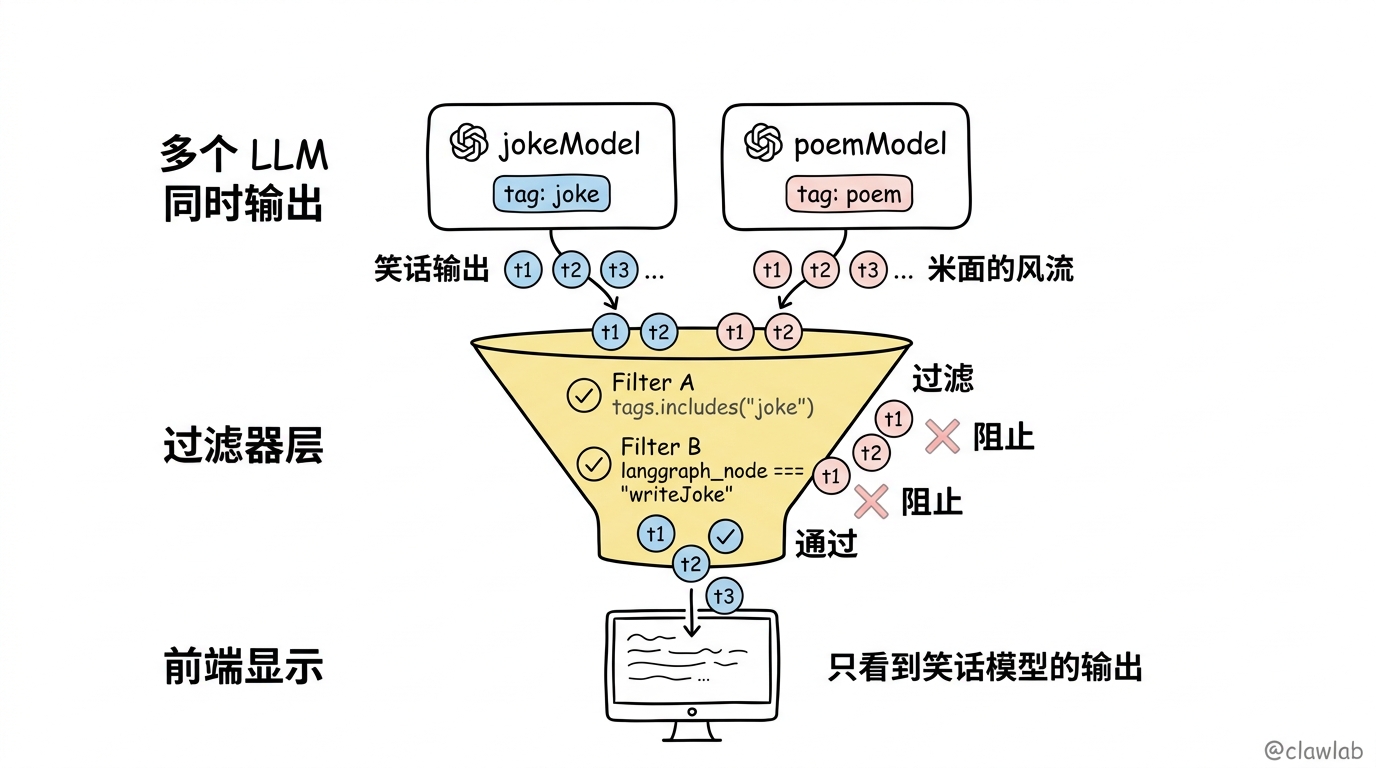
当图中有多个 LLM 调用时,可以用标签筛选:
typescript
import { ChatOpenAI } from "@langchain/openai";

const jokeModel = new ChatOpenAI({
  model: "gpt-4o-mini",
  tags: ["joke"],
});

const poemModel = new ChatOpenAI({
  model: "gpt-4o-mini",
  tags: ["poem"],
});

for await (const [msg, metadata] of await graph.stream(
  { topic: "cats" },
  { streamMode: "messages" }
)) {
  if (metadata.tags?.includes("joke")) {
    process.stdout.write(msg.content as string);
  }
}
💡 人话解读:
"我有两个 LLM,一个写笑话,一个写诗。我只想看笑话那个的实时输出,通过
tags过滤就行。"
2. 按节点过滤 LLM 输出
typescript
for await (const [msg, metadata] of await graph.stream(
  { topic: "cats" },
  { streamMode: "messages" }
)) {
  if (msg.content && metadata.langgraph_node === "writeJoke") {
    process.stdout.write(msg.content as string);
  }
}
💡 人话解读:
"metadata 里有
langgraph_node字段,告诉我这个 token 来自哪个节点。我只要writeJoke节点的输出。"
3. 在工具中推送自定义数据
typescript
import { tool } from "@langchain/core/tools";
import { z } from "zod";

const queryDatabase = tool(
  async (input, config) => {
    config.writer?.({ type: "progress", data: "查询中 0/100..." });

    // 模拟数据库查询
    await new Promise(resolve => setTimeout(resolve, 1000));

    config.writer?.({ type: "progress", data: "查询完成 100/100" });

    return "查询结果:共找到 42 条记录";
  },
  {
    name: "query_database",
    description: "查询数据库",
    schema: z.object({
      query: z.string().describe("SQL 查询语句"),
    }),
  }
);
4. 使用任意 LLM(非 LangChain 集成)
如果你的 LLM 没有 LangChain 集成,可以用 custom 模式手动流式:
typescript
import OpenAI from "openai";

const openaiClient = new OpenAI();

const callArbitraryModel = async (state: any, config: LangGraphRunnableConfig) => {
  const response = await openaiClient.chat.completions.create({
    messages: [{ role: "user", content: state.prompt }],
    model: "gpt-4o-mini",
    stream: true,
  });

  let fullContent = "";
  for await (const chunk of response) {
    const content = chunk.choices[0]?.delta?.content || "";
    fullContent += content;
    config.writer?.({ token: content });
  }

  return { result: fullContent };
};
5. 禁用特定模型的流式
某些模型(如 o1-preview)不支持流式,需要显式禁用:
typescript
const model = new ChatOpenAI({
  model: "o1-preview",
  streaming: false,
});
完整业务场景:智能客服系统
typescript
import { ChatOpenAI } from "@langchain/openai";
import { StateGraph, Annotation, START, END, LangGraphRunnableConfig } from "@langchain/langgraph";
import { tool } from "@langchain/core/tools";
import { ToolNode } from "@langchain/langgraph/prebuilt";
import { z } from "zod";

const State = Annotation.Root({
  messages: Annotation<any[]>({
    reducer: (curr, update) => [...curr, ...update],
    default: () => [],
  }),
  orderInfo: Annotation<string>(),
});

const queryOrder = tool(
  async (input, config) => {
    config.writer?.({ type: "status", message: "正在查询订单信息..." });
    await new Promise(resolve => setTimeout(resolve, 500));

    config.writer?.({ type: "status", message: "已找到订单,正在获取物流状态..." });
    await new Promise(resolve => setTimeout(resolve, 500));

    return `订单 ${input.orderId} 当前状态:运输中,预计明天送达`;
  },
  {
    name: "query_order",
    description: "查询订单状态",
    schema: z.object({
      orderId: z.string().describe("订单号"),
    }),
  }
);

const tools = [queryOrder];
const toolNode = new ToolNode(tools);

const model = new ChatOpenAI({
  model: "gpt-4o-mini",
  tags: ["customer_service"],
}).bindTools(tools);

const callModel = async (state: typeof State.State) => {
  const response = await model.invoke(state.messages);
  return { messages: [response] };
};

const shouldContinue = (state: typeof State.State) => {
  const lastMessage = state.messages[state.messages.length - 1];
  if (lastMessage.tool_calls?.length > 0) {
    return "tools";
  }
  return END;
};

const graph = new StateGraph(State)
  .addNode("agent", callModel)
  .addNode("tools", toolNode)
  .addEdge(START, "agent")
  .addConditionalEdges("agent", shouldContinue, ["tools", END])
  .addEdge("tools", "agent")
  .compile();

async function main() {
  const inputs = {
    messages: [
      { role: "user", content: "我订单 #12345 的物流状态是什么?" }
    ],
  };

  console.log("=== 智能客服系统 ===\n");
  console.log("用户:我订单 #12345 的物流状态是什么?\n");
  console.log("客服:");

  for await (const [mode, chunk] of await graph.stream(
    inputs,
    { streamMode: ["messages", "custom"] }
  )) {
    if (mode === "custom") {
      console.log(`\n📍 ${chunk.message}`);
    } else if (mode === "messages") {
      const [msg, metadata] = chunk;
      if (msg.content && metadata.langgraph_node === "agent") {
        process.stdout.write(msg.content as string);
      }
    }
  }
  console.log("\n");
}

main();执行效果:
=== 智能客服系统 ===

用户:我订单 #12345 的物流状态是什么?

客服:
📍 正在查询订单信息...
📍 已找到订单,正在获取物流状态...
您的订单 #12345 当前状态是运输中,预计明天送达。还有其他需要帮助的吗?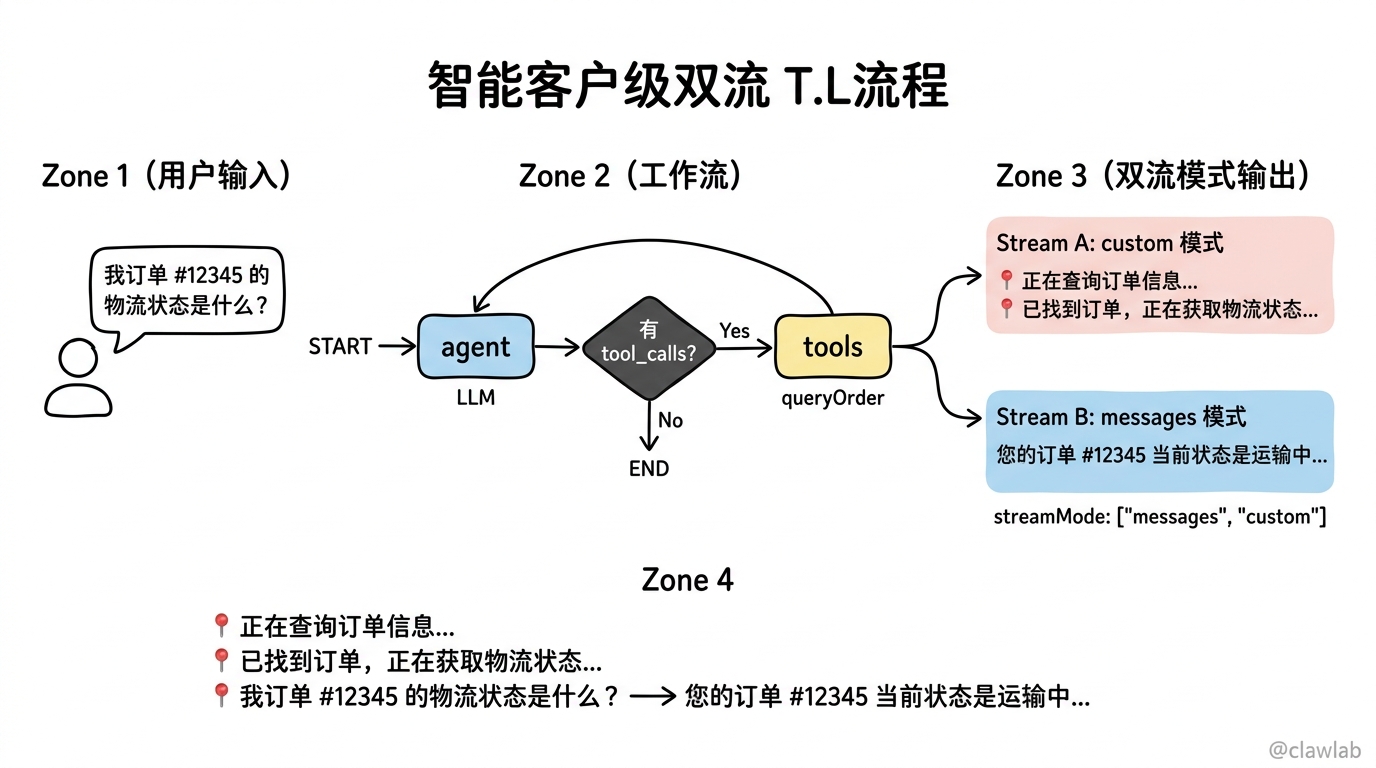
总结对比表
| 流模式 | 返回格式 | 典型用途 | 性能影响 |
|---|---|---|---|
values | state | 监控完整状态 | 数据量大 |
updates | { nodeName: updates } | 监控状态变化 | 数据量小 |
messages | [messageChunk, metadata] | 打字机效果 | 实时性好 |
custom | 自定义数据 | 进度推送 | 按需使用 |
debug | 详细调试信息 | 排查问题 | 数据量极大 |
核心要点回顾
5 种流模式:
values(完整状态)、updates(增量更新)、messages(LLM Token)、custom(自定义数据)、debug(调试信息)打字机效果:使用
streamMode: "messages"实现 LLM 输出的逐字显示自定义进度:在节点或工具中使用
config.writer()推送自定义数据子图流式:设置
subgraphs: true可以看到子图内部的执行细节过滤技巧:通过
tags或langgraph_node过滤特定 LLM 的输出
下一步学习
- 第 14 章:中断机制 - 学习如何让图"暂停"等待人工确认
- 第 15 章:子图构建 - 深入学习子图的设计与状态共享